New: Deceased Constituent Options in Web View

Kathryn Hall
Blackbaud Employee




In web view, we recently released options for how to handle deceased constituents to all Raiser’s Edge NXT customers. These options were carefully selected after consulting with existing customers to learn which options and rules they commonly set in database view.
How do the new options work?
From a constituent’s record, after you select Mark as, Deceased, you can now: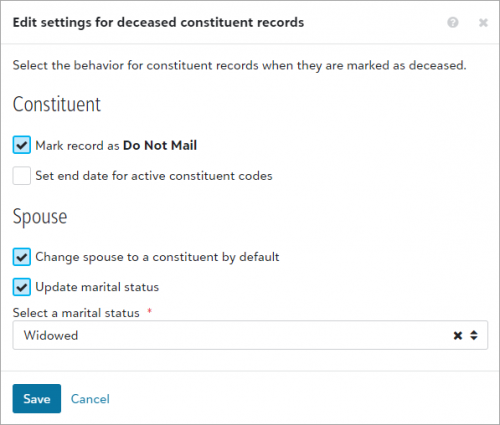 From Control panel, Settings, under Constituent records, admins can set rules for how Raiser’s Edge NXT handles records for deceased constituents and their spouses, such as:
Important considerations
In database view, admins can still define rules for marking a person deceased, but those rules work independently from rules in the web view. Records update according to the rules you set in the view where you mark a constituent deceased. We recommend you match your rules between the two views to avoid confusion.
Many organizations may find that the functionality in web view provides all they need for a straightforward way to mark people deceased. Plus, web view offers the added benefit of allowing you to attach an obituary. However, if your organization makes a practice of soft crediting gifts from deceased constituents to their spouses, you must still mark the constituents deceased in database view. If you do choose to mark a constituent deceased in database view, you still have the option to go to web view and attach an obituary.
Tell us what you think
We look forward to partnering with all of our customers as we continue to evolve our features. As you start to work with the features, be sure to discuss your thoughts and share your ideas in the Community to help guide their development.
For more information, see Deceased Individuals and Deceased Individuals Settings.
How do the new options work?
From a constituent’s record, after you select Mark as, Deceased, you can now:
- Attach a file, such as a PDF of their obituary
- Update how you communicate with their spouse, and (if necessary) change the spouse to a constituent.
 From Control panel, Settings, under Constituent records, admins can set rules for how Raiser’s Edge NXT handles records for deceased constituents and their spouses, such as:
- Stop future mail from being sent to deceased constituents
- End active constituent codes assigned to constituents when you mark them deceased
- Change widowed spouses to constituents by default
- Update marital statuses of spouses and select their new status, such as “Widowed”
Important considerations
In database view, admins can still define rules for marking a person deceased, but those rules work independently from rules in the web view. Records update according to the rules you set in the view where you mark a constituent deceased. We recommend you match your rules between the two views to avoid confusion.
Many organizations may find that the functionality in web view provides all they need for a straightforward way to mark people deceased. Plus, web view offers the added benefit of allowing you to attach an obituary. However, if your organization makes a practice of soft crediting gifts from deceased constituents to their spouses, you must still mark the constituents deceased in database view. If you do choose to mark a constituent deceased in database view, you still have the option to go to web view and attach an obituary.
Tell us what you think
We look forward to partnering with all of our customers as we continue to evolve our features. As you start to work with the features, be sure to discuss your thoughts and share your ideas in the Community to help guide their development.
For more information, see Deceased Individuals and Deceased Individuals Settings.
7
Comments
-
Thanks for the update - can you clarify what is meant by this statement above? "However, if your organization makes a practice of soft crediting gifts from deceased constituents to their spouses, you must still mark the constituents deceased in database view." Why do we need to use database view in this instance?0
-
Thanks for the heads up. Good to know. My one point of disagreement is I would not recommend attaching the obituary as a document via NXT until Blackbaud has fixed the problem of not being able to restore media files that were attached using NXT if full restore of the database is ever needed. Drag and drop is nice, but with no guarantee of being able to get our documents restored in case of a disaster, we are sticking with using Database view for attaching documents. However, nearly every obituary is online these days anyway, so we prefer the online obituary be found (a quick Google search usually turns it up) and we copy and paste that into notes, under a specific note type dedicated to obituaries. Much faster and easier, and it provides a link where others can go to the original document if they choose.
0 -
Hello Patrick,
The functionality we added expanded a bit on what was offered in NXT but it doesn't include anything related to soft credits. If that part of the process is important to your organization, we would encourage you to still use the deceasing function in the database view. If you typically only track the relationship changes and mailing changes, then the options added here will be great for you in NXT.
Anthony0 -
I don't understand why when a functionality like this is added to NXT it does not provide all the aspects available for the same process in database view, i.e. soft-crediting surviving spouse for all gifts.
So is this access available to all NXT users. I have full access to all facets but I only see settings under Tools, not control panel. Do not find this menu to set these options.
0 -
I'm still trying to figure out where I can find the uploaded obit once I mark the constituent as deceased. I don't seem to see it reflected in DB view either.
0










Categories
- All Categories
- 6 Blackbaud Community Help
- 213 bbcon®
- 1.4K Blackbaud Altru®
- 401 Blackbaud Award Management™ and Blackbaud Stewardship Management™
- 1.1K Blackbaud CRM™ and Blackbaud Internet Solutions™
- 15 donorCentrics®
- 360 Blackbaud eTapestry®
- 2.6K Blackbaud Financial Edge NXT®
- 655 Blackbaud Grantmaking™
- 576 Blackbaud Education Management Solutions for Higher Education
- 3.2K Blackbaud Education Management Solutions for K-12 Schools
- 939 Blackbaud Luminate Online® and Blackbaud TeamRaiser®
- 84 JustGiving® from Blackbaud®
- 6.6K Blackbaud Raiser's Edge NXT®
- 3.7K SKY Developer
- 248 ResearchPoint™
- 119 Blackbaud Tuition Management™
- 165 Organizational Best Practices
- 241 Member Lounge (Just for Fun)
- 34 Blackbaud Community Challenges
- 34 PowerUp Challenges
- 3 (Open) PowerUp Challenge: Chat for Blackbaud AI
- 3 (Closed) PowerUp Challenge: Data Health
- 3 (Closed) Raiser's Edge NXT PowerUp Challenge: Product Update Briefing
- 3 (Closed) Raiser's Edge NXT PowerUp Challenge: Standard Reports+
- 3 (Closed) Raiser's Edge NXT PowerUp Challenge: Email Marketing
- 3 (Closed) Raiser's Edge NXT PowerUp Challenge: Gift Management
- 4 (Closed) Raiser's Edge NXT PowerUp Challenge: Event Management
- 3 (Closed) Raiser's Edge NXT PowerUp Challenge: Home Page
- 4 (Closed) Raiser's Edge NXT PowerUp Challenge: Standard Reports
- 4 (Closed) Raiser's Edge NXT PowerUp Challenge: Query
- 791 Community News
- 2.9K Jobs Board
- 53 Blackbaud SKY® Reporting Announcements
- 47 Blackbaud CRM Higher Ed Product Advisory Group (HE PAG)
- 19 Blackbaud CRM Product Advisory Group (BBCRM PAG)