What’s New: K12 Product Updates For February 7

Derek Nichols
Blackbaud Employee




With January now behind us, Release 13.02 for the month of February is finally here.The K12 “ON” Products are getting a number of boosts on February 7 with several important updates and changes coming for onBoard, onCampus, and onRecord. There’s a few details for Core and the upcoming Blackbaud ID EAP to discuss as well.
Here’s a quick look at a few of the new features in this release:
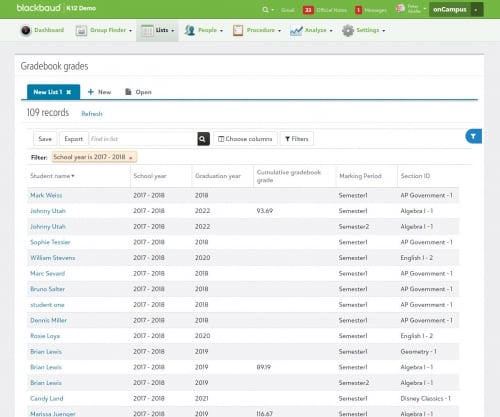
onCampus: View student performance with Gradebook List. From onCampus > Lists, academic managers can now use the newly added gradebook grades list to view student information related to academic performance. Information includes the marking period, cumulative gradebook grade, graduation year, and more. Just like other available lists, managers can filter information as well as save a customized layout or modified columns.
Where this list goes above and beyond typical LMS products is that Gradebook grades can also display student's athletic and extracurricular involvement if needed. This information could potentially be used in many ways by the school, such as comparing the student’s team participation to a recent trend of their grades slipping.
For now, we’ve limited this list to managers only, as the information displayed in it is especially useful for school leadership and monitoring student performance.
onRecord: View Names & Photos in Lists. List managers have new columns to utilize when working in Requests & recommendations and Report card grades lists. These options include a student’s First name, Middle name, Last name, and Nickname.
Not only that, a student photo can also be added as a column to the following lists:
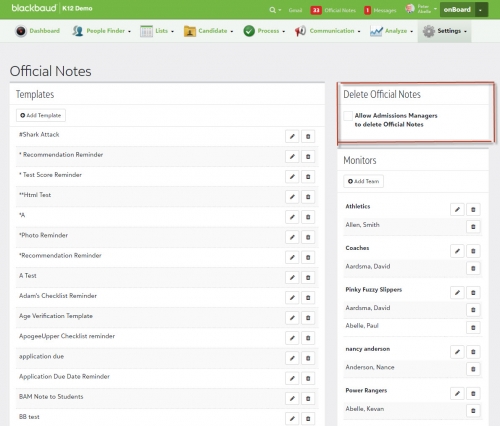
Though the option is disabled by default, it can be enabled from onBoard > Settings > Official Notes and then selcting Allow Admissions Managers to delete Official Notes. Once enabled, admissions managers can delete Official Notes from the Inbox or Candidate Record.
There’s a lot more to discover with the February release, so make sure to check out our release letter for the full breakdown of all the new features and changes this month. The 13.02 release video is also available for those who are looking for a visual overview of these changes.
Here’s a quick look at a few of the new features in this release:
onCampus: View student performance with Gradebook List. From onCampus > Lists, academic managers can now use the newly added gradebook grades list to view student information related to academic performance. Information includes the marking period, cumulative gradebook grade, graduation year, and more. Just like other available lists, managers can filter information as well as save a customized layout or modified columns.
Where this list goes above and beyond typical LMS products is that Gradebook grades can also display student's athletic and extracurricular involvement if needed. This information could potentially be used in many ways by the school, such as comparing the student’s team participation to a recent trend of their grades slipping.
For now, we’ve limited this list to managers only, as the information displayed in it is especially useful for school leadership and monitoring student performance.

onRecord: View Names & Photos in Lists. List managers have new columns to utilize when working in Requests & recommendations and Report card grades lists. These options include a student’s First name, Middle name, Last name, and Nickname.
Not only that, a student photo can also be added as a column to the following lists:
- Infractions.
- Consequences.
- Class attendance.
- Requests & recommendations.
- Day attendance.
- Report card grades.
Though the option is disabled by default, it can be enabled from onBoard > Settings > Official Notes and then selcting Allow Admissions Managers to delete Official Notes. Once enabled, admissions managers can delete Official Notes from the Inbox or Candidate Record.

There’s a lot more to discover with the February release, so make sure to check out our release letter for the full breakdown of all the new features and changes this month. The 13.02 release video is also available for those who are looking for a visual overview of these changes.
 https://www.youtube.com/watch?v=tV4m3oJwJNc
That’s all for this week! Make sure to subscribe to the K-12 community for all the latest blogs and discussions. We’ll be back next week with an all new blog post, so we’ll see you then!
0
Comments
-
On the image above referencing the new Gradebook List, it shows an export button. When we go in to test it out, with a user with academic manager role, we don't see an export button. Does it have anything to so with the K12 Demo tag in the upper left0
-
Hey Rod!
Good spotting there! While we intended to have that aspect ready to go alongside the launch of the Gradebook grades list, the export functionality had to be delayed out of the February release.
The good news in this situation is that the delay isn't terribly long and I can confirm that it'll be there when the next monthly release launches on March 7.
0 -
Always excited to see what new things are being developed and coming about!0
-
Thanks Cristina! We just posted the April Release blog yesterday. A lot of good stuff arriving this month so check it out if you haven't already!
https://community.blackbaud.com/blogs/17/45700




Categories
- All Categories
- 6 Blackbaud Community Help
- 211 bbcon®
- 1.4K Blackbaud Altru®
- 402 Blackbaud Award Management™ and Blackbaud Stewardship Management™
- 1.1K Blackbaud CRM™ and Blackbaud Internet Solutions™
- 15 donorCentrics®
- 360 Blackbaud eTapestry®
- 2.6K Blackbaud Financial Edge NXT®
- 655 Blackbaud Grantmaking™
- 576 Blackbaud Education Management Solutions for Higher Education
- 3.2K Blackbaud Education Management Solutions for K-12 Schools
- 940 Blackbaud Luminate Online® and Blackbaud TeamRaiser®
- 84 JustGiving® from Blackbaud®
- 6.7K Blackbaud Raiser's Edge NXT®
- 3.7K SKY Developer
- 248 ResearchPoint™
- 120 Blackbaud Tuition Management™
- 165 Organizational Best Practices
- 240 Member Lounge (Just for Fun)
- 34 Blackbaud Community Challenges
- 37 PowerUp Challenges
- 3 (Open) PowerUp Challenge: Grid View Batch
- 3 (Closed) PowerUp Challenge: Chat for Blackbaud AI
- 3 (Closed) PowerUp Challenge: Data Health
- 3 (Closed) Raiser's Edge NXT PowerUp Challenge: Product Update Briefing
- 3 (Closed) Raiser's Edge NXT PowerUp Challenge: Standard Reports+
- 3 (Closed) Raiser's Edge NXT PowerUp Challenge: Email Marketing
- 3 (Closed) Raiser's Edge NXT PowerUp Challenge: Gift Management
- 4 (Closed) Raiser's Edge NXT PowerUp Challenge: Event Management
- 3 (Closed) Raiser's Edge NXT PowerUp Challenge: Home Page
- 4 (Closed) Raiser's Edge NXT PowerUp Challenge: Standard Reports
- 4 (Closed) Raiser's Edge NXT PowerUp Challenge: Query
- 796 Community News
- 3K Jobs Board
- 54 Blackbaud SKY® Reporting Announcements
- 47 Blackbaud CRM Higher Ed Product Advisory Group (HE PAG)
- 19 Blackbaud CRM Product Advisory Group (BBCRM PAG)