New Data Imports Improve Data Refresh Process

Derek Nichols
Blackbaud Employee




We've been working hard to ensure our schools have more control over constituent data. Over the summer, we released several popular imports to eliminate the need for specialty data refreshes, including imports for usernames, addresses, and email addresses. Since they were so successful, we’ve decided to increase the number of data fields that can be updated by data import.
On February 6, 2019, we released four new imports, allowing you to add or update information previously handled by the data refresh process.
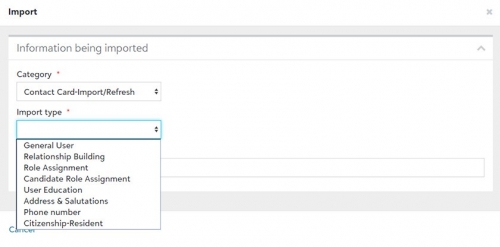
The new imports are:
General User — Import new constituents or update existing records by populating basic biographical information such as name, marital status, ethnicity, religion, gender, SSN, home address, home phone number, and more. When adding a new user, a HostID is required for each user. When updating existing users, you can match on either the HostID or UserID.
Roles — Assign constituent roles to users, including student, alumni, teacher, non-teaching staff, advisor, etc. Roles such as parent or grandparent that are set through relationships are handled with the following import.
Relationships — Tie people together with relationships that can be peer-to-peer (spouse, sibling, cousin) or hierarchical (parent, grandparent). Tying people together will also share addresses and home phone numbers (if they're identical) between spouses and parents/children.
User Education — Add one or more user education records to a contact card. This import is done on its own rather than in the general user import because constituents may have several education records.
While we have no immediate plans to stop providing data refreshes, we encourage all schools to use the new data imports to update constituent data because they offer the following advantages over the old data refresh process:
Thanks for reading everyone! Make sure to hit that like button below and let us know what you think of these improvements in the comments below. We'll see you right back here next week for a look at what's new in the March release.
On February 6, 2019, we released four new imports, allowing you to add or update information previously handled by the data refresh process.

The new imports are:
General User — Import new constituents or update existing records by populating basic biographical information such as name, marital status, ethnicity, religion, gender, SSN, home address, home phone number, and more. When adding a new user, a HostID is required for each user. When updating existing users, you can match on either the HostID or UserID.
Roles — Assign constituent roles to users, including student, alumni, teacher, non-teaching staff, advisor, etc. Roles such as parent or grandparent that are set through relationships are handled with the following import.
Relationships — Tie people together with relationships that can be peer-to-peer (spouse, sibling, cousin) or hierarchical (parent, grandparent). Tying people together will also share addresses and home phone numbers (if they're identical) between spouses and parents/children.
User Education — Add one or more user education records to a contact card. This import is done on its own rather than in the general user import because constituents may have several education records.
While we have no immediate plans to stop providing data refreshes, we encourage all schools to use the new data imports to update constituent data because they offer the following advantages over the old data refresh process:
- Update as many or as few fields as you want. Only need to update three fields instead of the entire data refresh routine? You can pick and choose the columns to include and only those fields will be updated.
- Delete unneeded data. To purge data such as religion, ethnicity, gender, addresses, phone numbers, etc. from constituent records, you can do so by creating a data file that indicates the fields to be deleted with a “^”.
- Process data immediately! Why wait 4-6 days for a data refresh file to get processed when the file you import yourself will complete in 10-15 minutes? This will be a huge time saver for schools during the busy summer months.
Thanks for reading everyone! Make sure to hit that like button below and let us know what you think of these improvements in the comments below. We'll see you right back here next week for a look at what's new in the March release.
6
Comments
-
Love anything that gives us more control of our data!
Is there a way to get the newly generated user_id of a General User import that is creating new constituents to be included in the View Results report?0 -
Hey Jamie,
Went and pinged the team in regards to your question. Essentially, that file is created before data is inserted into the database, so unfortunately not.0 -
Love it!0
-
Love having more import options!0







Categories
- All Categories
- 6 Blackbaud Community Help
- 213 bbcon®
- 1.4K Blackbaud Altru®
- 403 Blackbaud Award Management™ and Blackbaud Stewardship Management™
- 1.2K Blackbaud CRM™ and Blackbaud Internet Solutions™
- 15 donorCentrics®
- 360 Blackbaud eTapestry®
- 2.6K Blackbaud Financial Edge NXT®
- 656 Blackbaud Grantmaking™
- 577 Blackbaud Education Management Solutions for Higher Education
- 3.2K Blackbaud Education Management Solutions for K-12 Schools
- 940 Blackbaud Luminate Online® and Blackbaud TeamRaiser®
- 84 JustGiving® from Blackbaud®
- 6.7K Blackbaud Raiser's Edge NXT®
- 3.7K SKY Developer
- 249 ResearchPoint™
- 119 Blackbaud Tuition Management™
- 165 Organizational Best Practices
- 241 Member Lounge (Just for Fun)
- 34 Blackbaud Community Challenges
- 37 PowerUp Challenges
- 3 (Open) PowerUp Challenge: Grid View Batch
- 3 (Closed) PowerUp Challenge: Chat for Blackbaud AI
- 3 (Closed) PowerUp Challenge: Data Health
- 3 (Closed) Raiser's Edge NXT PowerUp Challenge: Product Update Briefing
- 3 (Closed) Raiser's Edge NXT PowerUp Challenge: Standard Reports+
- 3 (Closed) Raiser's Edge NXT PowerUp Challenge: Email Marketing
- 3 (Closed) Raiser's Edge NXT PowerUp Challenge: Gift Management
- 4 (Closed) Raiser's Edge NXT PowerUp Challenge: Event Management
- 3 (Closed) Raiser's Edge NXT PowerUp Challenge: Home Page
- 4 (Closed) Raiser's Edge NXT PowerUp Challenge: Standard Reports
- 4 (Closed) Raiser's Edge NXT PowerUp Challenge: Query
- 796 Community News
- 3K Jobs Board
- 54 Blackbaud SKY® Reporting Announcements
- 47 Blackbaud CRM Higher Ed Product Advisory Group (HE PAG)
- 19 Blackbaud CRM Product Advisory Group (BBCRM PAG)