Insight Recipes: Campaign, Fund, Appeal Goals-to-Revenue Comparisons





With insights, you can pair attributes with measures to break down totals and compare categorical data. For starters in Raiser's Edge NXT, try these "recipes" — based on ideas from the SKY Reporting EAP Community, with measures and attributes as the main ingredients — to compare the goals of your campaigns, funds, and appeals to their giving.
 In Raiser's Edge NXT, you can quickly compare giving toward campaigns, funds, and appeals toward their set goals.
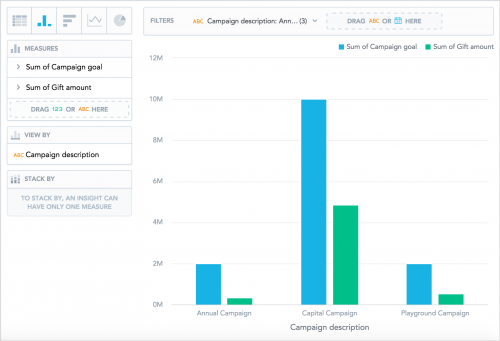 1. Select Clear and choose the insight format — Column chart or Bar chart.
2. Move Gift amount and Campaign goal, Fund goal, or Appeal goal (depending on what you're analyzing) from the data catalogue to Measures.
3. Move how you want to identify the campaigns, funds, or appeals — such as Campaign description or Fund short description — to View by.
4. Under Filters, select the attribute; choose which campaigns, funds, or appeals to analyze; and select Apply.
5. Select Save, enter a unique name to identify the insight, and select Save.
As you build your insights, include additional attribute filters to add your own flavor! For more ideas and inspiration, see the Gift Insights Recipes Help.
Have recipes for your own favorite or frequently used insights? Share the details below!
 In Raiser's Edge NXT, you can quickly compare giving toward campaigns, funds, and appeals toward their set goals.
- At the top of the record of a campaign, fund, or appeal, you can view how much it raised toward its goal and its overall progress, as a percentage.
- In Fundraising, Analyze, you can quickly compare giving toward your 20 top-grossing active campaigns, funds, and appeals to their goals under Overview or Campaigns, Funds, or Appeals.
 1. Select Clear and choose the insight format — Column chart or Bar chart.
2. Move Gift amount and Campaign goal, Fund goal, or Appeal goal (depending on what you're analyzing) from the data catalogue to Measures.
3. Move how you want to identify the campaigns, funds, or appeals — such as Campaign description or Fund short description — to View by.
4. Under Filters, select the attribute; choose which campaigns, funds, or appeals to analyze; and select Apply.
5. Select Save, enter a unique name to identify the insight, and select Save.
As you build your insights, include additional attribute filters to add your own flavor! For more ideas and inspiration, see the Gift Insights Recipes Help.
Have recipes for your own favorite or frequently used insights? Share the details below!
0
Comments
-
I'm very new to this, and I'm just trying to get into it. I have a couple of questions:
1. Is there a way to put appeal expenses in the measures so you can also compare expenses with the total raised and total goal?
2. When filtering, such as by project, is there a way to narrow down the projects you have to choose from to only those projects that are active? We have a lot of inactive projects.
Thanks!0




Categories
- All Categories
- 6 Blackbaud Community Help
- 211 bbcon®
- 1.4K Blackbaud Altru®
- 402 Blackbaud Award Management™ and Blackbaud Stewardship Management™
- 1.1K Blackbaud CRM™ and Blackbaud Internet Solutions™
- 15 donorCentrics®
- 360 Blackbaud eTapestry®
- 2.6K Blackbaud Financial Edge NXT®
- 655 Blackbaud Grantmaking™
- 576 Blackbaud Education Management Solutions for Higher Education
- 3.2K Blackbaud Education Management Solutions for K-12 Schools
- 941 Blackbaud Luminate Online® and Blackbaud TeamRaiser®
- 84 JustGiving® from Blackbaud®
- 6.7K Blackbaud Raiser's Edge NXT®
- 3.7K SKY Developer
- 248 ResearchPoint™
- 120 Blackbaud Tuition Management™
- 165 Organizational Best Practices
- 240 Member Lounge (Just for Fun)
- 34 Blackbaud Community Challenges
- 37 PowerUp Challenges
- 3 (Open) PowerUp Challenge: Grid View Batch
- 3 (Closed) PowerUp Challenge: Chat for Blackbaud AI
- 3 (Closed) PowerUp Challenge: Data Health
- 3 (Closed) Raiser's Edge NXT PowerUp Challenge: Product Update Briefing
- 3 (Closed) Raiser's Edge NXT PowerUp Challenge: Standard Reports+
- 3 (Closed) Raiser's Edge NXT PowerUp Challenge: Email Marketing
- 3 (Closed) Raiser's Edge NXT PowerUp Challenge: Gift Management
- 4 (Closed) Raiser's Edge NXT PowerUp Challenge: Event Management
- 3 (Closed) Raiser's Edge NXT PowerUp Challenge: Home Page
- 4 (Closed) Raiser's Edge NXT PowerUp Challenge: Standard Reports
- 4 (Closed) Raiser's Edge NXT PowerUp Challenge: Query
- 796 Community News
- 3K Jobs Board
- 54 Blackbaud SKY® Reporting Announcements
- 47 Blackbaud CRM Higher Ed Product Advisory Group (HE PAG)
- 19 Blackbaud CRM Product Advisory Group (BBCRM PAG)