Help: Where To Find It, When You Need It

Derek Nichols
Blackbaud Employee




This week, let's talk about the help system for Blackbaud’s Education Management tools. We have a lot of different ways to find the information you need, so here's a breakdown.Embedded Help
When working in the product, we provide help options embedded directly in the application. This help is specific to the area in which you are working. Our goal is to quickly address anticipated questions and allow you to move on with your work.
Some examples of this type of help include the following: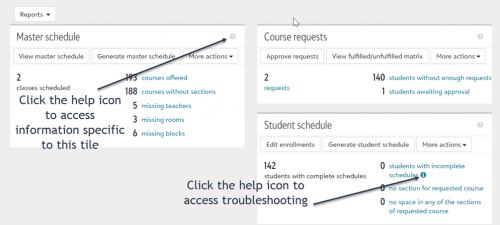
When working in the product, we provide help options embedded directly in the application. This help is specific to the area in which you are working. Our goal is to quickly address anticipated questions and allow you to move on with your work.
Some examples of this type of help include the following:
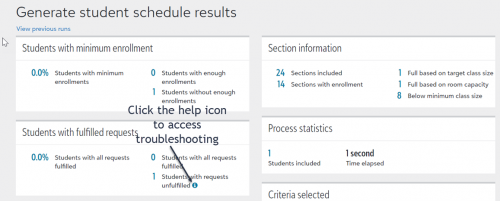
- We know schools regularly struggle trying to figure out incomplete student schedules, so we created a troubleshooting document that includes the exact steps used by support analysts when addressing this question with customers. We then added help icons to locations in the application where we know users will discover the scheduling issue:
- The Student schedule tile on the Overview tab in Request and Schedules in Academics.

- The Generate student schedule results page also in Requests and Schedules in Academics.

Panel Help
Another example of our embedded help is the question mark icon. Click on the question mark located in the upper right corner of the application. This opens help content specific to the area in the application in which you are working.
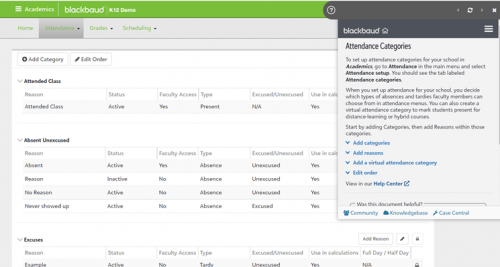
If while working in this help environment, you want to access the products help center, simply click the “View in our Help Center” link near the bottom of the embedded help topic.
Full Online Help Center
From the product’s help center, you have access to a searchable help system, our video library and tutorials, faculty resources, and training options. You can also easily access our latest blog posts and review featured help content, which usually addresses seasonal help needs, such as suggested annual processes, common questions around contracts, and more.
Hopefully, these help options provide you a smooth user experience while working in our Education Management products. If you do have questions and/or suggestions regarding our help deliverables, please reach out to our documentation team manager Denise Kadilak or use the “Was this document helpful?” tool provided near the bottom of every help topic.
Another example of our embedded help is the question mark icon. Click on the question mark located in the upper right corner of the application. This opens help content specific to the area in the application in which you are working.

If while working in this help environment, you want to access the products help center, simply click the “View in our Help Center” link near the bottom of the embedded help topic.
Full Online Help Center
From the product’s help center, you have access to a searchable help system, our video library and tutorials, faculty resources, and training options. You can also easily access our latest blog posts and review featured help content, which usually addresses seasonal help needs, such as suggested annual processes, common questions around contracts, and more.
Hopefully, these help options provide you a smooth user experience while working in our Education Management products. If you do have questions and/or suggestions regarding our help deliverables, please reach out to our documentation team manager Denise Kadilak or use the “Was this document helpful?” tool provided near the bottom of every help topic.
1
Comments
-
I tend to use the Panel Help a good bit when venturing into something new. It is also nice if there are updates.
0



Categories
- All Categories
- 6 Blackbaud Community Help
- 211 bbcon®
- 1.4K Blackbaud Altru®
- 402 Blackbaud Award Management™ and Blackbaud Stewardship Management™
- 1.1K Blackbaud CRM™ and Blackbaud Internet Solutions™
- 15 donorCentrics®
- 360 Blackbaud eTapestry®
- 2.6K Blackbaud Financial Edge NXT®
- 655 Blackbaud Grantmaking™
- 576 Blackbaud Education Management Solutions for Higher Education
- 3.2K Blackbaud Education Management Solutions for K-12 Schools
- 940 Blackbaud Luminate Online® and Blackbaud TeamRaiser®
- 84 JustGiving® from Blackbaud®
- 6.7K Blackbaud Raiser's Edge NXT®
- 3.7K SKY Developer
- 248 ResearchPoint™
- 120 Blackbaud Tuition Management™
- 165 Organizational Best Practices
- 240 Member Lounge (Just for Fun)
- 34 Blackbaud Community Challenges
- 37 PowerUp Challenges
- 3 (Open) PowerUp Challenge: Grid View Batch
- 3 (Closed) PowerUp Challenge: Chat for Blackbaud AI
- 3 (Closed) PowerUp Challenge: Data Health
- 3 (Closed) Raiser's Edge NXT PowerUp Challenge: Product Update Briefing
- 3 (Closed) Raiser's Edge NXT PowerUp Challenge: Standard Reports+
- 3 (Closed) Raiser's Edge NXT PowerUp Challenge: Email Marketing
- 3 (Closed) Raiser's Edge NXT PowerUp Challenge: Gift Management
- 4 (Closed) Raiser's Edge NXT PowerUp Challenge: Event Management
- 3 (Closed) Raiser's Edge NXT PowerUp Challenge: Home Page
- 4 (Closed) Raiser's Edge NXT PowerUp Challenge: Standard Reports
- 4 (Closed) Raiser's Edge NXT PowerUp Challenge: Query
- 796 Community News
- 3K Jobs Board
- 54 Blackbaud SKY® Reporting Announcements
- 47 Blackbaud CRM Higher Ed Product Advisory Group (HE PAG)
- 19 Blackbaud CRM Product Advisory Group (BBCRM PAG)