Aggregate a gift query in a report Only by FY showing 2 columns: total $'s and total # of Gifts





Hi all, I’m looking for help creating a very basic and simple aggregation report based on a gift query (Report needs to be able to use a gift query as I am needing the criteria to use a fund attribute/custom field). It should display 2 columns only: 1. total $ giving and 2. total number of gifts by Only the 2 fiscal years I enter in the report config. Is this possible in any Report that uses a Gift Query. Thanks in advance!
Answers
-
Does this need to be an actual report printed out of Unified View? Or can this be exported to Excel and formatted nicely there for presentation?
I'd suggest creating a Constituent Export (which is currently only in database view) and then exporting:
*Cons ID
*Name
*Total Amount of Giving and filter by your gift query on the filter tab of total giving
*Total # of Gifts and filter by your gift query on the filter tab of total # of gifts.
You will find this KB helpful in using a gift query on the filter tab. KB # 38785
Here is a screenshot of how to use a query on the filter tab: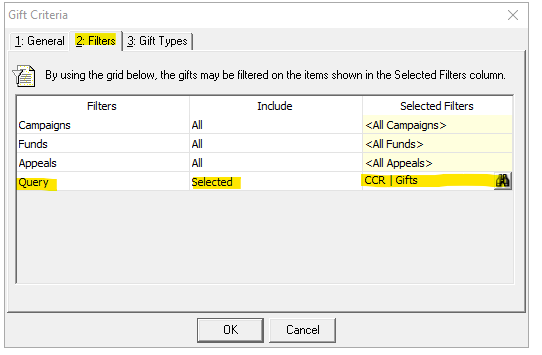
Here is an image of what your export should look like: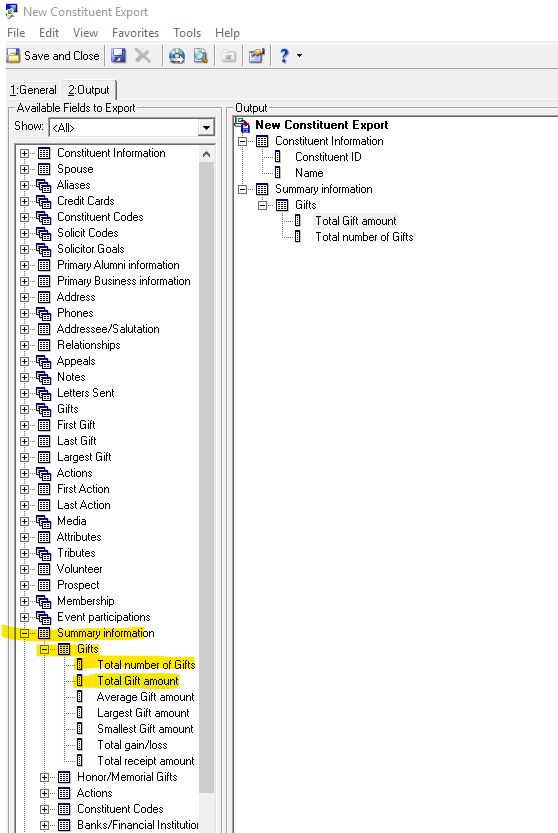 4
4 -
Thanks, Carlene! This is helpful. I ran a fund query, pulled total giving and number of gifts into the Output using the right fund attribute and “New Business” gift types, exported, de-duped, and totaled. For us, that’s a much shorter list than pulling every constituent for this dataset. Looks like RE DBV and WBV can’t give me an aggregate-only rows by fiscal year. I’d use NXT dashboards but fund custom fields don’t show up as filters for me. Appreciate the nudge in the right direction.
1 -
Hopefully the export function will be up and running soon in webview, because that way you can replicate the exact data in your query but not have all the duplicates. (and yes, I feel your pain about not having the filters you need on dashboards)
2 -
You can use Fund Query like you mentioned, and in the Total Number of Gift and Total Amount of Gift, you can create mutiple output columns each filtering by gift date to give you columns by fiscal year. if you need "rows" by fiscal year, then some excel work.
2 -
@Alex Wong Thanks, that’s essentially what I did. I used the Fund Query as you suggested, then brought the results into Power Pivot to aggregate by fiscal year and maintain Fund-level detail. Power Query can made it easy to generate a fiscal year dimension, keep a clean star schema, and drill from Fund aggregates to transaction-level data.
2












Categories
- All Categories
- 6 Blackbaud Community Help
- 211 bbcon®
- 1.4K Blackbaud Altru®
- 403 Blackbaud Award Management™ and Blackbaud Stewardship Management™
- 1.2K Blackbaud CRM™ and Blackbaud Internet Solutions™
- 15 donorCentrics®
- 360 Blackbaud eTapestry®
- 2.6K Blackbaud Financial Edge NXT®
- 659 Blackbaud Grantmaking™
- 579 Blackbaud Education Management Solutions for Higher Education
- 3.2K Blackbaud Education Management Solutions for K-12 Schools
- 943 Blackbaud Luminate Online® and Blackbaud TeamRaiser®
- 84 JustGiving® from Blackbaud®
- 6.7K Blackbaud Raiser's Edge NXT®
- 3.8K SKY Developer
- 250 ResearchPoint™
- 120 Blackbaud Tuition Management™
- 165 Organizational Best Practices
- 241 Member Lounge (Just for Fun)
- 36 Blackbaud Community Challenges
- 37 PowerUp Challenges
- 3 (Open) PowerUp Challenge: Grid View Batch
- 3 (Closed) PowerUp Challenge: Chat for Blackbaud AI
- 3 (Closed) PowerUp Challenge: Data Health
- 3 (Closed) Raiser's Edge NXT PowerUp Challenge: Product Update Briefing
- 3 (Closed) Raiser's Edge NXT PowerUp Challenge: Standard Reports+
- 3 (Closed) Raiser's Edge NXT PowerUp Challenge: Email Marketing
- 3 (Closed) Raiser's Edge NXT PowerUp Challenge: Gift Management
- 4 (Closed) Raiser's Edge NXT PowerUp Challenge: Event Management
- 3 (Closed) Raiser's Edge NXT PowerUp Challenge: Home Page
- 4 (Closed) Raiser's Edge NXT PowerUp Challenge: Standard Reports
- 4 (Closed) Raiser's Edge NXT PowerUp Challenge: Query
- 798 Community News
- 3K Jobs Board
- 56 Blackbaud SKY® Reporting Announcements
- 47 Blackbaud CRM Higher Ed Product Advisory Group (HE PAG)
- 19 Blackbaud CRM Product Advisory Group (BBCRM PAG)