Sharing my Power Automate template: Extract Multiple Advanced Lists to SharePoint Folders





Description - This flow reads an Excel file containing advanced list IDs and SharePoint destinations, then pulls results from multiple advanced lists. It saves each set of results as a CSV file in the appropriate SharePoint folder.
Required connections -
- Blackbaud SKY Add-ins, SharePoint for Business, Excel Online, Outlook 365
Skill level - Beginner/intermediate
Configuration details - You'll need to specify the List IDs of the Advanced Lists to be used in the flow, the SharePoint locations where the files should be saved, and the file names for each output. Keep in mind there may be limitations when working with large Advanced Lists.
Instructions
- Download the Advanced_Lists_Download.xlsx to a location in SharePoint, you will need to populate the following fields-
List ID (of the Advanced List)
To find the List ID, go to Core > Reporting > Manage Lists > Manage Basic and Advanced Lists, then search for your list by name. The List ID is displayed at the top of the list summary page, next to the creation and modification details.
SharePoint URL
This is the web address of the SharePoint site or document library where you want to save your files. You can copy it directly from your browser’s address bar.
Folder Path
The specific folder within the SharePoint document library where the file should be saved. This folder must already exist.
File Name
The desired name of the file to be saved.
Notes
Any additional information or comments you would like to store with the file - Import the attached .zip file into Power Automate
- Download the .zip file.
- From Go to My Flows>Import>Import Package (Legacy)
- Click Upload
- File the zip file and click Open.
- Update all the connections
- Blackbaud SKY Add-ins
- Excel Online
- SharePoint for Business
- Outlook 365
- Update Power Automate Flow
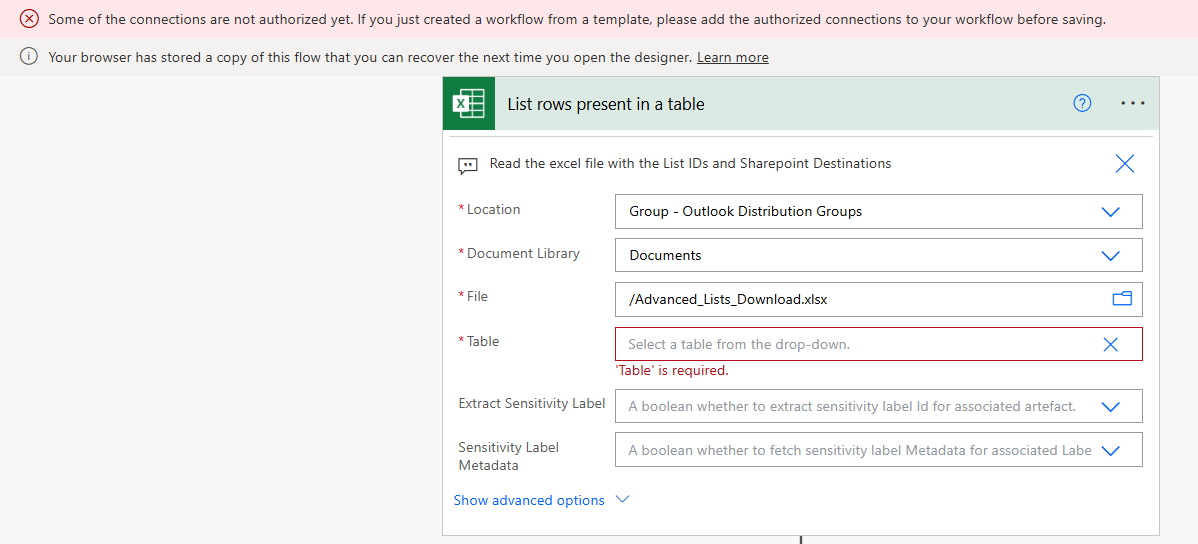
- List rows present in a table
Update the action to point to the location of your Advanced List download file. You should be able to select the file from the dropdown menu if it's in the correct SharePoint folder or document library.
Location – SharePoint URL
Document Library – Folder
File - /Advanced_Lists_Downloads.xlsx
Table - AdvancedList - Send an Email (V2)
Sends a notification that the job is completed. Please update with your email otherwise I will get the notification! - Manually trigger a flow
Change to Schedule Flow by deleting the Manually trigger a flow to Recurrence Schedule.
- List rows present in a table
ExtractMultipleAdvancedListstoSharePointFoldersTemplate.zip
Comments
-
@Victoria Wong Thank you! This looks amazing
1 -
Hi Victoria,
Thank you so much for all this info. I am getting this error though when I try step #3.
 0
0 -
Also, I'm not sure what I'm suppose to put in this field…
 0
0 -
Hi Victoria,
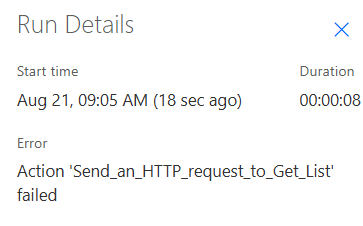
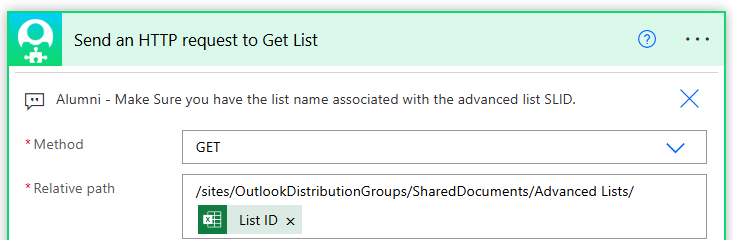
I've gotten past the two questions I asked about, but I'm still not able to run this because I keep getting stuck on the Relative path of the 'Send an HTTP request to Get List' area. I know I'm supposed to put the path in, but I'm not getting it.
 0
0 -
Hi Victoria, @Victoria Wong
It dawned on me that you might not get notifications when someone makes a new comment? So I'm also tagging you.
0 -
Hi Tyler,
Thank you for tagging me.
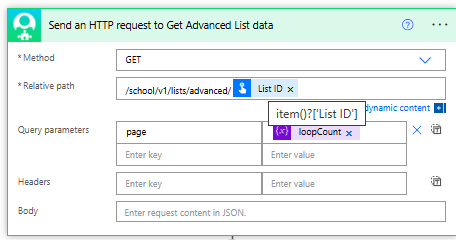
This is what I have. The relative path is to the advanced list.
Hope it works!
Let me know if you have other questions,
Vicky
0







Categories
- All Categories
- 6 Blackbaud Community Help
- 211 bbcon®
- 1.4K Blackbaud Altru®
- 402 Blackbaud Award Management™ and Blackbaud Stewardship Management™
- 1.1K Blackbaud CRM™ and Blackbaud Internet Solutions™
- 15 donorCentrics®
- 360 Blackbaud eTapestry®
- 2.6K Blackbaud Financial Edge NXT®
- 657 Blackbaud Grantmaking™
- 578 Blackbaud Education Management Solutions for Higher Education
- 3.2K Blackbaud Education Management Solutions for K-12 Schools
- 941 Blackbaud Luminate Online® and Blackbaud TeamRaiser®
- 84 JustGiving® from Blackbaud®
- 6.7K Blackbaud Raiser's Edge NXT®
- 3.8K SKY Developer
- 249 ResearchPoint™
- 120 Blackbaud Tuition Management™
- 165 Organizational Best Practices
- 240 Member Lounge (Just for Fun)
- 34 Blackbaud Community Challenges
- 37 PowerUp Challenges
- 3 (Open) PowerUp Challenge: Grid View Batch
- 3 (Closed) PowerUp Challenge: Chat for Blackbaud AI
- 3 (Closed) PowerUp Challenge: Data Health
- 3 (Closed) Raiser's Edge NXT PowerUp Challenge: Product Update Briefing
- 3 (Closed) Raiser's Edge NXT PowerUp Challenge: Standard Reports+
- 3 (Closed) Raiser's Edge NXT PowerUp Challenge: Email Marketing
- 3 (Closed) Raiser's Edge NXT PowerUp Challenge: Gift Management
- 4 (Closed) Raiser's Edge NXT PowerUp Challenge: Event Management
- 3 (Closed) Raiser's Edge NXT PowerUp Challenge: Home Page
- 4 (Closed) Raiser's Edge NXT PowerUp Challenge: Standard Reports
- 4 (Closed) Raiser's Edge NXT PowerUp Challenge: Query
- 797 Community News
- 3K Jobs Board
- 54 Blackbaud SKY® Reporting Announcements
- 47 Blackbaud CRM Higher Ed Product Advisory Group (HE PAG)
- 19 Blackbaud CRM Product Advisory Group (BBCRM PAG)