Authorizing token for Test environment





I have three environments. Production, Test, and a link to a training environment from a class. I am logged into Test. I have created an application and I have connected it to Test. I am using the URL to get a refresh token and it will only give me the option to authorize access to the training environment. What am I missing? I am logged into the right environment and my app is connected to the right environment. I don't have the option to choose a different environment at the authorization point… Thanks for the help!
Answers
-
if you are using Power Automate, this is a known issue.
There is no way to determine what Blackbaud environment the Power Automate "connection" created is linked to. You cannot use the same Power Automate environment for all 3 Blackbaud environments.
So what you need to do is to create 3 separate Power Platform environment (the one that you started out with is likely the "Default" environment for your org). Each is named appropreiate for each of the 3 Blackbaud Environment you have.
1 -
Hmmm… so I have multiple environments in Power Automate. My test environment is only connected to my test database. However, I am just using the URL in Chrome to get the refresh token and it is picking its own environment. How do I make that URL go to the right one? I am using: https://oauth2.sky.blackbaud.com/authorization?response_type=code&client_id=CLIENTID&redirect_uri= REDIRECTURI
0 -
I don't know what you mean by "I am just using the URL in Chrome to get the refresh token".
You cannot just use the URL you posted to refresh your auth token. Might want to spend some time to make sure you are following the Auth/Refresh Auth token process
If you are using Power Automate, you do not need to worry about auth/refresh token. The connector handles it for you.
1 -
Hmmm. I don't think I'm explaining this well and maybe scrambling my terms.
I am using Power Automate, but not using the Sky API connection because I want to delete solicit codes and that is not (that I can tell) part of the API. So I am working to add some code to connect thru HTTP REST.
In Python, I have a script that takes a token and uses it to get the authorization information and then auto refreshes itself every time it runs so it never expires. I'm trying to do the same in PA.
I supposed this isn't really a Power Automate question. More of an environment question. Whenever I get a screen where I can authorize a connection, I usually have the option to choose the environment. But in this instance, I do not. I am pretty sure I used to because I've used this in my live and my test systems…
I'll go thru the documentation. Perhaps there is an easier and better way to set this up! Thank you!!
0 -
There is a Blackbaud specific HTTP action you can use that will take care of authorization
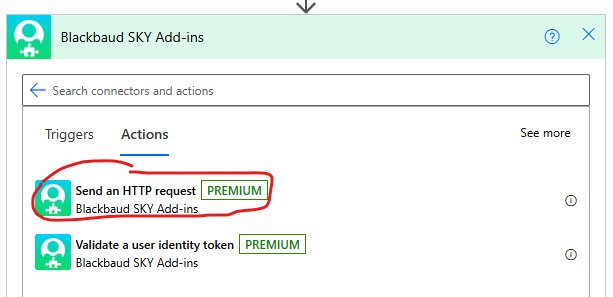 0
0 -
Ahhh. Cool. I shall try it. I've been used the Rest HTTP option.
I did learn that all I had to do was go to a new browser in a different application and it would give me the option to select a database. Apparently I am logged into all the databases in various places so it was confused :)
Appreciate all your help. Hope to see you at BBCon.
0





Categories
- All Categories
- 6 Blackbaud Community Help
- 211 bbcon®
- 1.4K Blackbaud Altru®
- 403 Blackbaud Award Management™ and Blackbaud Stewardship Management™
- 1.2K Blackbaud CRM™ and Blackbaud Internet Solutions™
- 15 donorCentrics®
- 360 Blackbaud eTapestry®
- 2.6K Blackbaud Financial Edge NXT®
- 659 Blackbaud Grantmaking™
- 579 Blackbaud Education Management Solutions for Higher Education
- 3.2K Blackbaud Education Management Solutions for K-12 Schools
- 943 Blackbaud Luminate Online® and Blackbaud TeamRaiser®
- 84 JustGiving® from Blackbaud®
- 6.7K Blackbaud Raiser's Edge NXT®
- 3.8K SKY Developer
- 250 ResearchPoint™
- 120 Blackbaud Tuition Management™
- 165 Organizational Best Practices
- 241 Member Lounge (Just for Fun)
- 36 Blackbaud Community Challenges
- 37 PowerUp Challenges
- 3 (Open) PowerUp Challenge: Grid View Batch
- 3 (Closed) PowerUp Challenge: Chat for Blackbaud AI
- 3 (Closed) PowerUp Challenge: Data Health
- 3 (Closed) Raiser's Edge NXT PowerUp Challenge: Product Update Briefing
- 3 (Closed) Raiser's Edge NXT PowerUp Challenge: Standard Reports+
- 3 (Closed) Raiser's Edge NXT PowerUp Challenge: Email Marketing
- 3 (Closed) Raiser's Edge NXT PowerUp Challenge: Gift Management
- 4 (Closed) Raiser's Edge NXT PowerUp Challenge: Event Management
- 3 (Closed) Raiser's Edge NXT PowerUp Challenge: Home Page
- 4 (Closed) Raiser's Edge NXT PowerUp Challenge: Standard Reports
- 4 (Closed) Raiser's Edge NXT PowerUp Challenge: Query
- 798 Community News
- 3K Jobs Board
- 56 Blackbaud SKY® Reporting Announcements
- 47 Blackbaud CRM Higher Ed Product Advisory Group (HE PAG)
- 19 Blackbaud CRM Product Advisory Group (BBCRM PAG)