Is there a place in FE NXT where I can view errors and/or my own reoprt queue?





I am looking to find a report or place in FE where I can see:
- A list of errors users have received in the database.
- Would be useful to understand what errors different users are receiving that they may not have reported to the admin or can be useful in troubleshooting issues.
- A list of processes that are running/taking a long amount of time and a way to potentially cancel a stuck process.
- Would be useful to understand if there are processes running in the background that may affect the usability of the system by that user (and possibly other users?)
- A list of reports I have recently run.
- It would be useful to access a report that was run after the notification in the bottom right goes away.
Answers
-
To my knowledge there is nothing available to address your needs/wants for item #1 or #2, but if you find out any good information I would be interested in knowing also. For #3 if you have the "Last run" date in the columns you are seeing in Reports you can sort by most recent first and see which reports were run and if you include the "Created by" column you can see who created the report. Unfortunately, no "who ran" the report information.
0 -
There is a 'Recently Run' tab under reports
0 -
Thank you both. For #3, I was looking more to open the specific report results or a report run generation (not the report template that was used to process the request).
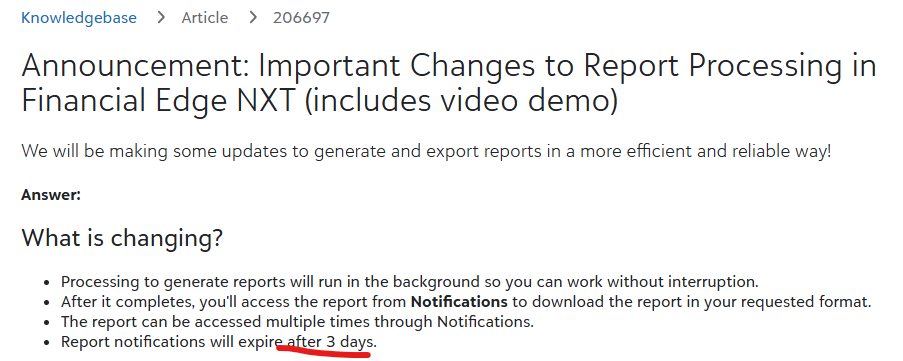
In WorkDay, when I run a report that takes awhile to run, I can access the report results from clicking a notification AND ALSO in a section called MyReports. The exact report results run stays in the MyReports tab and I can access it again later on even after I have dismissed the notification. I was curious if there was a place in FE NXT like that where the report results live for a certain period of time and can be accessed.
0 -
Not sure but this may be what you're looking for:
 1
1 -
Once we access the Report Notification it is gone and we can't access it after clicking the x on the small pop up.
0





Categories
- All Categories
- 6 Blackbaud Community Help
- 211 bbcon®
- 1.4K Blackbaud Altru®
- 403 Blackbaud Award Management™ and Blackbaud Stewardship Management™
- 1.2K Blackbaud CRM™ and Blackbaud Internet Solutions™
- 15 donorCentrics®
- 360 Blackbaud eTapestry®
- 2.6K Blackbaud Financial Edge NXT®
- 659 Blackbaud Grantmaking™
- 579 Blackbaud Education Management Solutions for Higher Education
- 3.2K Blackbaud Education Management Solutions for K-12 Schools
- 943 Blackbaud Luminate Online® and Blackbaud TeamRaiser®
- 84 JustGiving® from Blackbaud®
- 6.7K Blackbaud Raiser's Edge NXT®
- 3.8K SKY Developer
- 250 ResearchPoint™
- 120 Blackbaud Tuition Management™
- 165 Organizational Best Practices
- 241 Member Lounge (Just for Fun)
- 36 Blackbaud Community Challenges
- 37 PowerUp Challenges
- 3 (Open) PowerUp Challenge: Grid View Batch
- 3 (Closed) PowerUp Challenge: Chat for Blackbaud AI
- 3 (Closed) PowerUp Challenge: Data Health
- 3 (Closed) Raiser's Edge NXT PowerUp Challenge: Product Update Briefing
- 3 (Closed) Raiser's Edge NXT PowerUp Challenge: Standard Reports+
- 3 (Closed) Raiser's Edge NXT PowerUp Challenge: Email Marketing
- 3 (Closed) Raiser's Edge NXT PowerUp Challenge: Gift Management
- 4 (Closed) Raiser's Edge NXT PowerUp Challenge: Event Management
- 3 (Closed) Raiser's Edge NXT PowerUp Challenge: Home Page
- 4 (Closed) Raiser's Edge NXT PowerUp Challenge: Standard Reports
- 4 (Closed) Raiser's Edge NXT PowerUp Challenge: Query
- 798 Community News
- 3K Jobs Board
- 56 Blackbaud SKY® Reporting Announcements
- 47 Blackbaud CRM Higher Ed Product Advisory Group (HE PAG)
- 19 Blackbaud CRM Product Advisory Group (BBCRM PAG)