Updating Email with Power Automate





Hello,
I need help updating a specific email with Power Automate. I can update both on the record, but I need to just update one of them.
I have added the "list of emails" in the flow so I can grab the Email ID, but then when I add the "Update a const. email" the system puts it under a "Apply to each" due to what I assume is because of adding the "list of emails".
I have narrowed it down in the dropdowns, but it still update every email on the record.
What am I missing?

Best Answer
-
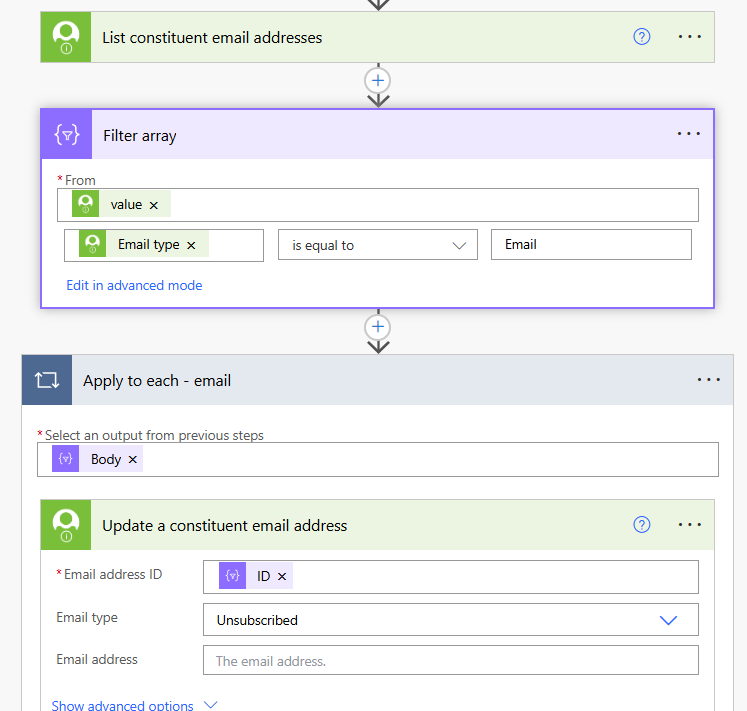
Here's what you need to do - Immediately prior to this apply to each, directly below the "List constituent emails addresses" action put in an a "Filter Array" (from the Data Operations connector, purple). Set it up like this….
- The from is the value from the above 'list constituent emails' action.
- Set the criteria to how you identify the email you want to update on a record. Think dynamically. If you need more than one criteria, you can set up multiple filter arrays or edit in advance mode (ChatGPT can help with compiling that complex expression - if you want to know the steps for that let me know, happy to share)
- In your "apply to each" remove the current value and replace with the body (output) from the Filter array.
- In the "update email addresses" replace the email ID with the ID from the filter array.
Side note - also recommend switching from the old connector (the one with the check in the icon) to the newer "Blackbaud Raisers Edge NXT Constituents" connector. You'll have more dynamic content options, this and the other newer connectors are the one's they are actively updating.
 3
3






Answers
-
That was perfect, thank you so much for helping me out!
Cheers,
Tyler
2 -
nm
0
Categories
- All Categories
- 6 Blackbaud Community Help
- 211 bbcon®
- 1.4K Blackbaud Altru®
- 403 Blackbaud Award Management™ and Blackbaud Stewardship Management™
- 1.2K Blackbaud CRM™ and Blackbaud Internet Solutions™
- 15 donorCentrics®
- 360 Blackbaud eTapestry®
- 2.6K Blackbaud Financial Edge NXT®
- 659 Blackbaud Grantmaking™
- 579 Blackbaud Education Management Solutions for Higher Education
- 3.2K Blackbaud Education Management Solutions for K-12 Schools
- 943 Blackbaud Luminate Online® and Blackbaud TeamRaiser®
- 84 JustGiving® from Blackbaud®
- 6.7K Blackbaud Raiser's Edge NXT®
- 3.8K SKY Developer
- 250 ResearchPoint™
- 120 Blackbaud Tuition Management™
- 165 Organizational Best Practices
- 241 Member Lounge (Just for Fun)
- 36 Blackbaud Community Challenges
- 37 PowerUp Challenges
- 3 (Open) PowerUp Challenge: Grid View Batch
- 3 (Closed) PowerUp Challenge: Chat for Blackbaud AI
- 3 (Closed) PowerUp Challenge: Data Health
- 3 (Closed) Raiser's Edge NXT PowerUp Challenge: Product Update Briefing
- 3 (Closed) Raiser's Edge NXT PowerUp Challenge: Standard Reports+
- 3 (Closed) Raiser's Edge NXT PowerUp Challenge: Email Marketing
- 3 (Closed) Raiser's Edge NXT PowerUp Challenge: Gift Management
- 4 (Closed) Raiser's Edge NXT PowerUp Challenge: Event Management
- 3 (Closed) Raiser's Edge NXT PowerUp Challenge: Home Page
- 4 (Closed) Raiser's Edge NXT PowerUp Challenge: Standard Reports
- 4 (Closed) Raiser's Edge NXT PowerUp Challenge: Query
- 798 Community News
- 3K Jobs Board
- 56 Blackbaud SKY® Reporting Announcements
- 47 Blackbaud CRM Higher Ed Product Advisory Group (HE PAG)
- 19 Blackbaud CRM Product Advisory Group (BBCRM PAG)