Report Card Builder - Still too Limiting





I've been using the new Report Card Builder for several years, and I find that the design elements are far too limited. The one thing that we are begging for is the ability to space out our courses on the page. A report card typically displays 8 courses, and for each course, we have learning skills ratings as well as a percentage grade, subject comment and attendance. This is a lot of information for each course, but when one course immediately follows the last (without any line spacing between the courses), it becomes difficult to read the report card. Unfortunately, support has advised that inserting a blank row between each course is not an option. Has anyone come up with a report card template that they'd be willing to share that might help address this design issue?
Answers
-
We use color on our report cards as a visual indicator of where one course ends and another begins. Not sure if that would be helpful in your case or not.
1 -
@Geoffrey Goodfellow Could you show the settings for your report card in the new report card builder? I believe this would fix the issue I came to put in, but maybe not the original posters. I am brand new this year and struggling with the new report card builder and we need our report card to look exactly like yours (assessment style).
0 -
@Geoffrey Goodfellow I would also love to know how you have added color to your report card as I think it would help the 'readability' of ours as well! I just did some poking around in the report card setup for our templates but didn't see anything obvious to add color.
0 -
Yes, I would like to know how you got the coloring to work on the assessment categories. Impressed with the layout!
0 -
@Geoffrey Goodfellow We are using colour to separate courses, but I still find it too tight on the page:
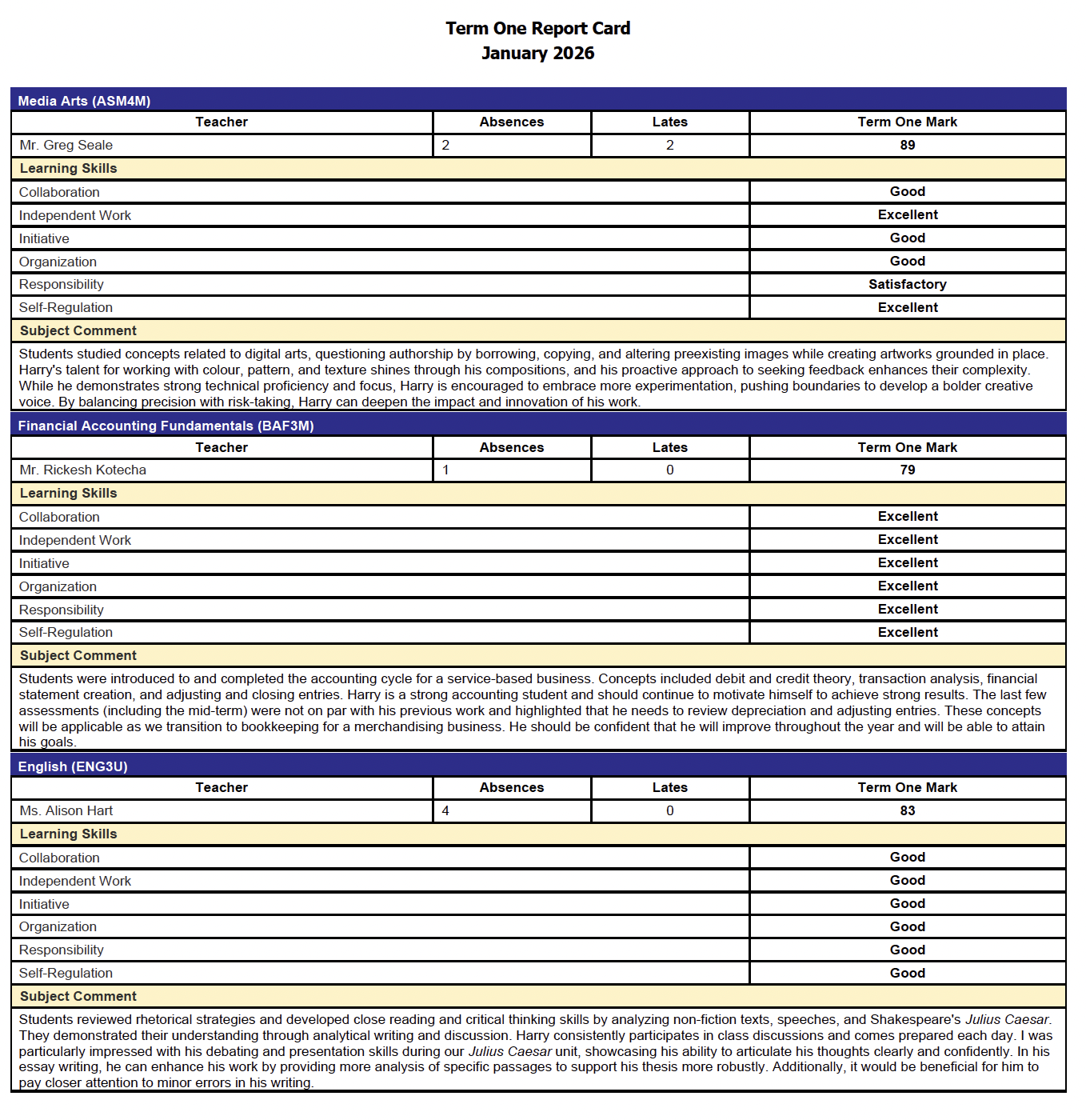 1
1 -
I agree that the styling is limited. Have you tried increasing the font to see if that helps?
0 -
Also play with the line spacing. I have mine set to 1.5.
0 -
My apologies, but I have typed out very specific direction twice now, and when I "Post Comment" it gets deleted.
0 -
When you have the report card template open, the "3. Style Form" tab allows you to click items on the right pane and then set their styling with options in the left pane.
The following are some of my styles:
- Courses/Groups Grid Subgrouping Style, Fill light yellow, Text italics purple.
- Course Title Header Style and Teacher Title Header Style, Fill light yellow, Text bold black.
- Course Title Style and Teacher Style, Fill dark purple, Text non-bold white.
- Marking Column Header Style, Fill light yellow, Text bold black.
- Marking Column Style, Fill none, Text non-bold black.
I will acknowledge that you are constrained by only the style settings that are available on the left. Not every element can be styled. I will also admit that the preview that shows in the right pane isn't always an accurate representation of the styling of the final report card, so I did a lot of trial and error where I would change a styling option and then preview a real report card to see how it looked.
Hope that helps!
0 -
The coloring on the report card can be set by going to Academics > Grades > Report Card Setup. Find the desired report card, use the three dots to the left to "Edit Template". Switch to the "3. Style Form" tab. From there, you can click on the various element on the right-side of the screen and then set their color styles from the left side of the screen. The following are some of my style settings:
- Courses/Groups Grid Subgrouping Style, Fill is set to light yellow, and Text is italics purple.
- Course Title Header Style, Fill is set to light yellow, and Text is bold black.
- Course Title Style, Fill is set to dark purple, and Text is set to white.
- Teacher Header Style, Fill is set to light yellow, and Text is bold black.
- Teacher Style, Fill is set to dark purple, and Text is set to white.
- Marking Column Header Style, Fill is set to light yellow, and Text is bold black.
- Marking Column Style, Fill is set to blank, and Text is non-bold black.
I will admit that you are limited to styling only what options are available in the left pane. I also find that the "preview" shown in the right pane doesn't always match perfectly to how the actual report card gets styled, so with a lot of trial and error, I would make a change and the preview a real student report card.
Hope that helps!
0 -
@Geoffrey Goodfellow Finally getting a chance to look at this - appreciate you taking the time to share (and doing it multiple times)! I found the settings you identified now I just need to figure out why it isn't applying and saving my selections :) but will continue to fight with it another day! Thanks again for the details!!
1 -
@Geoffrey Goodfellow Just wanted to say thanks again as I was able to get our templates updated successfully! Our preschool and elementary division directors are very pleased with how the color blocking has improved the readability of our reports and I'm sure the parents will be too! Appreciate the information sharing in this community!
1 -
0










Categories
- All Categories
- 6 Blackbaud Community Help
- 211 bbcon®
- 1.4K Blackbaud Altru®
- 403 Blackbaud Award Management™ and Blackbaud Stewardship Management™
- 1.2K Blackbaud CRM™ and Blackbaud Internet Solutions™
- 15 donorCentrics®
- 360 Blackbaud eTapestry®
- 2.6K Blackbaud Financial Edge NXT®
- 659 Blackbaud Grantmaking™
- 579 Blackbaud Education Management Solutions for Higher Education
- 3.2K Blackbaud Education Management Solutions for K-12 Schools
- 943 Blackbaud Luminate Online® and Blackbaud TeamRaiser®
- 84 JustGiving® from Blackbaud®
- 6.7K Blackbaud Raiser's Edge NXT®
- 3.8K SKY Developer
- 250 ResearchPoint™
- 120 Blackbaud Tuition Management™
- 165 Organizational Best Practices
- 241 Member Lounge (Just for Fun)
- 36 Blackbaud Community Challenges
- 37 PowerUp Challenges
- 3 (Open) PowerUp Challenge: Grid View Batch
- 3 (Closed) PowerUp Challenge: Chat for Blackbaud AI
- 3 (Closed) PowerUp Challenge: Data Health
- 3 (Closed) Raiser's Edge NXT PowerUp Challenge: Product Update Briefing
- 3 (Closed) Raiser's Edge NXT PowerUp Challenge: Standard Reports+
- 3 (Closed) Raiser's Edge NXT PowerUp Challenge: Email Marketing
- 3 (Closed) Raiser's Edge NXT PowerUp Challenge: Gift Management
- 4 (Closed) Raiser's Edge NXT PowerUp Challenge: Event Management
- 3 (Closed) Raiser's Edge NXT PowerUp Challenge: Home Page
- 4 (Closed) Raiser's Edge NXT PowerUp Challenge: Standard Reports
- 4 (Closed) Raiser's Edge NXT PowerUp Challenge: Query
- 798 Community News
- 3K Jobs Board
- 56 Blackbaud SKY® Reporting Announcements
- 47 Blackbaud CRM Higher Ed Product Advisory Group (HE PAG)
- 19 Blackbaud CRM Product Advisory Group (BBCRM PAG)