Unable to Embed Power BI Dashboard





I'm trying to embed a dashboard created in Power BI to my org's Raiser's Edge homepage, however, whenever I save the add in, I do not see it.

I've done this before, however, am unable to now. Is there an issue with the URL pictured above? Or are there other reasons for why this dashboard is unable to be displayed
Best Answer
-
Hi Nadia,
You need two add-ins — one for the button that will display on the home page and then a page add-in to display the report. Try using the SKY URL Add-in builder tool we created to help you build your URLs:
Build Add-In #1: Embed Your Power BI Report in a Page•Start by logging into your developer account, select developer Account -> My Applications and select your app.
•In the Add-ins section, click +Add
•Fill in the Add add-in form.
•Add-in name – The name of your add in
•Add-in URL – Compose and enter the “add-in URL” that was generated from the SKY URL Builder.
•Extension point – Navigation -> Page (Preview)
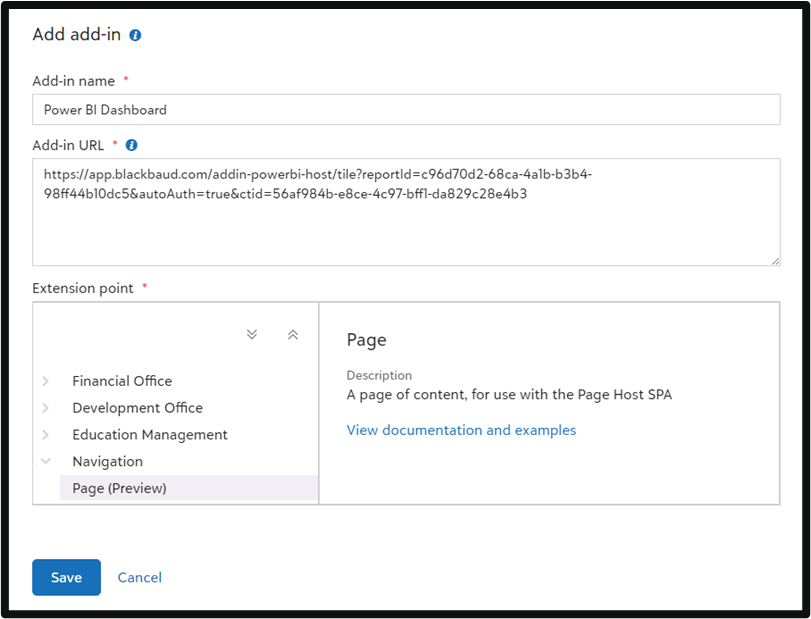
Build Add-in #2: Create a Home Page Action Button
•Start by logging into your developer account, select developer Account -> My Applications and select your app.
•In the Add-ins section, click +Add
•Fill in the Add add-in form.
•Add-in name – The name of your application. This must be the EXACT same name used in step 5 of the URL Builder
•Add-in URL – Compose and enter the “Button URL” that was generated from the SKY URL Builder.
•Extension point – Select Home Page -> Development Office Home Action (Preview)
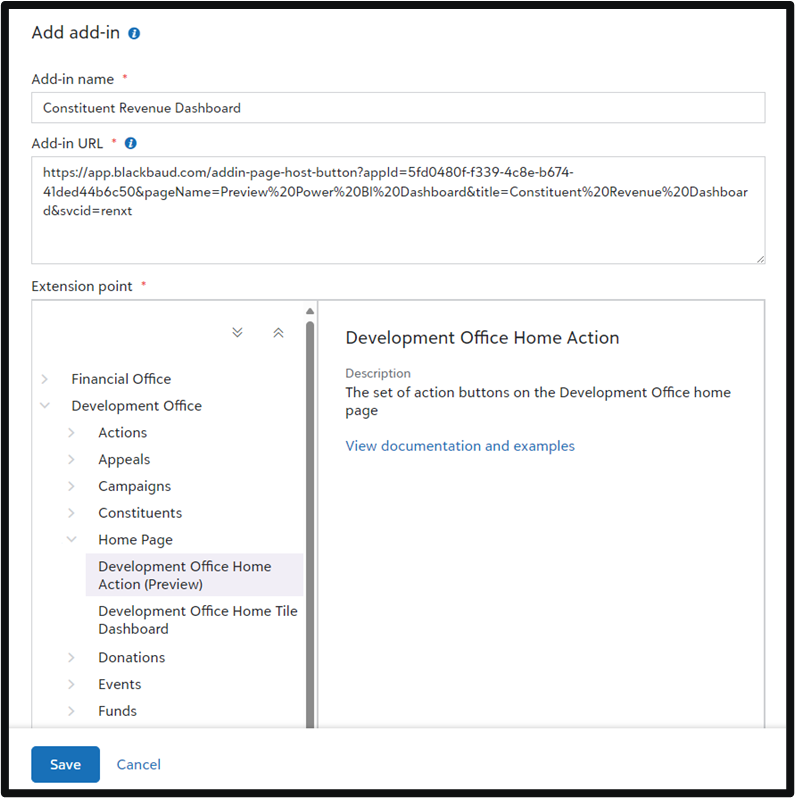 2
2






Answers
-
You can also simply embed the power bi as a add-in tile on the homepage, though it will be "smaller" and maybe not best viewing. If you want a bigger space for the power bi to show, then you have to do what Erik said, setup a full page add-in and then a button that "brings up" the full page addin.
1 -
Hello
I've done this a few times now and it all saves but when i go to Add ins on the homepage nothing is showing. Is there any reason why that would be? @Alex Wong
0 -
Can you provide a screenshot of the add in for the development office home action?
0 -
Actually @Alex Wong I've managed to get it on there now. But it just shows as an Add In link so you click on that link to take you to the PowerBi report. Is there a way to create it so that it is a big tile on the Home page? I managed to get the name added to the tile but the power bi report wasn't showing? Thanks :)
0 -
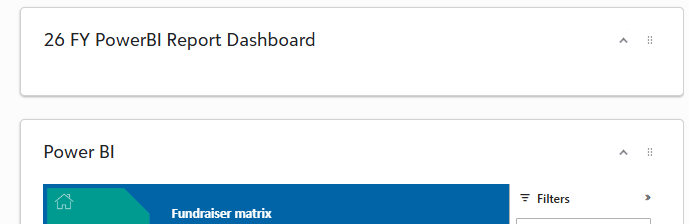
Thanks for getting back to me @Erik Leaver.This is what I'm seeing on the home page. So I've created two tiles to show two different reports. The first one the tile is showing but the PowerBI report is not (26 FY PowerBI Report Dashboard). The second one (called Power BI) is working and report is showing? Why would that be?
0 -
@Pippi Reader - most likely the add-in URL is malformed. Can you provide a screenshot of the add in?
0 -
The homepage tile can only be so big (usually sized at about a quarter of the screen). If you want to have the power bi report to show bigger, the choices is going to be with a modal (not sure about this option) or full page addin, which works quite differently.
0





Categories
- All Categories
- 6 Blackbaud Community Help
- 211 bbcon®
- 1.4K Blackbaud Altru®
- 403 Blackbaud Award Management™ and Blackbaud Stewardship Management™
- 1.2K Blackbaud CRM™ and Blackbaud Internet Solutions™
- 15 donorCentrics®
- 360 Blackbaud eTapestry®
- 2.6K Blackbaud Financial Edge NXT®
- 659 Blackbaud Grantmaking™
- 579 Blackbaud Education Management Solutions for Higher Education
- 3.2K Blackbaud Education Management Solutions for K-12 Schools
- 943 Blackbaud Luminate Online® and Blackbaud TeamRaiser®
- 84 JustGiving® from Blackbaud®
- 6.7K Blackbaud Raiser's Edge NXT®
- 3.8K SKY Developer
- 250 ResearchPoint™
- 120 Blackbaud Tuition Management™
- 165 Organizational Best Practices
- 241 Member Lounge (Just for Fun)
- 36 Blackbaud Community Challenges
- 37 PowerUp Challenges
- 3 (Open) PowerUp Challenge: Grid View Batch
- 3 (Closed) PowerUp Challenge: Chat for Blackbaud AI
- 3 (Closed) PowerUp Challenge: Data Health
- 3 (Closed) Raiser's Edge NXT PowerUp Challenge: Product Update Briefing
- 3 (Closed) Raiser's Edge NXT PowerUp Challenge: Standard Reports+
- 3 (Closed) Raiser's Edge NXT PowerUp Challenge: Email Marketing
- 3 (Closed) Raiser's Edge NXT PowerUp Challenge: Gift Management
- 4 (Closed) Raiser's Edge NXT PowerUp Challenge: Event Management
- 3 (Closed) Raiser's Edge NXT PowerUp Challenge: Home Page
- 4 (Closed) Raiser's Edge NXT PowerUp Challenge: Standard Reports
- 4 (Closed) Raiser's Edge NXT PowerUp Challenge: Query
- 798 Community News
- 3K Jobs Board
- 56 Blackbaud SKY® Reporting Announcements
- 47 Blackbaud CRM Higher Ed Product Advisory Group (HE PAG)
- 19 Blackbaud CRM Product Advisory Group (BBCRM PAG)