Power BI Connector not Appearing





Hey y'all! So I have had the PBI connector set up since 12/2023 and it was working perfectly… until I got a new laptop and tried to rebuild it/update it. I have done all of the steps in the Repository for setup, I have my folders created & settings set, but the connector refuses to show up in my Get Data box.
Does anyone happen to have any ideas on what I should do?
Comments
-
@Catie Wools
you didnt' need to rebuild it. just copy the file from your old laptop to the new in the same location1 -
@Alex Wong I had tried that initially and it was giving me errors whenever I tried to refresh my data (specifically, it was saying that “The import Blackbaud.Contents matches no exports. Did you miss a module reference?”)
0 -
@Catie Wools
when you copy from old to new laptop, did you make sure to do the steps needed on your local Power BI Desktop to allow custom uncertified connectors?When you say you tried to refresh, are you refreshing on Power BI Desktop or Power BI cloud service? where are you seeing the error message.
0 -
@Alex Wong That's my bad – I should have included that! I'm trying to refresh using PowerBI Desktop. I did make sure to follow the steps again and I've even redone them (like just straight up remaking the folders & changing the setting on and off). I've attached a screenshot of the error I'm getting so you can see kind of what is going on (The other queries its referencing are NXT lists I was using to pull counts from, i.e., counts on membership numbers)
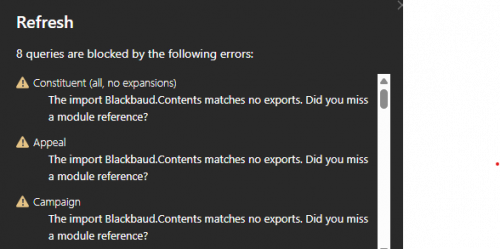 1
1 -
@Catie Wools
first of all, copy the exact file from your old laptop, don't need to recreate the mez file. Take a screenshot of the folder and the file you put in it here. the screenshot should show the FULL path of the folder (by clicking on the folder location bar)Start Power BI Desktop and go into option to enable use of custom connector

Restart Power BI Desktop
0 -
@Alex Wong I am experiencing the same issue as Catie Wools where my Power BI connection has broken now that I have a new laptop. My old laptop crashed and I am not able to copy the mez file. I have recreated it and saved it in this filepath: C:\Users\faryns\Documents\Power BI Desktop\Custom Connectors
I have enabled the use of a custom connector in Power BI and restarted the app. I am still getting the error
“The import Blackbaud.Contents matches no exports. Did you miss a module reference?”
Any chance you can help?
Thank you!
0 -
Please check to make sure you followed all the steps as I outlined in this post's reply
0







Categories
- All Categories
- 6 Blackbaud Community Help
- 211 bbcon®
- 1.4K Blackbaud Altru®
- 403 Blackbaud Award Management™ and Blackbaud Stewardship Management™
- 1.2K Blackbaud CRM™ and Blackbaud Internet Solutions™
- 15 donorCentrics®
- 360 Blackbaud eTapestry®
- 2.6K Blackbaud Financial Edge NXT®
- 659 Blackbaud Grantmaking™
- 579 Blackbaud Education Management Solutions for Higher Education
- 3.2K Blackbaud Education Management Solutions for K-12 Schools
- 943 Blackbaud Luminate Online® and Blackbaud TeamRaiser®
- 84 JustGiving® from Blackbaud®
- 6.7K Blackbaud Raiser's Edge NXT®
- 3.8K SKY Developer
- 250 ResearchPoint™
- 120 Blackbaud Tuition Management™
- 165 Organizational Best Practices
- 241 Member Lounge (Just for Fun)
- 36 Blackbaud Community Challenges
- 37 PowerUp Challenges
- 3 (Open) PowerUp Challenge: Grid View Batch
- 3 (Closed) PowerUp Challenge: Chat for Blackbaud AI
- 3 (Closed) PowerUp Challenge: Data Health
- 3 (Closed) Raiser's Edge NXT PowerUp Challenge: Product Update Briefing
- 3 (Closed) Raiser's Edge NXT PowerUp Challenge: Standard Reports+
- 3 (Closed) Raiser's Edge NXT PowerUp Challenge: Email Marketing
- 3 (Closed) Raiser's Edge NXT PowerUp Challenge: Gift Management
- 4 (Closed) Raiser's Edge NXT PowerUp Challenge: Event Management
- 3 (Closed) Raiser's Edge NXT PowerUp Challenge: Home Page
- 4 (Closed) Raiser's Edge NXT PowerUp Challenge: Standard Reports
- 4 (Closed) Raiser's Edge NXT PowerUp Challenge: Query
- 798 Community News
- 3K Jobs Board
- 56 Blackbaud SKY® Reporting Announcements
- 47 Blackbaud CRM Higher Ed Product Advisory Group (HE PAG)
- 19 Blackbaud CRM Product Advisory Group (BBCRM PAG)