Adding pass/fail grades in bulk





Recently, our PE/Wellness course has switched from a numeric grade to a pass/fail.
Because teachers of this course will record grades 8 times per year for between 100 to 200 students each, it would be helpful for them if there was a way to record the "P" (pass) or "F" (fail) in bulk for their sections, rather than having to select each manually. Is there a way to achieve this in a more automated way?
Answers
-
Platform managers can import report card grades for a class. I do that for a Service Learning course at the end of the academic year.
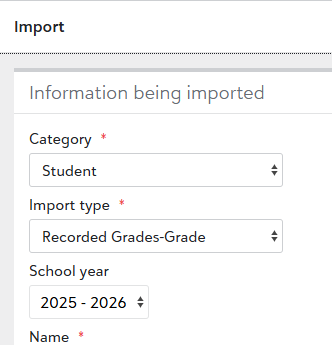
It will take you some time to work out the details of the file format, so start experimenting well before the first grades must be reported.
0 -
Thank you, Brian! Super helpful as always.
0 -
Hi Michael -
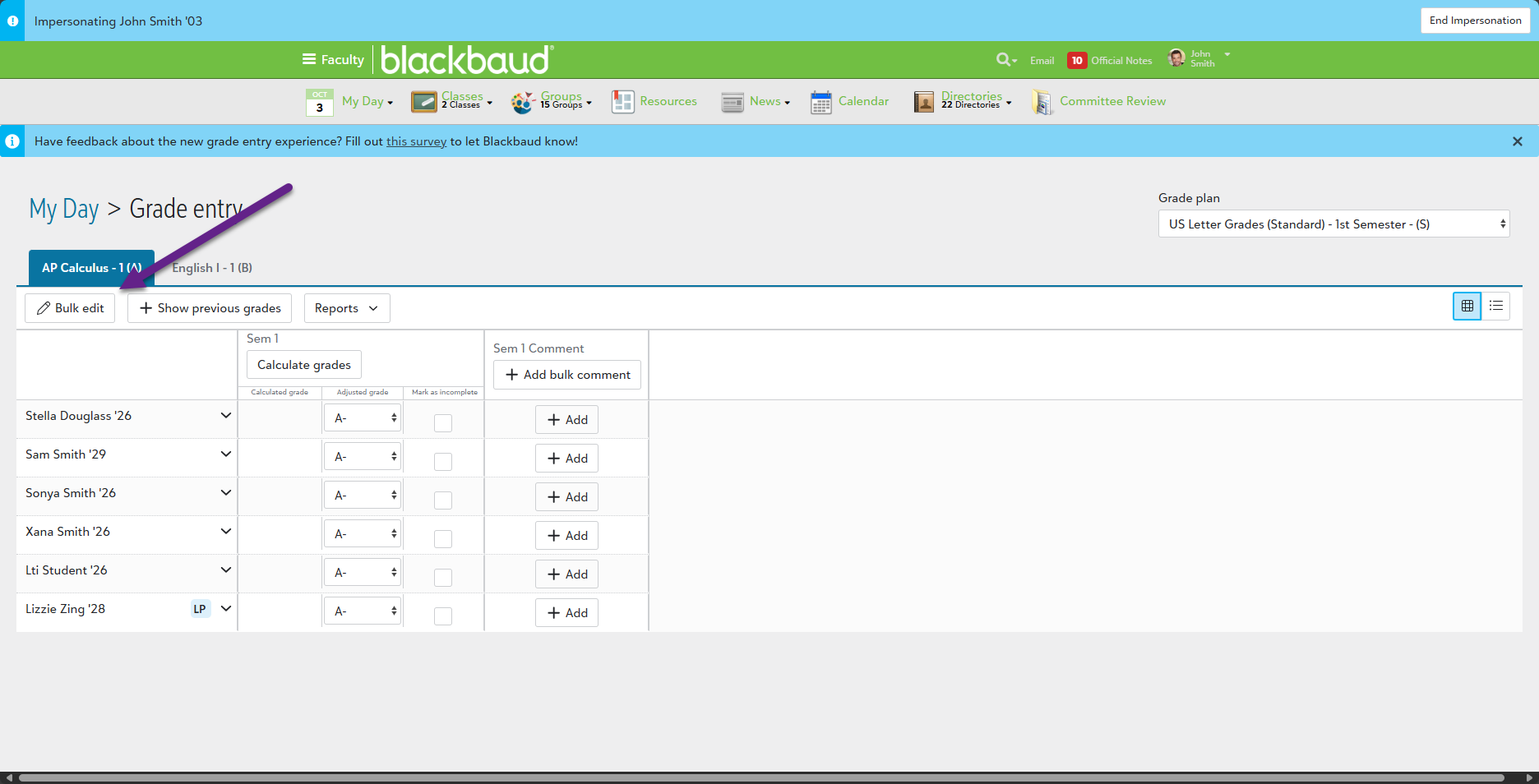
We actually just introduced this ability in one of our latest releases. When teachers are entering Standard Grades, they can now access a Bulk Edit option. This exists for both the Grid and Narrative views. So, you and your teachers won't have to worry about importing these values any longer.
 0
0 -
@Michael Morrissette - Many teachers of pass/fail classes will be very happy to see that button. I'm glad to see it on Athletics grading pages too. (We use grading in athletics to keep track of activity credits required for graduation.)
Thanks to you and your team!
0









Categories
- All Categories
- 6 Blackbaud Community Help
- 211 bbcon®
- 1.4K Blackbaud Altru®
- 403 Blackbaud Award Management™ and Blackbaud Stewardship Management™
- 1.2K Blackbaud CRM™ and Blackbaud Internet Solutions™
- 15 donorCentrics®
- 360 Blackbaud eTapestry®
- 2.6K Blackbaud Financial Edge NXT®
- 659 Blackbaud Grantmaking™
- 579 Blackbaud Education Management Solutions for Higher Education
- 3.2K Blackbaud Education Management Solutions for K-12 Schools
- 943 Blackbaud Luminate Online® and Blackbaud TeamRaiser®
- 84 JustGiving® from Blackbaud®
- 6.7K Blackbaud Raiser's Edge NXT®
- 3.8K SKY Developer
- 250 ResearchPoint™
- 120 Blackbaud Tuition Management™
- 165 Organizational Best Practices
- 241 Member Lounge (Just for Fun)
- 36 Blackbaud Community Challenges
- 37 PowerUp Challenges
- 3 (Open) PowerUp Challenge: Grid View Batch
- 3 (Closed) PowerUp Challenge: Chat for Blackbaud AI
- 3 (Closed) PowerUp Challenge: Data Health
- 3 (Closed) Raiser's Edge NXT PowerUp Challenge: Product Update Briefing
- 3 (Closed) Raiser's Edge NXT PowerUp Challenge: Standard Reports+
- 3 (Closed) Raiser's Edge NXT PowerUp Challenge: Email Marketing
- 3 (Closed) Raiser's Edge NXT PowerUp Challenge: Gift Management
- 4 (Closed) Raiser's Edge NXT PowerUp Challenge: Event Management
- 3 (Closed) Raiser's Edge NXT PowerUp Challenge: Home Page
- 4 (Closed) Raiser's Edge NXT PowerUp Challenge: Standard Reports
- 4 (Closed) Raiser's Edge NXT PowerUp Challenge: Query
- 798 Community News
- 3K Jobs Board
- 56 Blackbaud SKY® Reporting Announcements
- 47 Blackbaud CRM Higher Ed Product Advisory Group (HE PAG)
- 19 Blackbaud CRM Product Advisory Group (BBCRM PAG)