Split Gifts





Is there a way to show split gifts in a list or on a dashboard or report….We have a campaign raising funds to endow a scholarship at $25,000.00 however this is being done via a Standard Donation Form and Donor Cover has been selected. We need to see what is true revenue toward the scholarship and what is a donor cover cc fee that goes to our unrestricted fund.
Best Answer
-
It used to be that Split Gifts included the full amount of the gift in both funds (not in query, but on reports). For example, a $100 gift split into $50 to Operations and $50 Endowment would show on the report as $100 to each. We haven't used split gifts because of that - but I may be a few years out of date. Has that issue been resolved?
1




Answers
-
Hmm. I just created a quick Gift list. Only chose our scholarship fund. Was surprised to see the amounts listed included the amount split to credit card fees.
Tried to get a query but haven't found a way to include gifts with that split yet exclude the amount.
Whew. Hope someone else has the answer. I don't have time right now to test.
0 -
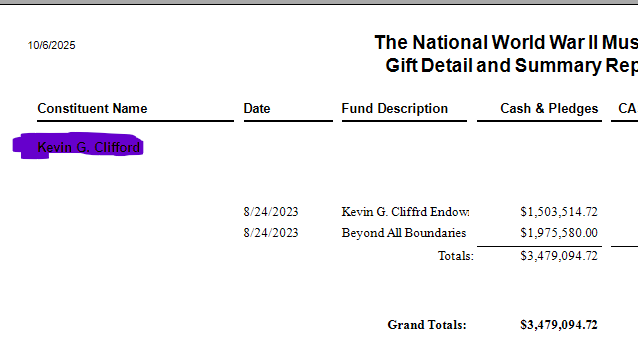
Gift Detail and Summary Reports will split the gifts. Below is a split gift among Funds.
 2
2 -
Thank you, both. i'm at BBCON and we worked on it yesterday, but without much luck using both query and the gift detail summary report.
1 -
So it really isn't a split gift issue, sounds more like the fee coverage issue.
1 -
Yes and no, for me. Gifts are split between two funds: the sport scholarship fund and the credit card fee fund. So in RE they are entered as split gifts whenever donor pays the fee.
0 -
Well, that is strange that the Gift Detail Summary Report doesn't work, because it always splits gifts for me regardless if it is a fund, campaign or appeal split. Strange, since you have it split amount two different funds.
0 -
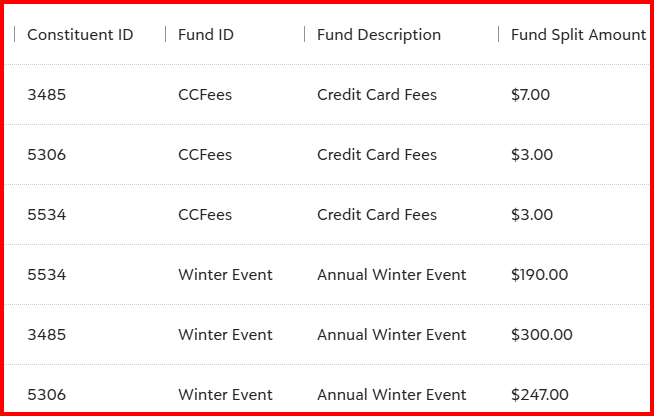
Query should work; I entered 3 split gifts with one of the funds being the fee fund. Sorted by the Fund ID. It will also work if you specify your scholarship fund and the cc fee fund in your criteria. And yes, Joe is correct, you do get the split gift summary by fund in the Gift Detail Summary Report.

 2
2 -
Fund Split Amount is an available output on most queries that can then be modified to report in Excel. I believe you could also build something in Dashboard Report Builder using filters to only split amounts.
1 -
@Faith Murray The gift detail and summary report indicates the true split amount and does not report the full amount to each fund. If the total gift amount is $307, it reports $300 to the gift fund and $7 to the credit card fee fund.
2 -
Thank you to everyone i haven't been able to get the gift detail summary to run but using just a query and splitting as shown in Madeleine's example it did pull for me what I needed. I'm so thankful for this community and all of the suggestions and assistance.
2 -
I agree with @Faith Murray. We stopped using Split Gifts very soon after implementing RE because reporting with them is such a bear. We've even gone back and deleted out old Split Gifts and replaced them with 2 separate gifts to avoid these issues. Not sure what (if any) improvements are being made with NXT on this front, but we have been using Gift Amount to record the gross donation, Receipt Amount to track the actual donation amount, and a Gift Attribute to capture credit card processing fees covered by the donor. This has been working well for us over the years.
2 -
Thank you, Rachel. I like that thought process of just recording the gift separately for tracking.
0 -
Tracking separately is a nice idea. It would not work for us as we are integrated with FE and want the paid fee amount to carry over into that FE account.
0 -
With Query, you just have to be careful what you export as the column for amount.
Due to one-to-many relationship, Gift Amount should never be used if you criteria/output/sort tab has anything relating to split info (campaign, fund, appeal, package). If you do, then you must use the Fund Split Amount field, and summarize by that column.
Use the Gift Detail and Summary report is good too, as it will know to use the split amount column. However, I recommend you use the webview version of this report if you intent to export the data into excel format and potentially do additional formatting on it. As the webview export to excel correctly aligns columns better than dbview's.
5


















Categories
- All Categories
- 6 Blackbaud Community Help
- 211 bbcon®
- 1.4K Blackbaud Altru®
- 403 Blackbaud Award Management™ and Blackbaud Stewardship Management™
- 1.2K Blackbaud CRM™ and Blackbaud Internet Solutions™
- 15 donorCentrics®
- 360 Blackbaud eTapestry®
- 2.6K Blackbaud Financial Edge NXT®
- 659 Blackbaud Grantmaking™
- 579 Blackbaud Education Management Solutions for Higher Education
- 3.2K Blackbaud Education Management Solutions for K-12 Schools
- 943 Blackbaud Luminate Online® and Blackbaud TeamRaiser®
- 84 JustGiving® from Blackbaud®
- 6.7K Blackbaud Raiser's Edge NXT®
- 3.8K SKY Developer
- 250 ResearchPoint™
- 120 Blackbaud Tuition Management™
- 165 Organizational Best Practices
- 241 Member Lounge (Just for Fun)
- 36 Blackbaud Community Challenges
- 37 PowerUp Challenges
- 3 (Open) PowerUp Challenge: Grid View Batch
- 3 (Closed) PowerUp Challenge: Chat for Blackbaud AI
- 3 (Closed) PowerUp Challenge: Data Health
- 3 (Closed) Raiser's Edge NXT PowerUp Challenge: Product Update Briefing
- 3 (Closed) Raiser's Edge NXT PowerUp Challenge: Standard Reports+
- 3 (Closed) Raiser's Edge NXT PowerUp Challenge: Email Marketing
- 3 (Closed) Raiser's Edge NXT PowerUp Challenge: Gift Management
- 4 (Closed) Raiser's Edge NXT PowerUp Challenge: Event Management
- 3 (Closed) Raiser's Edge NXT PowerUp Challenge: Home Page
- 4 (Closed) Raiser's Edge NXT PowerUp Challenge: Standard Reports
- 4 (Closed) Raiser's Edge NXT PowerUp Challenge: Query
- 798 Community News
- 3K Jobs Board
- 56 Blackbaud SKY® Reporting Announcements
- 47 Blackbaud CRM Higher Ed Product Advisory Group (HE PAG)
- 19 Blackbaud CRM Product Advisory Group (BBCRM PAG)