Importing new constituents with Education attribute





I am setting up a large import of new constituents. One of the columns is Education Attribute - and the message below pops up. I don't know the education IDs since these are new people. What's the best way to go about it? Thank you!

Best Answer
-
Import ID is assigned by RE as new records are created, which has a specific naming format that is systematically recognizable by RE, however, using the system generated import id is not required, and depending on your needs, can be manually specified like Joe said.
Especially when you are trying to do ONE BIG import where you are trying to import "everything" in 1-go, you will need to create your own import id that's then within the same process used as identifier to import the "extra" data.
Applying this to your import (with some assumption made), it seems like you are importing new constituent, and education relationship, and education relationship attribute all at once. So in order for the education relationship attribute to be created, you need to identify the education relationship record you are trying to create the attribute on, therefore it is asking for the relationship record's import id, but since it's a new import, the relationship record doesn't exists yet. So that's why assigning a user defined import ID to the education relationship becomes required.
If you don't want do manually assign import id, then you will have to break your import into 2, where you import the constituent first (and create the relationship), and then use query to export the education relationship import id needed to create your 2nd import of the attribute.
1





Answers
-
Since you are entering new records, you need to create the education relationship Import ID, just like you create an import ID for new records, so it would be ERID101525-1, ERID101525-2 and so on and so on.
1 -
@Joe Moretti thank you, I'll try that. I don't usually create an Import IDs for new records, RE automatically creates them - what's the benefit of creating one yourself?
0 -
When you import new records, you do need to have an import ID created. The system will create the Constituent ID, but when you are importing new records, the system needs to be able to identify the record and that is the reason for creating the Import ID, other wise you cannot import the record. I have always done it this way.
1 -
Thank you @Joe Moretti - however that's not the case for us - in our import we never create import IDs (although one can as you say) for new records - the system creates both - new Constituent IDs and import IDs.
1 -
@Lena Payne You are correct many import ids can be created when you import if they are not already there. One option as @Joe Moretti mentioned is to include your own import ids so you can then later import things like education attributes a bit more easily since you already have that education relationship import id.
That being said, if you need to get the edu rel import id I think the easiest way to do this would be to create a query of education relationships that were added or yesterday (assuming you are doing these close together) and you can export the import id you need from the query output.1 -
The import guide is pretty out of date, but imports haven't changed so maybe there was no reason to update it. But this section implies that it is required only if you are updating an existing attribute.
It may have more to do with what type of import you are doing - see the highlighted section.
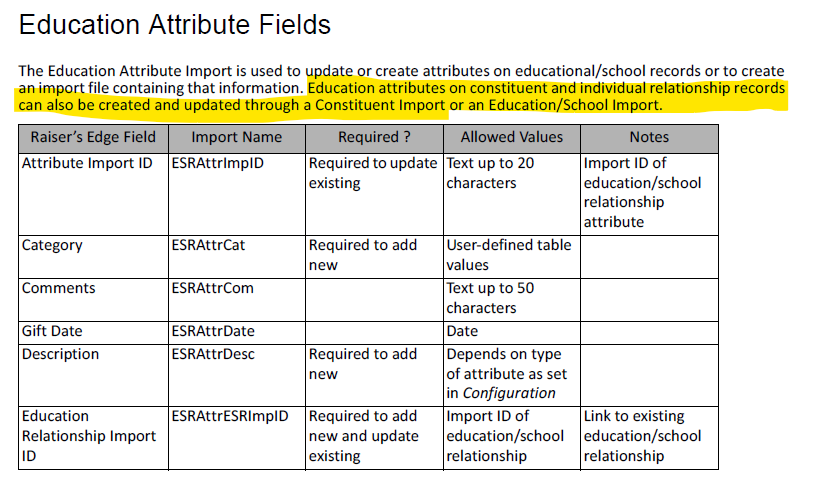
It is no big deal to create an Import ID for the attribute.
1 -
@Alex Wong thank you, you are right - I was trying to do 'everything in one go' as previously we have been splitting the imports like you and others have suggested. I have one more similar import to do and will try to see if it allows me to do it all at once with a bit of tweaking.
0








Categories
- All Categories
- 6 Blackbaud Community Help
- 211 bbcon®
- 1.4K Blackbaud Altru®
- 403 Blackbaud Award Management™ and Blackbaud Stewardship Management™
- 1.2K Blackbaud CRM™ and Blackbaud Internet Solutions™
- 15 donorCentrics®
- 360 Blackbaud eTapestry®
- 2.6K Blackbaud Financial Edge NXT®
- 659 Blackbaud Grantmaking™
- 579 Blackbaud Education Management Solutions for Higher Education
- 3.2K Blackbaud Education Management Solutions for K-12 Schools
- 943 Blackbaud Luminate Online® and Blackbaud TeamRaiser®
- 84 JustGiving® from Blackbaud®
- 6.7K Blackbaud Raiser's Edge NXT®
- 3.8K SKY Developer
- 250 ResearchPoint™
- 120 Blackbaud Tuition Management™
- 165 Organizational Best Practices
- 241 Member Lounge (Just for Fun)
- 36 Blackbaud Community Challenges
- 37 PowerUp Challenges
- 3 (Open) PowerUp Challenge: Grid View Batch
- 3 (Closed) PowerUp Challenge: Chat for Blackbaud AI
- 3 (Closed) PowerUp Challenge: Data Health
- 3 (Closed) Raiser's Edge NXT PowerUp Challenge: Product Update Briefing
- 3 (Closed) Raiser's Edge NXT PowerUp Challenge: Standard Reports+
- 3 (Closed) Raiser's Edge NXT PowerUp Challenge: Email Marketing
- 3 (Closed) Raiser's Edge NXT PowerUp Challenge: Gift Management
- 4 (Closed) Raiser's Edge NXT PowerUp Challenge: Event Management
- 3 (Closed) Raiser's Edge NXT PowerUp Challenge: Home Page
- 4 (Closed) Raiser's Edge NXT PowerUp Challenge: Standard Reports
- 4 (Closed) Raiser's Edge NXT PowerUp Challenge: Query
- 798 Community News
- 3K Jobs Board
- 56 Blackbaud SKY® Reporting Announcements
- 47 Blackbaud CRM Higher Ed Product Advisory Group (HE PAG)
- 19 Blackbaud CRM Product Advisory Group (BBCRM PAG)