Notification of Event Change on Master Calendar using Power Automate





Hello,
It seems Power Automate is more for RENXT than the Education Management side, but is there a way to create a flow that would pull an Event that was modified on the Master Calendar? Talking about this area:

And this is the calendar I'm talking about:

Best Answer
-
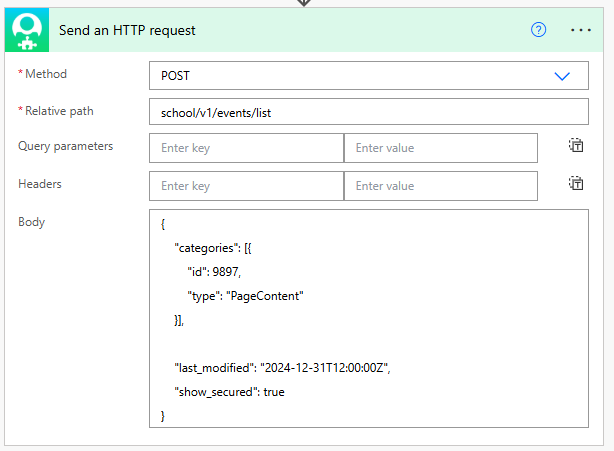
Try this:
 1
1





Answers
-
Hi Tyler,
I'm not sure…this would probably have to be pulled through an http request. Have you checked the SKY API endpoints to see if this is something that can be pulled? Have you set up a SKY account? Here is the link:
1 -
@Tyler Johnson Should be accessible via the Events Endpoint. If you are using the Power Platform, you'll need to use the SKY Add-in connector and the http request action. Here's a video example of using the http request (example is using RENX but the process will be the same for Education)
1 -
@Erik Leaver thanks Erik! I'll check this out and report back if I get stuck.
0 -
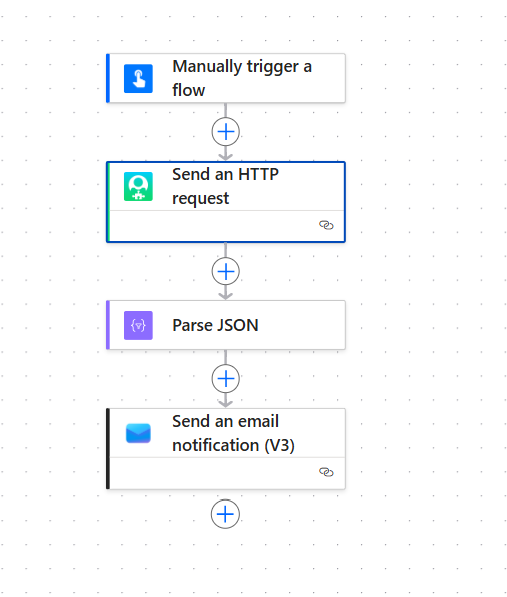
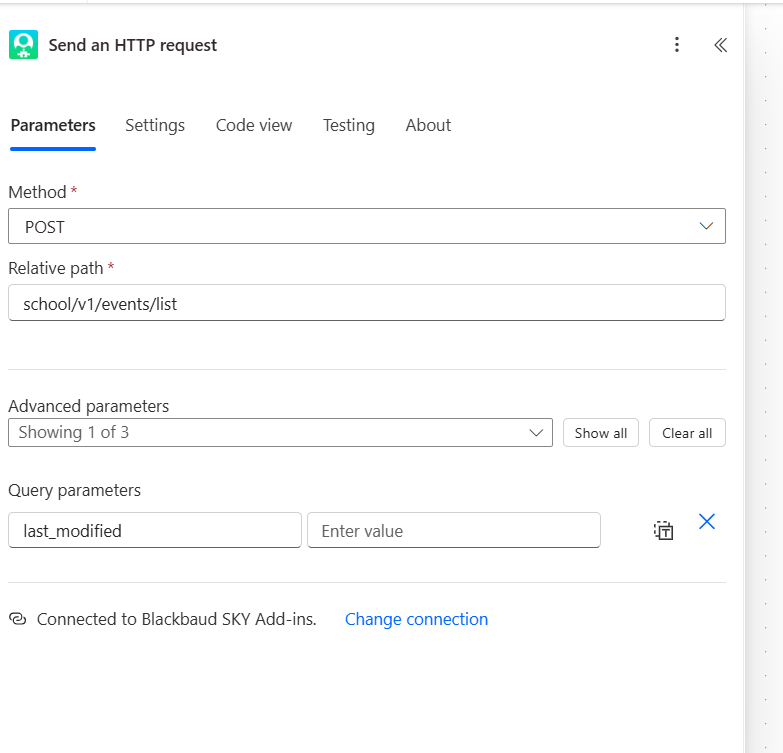
I’ve started a flow and I can’t get it to pull anything…maybe it’s too simple still…Here are the screenshots to show my work.
Also, not sure what to put in the “value” box for the date, as I want the flow to grab a date that has been modified.
 0
0 -
@Tyler Johnson Good start! Looks like you used a "Post" request. Post is used to send data to the database. You want to use Get as you want to get the list from the database.
The Events list documentation also has a required field to include in your parameters - categories: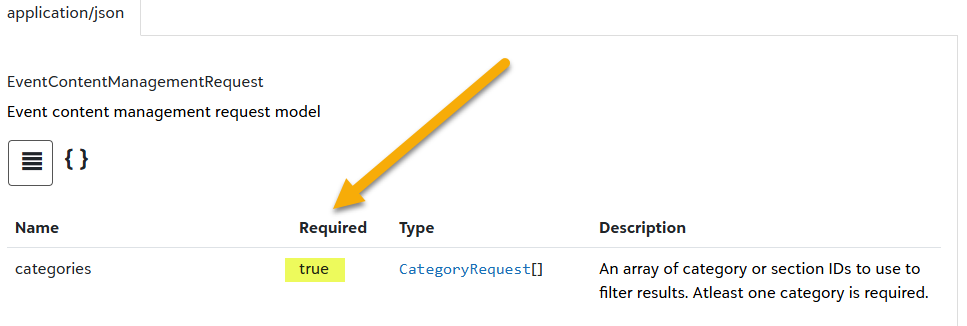
Once you update the method to Get & add in the required category, your flow should produce a list.
I see you have date_modified in your http parameters but without any value — as written now this will return the full list. You'll want to set this for 24 hours to get any changes in the last day. See the video I shared as the example looks for changes in the last 24 hours. I'd add this to your flow after a successful attempt to get the full list of events.0 -
@Erik Leaver Thanks Erik!
I was able to get help from someone else, but much appreciated. My flow is working now, but I can't seem to narrow down the 'Last Modified' parameter so that it only pulls from 2025 to now. It's pulling stuff all the way back from 2015….
I've tried using the date format in the documentation (2022-04-01T12:00:00) and switching it to
2025-04-29T12:00:00
and I've tried this formula that was given to me, but still pulls everything: subtractFromTime(utcNow(),1,’Day’)
Any suggestions?
0 -
@Tyler Johnson can you show the flow (all steps and expressions/actions)? The video example I shared included steps on how to pull data from the last 24 hours & you can easily modify that.
0 -
@Erik Leaver ah, yes, I've watched that video several times. It's helpful in a general sense, but they do not go step by step on everything. For example, the "past time" was already created in their flow.
Here is my set up:
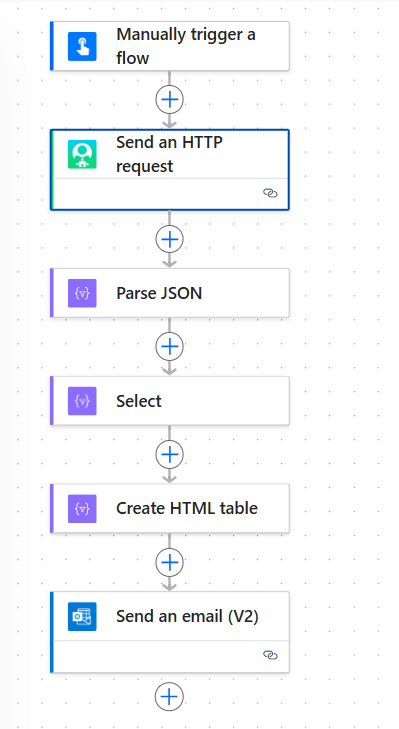 0
0 -
can you show how you are filtering on the dates?
Also, the Power Automate user group meets tomorrow. You could bring this to the meeting for feedback.0 -
Sure thing. I've been playing around with it, but here ya go. Also, I know you said to use "GET" , but the person helping me is from Blackbaud (who I met at BBCON) and said this:
"I was able to check with the Education Management Product Manager and he clarified that the POST Events endpoint should get you what you need. Even though this is listed as a POST endpoint you are actually just creating an Event List, not multiple events. I’ve asked if that can be renamed to help prevent confusion, but regardless, this endpoint has what you need with Last modified. "
ah, I will try and make that meeting…thanks!
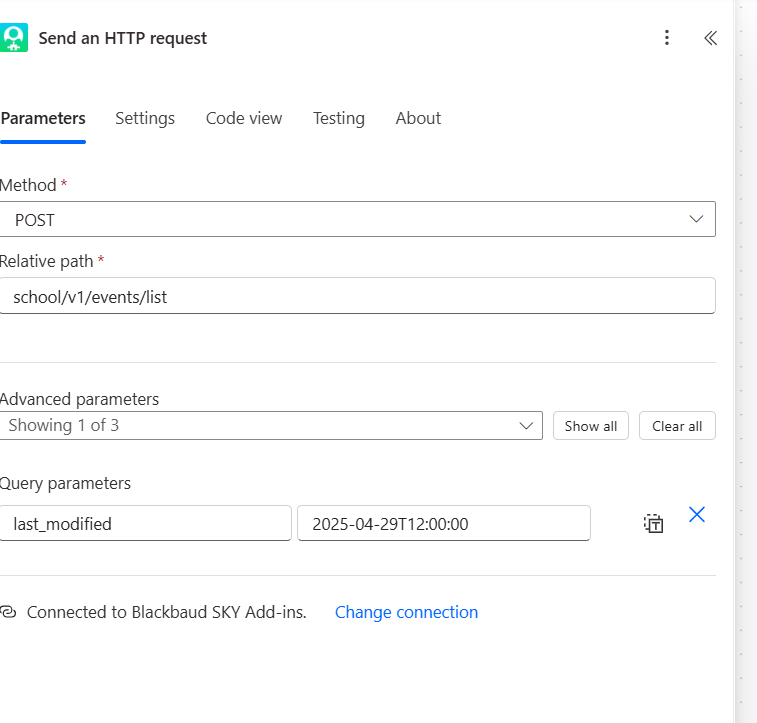 0
0 -
You should tag that person here on the thread so we have one consolidated conversation.
I don't see the required parameter of Categories. Interesting that you are getting a result set without it.
I just succeeded in using the Try it function in the SKY Developer documentation with a Post call & here's the date format that worked:{
"categories": [{
"id": 1,
"type": "Class"
}],"last_modified": "2024-12-31T12:00:00Z","show_secured": false}This tracks with the Microsoft documentation on ISO-8601 date format:
When entered manually, the timestamp is expected to follow the ISO 8601 format ("yyyy-MM-ddTHH:mm:ssZ"). The Z stans for Zulu time, another way of noting UTC (Coordinated Universal Time). This is needed in your query last_modified parameter to indicate the time zone.
try adding the :00Z to get the seconds & the time zone and see if that returns the expected results.
1 -
@Erik Leaver We were emailing each other back and forth and I had made this post on here before the conference, so it is two separate ways to try and find the solution.
ah, got it. ok, I will try that, thanks!
0 -
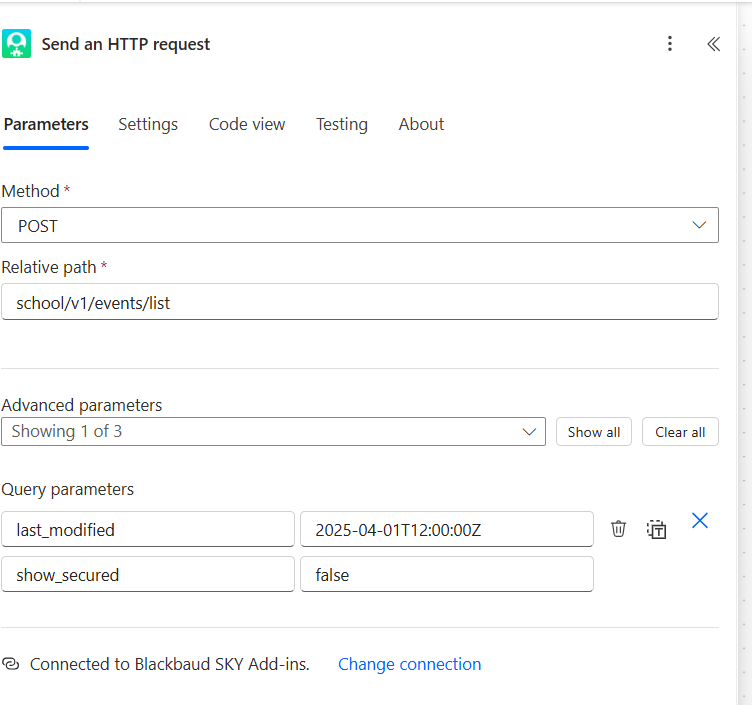
ok, the flow worked and I got the email, but it still has stuff from 2015….
Is there something missing in my JSON code that is not picking up the date? Here is what I have:
{

    "type": "array",

    "items": {

        "type": "object",

        "properties": {

            "featured": {

                "type": "boolean"

            },

            "show_details": {

                "type": "boolean"

            },

            "show_description": {

                "type": "boolean"

            },

            "created_by": {

                "type": "integer"

            },

            "modified_by": {

                "type": "integer"

            },

            "created_date": {

                "type": "string"

            },

            "modified_date": {

                "type": "string"

            },

            "id": {

                "type": "integer"

            },

            "title": {

                "type": "string"

            },

            "start_date": {

                "type": "string"

            },

            "start_time": {

                "type": "string"

            },

            "recurring": {

                "type": "boolean"

            },

            "details": {

                "type": "string"

            },

            "description": {

                "type": "string"

            },

            "location": {

                "type": "object",

                "properties": {

                    "type": {

                        "type": "string"

                    },

                    "name": {

                        "type": "string"

                    }

                }

            },

            "contact": {

                "type": "object",

                "properties": {

                    "name": {

                        "type": "string"

                    },

                    "email": {

                        "type": "string"

                    }

                }

            },

            "registration": {

                "type": "object",

                "properties": {

                    "description": {

                        "type": "string"

                    }

                }

            },

            "categories": {

                "type": "array",

                "items": {

                    "type": "object",

                    "properties": {

                        "id": {

                            "type": "integer"

                        },

                        "name": {

                            "type": "string"

                        },

                        "type": {

                            "type": "string"

                        },

                        "primary": {

                            "type": "boolean"

                        }

                    },

                    "required": [

                        "id",

                        "name",

                        "type",

                        "primary"

                    ]

                }

            }

        },

        "required": [

            "featured",

            "show_details",

            "show_description",

            "created_by",

            "modified_by",

            "created_date",

            "modified_date",

            "id",

            "title",

            "recurring",

            "details",

            "description",

            "location",

            "contact",

            "registration",

            "categories"

        ]

    }
0 -
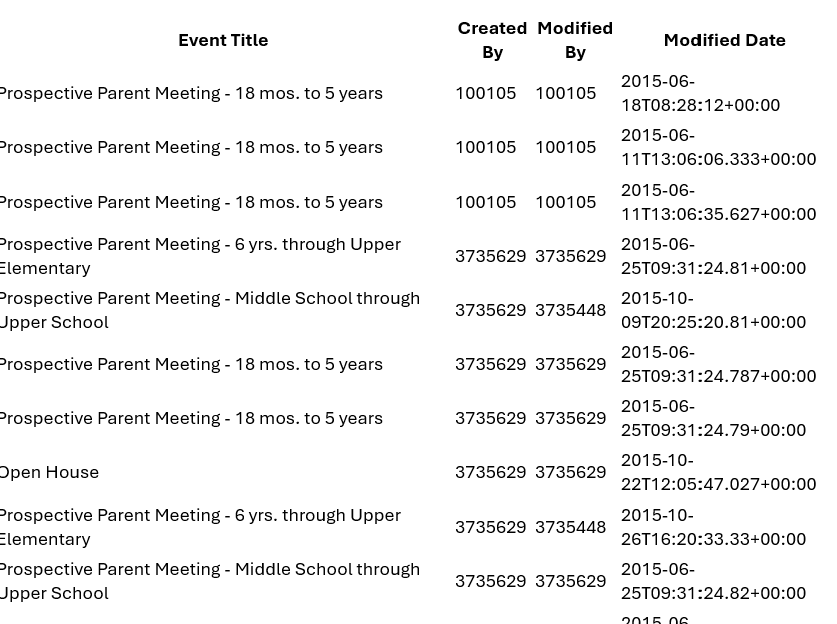
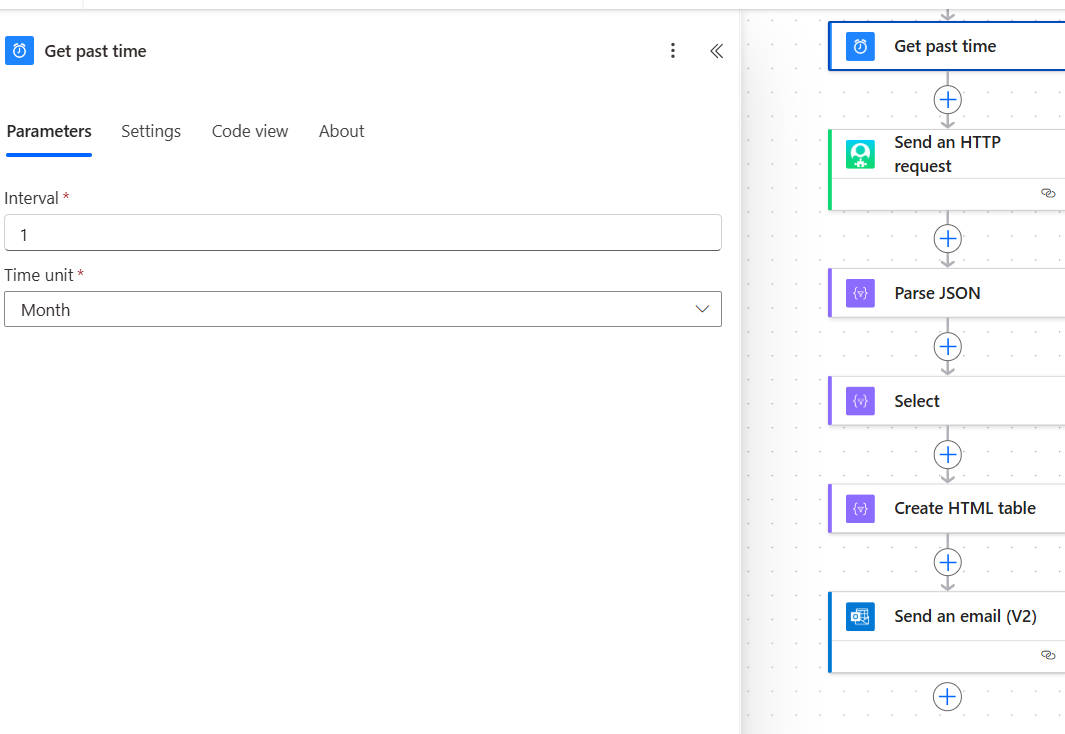
Hey @Erik Leaver I'm getting pretty frustrated. haha. This should be an easy thing to set up, no? I just tried the "Past Time" action (sreenshot below). The flow worked and sent me the email, but is still giving me stuff from 2015 (see screenshot).
Is this due to either A) the JSON code or B) that it is a "POST" instead of "GET", so it can't narrow the search down by the date because it is technically not pulling the data like in a normal "GET" phase?
 0
0 -
I tested your flow & got the same result. I believe it's because you haven't included the required categories. I noted this early in the thread that the API notes categories are required. They are not in your query parameters.
I'm not overly familiar with Categories and was hoping to connect with the person you mentioned you were speaking with to so we could advise you best. But my guesses on who you were talking to haven't uncovered the person.
0 -
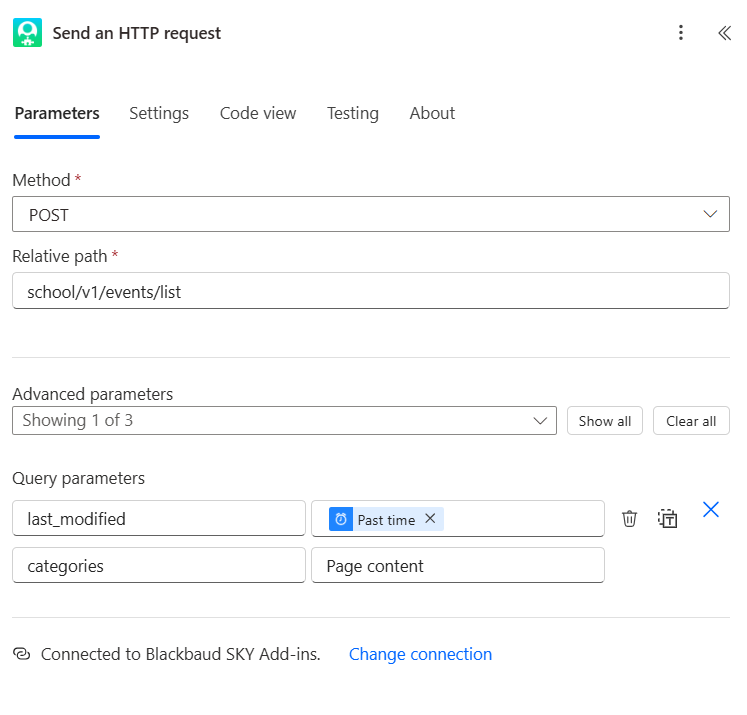
@Erik Leaver ah, I missed that part, sorry about that. OK, I have added in the "Categories" parameter and entered the value "Page Content" as that is what it seems I'm pulling (see code), but it still sends me stuff from 2015. haha. So maybe I did not set up the Categories corretly.
"categories": [
{
"id": 9897,
"name": "Admissions",
"type": "PageContent",
"primary": true
}, 0
0 -
That worked! Thank you so much. So I noticed you have this code in the 'Body' parameter instead of the 'Query' parameter, so maybe that was where I was messing up…
0 -
Categories is an array so works best in the body in json format. Glad this is coming together for you!
1 -
Yeah, I saw that in the notes and was trying to do an array with the value field of the Query area…hahaha. Good to know about this.
0 -
Hey Erik, I'm on to part two of pulling this list. Could you maybe guide me…I know what I want to do and think I'm going in the right direction, but I'm stuck.
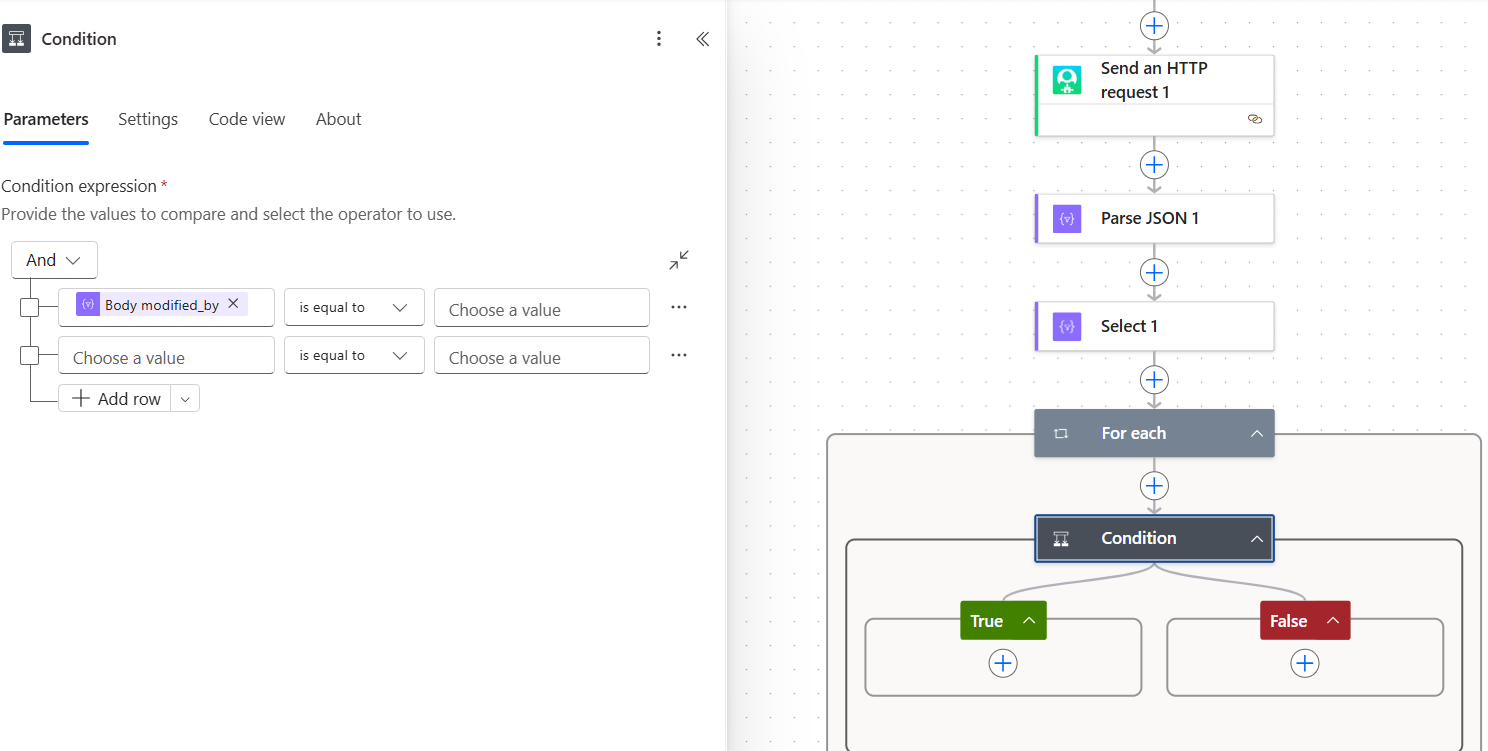
So this list is only pulling the user_id and not name of the person who created/modified the event. So I would like to pull the user_id from the system and then match it with the one in the list to pull the name in the email instead of the user_id.
I know to use GET: school/v1/users/{user_id} but then when I try to pull the user_id field it is not there…only the host_id.
 0
0 -
The Events List should provide you with json for the created by & modified by id:
"created_by": 12345,
"modified_by": 67891,You'll then pass in the modified by ID to the User by ID which should return the name & email.
0 -
@Erik Leaver Yep, I have those two fields in the email.
Yeah, I was trying to do that with the condition in my screenshot - If "modified_by" = "user_id", then pull name….but I don't see the user_id field. Should I be using a different action to pass this info to each other?
0 -
Two things to check:
Is the modified by ID coming in the JSON response from your event request?
How are you treating this value in your Parse JSON?
I'm able to get the modified_by ID with the following JSON schema in the Parse JSON action:{
"type": "array",
"items": {
"type": "object",
"properties": {
"featured": {
"type": "boolean"
},
"show_details": {
"type": "boolean"
},
"show_description": {
"type": "boolean"
},
"created_by": {
"type": "integer"
},
"modified_by": {
"type": "integer"
},
"created_date": {
"type": "string"
},
"modified_date": {
"type": "string"
},
"id": {
"type": "integer"
},
"title": {
"type": "string"
},
"start_date": {
"type": "string"
},
"end_date": {
"type": "string"
},
"start_time": {
"type": "string"
},
"end_time": {
"type": "string"
},
"recurring": {
"type": "boolean"
},
"details": {
"type": "string"
},
"description": {
"type": "string"
},
"location": {
"type": "object",
"properties": {
"type": {
"type": "string"
},
"room_id": {
"type": "integer"
},
"name": {
"type": "string"
}
}
},
"contact": {
"type": "object",
"properties": {
"name": {
"type": "string"
},
"email": {
"type": "string"
}
}
},
"registration": {
"type": "object",
"properties": {
"description": {
"type": "string"
}
}
},
"categories": {
"type": "array",
"items": {
"type": "object",
"properties": {
"id": {
"type": "integer"
},
"name": {
"type": "string"
},
"type": {
"type": "string"
},
"primary": {
"type": "boolean"
}
},
"required": [
"id",
"name",
"type",
"primary"
]
}
}
},
"required": [
"featured",
"show_details",
"show_description",
"created_by",
"modified_by",
"created_date",
"modified_date",
"id",
"title",
"start_date",
"end_date",
"start_time",
"end_time",
"recurring",
"details",
"description",
"location",
"contact",
"registration",
"categories"
]
}
}Note: as per documentation, User by ID requires at least one of the following roles in the Education Management system:
- SKY API Data Sync
- Platform Manager
- Admissions Manager
- Contact Card Manager
I think you'll need one of these roles for your next step to be successful
0 -
@Erik Leaver Yep, I'm a Platform Manager.
Yep, I'm able to pull the "Modified_ID" field in my first HTTP request when pulling for the modified dates, which is the user_ID in Core.
But I need the name, not the ID.
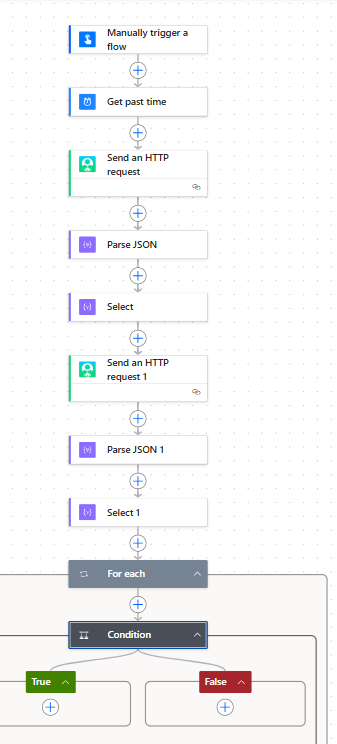
Maybe I'm thinking about this the wrong way. Are you saying after I pull this info I can match the Modified_ID with a name from the fields being pulled and I do not have to use another HTTP request to get the user_ID and name?
Here is my flow right now:
 0
0 -
You'll need a second http request to the User by ID endpoint where you will pass in the modified_ID. You can then parse the json again to get the name, email etc.
0 -
@Erik Leaver ok, I thought I had it set up like that when I first replied to you this morning, but I guess I'm missing something. Here are my screenshots so you can see exactly what I've set up.
Also, I do not see the user_id field in the dropdown in my Condition area….is body_id the user_id?
Also, what do you mean "pass in"? Sorry, I'm pretty good with different programming languages, but new to what to use for pulling info in Power Automate.
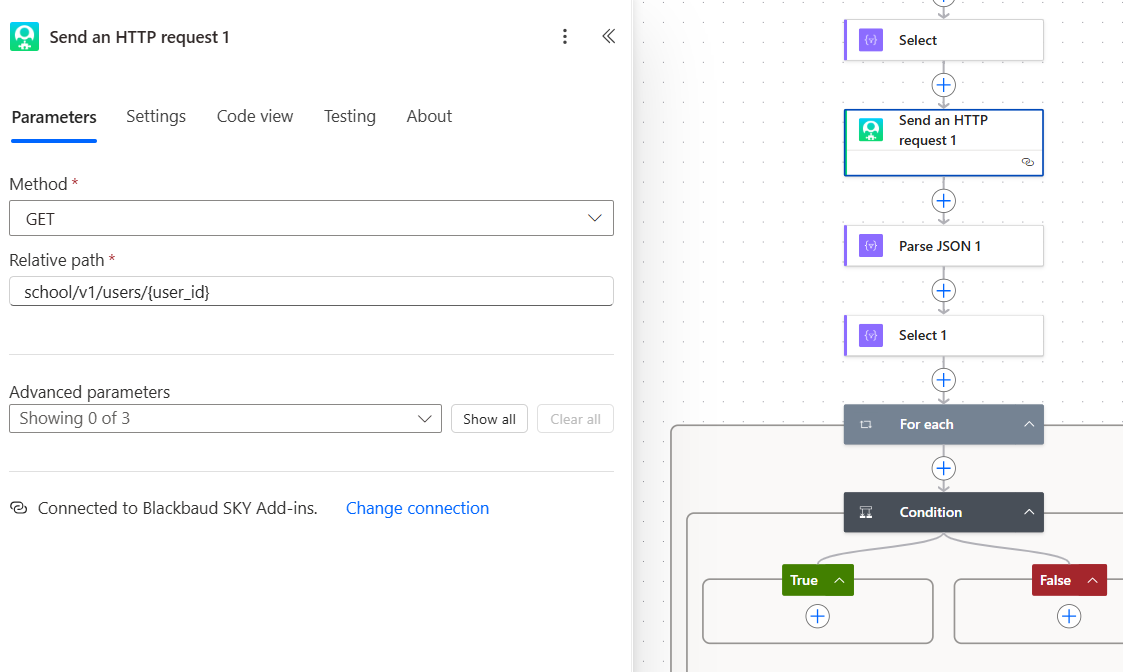
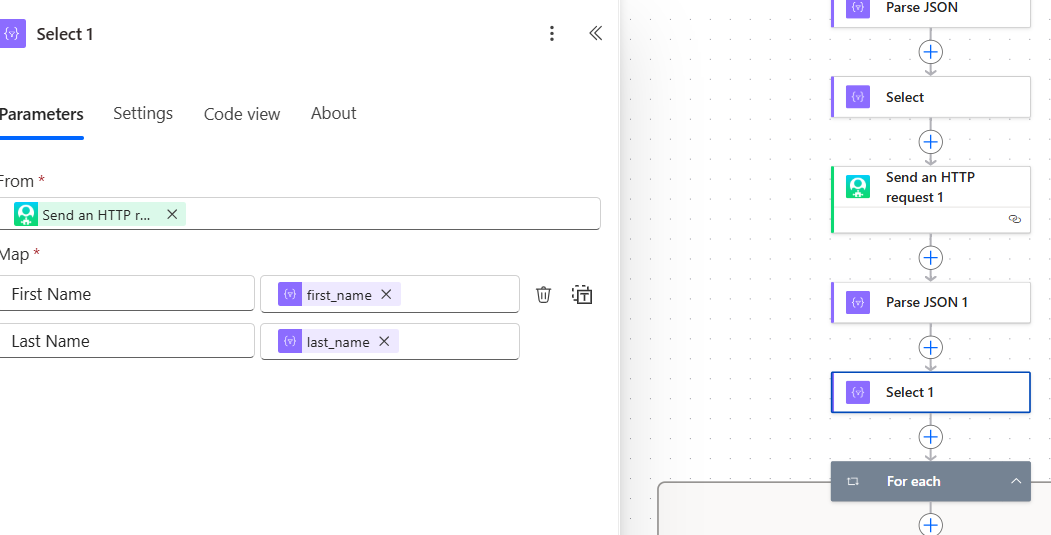
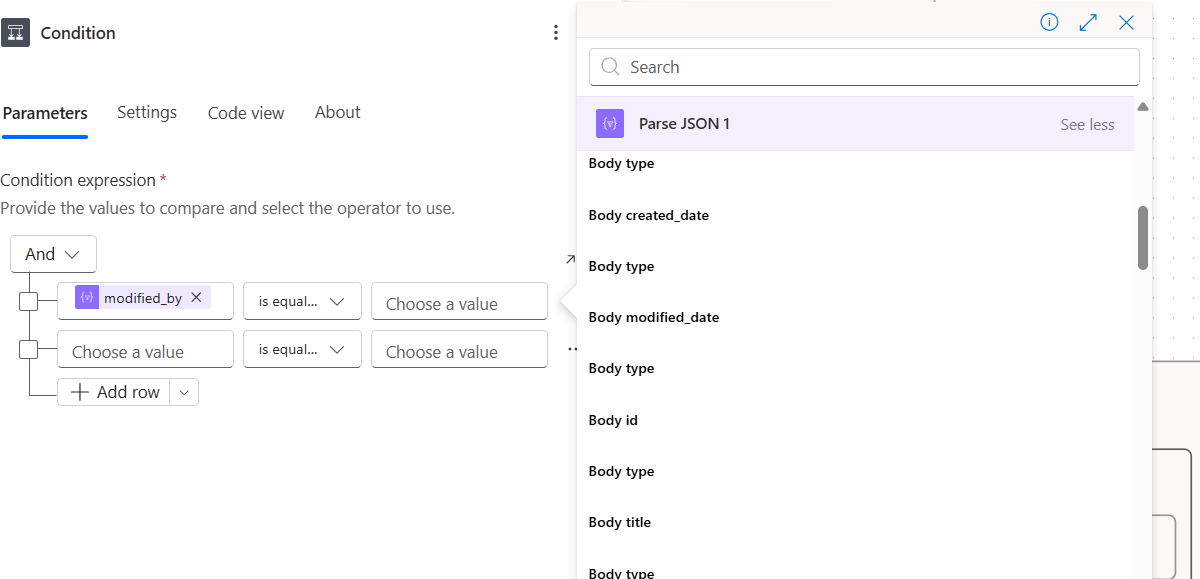 0
0 -
Also, I was getting stuck with an error message on the HTTP request with the code -
school/v1/users/{user_id}
I assumed it was because of the {user_id} part and so I tried to put in an actual number and it passed that part on the next test.
So how do I set this up where it will be generic enough to pull any user_id, not just one I type in…
0 -
@Tyler Johnson Here's what I built - this will return the list of events modified (I set for this year as I'm in a sample environment) and then look up the user information of the person who modified the event.
Data will be in an array and from there you can create a table or send via an email. Screenshots are using the original designer (not New Designer).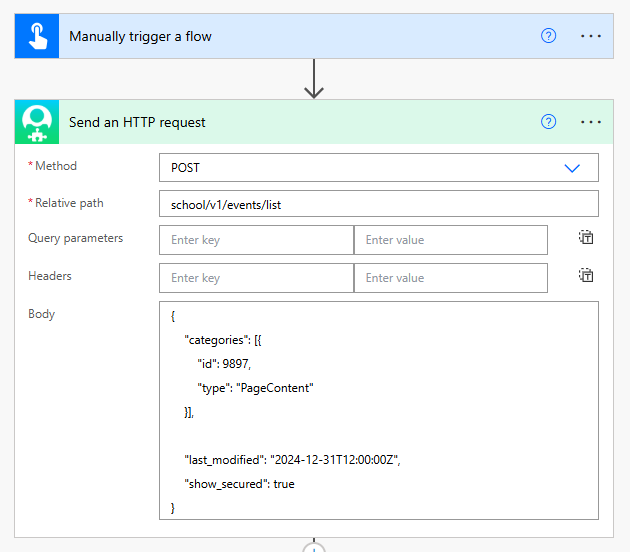
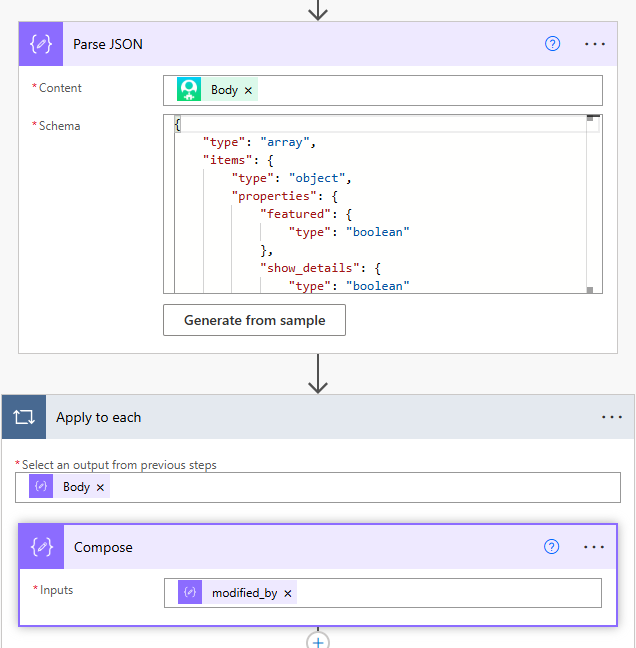
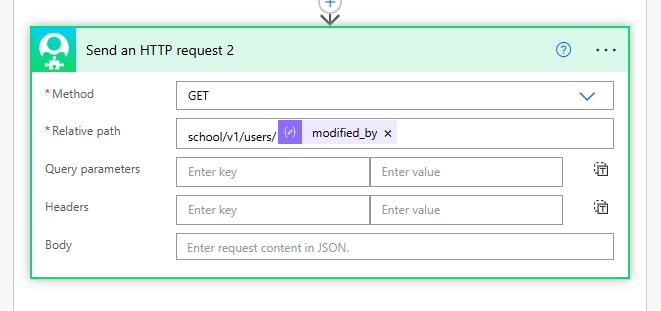 0
0 -
@Erik Leaver Thank you for your help. I was able to follow this, but I'm getting stuck when testing it out. This is the error message:
Unable to process template language expressions in action 'Compose' inputs at line '0' and column '0': 'The template language expression 'body('Parse_JSON')?['items']?['properties']?['modified_by']' cannot be evaluated because property 'items' cannot be selected. Array elements can only be selected using an integer index. Please see https://aka.ms/logicexpressions for usage details.'.
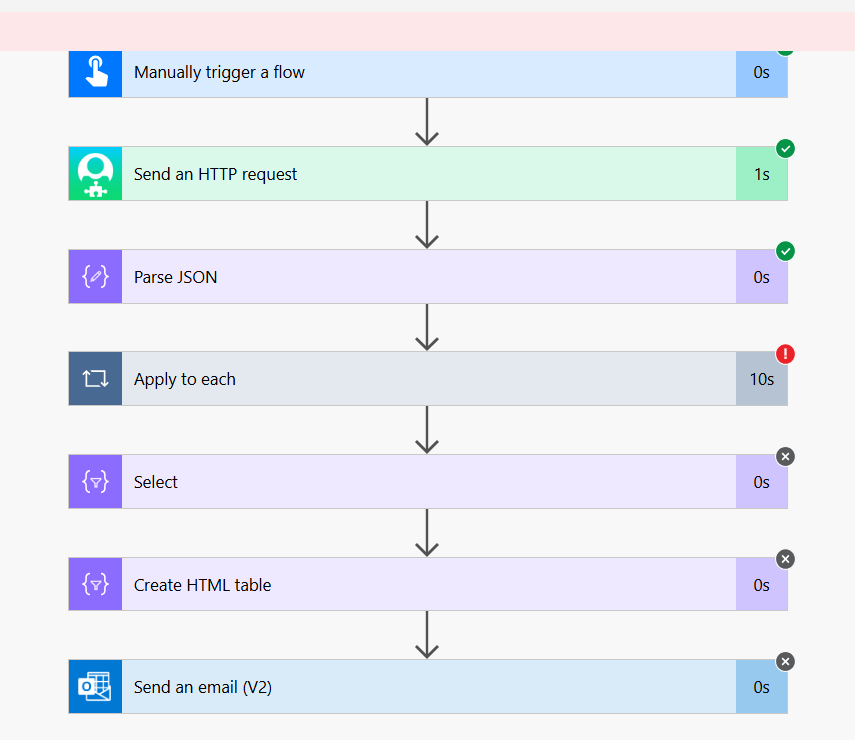 0
0






Categories
- All Categories
- 6 Blackbaud Community Help
- 211 bbcon®
- 1.4K Blackbaud Altru®
- 403 Blackbaud Award Management™ and Blackbaud Stewardship Management™
- 1.2K Blackbaud CRM™ and Blackbaud Internet Solutions™
- 15 donorCentrics®
- 360 Blackbaud eTapestry®
- 2.6K Blackbaud Financial Edge NXT®
- 659 Blackbaud Grantmaking™
- 579 Blackbaud Education Management Solutions for Higher Education
- 3.2K Blackbaud Education Management Solutions for K-12 Schools
- 943 Blackbaud Luminate Online® and Blackbaud TeamRaiser®
- 84 JustGiving® from Blackbaud®
- 6.7K Blackbaud Raiser's Edge NXT®
- 3.8K SKY Developer
- 250 ResearchPoint™
- 120 Blackbaud Tuition Management™
- 165 Organizational Best Practices
- 241 Member Lounge (Just for Fun)
- 36 Blackbaud Community Challenges
- 37 PowerUp Challenges
- 3 (Open) PowerUp Challenge: Grid View Batch
- 3 (Closed) PowerUp Challenge: Chat for Blackbaud AI
- 3 (Closed) PowerUp Challenge: Data Health
- 3 (Closed) Raiser's Edge NXT PowerUp Challenge: Product Update Briefing
- 3 (Closed) Raiser's Edge NXT PowerUp Challenge: Standard Reports+
- 3 (Closed) Raiser's Edge NXT PowerUp Challenge: Email Marketing
- 3 (Closed) Raiser's Edge NXT PowerUp Challenge: Gift Management
- 4 (Closed) Raiser's Edge NXT PowerUp Challenge: Event Management
- 3 (Closed) Raiser's Edge NXT PowerUp Challenge: Home Page
- 4 (Closed) Raiser's Edge NXT PowerUp Challenge: Standard Reports
- 4 (Closed) Raiser's Edge NXT PowerUp Challenge: Query
- 798 Community News
- 3K Jobs Board
- 56 Blackbaud SKY® Reporting Announcements
- 47 Blackbaud CRM Higher Ed Product Advisory Group (HE PAG)
- 19 Blackbaud CRM Product Advisory Group (BBCRM PAG)