Sharing my Import Templates





I had the pleasure of tuning into the Blackbaud Champions data cleanup roundtable yesterday and the subject of imports for cleanup and creating templates from the import guidebook came up. A few people mentioned wanting template examples, and I've built up a few over the years, which I'm sharing here. For all of these, if you are updating existing records, you will need the import ID of the constituent and sometimes the phone number or other piece of information.
Please feel free to ask any questions!
- Address import template - useful for cleanup or importing data from a third party verification service
- Actions import template
- Constituent import template - I used this one for brand new event attendees who were in an external system.
- Hard bounce Email Import - this is a template I use to mass mark emails as hard bounced from an external software (in this case mailchimp). You will have to query the email addresses and export the constituent import ID and the phone ID's for each email address you want to modify.
- Notes import template - Mass adding notes. We use this to track our top 25 vendors for each fiscal year.
- Phone Import - I use this for data cleanup by exporting phones, identifying duplicates, then using the constituent and phone ID's to change the phone types of the dupes to DELETE, which I can globally delete via a plugin. Especially useful after a phonefinder run.
Constituent Import Template - Individuals.csv
Hard Bounce Email Import Template.csv
Comments
-
@Sarah Krenicki, Hi there. I'm trying to import new constituents but can't locate the numerical ID values in our Dataview. How do I find what the PrimAddID and PrimSalID, along with any others I need, in my system?
0 -
@Annie Daum Go to Config > Addressees/Salutations right click in the window showing the formats. You can Export, Preview or Print. Try Preview Addressee / Salutation Report and it will show you the formats and their # code.
0 -
@Annie Daum
VERY good question! In DB view under addressees/salutations, right click the first option and select either preview or print the addressee/salutations report. The corresponding numbers should be listed on that. (I did not know that for several years and manually counted them at one point. ?)0 -
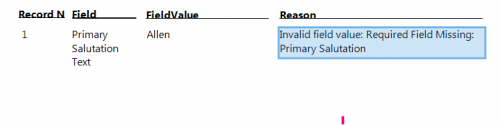
@Sarah Krenicki Thank you! Now I keep getting an Exceptions for Primary Salutation Text. I can't figure out how to fix the issue. I don't know why it's saying Invalid field value. Do you have any troubleshooting advice? I don't understand why importing is being so problematic for me.
 0
0 -
@Annie Daum I would first make sure the fields are mapped properly in the import, and then I would check that the config you have for salutation has data in all the fields (ex: if you use “Mr Jones” but there is no title on the record, or if the primary sal is “nickname” but that field is blank).
0 -
@Annie Daum
importing is going to have different problem based on your org's RE configuration regarding what are the valid values and what is required.For addressee/salutation, there are 3 fields for each and depending on what you are trying to do.
Primary Addressee Editable
Primary Addressee ID Number
Primary Addressee TextPrimary Salutation Editable
Primary Salutation ID Number
Primary Salutation Textso if you want to use pre-configured format, then follow instruction already given to you and you only need to have column for Primary Addressee ID Number.
however, if you want to use editable addressee (meaning free text “anything goes” addressee that's not based on a format, then you need ALL 3: Primary Addressee Editable, Primary Addressee ID Number, and Primary Addressee Text.
Primary Addressee Editable = Yes
Primary Addressee ID Number = any valid format id
Primary Addressee Text = “addressee you want to give to donor”0 -
Thank you so much for sharing your templates — so helpful. I am trying to import actions into existing records. On your sample file — where do I find the ImportID? Also, how to I add the Solicitor's name who was responsible for the action? You have been a big help in providing the templates!
0 -
When using the native import, you cannot import the Solicitor along with the action. You need to create the action first and then import the solicitor to it. So best to make sure the import creates an output query so that you can easily grab the action import Ids. Then the import of the solicitor will be an Import/Action/Constituent Action Solicitor. Import New records. And the fields would be
Action Import ID = ACIMpID
Solicitor Import ID = ACSolImpID
(the solicitor import ID is the import ID of the solicitor's constituent record).
You can import multiple solicitors to the same action with this import.
0














Categories
- All Categories
- 6 Blackbaud Community Help
- 211 bbcon®
- 1.4K Blackbaud Altru®
- 403 Blackbaud Award Management™ and Blackbaud Stewardship Management™
- 1.1K Blackbaud CRM™ and Blackbaud Internet Solutions™
- 15 donorCentrics®
- 360 Blackbaud eTapestry®
- 2.6K Blackbaud Financial Edge NXT®
- 657 Blackbaud Grantmaking™
- 578 Blackbaud Education Management Solutions for Higher Education
- 3.2K Blackbaud Education Management Solutions for K-12 Schools
- 943 Blackbaud Luminate Online® and Blackbaud TeamRaiser®
- 84 JustGiving® from Blackbaud®
- 6.7K Blackbaud Raiser's Edge NXT®
- 3.8K SKY Developer
- 250 ResearchPoint™
- 120 Blackbaud Tuition Management™
- 165 Organizational Best Practices
- 240 Member Lounge (Just for Fun)
- 34 Blackbaud Community Challenges
- 37 PowerUp Challenges
- 3 (Open) PowerUp Challenge: Grid View Batch
- 3 (Closed) PowerUp Challenge: Chat for Blackbaud AI
- 3 (Closed) PowerUp Challenge: Data Health
- 3 (Closed) Raiser's Edge NXT PowerUp Challenge: Product Update Briefing
- 3 (Closed) Raiser's Edge NXT PowerUp Challenge: Standard Reports+
- 3 (Closed) Raiser's Edge NXT PowerUp Challenge: Email Marketing
- 3 (Closed) Raiser's Edge NXT PowerUp Challenge: Gift Management
- 4 (Closed) Raiser's Edge NXT PowerUp Challenge: Event Management
- 3 (Closed) Raiser's Edge NXT PowerUp Challenge: Home Page
- 4 (Closed) Raiser's Edge NXT PowerUp Challenge: Standard Reports
- 4 (Closed) Raiser's Edge NXT PowerUp Challenge: Query
- 798 Community News
- 3K Jobs Board
- 54 Blackbaud SKY® Reporting Announcements
- 47 Blackbaud CRM Higher Ed Product Advisory Group (HE PAG)
- 19 Blackbaud CRM Product Advisory Group (BBCRM PAG)