Handling Query Parameter with MS Update





Per conversation in today's Power Automate User Group:
Issue: Query Parameter is gone from trigger output for use in flow
Acknowledge: true, it is not easily accessible, but still available
Solution:

Compose External URL: triggerOutputs()?['headers']?['x-ms-igw-external-uri']
Select Query Parameter:
From: split(last(split(first(split(outputs('Compose_External_URL'), ', ')), '?')), '&')
Map (property): first(split(item(), '='))
Map (value): last(split(item(), '='))
Filter Array for testapi Query Parameter:
From: Output from Select Query Parameter
Condition (left): item()?['property']
Condition (right): testapi (the query parameter field/property name
Compose
first(body('Filter_Array_for_testapi_Query_Parameter'))?['value']
Result Run with testapi and testapi2 passed in

Answers
-
In checking the MS Power Automate Community, it looks like this is a bug and "This will be fixed by early October". It seems this may be impacting multiple products and not just Power Automate. https://community.powerplatform.com/forums/thread/details/?threadid=1d50dc3d-c289-f011-b4cb-000d3a1a2a23
1 -
Good to know @Glen Hutson! I was also working on solution that Alex gave above. It does return the Record Type if I filter by that one item. The issue I found with it is it doesn't return SystemRecordID. I considered putting the fields that are needed into the JSON schema like we do with Adaptive Cards. I'm wondering if this would work for Fund Type though because it's not a regular Https response field.
{
"type": "object",
"properties": {
"uit": {
"type": "string"
},
"context": {
"type": "object",
"properties": {
"recordId": {
"type": "string"
}
}
}0 -
Are you using AIO that Glen worked on prior to Adaptive Card's became available?
0 -
I am using the AIO but it produces a tile either on the Fund or on the Constituent depending on what record type it sends back.
The flow is here from March 2023
0 -
Carol, given your knowledge with Power Automate now, I think you will have better result rebuilding this using Adaptive Card, you can copy a lot of the logic (actions) and no need to redo everything.
1 -
The MS Bug (5532852) has been updated to show that this has been fixed. A quick check looks like this is the case. Will do a bit more testing if time available prior to tomorrow's Power Automate User Group.
0 -
Update: I've tested this specifically with the Constituent/Fund Relationship Tiles ( @Carol Grant ) and have confirmed that it works. I'd recommend not spending time in trying to recreate that using Adaptive Cards. Though Adaptive Cards are great in a large % of scenarios, there are a few that don't quite work out, and this is one of them.
1 -
@Glen Hutson - Hi Glen, thanks for testing it out! I welcomed the challenge of trying to re-create it using Adaptive Cards but I did hit a roadblock.
0 -
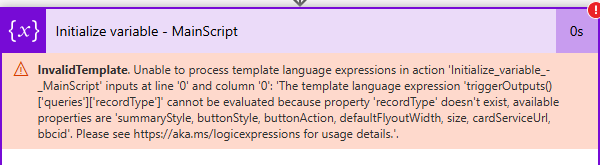
@Glen Hutson - it's still giving me an error, saying this is NULL. It's not finding record type.
if(contains(triggerOutputs()?['queries']?['recordType'],'fund'),'Constituent','Fund')
Here is what is being returned from the queries section when I get something:
, "queries": { "summaryStyle": "None",
"buttonStyle": "None",
"buttonAction": "Flyout",
"defaultFlyoutWidth": "500",
"size": "medium",
"cardServiceUrl": "…..6JvE",
"bbcid": "sp
Any ideas? Do you see record type in your queries output? I have it in the application as &recordtype=fund after the encoded URL.
Thanks,
Carol
0 -
Hey @Carol Grant, want to double check and make sure you've got it set as "recordType=fund". URL query parameters are case sensitive. [Edit] After rereading your question, is this related to trying to make this an Adaptive Card flow?
0 -
@Glen Hutson Here's what I have in the application under the Add-In. I removed alot of the encoded URL. I put the quotes at the front so it wouldn't turn it into a link.
"https://app.blackbaud.com/addin-adaptivecard-host/tile?cardServiceUrl=https%3A%2F%2Fdefaulta1bb0a191576421dbe93b3a7d4b6dc.aa.environment.api.powerplatform.com.....NA1D4TsbJiA6JvE&recordType=fund"
Still erroring out at the Main Script, I had removed it from the Tile Name to see what would happen.
 0
0 -
@Carol Grant , I see. It looks like you're starting with the orignal "All In One" version and trying to modify that to become an Adaptive Card. When moving from one approach to the other, you basically have to start from a new flow. The two approaches aren't really compatible. The "MainScript", as an exmaple, contains a number of mechanics that are already handled by the Adaptive Card feature. It also introduces JavaScript that is used through the rest of the flow that isn't compatible with Adaptive Cards. There are a number of other elements that would have to be removed and reworked for the AC version. If you can get it to work via the orignal method, I'd recommend sticking with that.
0 -
@Glen Hutson OH, I'm calling it wrong in the application! OY, thanks for pointing that out. All I need to do is paste the URL into the Add-In (no encoding? ) and put the & after. Maybe I'll start fresh and download your original. Thanks for pointing that out.
0 -
IT WORKS— Thanks @Glen Hutson
0 -
@Carol Grant , glad you got it to work!
0






Categories
- All Categories
- 6 Blackbaud Community Help
- 211 bbcon®
- 1.4K Blackbaud Altru®
- 403 Blackbaud Award Management™ and Blackbaud Stewardship Management™
- 1.2K Blackbaud CRM™ and Blackbaud Internet Solutions™
- 15 donorCentrics®
- 360 Blackbaud eTapestry®
- 2.6K Blackbaud Financial Edge NXT®
- 659 Blackbaud Grantmaking™
- 579 Blackbaud Education Management Solutions for Higher Education
- 3.2K Blackbaud Education Management Solutions for K-12 Schools
- 943 Blackbaud Luminate Online® and Blackbaud TeamRaiser®
- 84 JustGiving® from Blackbaud®
- 6.7K Blackbaud Raiser's Edge NXT®
- 3.8K SKY Developer
- 250 ResearchPoint™
- 120 Blackbaud Tuition Management™
- 165 Organizational Best Practices
- 241 Member Lounge (Just for Fun)
- 36 Blackbaud Community Challenges
- 37 PowerUp Challenges
- 3 (Open) PowerUp Challenge: Grid View Batch
- 3 (Closed) PowerUp Challenge: Chat for Blackbaud AI
- 3 (Closed) PowerUp Challenge: Data Health
- 3 (Closed) Raiser's Edge NXT PowerUp Challenge: Product Update Briefing
- 3 (Closed) Raiser's Edge NXT PowerUp Challenge: Standard Reports+
- 3 (Closed) Raiser's Edge NXT PowerUp Challenge: Email Marketing
- 3 (Closed) Raiser's Edge NXT PowerUp Challenge: Gift Management
- 4 (Closed) Raiser's Edge NXT PowerUp Challenge: Event Management
- 3 (Closed) Raiser's Edge NXT PowerUp Challenge: Home Page
- 4 (Closed) Raiser's Edge NXT PowerUp Challenge: Standard Reports
- 4 (Closed) Raiser's Edge NXT PowerUp Challenge: Query
- 798 Community News
- 3K Jobs Board
- 56 Blackbaud SKY® Reporting Announcements
- 47 Blackbaud CRM Higher Ed Product Advisory Group (HE PAG)
- 19 Blackbaud CRM Product Advisory Group (BBCRM PAG)