Notification of Event Change on Master Calendar using Power Automate
Answers
-
@Tyler Johnson Looks like your parse json has a problem.
Here's what my step looks like: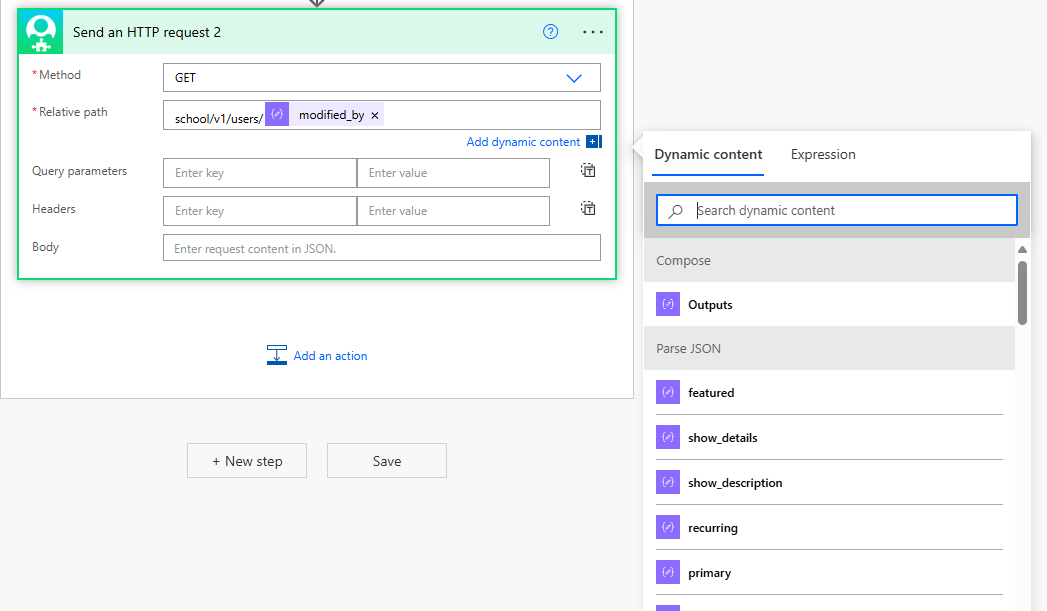
Your screenshot has a ton of parse json. My example just needs one.
0 -
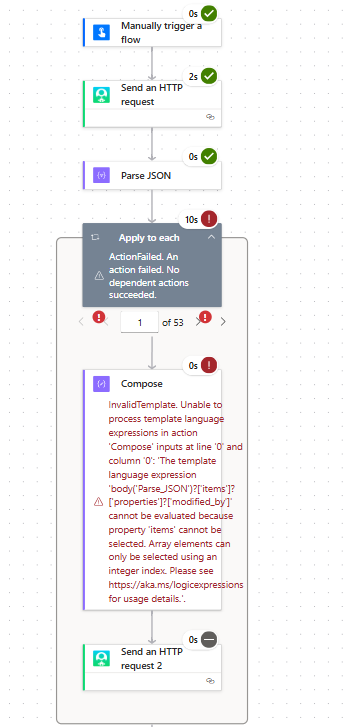
@Erik Leaver It seems the Parse JSON passes the test, but it gets stuck on the "Apply Each" - Compose part:
Action 'Compose' failed: Unable to process template language expressions in action 'Compose' inputs at line '0' and column '0': 'The template language expression 'body('Parse_JSON')?['items']?['properties']?['modified_by']' cannot be evaluated because property 'items' cannot be selected. Array elements can only be selected using an integer index. Please see https://aka.ms/logicexpressions for usage details.'.
 0
0 -
This is my Parse JSON code:
{

    "type": "array",

    "items": {

        "type": "object",

        "properties": {

            "featured": {

                "type": "boolean"

            },

            "show_details": {

                "type": "boolean"

            },

            "show_description": {

                "type": "boolean"

            },

            "created_by": {

                "type": "integer"

            },

            "modified_by": {

                "type": "integer"

            },

            "created_date": {

                "type": "string"

            },

            "modified_date": {

                "type": "string"

            },

            "id": {

                "type": "integer"

            },

            "title": {

                "type": "string"

            },

            "start_date": {

                "type": "string"

            },

            "start_time": {

                "type": "string"

            },

            "recurring": {

                "type": "boolean"

            },

            "details": {

                "type": "string"

            },

            "description": {

                "type": "string"

            },

            "location": {

                "type": "object",

                "properties": {

                    "type": {

                        "type": "string"

                    },

                    "name": {

                        "type": "string"

                    }

                }

            },

            "contact": {

                "type": "object",

                "properties": {

                    "name": {

                        "type": "string"

                    },

                    "email": {

                        "type": "string"

                    }

                }

            },

            "registration": {

                "type": "object",

                "properties": {

                    "description": {

                        "type": "string"

                    }

                }

            },

            "categories": {

                "type": "array",

                "items": {

                    "type": "object",

                    "properties": {

                        "id": {

                            "type": "integer"

                        },

                        "name": {

                            "type": "string"

                        },

                        "type": {

                            "type": "string"

                        },

                        "primary": {

                            "type": "boolean"

                        }

                    },

                    "required": [

                        "id",

                        "name",

                        "type",

                        "primary"

                    ]

                }

            }

        },

        "required": [

            "featured",

            "show_details",

            "show_description",

            "created_by",

            "modified_by",

            "created_date",

            "modified_date",

            "id",

            "title",

            "recurring",

            "details",

            "description",

            "location",

            "contact",

            "registration",

            "categories"

        ]

    }

}
0 -
The Parse json looks ok. But if you don't have "modified_by" available for your compose input, something is wrong (either with the compose, the parse json or with your first send an http request).
I've attached my test flow which might help with your troubleshooting.
If you still are having trouble, I'd suggest coming to the next Power Automate user group so you can share your flow live for further troubleshooting.
1 -
@Erik Leaver Thanks Erik. I'll look at your test flow and see where I went wrong. I tried to make this month's meeting, but missed it due to work.
1 -
@Erik Leaver Hey Erik, I looked at your test flow and mine was set up exactly like yours, but I guess there was something off though.
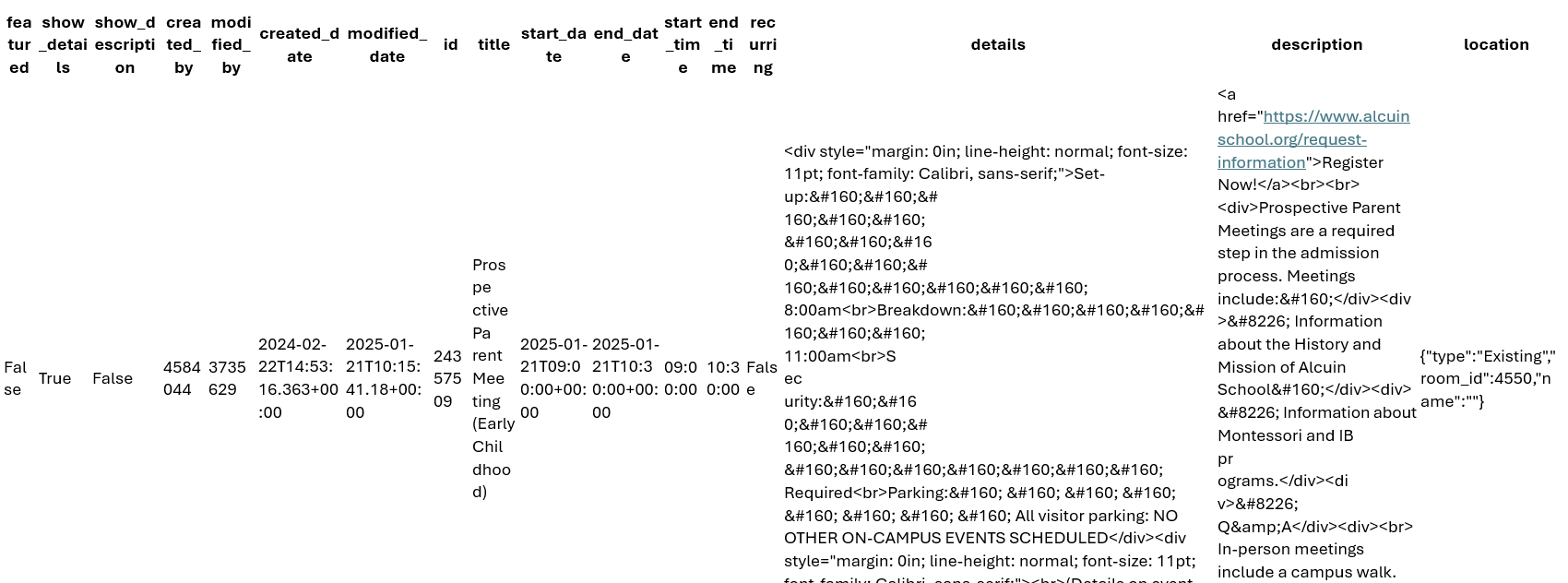
However, I wanted to see what it would pull before I formated the text and it seems to pull everything, but the Modified_by is till in number format and not name format.
You were helpful at the beginning, which allowed me to figure out how to pull that to begin with, but now I need the name, so it seems I'm still stuck on what I need…
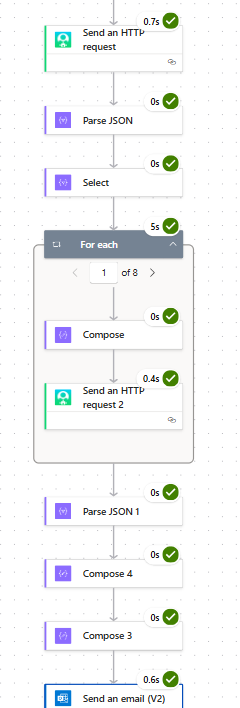
Screenshot to show you:
 0
0 -
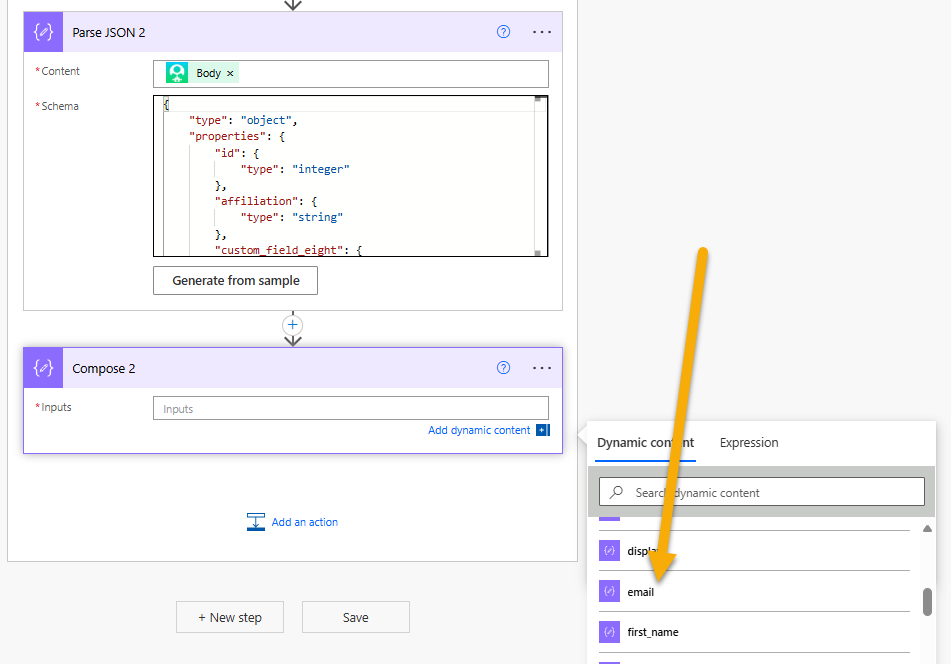
In my flow, the Send an HTTP request 2 gets the user id and the body includes the email, first & last name. You'll need to parse that json next (use the "generate from sample" button and copy & paste in the default json from https://developer.sky.blackbaud.com/api#api=school&operation=V1UsersByUser_idGet) the so you can get that data to use for your next action.
 0
0 -
Hey Erik,
I've been playing around with this and now my flow works and pulls the first part (the event details) and the second part (the name), but I still do not understand how to connect them so it shows which events were modified and the name of who modified it in one email.
Here is the information that was emailed to me and my flow:
[{"Title":"Staff AppreciationLunch","CreatedBy:":"2025-04-30T10:24:38.73+00:00","ModifiedBy:":3754334,"ModifiedDate:":"2025-09-08T10:49:43.65+00:00"},{"Title":"StudentCouncil Car Wash","CreatedBy:":"2025-04-29T15:21:22.373+00:00","ModifiedBy:":8118576,"ModifiedDate:":"2025-09-08T11:58:12.353+00:00"},{"Title":"SpeakerSeries","CreatedBy:":"2025-08-29T10:37:34.207+00:00","ModifiedBy:":8118576,"ModifiedDate:":"2025-09-08T12:01:51.503+00:00"},{"Title":"LearnHow We Learn","Created By:":"2025-04-10T10:32:21.367+00:00","ModifiedBy:":8118576,"ModifiedDate:":"2025-09-09T18:23:56.883+00:00"},{"Title":"SpiritWeek","CreatedBy:":"2025-09-25T17:35:20.5+00:00","Modified By:":8118576,"ModifiedDate:":"2025-09-25T17:35:20.5+00:00"},{"Title":"FallFestival","CreatedBy:":"2025-03-11T14:18:59.777+00:00","ModifiedBy:":3735629,"Modified Date:":"2025-10-20T15:29:56.23+00:00"},{"Title":"Trunkor Treat","CreatedBy:":"2025-04-29T15:29:29.093+00:00","ModifiedBy:":8118576,"Modified Date:":"2025-09-26T10:41:58.757+00:00"},{"Title":"SpeakerSeries","CreatedBy:":"2025-05-21T11:08:35.553+00:00","ModifiedBy:":3735629,"ModifiedDate:":"2025-10-28T15:25:53.767+00:00"}][{"id":3754334,"affiliation":"","custom_field_eight":"","custom_field_five":"","custom_field_four":"","custom_field_nine":"","custom_field_one":"","custom_field_seven":"","custom_field_six":"","custom_field_ten":"","custom_field_three":"","custom_field_two":"","deceased":false,"display":"Haigood,Jana","email":"
 0
0 -
you will need to add the property to your first json array.
- Apply to each item in first array
- filter array 2nd array, filter by id = first array's ModifiedBy value
- use
addProperty()expression to add the first() matched on the filter array action
0 - Apply to each item in first array
-
@Alex Wong Thank you for helping out Alex!
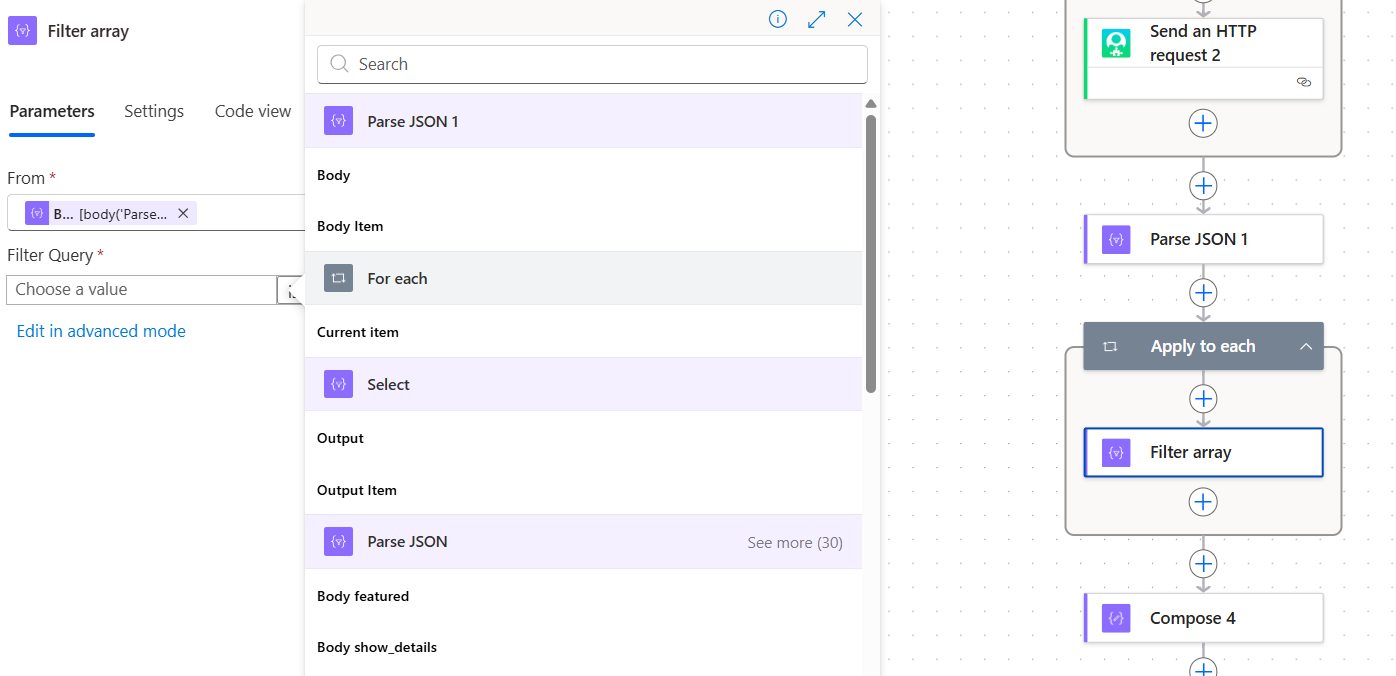
Still a little lost though on the set up…logically if I have this right, you are suggesting to filter information from the 2nd array and pair it with information from the first array? If correct, I'm not sure where in the flow to add this because I'm having a hard time getting my 2nd JSON to list the fields in the dropdown….only shows for the first one.
And not sure what you meant by "add the first() matched on the filter array action".
 0
0 -
Create an Array variable to store new object of event after adding modified by name property
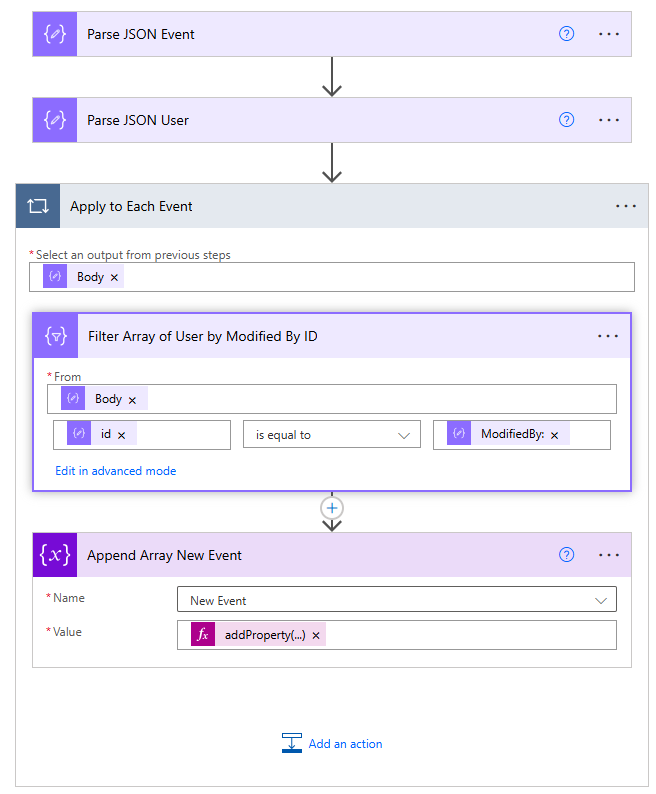
Apply to Each Event
Select an output from previous steps =body('Parse_JSON_Event')Filter Array of User by Modified By ID
From =body('Parse_JSON_User')item()?['id']is equal toitems('Apply_to_Each_Event')?['ModifiedBy:']Append Array New Event
addProperty(item(), 'modifiedbyname', first(body('Filter_Array_of_User_by_Modified_By_ID'))?['display'])0 -
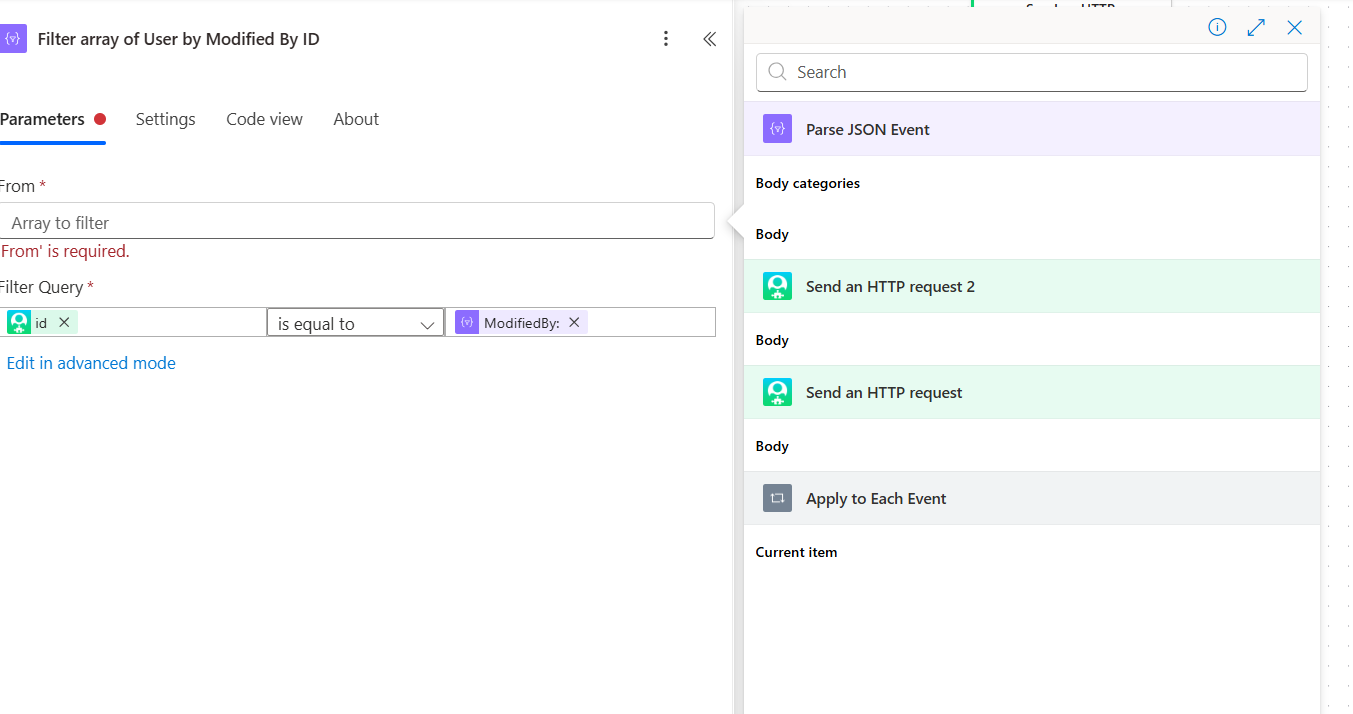
Hey @Alex Wong I'm finally able to look at this again. Thank you for your notes. I'm getting stuck on the Filter Array though, as it seems the body('Parse_JSON_User') does not show up for me, just the JSON Event one…which means something is not organized correctly in my flow, right?
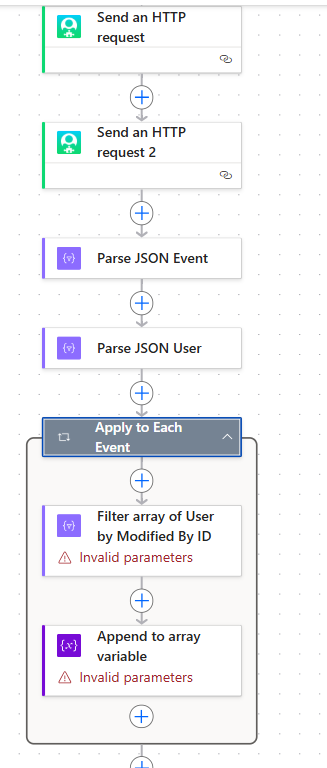 0
0 -
not sure if this is a new designer issue or not, try on the old designer and see.
0

















Categories
- All Categories
- 6 Blackbaud Community Help
- 211 bbcon®
- 1.4K Blackbaud Altru®
- 403 Blackbaud Award Management™ and Blackbaud Stewardship Management™
- 1.2K Blackbaud CRM™ and Blackbaud Internet Solutions™
- 15 donorCentrics®
- 360 Blackbaud eTapestry®
- 2.6K Blackbaud Financial Edge NXT®
- 659 Blackbaud Grantmaking™
- 579 Blackbaud Education Management Solutions for Higher Education
- 3.2K Blackbaud Education Management Solutions for K-12 Schools
- 943 Blackbaud Luminate Online® and Blackbaud TeamRaiser®
- 84 JustGiving® from Blackbaud®
- 6.7K Blackbaud Raiser's Edge NXT®
- 3.8K SKY Developer
- 250 ResearchPoint™
- 120 Blackbaud Tuition Management™
- 165 Organizational Best Practices
- 241 Member Lounge (Just for Fun)
- 36 Blackbaud Community Challenges
- 37 PowerUp Challenges
- 3 (Open) PowerUp Challenge: Grid View Batch
- 3 (Closed) PowerUp Challenge: Chat for Blackbaud AI
- 3 (Closed) PowerUp Challenge: Data Health
- 3 (Closed) Raiser's Edge NXT PowerUp Challenge: Product Update Briefing
- 3 (Closed) Raiser's Edge NXT PowerUp Challenge: Standard Reports+
- 3 (Closed) Raiser's Edge NXT PowerUp Challenge: Email Marketing
- 3 (Closed) Raiser's Edge NXT PowerUp Challenge: Gift Management
- 4 (Closed) Raiser's Edge NXT PowerUp Challenge: Event Management
- 3 (Closed) Raiser's Edge NXT PowerUp Challenge: Home Page
- 4 (Closed) Raiser's Edge NXT PowerUp Challenge: Standard Reports
- 4 (Closed) Raiser's Edge NXT PowerUp Challenge: Query
- 798 Community News
- 3K Jobs Board
- 56 Blackbaud SKY® Reporting Announcements
- 47 Blackbaud CRM Higher Ed Product Advisory Group (HE PAG)
- 19 Blackbaud CRM Product Advisory Group (BBCRM PAG)