Simple YTD Comparison with Previous YTD





Hi all, I'm looking for a little guidance. My DoD looks for one metric almost daily and that's where we are today compared to the same day last year in terms of dollars raised and donors. To do this currently, he opens, edits the report periods to be today this year and the same date the previous year on two different Comparisons and Summary standard reports in RE.
For a while a fringe goal of mine has been to make this easier for him. I was able to build a Power Automate flow that runs the reports, saves them as PDFs in a Google Drive folder then emails him the PDFs every morning. But the problem remains the same, in this scenario, I still have to go edit the report periods before the flow runs for it to be as accurate as possible.
I'm wondering if there is an even easier way to get these metrics to his fingertips? After doing some digging it seems like I have to go down a Power BI or Google Looker Studio route but that seems to mean building a data set of every gift over the past two years to do the calculations.
Does anyone have any ideas or suggestions on an way to go about this using any of the Power products, the Sky API or even a Google environment?
Answers
-
Recommend you take a look at Power BI, it can integrate with RE NXT (through a custom connector) and/or Power Automate data pulls to bring data in. There is a monthly user group where you can converse with other Power BI users and ask questions - recommending attending that:
2 -
Thanks @Austen Brown, that's what I figured and what I'll continue to look into.
1 -
@Andrew Peterson Let me know if you need any help getting started.
0 -
if you want a dashboard (containing table, and charts) that sit in RE NXT for your DoD to login and see whenever s/he wants, you can go Power BI route, I would suggest using this template to start where you don't need to build a 24/7 computer as a gateway.
If you want this report to be formatted in an email for s/he to get each morning as a table of comparison, then Power Automate can do the trick, likely best is to use Query API, can be fully automated without "manual edit first".
0 -
@Andrew Peterson - I thought I would also share what I do. I run a gift exports from RE of gifts for the last 2 years and keep it as static data in an Excel sheet. Then I run an export of the current fiscal year and combine them in Power BI. If I need to refresh the previous years export I can. (adjustments or write offs) but normally a previous year gifts data set doesn't have to be refreshed as often as this years.
Once in Power BI there are some DAX measures that can be built to help you do this. Here's one where I use SAMEPERIODLASTYEAR and it does the calculation based on gift amount.
SAMEPERIODLASTYEAR ( DATESBETWEEN ( 'Calendar'[Date], BLANK (), GiftMaxDate ) )
-Carol
0 -
I wanted to send an update on this. @Andrew Peterson and I work in the same office and here is the solution we came up with for our DoD and team:

Inspired by @Glen Hutson's share at the Houston Power Automate workshop, I put together an iOS widget that displays comparative metrics right on our iPhones home screen using:
- Two gift queries: YTD, and previous YTD gifts (then filtered within Power Automate to get a total to the same date last year)
- Power Automate to run the queries on a schedule, process the data, and post the data and widget code to JSONBIN
- JSONBIN to store both the giving data AND the entire widget code itself
- Scriptable – an iOS app that fetches and executes the code from JSONBIN and then displays it on an iOS widget. The JavaScript was written entirely by AI.
The widget code was written with the help of AI, and storing it in JSONBIN means I can push updates (e.g. styling) to all colleagues who use the widget without them needing to do anything so they just get the latest version automatically. For privacy, only the two totals are sent to JSONBIN and Scriptable, so there’s little risk if that data were to be exposed.
The result is a simple, at-a-glance widget that updates automatically—no need to log in, run reports, or open emails.
P.S. – A special shout out to my colleague @Andrew Peterson for his daily wizardry. And many thanks to @Glen Hutson, @Ashley Moose, @Heather McLean, and @Erik Leaver, who are fantastic teachers!
7 -
Wow! Nice work you two — this is super impressive!
2 -
Similar issue but different question related to Standard Reports (and the SR API?):
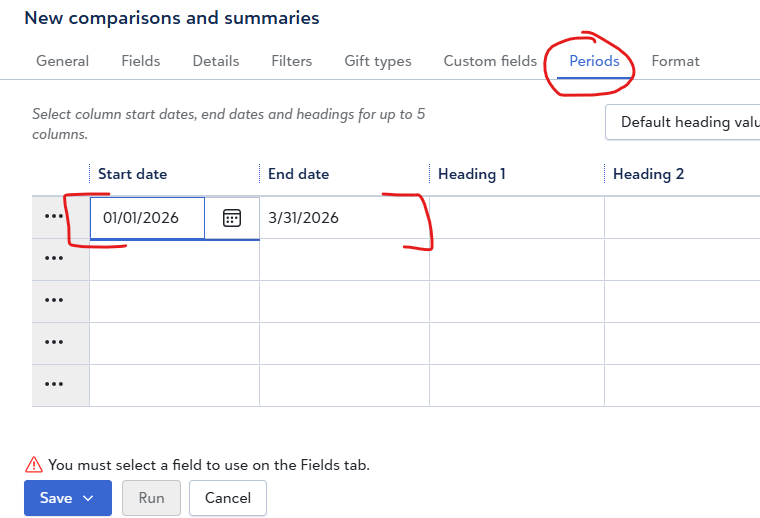
I have a Comparison and Summaries standard report of unique donors (periods are "from beginning of FY" to "this past Friday" and comparison dates from last year). I have to manually change the end periods each week.
I know the SR API supports ask fields, but unlike with inspecting the JSON from a query, I can't figure out what the fields are for Period 1 and Period 2. Help?!0 -
go to the query you setup, then instead of "<ask>" specify the "Period 1" and "Period 2" and go to the JSON Query definition to copy out how the filter is specified in JSON. Close the query without saving (so the <ask> is still there.
0 -
@Alex Wong Either I'm asking the question poorly or we're talking about two different things. There is no query involved — the only place I see input for a query is on the General tab, where I'd include Selected Records of a query with the ask fields we're talking about… but then what do I do with the Periods tab, since it requires dates there?
0 -
my misunderstanding there. I thought you meant period as in query criterion.
Unfortunately, unlike Query API where you can execute Ad-hoc query by JSON definition, SR API does not have that, it relies on the "saved report" that you are asking the API to run, so what you trying to do is not possible at the moment. There is also no API for PATCHing (edit) a saved report. So until then….
1 -
@Alex Wong @Kevin Fletcher Since the standard report is based on a query could you use query to API to update the query with the date range before running the report that the query is used in?
0 -
The report itself defines "period" of reporting on top of the query used. So while you can update the query, you cannot update the Period dynamically
 1
1



















Categories
- All Categories
- 6 Blackbaud Community Help
- 211 bbcon®
- 1.4K Blackbaud Altru®
- 403 Blackbaud Award Management™ and Blackbaud Stewardship Management™
- 1.2K Blackbaud CRM™ and Blackbaud Internet Solutions™
- 15 donorCentrics®
- 360 Blackbaud eTapestry®
- 2.6K Blackbaud Financial Edge NXT®
- 658 Blackbaud Grantmaking™
- 579 Blackbaud Education Management Solutions for Higher Education
- 3.2K Blackbaud Education Management Solutions for K-12 Schools
- 943 Blackbaud Luminate Online® and Blackbaud TeamRaiser®
- 84 JustGiving® from Blackbaud®
- 6.7K Blackbaud Raiser's Edge NXT®
- 3.8K SKY Developer
- 250 ResearchPoint™
- 120 Blackbaud Tuition Management™
- 165 Organizational Best Practices
- 241 Member Lounge (Just for Fun)
- 36 Blackbaud Community Challenges
- 37 PowerUp Challenges
- 3 (Open) PowerUp Challenge: Grid View Batch
- 3 (Closed) PowerUp Challenge: Chat for Blackbaud AI
- 3 (Closed) PowerUp Challenge: Data Health
- 3 (Closed) Raiser's Edge NXT PowerUp Challenge: Product Update Briefing
- 3 (Closed) Raiser's Edge NXT PowerUp Challenge: Standard Reports+
- 3 (Closed) Raiser's Edge NXT PowerUp Challenge: Email Marketing
- 3 (Closed) Raiser's Edge NXT PowerUp Challenge: Gift Management
- 4 (Closed) Raiser's Edge NXT PowerUp Challenge: Event Management
- 3 (Closed) Raiser's Edge NXT PowerUp Challenge: Home Page
- 4 (Closed) Raiser's Edge NXT PowerUp Challenge: Standard Reports
- 4 (Closed) Raiser's Edge NXT PowerUp Challenge: Query
- 798 Community News
- 3K Jobs Board
- 56 Blackbaud SKY® Reporting Announcements
- 47 Blackbaud CRM Higher Ed Product Advisory Group (HE PAG)
- 19 Blackbaud CRM Product Advisory Group (BBCRM PAG)