Reg. The Power of Power Automate in Blackbaud CRM Empowering Major Gift Officers in Data Entry#bbdev




hello @Ashley Moose
Reg. The Power of Power Automate in Blackbaud CRM Empowering Major Gift Officers in Data Entry#bbdevdays
I’m reaching out from York University in Toronto. We are currently using Blackbaud CRM and are exploring your solution involving Power Automate and BB SKY PAI, specifically around managing Interactions and Steps within Power Apps.
I’ve attempted to implement the solution, but I’m facing challenges with parsing JSON output and using it effectively in the Select data operation within Power Automate. Would it be possible to get a step-by-step video or documentation guide or walkthrough to help with the creation of this solution?
I am not getting select operation but default going as apply for each loop. not sure how you have able to map select operation ?

Thank you in advance for your support!
Best regards,
Balasubramani T Mohanasundaram
Hi @Balasubramani Thiruneirmalai Mohanasundaram - I do agree it's likely better to add this as a new post, but let's see if we can get you sorted out.
- Make sure you are calling this endpoint: /crm-conmg/fundraisers/List
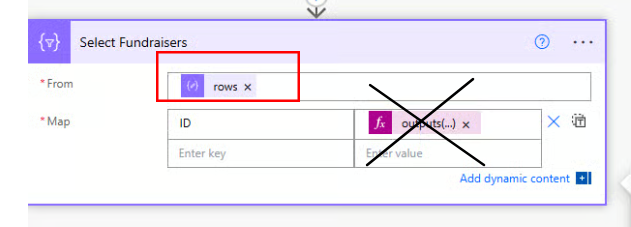
- Then on the Select action, the Input should be taking the Value field. With you selecting Rows, that is likely what is forcing you into the Apply to Each loop.

@Ashley Moose I have created prospect List in information analysis and used in this API call
/crm-anamg/adhocqueries/977ad769-9576-402b-a9fe-c6203b61463f
can you please share your sample schema for Parse JSON

My schema show array i can't put select action.
Once I am able to get this list and i need to populate prospect ID list in dropdown power app screen.
Thanks
Bala
Answers
-
Hi @Balasubramani Thiruneirmalai Mohanasundaram - The structure of the query output changed since I demo'd this at bbdevdays.
The schema of Parse JSON is:
{
"type": "object",
"properties": {
"type": {
"type": "string"
},
"properties": {
"type": "object",
"properties": {
"count": {
"type": "object",
"properties": {
"type": {
"type": "string"
}
}
},
"value": {
"type": "object",
"properties": {
"type": {
"type": "string"
},
"items": {
"type": "object",
"properties": {
"type": {
"type": "string"
},
"properties": {
"type": "object",
"properties": {
"record_type_id": {
"type": "object",
"properties": {
"type": {
"type": "string"
}
}
},
"query_name": {
"type": "object",
"properties": {
"type": {
"type": "string"
}
}
},
"fields": {
"type": "object",
"properties": {
"type": {
"type": "string"
},
"items": {
"type": "object",
"properties": {
"type": {
"type": "string"
}
}
}
}
},
"field_names": {
"type": "object",
"properties": {
"type": {
"type": "string"
},
"items": {
"type": "object",
"properties": {
"type": {
"type": "string"
}
}
}
}
},
"row_count": {
"type": "object",
"properties": {
"type": {
"type": "string"
}
}
},
"rows": {
"type": "object",
"properties": {
"type": {
"type": "string"
},
"items": {
"type": "object",
"properties": {
"type": {
"type": "string"
},
"items": {
"type": "object",
"properties": {
"type": {
"type": "string"
}
}
}
}
}
}
}
}
},
"required": {
"type": "array",
"items": {
"type": "string"
}
}
}
}
}
}
}
}
}
}That part didn't change. The input value for the Select action did change though. That should now be:
outputs('Parse_JSON_from_Fundraiser_List')?['body']?['value']?[0]?['rows']0 -
Sorry for the late reply—I was away for the past two weeks. I will try working with this schema structure and let you know how it goes.
Thanks,
Bala0 -
Hi @Ashley Moose ,
I have updated select action and schema but
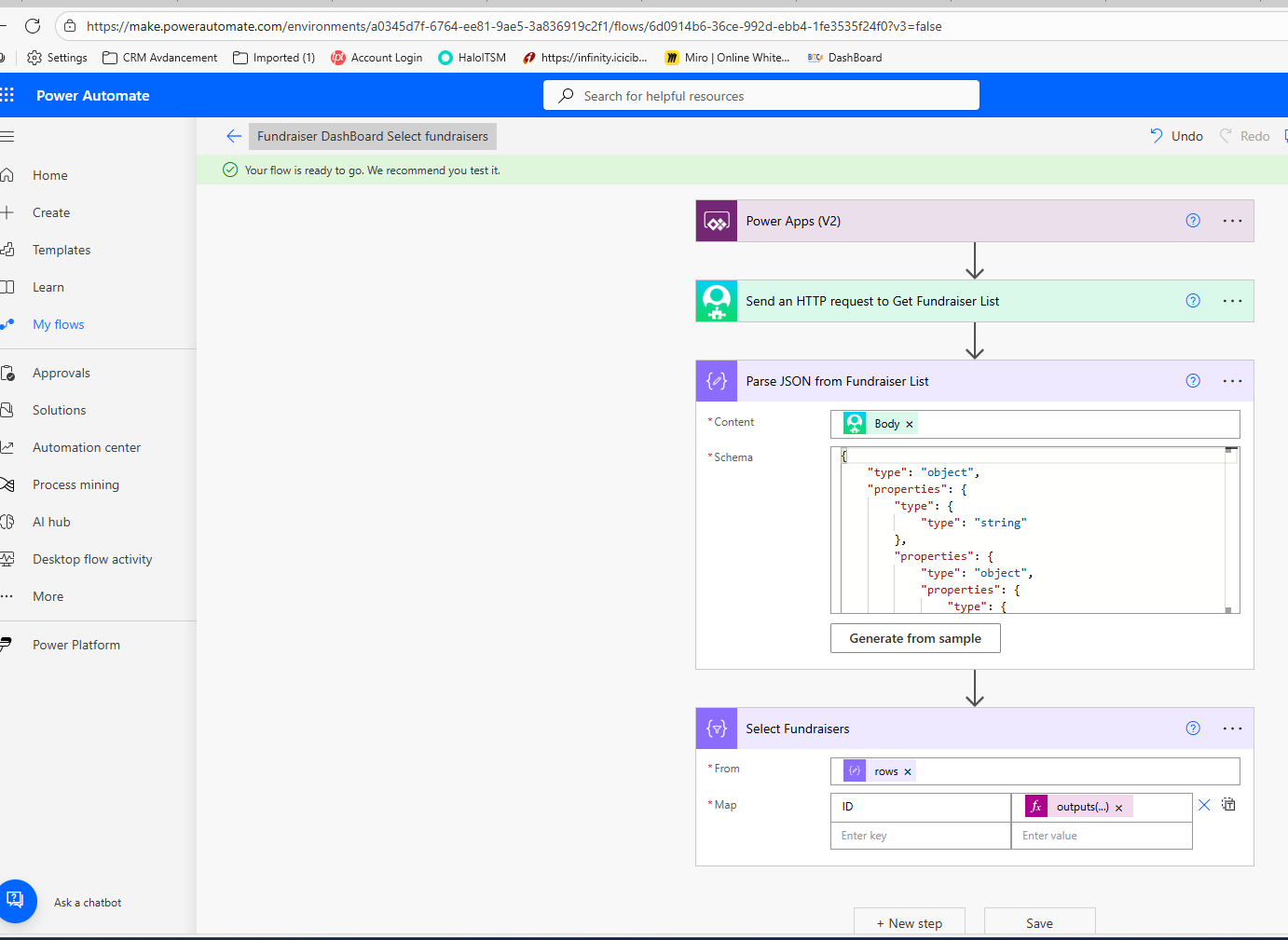
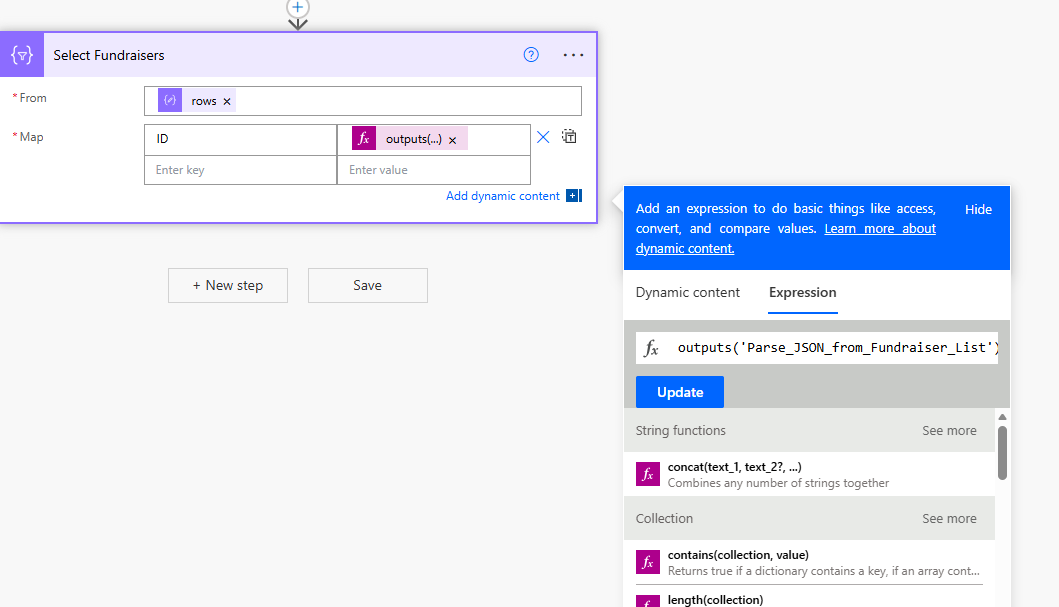
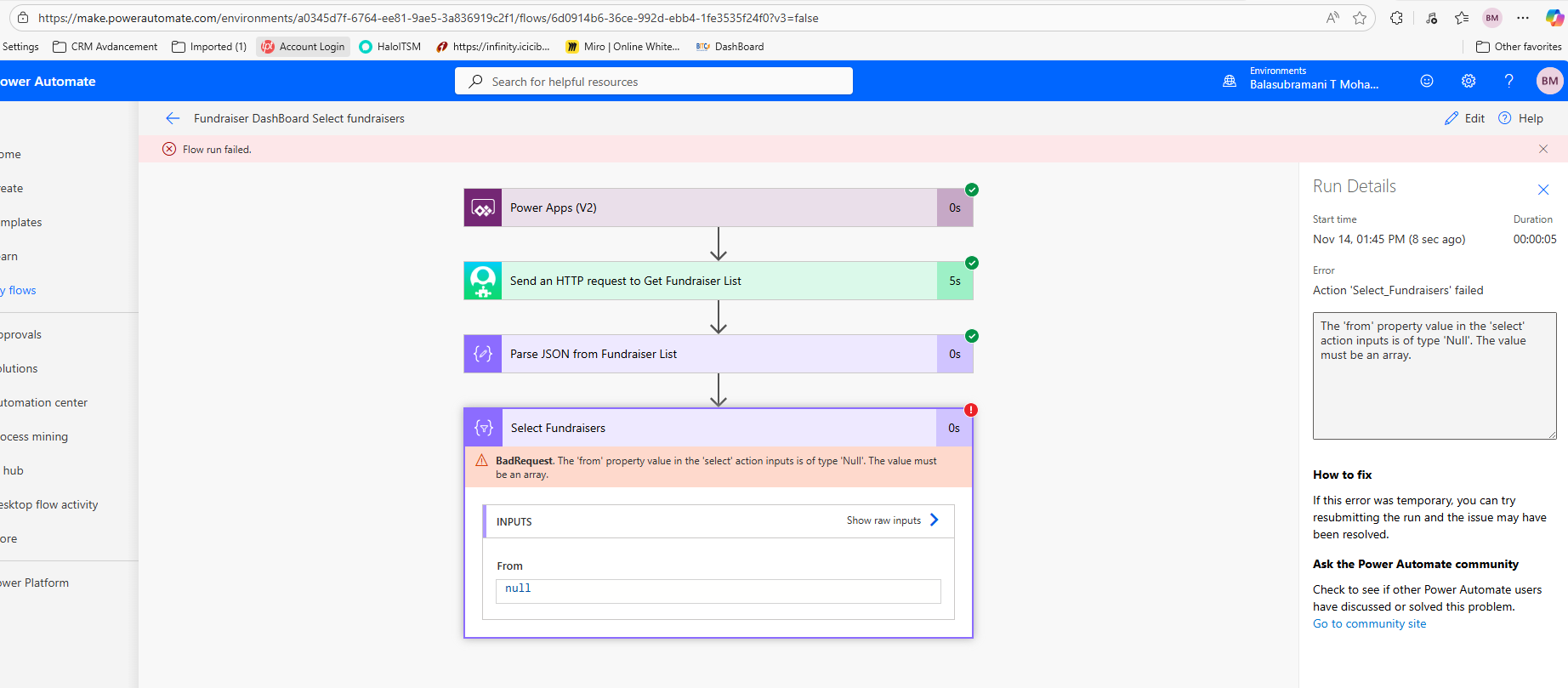
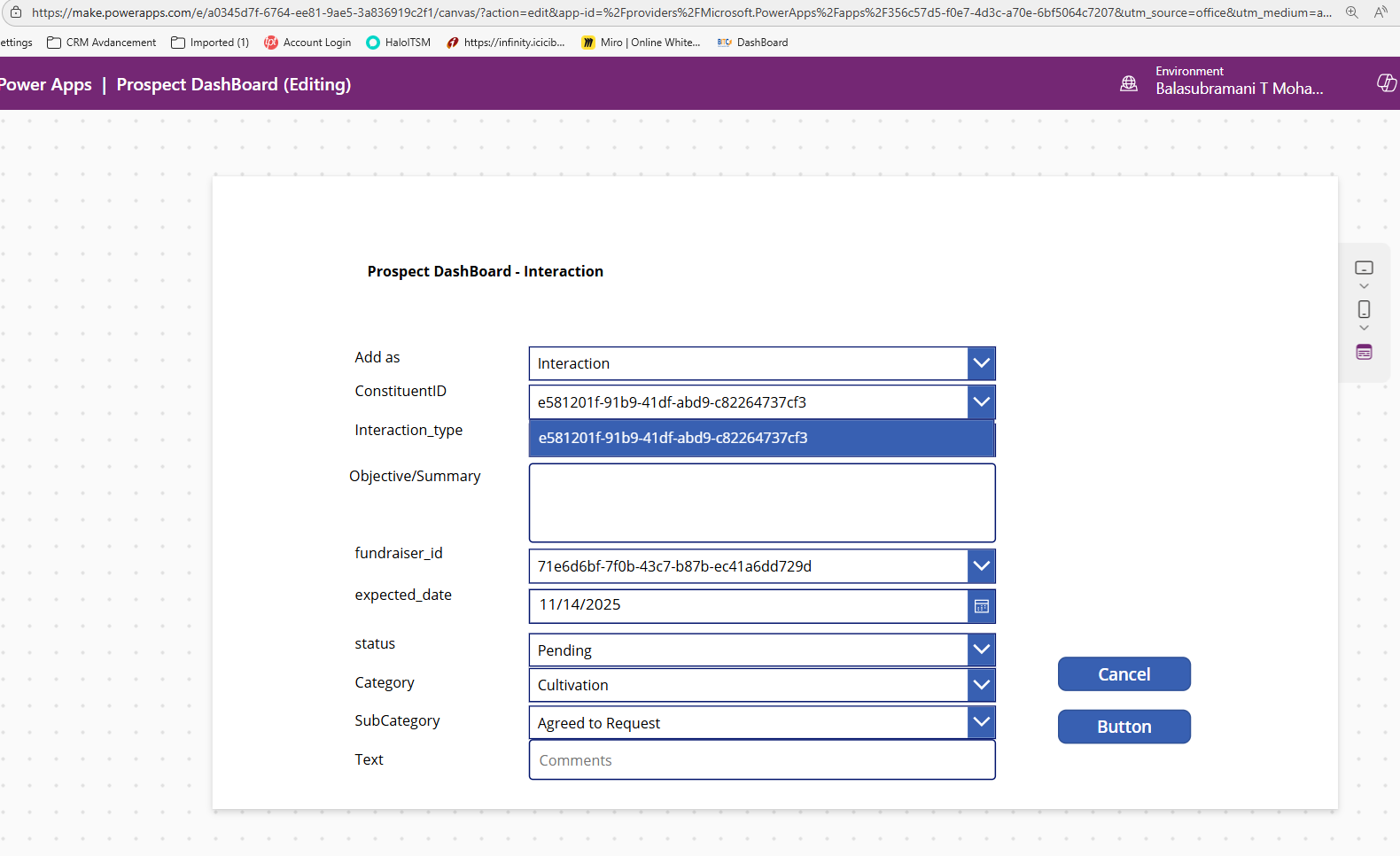
Basically, I want to pull data from API and populate value in the Constituent ID and Lookup value dropdown list box for user selection but when i am posting back to API I need to send GUI ID from dropdown value
 0
0 -
@Balasubramani Thiruneirmalai Mohanasundaram It looks like the wrong value in the Select action was changed. The From field is what needed to be updated with the expression I shared earlier. The part that was mapped for ID should not have changed.
 0
0






Categories
- All Categories
- 6 Blackbaud Community Help
- 211 bbcon®
- 1.4K Blackbaud Altru®
- 403 Blackbaud Award Management™ and Blackbaud Stewardship Management™
- 1.2K Blackbaud CRM™ and Blackbaud Internet Solutions™
- 15 donorCentrics®
- 360 Blackbaud eTapestry®
- 2.6K Blackbaud Financial Edge NXT®
- 659 Blackbaud Grantmaking™
- 579 Blackbaud Education Management Solutions for Higher Education
- 3.2K Blackbaud Education Management Solutions for K-12 Schools
- 943 Blackbaud Luminate Online® and Blackbaud TeamRaiser®
- 84 JustGiving® from Blackbaud®
- 6.7K Blackbaud Raiser's Edge NXT®
- 3.8K SKY Developer
- 250 ResearchPoint™
- 120 Blackbaud Tuition Management™
- 165 Organizational Best Practices
- 241 Member Lounge (Just for Fun)
- 36 Blackbaud Community Challenges
- 37 PowerUp Challenges
- 3 (Open) PowerUp Challenge: Grid View Batch
- 3 (Closed) PowerUp Challenge: Chat for Blackbaud AI
- 3 (Closed) PowerUp Challenge: Data Health
- 3 (Closed) Raiser's Edge NXT PowerUp Challenge: Product Update Briefing
- 3 (Closed) Raiser's Edge NXT PowerUp Challenge: Standard Reports+
- 3 (Closed) Raiser's Edge NXT PowerUp Challenge: Email Marketing
- 3 (Closed) Raiser's Edge NXT PowerUp Challenge: Gift Management
- 4 (Closed) Raiser's Edge NXT PowerUp Challenge: Event Management
- 3 (Closed) Raiser's Edge NXT PowerUp Challenge: Home Page
- 4 (Closed) Raiser's Edge NXT PowerUp Challenge: Standard Reports
- 4 (Closed) Raiser's Edge NXT PowerUp Challenge: Query
- 798 Community News
- 3K Jobs Board
- 56 Blackbaud SKY® Reporting Announcements
- 47 Blackbaud CRM Higher Ed Product Advisory Group (HE PAG)
- 19 Blackbaud CRM Product Advisory Group (BBCRM PAG)