Guide for handling 'your flow has a new trigger'?





I've seen several topics and discussions come up, but I've yet to find a guide for 'what to do' … is there a TL;DR that anyone can point me to?
context: I've inherited a power automate setup, I'm not super familiar with the ins and outs of it, so I'm looking for a shortcut to what needs to be updated/changed in order to keep things working and not come crashing down in the short term. Thanks!
Answers
-
I don't have an answer, but I am interested to see what others say! I keep getting that notification too, but I am too deep in other projects to really stop and try to figure it out at the moment!
0 -
Misunderstood the question. Refer to Alex's response below.
1 -
@Austen Brown I help a client of mine handle this and does not need to do the steps you mentioned. The flow have a new trigger URL, assuming this is what the OP is asking about:
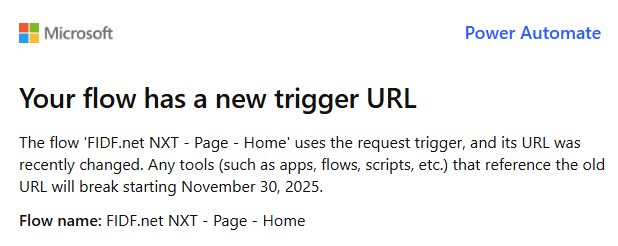
Then the flow does not need to be updated at all. What needs to happen is change the "calling" app.
For example:
You created an adaptive card custom tile that is added to RE NXT (i.e. gift page, constituent page, or home page). RE NXT when the page is called, will trigger the URL that is calling the flow to run and return adaptive card to display. The flow that creates the adaptive card has 2 URL right now, the existing (OLD) one, and a new (assigned by MS recently due to their change) one, BOTH will trigger the flow to run and return an adaptive card to RE NXT. After 11/30, the old one will no longer work.
What needs to be done is:
- Edit your flow (no need to do anything in the flow and save) and go to the trigger action at the top, the NEW URL is right in the trigger for you to copy
- go to any URL Encoder tool on web and put the URL there and encode it
- go to developer.blackbaud.com and your application where the custom tile is defined.
- update the add-in for the custom tile where it is calling the flow's OLD encoded URL and replace it with NEW.
- DONE
2 -
Would you know how to subscribe to the Sky API Webhooks using the "New URL"?
0 -
SKY API webhook had an issue that some said it is fixed from Microsoft, I have not attempted to do this yet, but will have to this week/next week as I have a ton of webhook registered too.
@Ben Wong @Erik Leaver any info you can provide. Also, I try using the Get Subscription List API endpoint and did not retrieve ANY webhook I registered. Is there a bug there? I have almost every event type registered to a flow and they are currently still getting triggered.
0 -
Misunderstood the question. Thanks for clarifying. I'll edit to point them to your response.
0 -
Thanks for the assistance @Alex Wong and @Austen Brown!
0 -
Hey @Alex Wong and @Jason Guan, we don't have a way to update the URL on an existing webhook subscription, so the only way to use the new URL from Microsoft is to create a new webhook subscription for each event type.
However, I just tried doing this and ran into an issue when performing the CloudEvents handshake using the OPTIONS method. In the instructions I shared back in 2021 the Request Trigger could be used to set the method to OPTIONS. However, OPTIONS doesn't appear in the method list (I can't remember if it used to before but I assume it did since I didn't mention it) and while it gets accepted as a custom value, it doesn't seem to work. Testing the Request Trigger with other methods work, but I get a 404 when using OPTIONS. It appears to be a bug but will contact Microsoft to confirm.
Also, the GET Subscription List works for me. Make sure you're using it in the correct environment where your webhooks are subscribed.1 -
Today's PA User Group, we went over various situation of new http trigger URL.
@Erik Leaver if you can post the video (when ready) here, will help others in the same boat
1 -
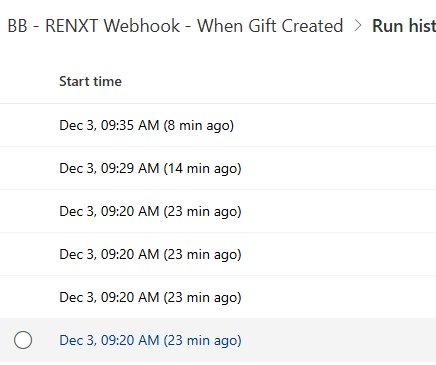
Looks like MS did not turn off the old URL…
even though I replaced all old with new before 12/1. I can't do the same with the webhook, but looking at my run history, looks like old URL still working… anyone got any info from MS?
 0
0 -
It seems that Microsoft is aware of the issue with making the OPTIONS call and are working to fix this issue. Until then, the old URLS will continue to work until the issue has been fixed.
1 -
Adding link to November 2025's Power Automate User Group where @Alex Wong walked through the steps for updating a trigger (start at 37:44):
1 -
Thanks for this. I will definitely check this out. I didn't know there was a Blackbaud Power Automate User Group. I've joined it! :)
0
















Categories
- All Categories
- 6 Blackbaud Community Help
- 211 bbcon®
- 1.4K Blackbaud Altru®
- 403 Blackbaud Award Management™ and Blackbaud Stewardship Management™
- 1.2K Blackbaud CRM™ and Blackbaud Internet Solutions™
- 15 donorCentrics®
- 360 Blackbaud eTapestry®
- 2.6K Blackbaud Financial Edge NXT®
- 659 Blackbaud Grantmaking™
- 579 Blackbaud Education Management Solutions for Higher Education
- 3.2K Blackbaud Education Management Solutions for K-12 Schools
- 943 Blackbaud Luminate Online® and Blackbaud TeamRaiser®
- 84 JustGiving® from Blackbaud®
- 6.7K Blackbaud Raiser's Edge NXT®
- 3.8K SKY Developer
- 250 ResearchPoint™
- 120 Blackbaud Tuition Management™
- 165 Organizational Best Practices
- 241 Member Lounge (Just for Fun)
- 36 Blackbaud Community Challenges
- 37 PowerUp Challenges
- 3 (Open) PowerUp Challenge: Grid View Batch
- 3 (Closed) PowerUp Challenge: Chat for Blackbaud AI
- 3 (Closed) PowerUp Challenge: Data Health
- 3 (Closed) Raiser's Edge NXT PowerUp Challenge: Product Update Briefing
- 3 (Closed) Raiser's Edge NXT PowerUp Challenge: Standard Reports+
- 3 (Closed) Raiser's Edge NXT PowerUp Challenge: Email Marketing
- 3 (Closed) Raiser's Edge NXT PowerUp Challenge: Gift Management
- 4 (Closed) Raiser's Edge NXT PowerUp Challenge: Event Management
- 3 (Closed) Raiser's Edge NXT PowerUp Challenge: Home Page
- 4 (Closed) Raiser's Edge NXT PowerUp Challenge: Standard Reports
- 4 (Closed) Raiser's Edge NXT PowerUp Challenge: Query
- 798 Community News
- 3K Jobs Board
- 56 Blackbaud SKY® Reporting Announcements
- 47 Blackbaud CRM Higher Ed Product Advisory Group (HE PAG)
- 19 Blackbaud CRM Product Advisory Group (BBCRM PAG)