What does this JE Batch error mean?





I entered a JE into FE NXT yesterday. It was only 23 lines, 22 debits and 1 credit, and it was in balance. But it absolutely would not let me save or validate it.
There was an error at the very bottom which said:
"The total distributed (0) must equal the amount of the transaction (8384)."
First time I've come across that error. Other than the fact that $8,384.00 is the amount of one of my debit rows, I have no idea what it thinks I distributed, or should have. But I was forced to forfeit that work because I couldn't save it or even export it. (I managed to get a screenshot, but that's it.)
I called Blackbaud, and got nowhere. The agent didn't know what the error meant either, he had to look it up, didn't have anyone he could ask, and tried to give me a workaround by importing the same JE using the Excel JE add-in. But honestly that was more cumbersome than typing it, since I hadn't been working from an importable spreadsheet in the first place.. I was more upset at losing my work, and not knowing what went wrong, than I was having to re-do the JE.
Does anyone know what that error means and what might cause it?
Thanks!
Answers
-
I believe that error happens if the transaction amounts entered have some type of error regarding how many digits there are after the decimal point. I can confirm that systems we have that import information into the AP subsidiary can include amounts out to thirteen decimal places because in the past either excel itself or FE 7 had a requirement for this. I think this error can be generated if you input a transaction with incorrect cents and then correct it. On the rare occasion we see this error we usually have to clear or delete the JV and try again keeping this decimal point requirement in mind. Hope this makes sense.
0 -
Wow, thank you for getting back to me so quickly! All my numbers had 2 places after the decimal, as far as I recall - none were formulas, but I will check, since there was a fair amt of copy/paste involved. I know I corrected a typo where I had typed .00 instead of .06. But still 2 decimal places.
So is this a software glitch, which will be corrected? I type JEs all the time and have never encountered this before.
0 -
I don't think it is on the BB radar to correct. It happens so infrequently that we have just chalked it up to one of those weird things about FE.
0 -
For those of us who encounter it, it would be nice if the error actually gave a realistic hint about what went wrong. Even the Help people at BB are clueless about it, and of course have to go through the whole screenshare thing, wait a few days to research, etc etc. The screenshare session took much longer than it took me to type that JE, which I ultimately lost and had to re-do. So it may be infrequent, but it is certainly impactful. Just saying - I support fixing as many weird things about FE as possible. 🙃
0 -
Hi Roberta,
I have experienced the same issue on some JE or even Distributions when creating AP or AR Invoices.
What I have found is that sometime (Don't know why) FE NXT breaks the distribution splits and it end up with a 0 amount although in the Journal Entry it shows the Debit or Credit amount you put.
You will need to go to the line with the amount the error message is mentioning and click on the icon on column "SPLIT". It will display a new interface showing: Amount, Project, Class, etc.
Make sure that on the amount column it has the correct amount instead of 0.
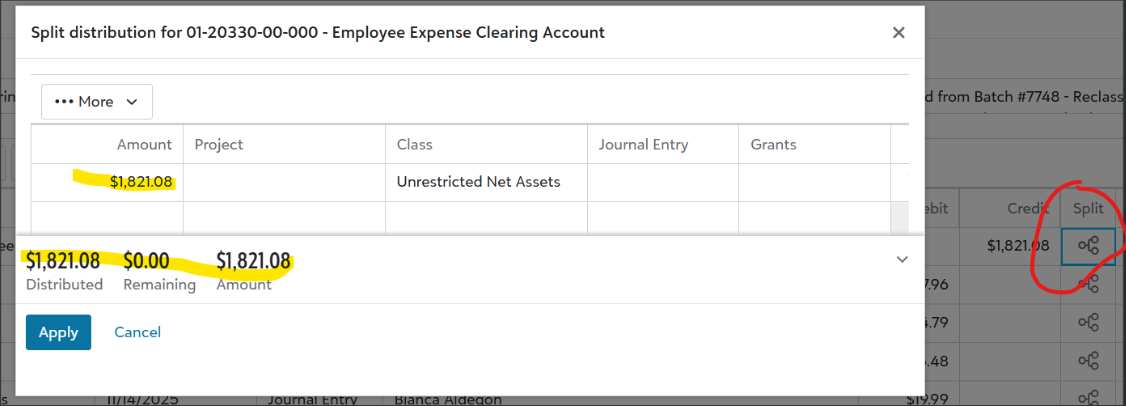
This is what caused the issue on my end, hopefully is the same on yours and you can fix it.
1 -
@Sebastian Grajales
Thank you for this - I just saw your response this morning. I ended up re-entering a fresh JE manually and the new one was fine, no errors. But it was visually identical to the one which wouldn't validate.This info about the split is interesting. I never use the split column, even if I have multiple accounts I am expensing to. I just simply put each code on a new line, and I never understood what the split thing was for. (It didn't exist in the database, as far as I can recall.) So I doubt this was my issue.
Someone else said it was related to the number of decimal places - if a number was rounded from 3 or more decimal places (or from only 1 decimal place), that would cause this error too. I checked my original JE at the time and each number was exactly 2 decimal places - no rounding, no formulas.
Meanwhile I had also created a support case for this, and the support agent had no idea what it was, had never seen it before, wasn't allowed to escalate my question to someone who might know the answer, and wanted to start a longterm research project to track it down for me. I didn't have time for that, I just wanted to get my JE posted. But I did tell him to read this thread in the BB Communities, because it was more informative than anything else I've seen. Since he was still asking me about doing a screenshare and whether I still needed his help, I assume he never bothered to read this, and was just following beginner support protocol. (But my opinions of BB's support services are out of scope here.)
0






Categories
- All Categories
- 6 Blackbaud Community Help
- 211 bbcon®
- 1.4K Blackbaud Altru®
- 403 Blackbaud Award Management™ and Blackbaud Stewardship Management™
- 1.2K Blackbaud CRM™ and Blackbaud Internet Solutions™
- 15 donorCentrics®
- 360 Blackbaud eTapestry®
- 2.6K Blackbaud Financial Edge NXT®
- 659 Blackbaud Grantmaking™
- 579 Blackbaud Education Management Solutions for Higher Education
- 3.2K Blackbaud Education Management Solutions for K-12 Schools
- 943 Blackbaud Luminate Online® and Blackbaud TeamRaiser®
- 84 JustGiving® from Blackbaud®
- 6.7K Blackbaud Raiser's Edge NXT®
- 3.8K SKY Developer
- 250 ResearchPoint™
- 120 Blackbaud Tuition Management™
- 165 Organizational Best Practices
- 241 Member Lounge (Just for Fun)
- 36 Blackbaud Community Challenges
- 37 PowerUp Challenges
- 3 (Open) PowerUp Challenge: Grid View Batch
- 3 (Closed) PowerUp Challenge: Chat for Blackbaud AI
- 3 (Closed) PowerUp Challenge: Data Health
- 3 (Closed) Raiser's Edge NXT PowerUp Challenge: Product Update Briefing
- 3 (Closed) Raiser's Edge NXT PowerUp Challenge: Standard Reports+
- 3 (Closed) Raiser's Edge NXT PowerUp Challenge: Email Marketing
- 3 (Closed) Raiser's Edge NXT PowerUp Challenge: Gift Management
- 4 (Closed) Raiser's Edge NXT PowerUp Challenge: Event Management
- 3 (Closed) Raiser's Edge NXT PowerUp Challenge: Home Page
- 4 (Closed) Raiser's Edge NXT PowerUp Challenge: Standard Reports
- 4 (Closed) Raiser's Edge NXT PowerUp Challenge: Query
- 798 Community News
- 3K Jobs Board
- 56 Blackbaud SKY® Reporting Announcements
- 47 Blackbaud CRM Higher Ed Product Advisory Group (HE PAG)
- 19 Blackbaud CRM Product Advisory Group (BBCRM PAG)