Using the Webhook API to trigger flows in Power Automate





Hi everyone,
During my session at #BBDEVDAYS last week, some of you asked about how the Webhook API can be used in Power Automate as triggers. I explained that Power Automate does not natively support webhooks adhering to the CloudEvents specification, however, there is a workaround that I can share here.
Below is an example of a simple flow that sends an email notification when a new gift is added in RE NXT.
-
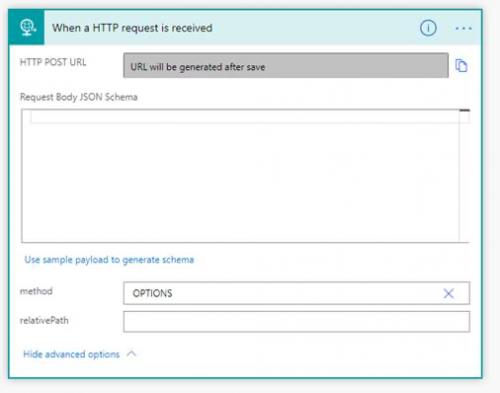
Define a flow using a Request trigger and set the method to OPTIONS:
-
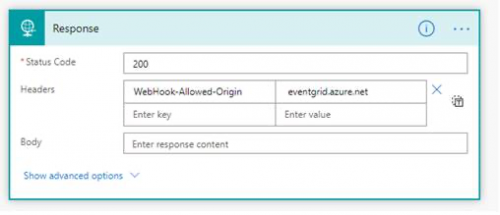
Implement the CloudEvents handshake by returning a 200 with the appropriate header (WebHook-Allowed-Origin: eventgrid.azure.net) using a Response action:
-
Save the flow to get the URL, and then manually register that URL as a webhook through the Webhook SKY API:
POST https://api.sky.blackbaud.com/webhook/v1/subscriptionsHTTP/1.1
Host: api.sky.blackbaud.com
Content-Type: application/json
Authorization: <your access token>
Bb-Api-Subscription-Key: <your subscription key>
{
"webhook_url": "<the URL of the flow>",
"event_type": "com.blackbaud.gift.add.v1"
}
(make sure to specify the event_type that you’re interested in from the Event Types reference page)
Our API will send the OPTIONS handshake request (to your flow URL), which will respond with a 200 and the subscription will be created. Of course, the flow won’t be able to handle actual POST webhook events yet because it’s only coded to handle the OPTIONS handshake. We’ll handle that next.
- Update the flow and change the method to POST.
- Paste in the CloudEvents JSON schema into the request body to enable Power Automate to interpret the webhook message properties. You'll need to make sure this schema includes the properties that are in the data object for the specific event-type you're subscribing to. For example, if the event type provides an id, you can paste this in:
{
"type": "object",
"properties": {
"type": {
"type": "string"
},
"specversion": {
"type": "string"
},
"source": {
"type": "string"
},
"subject": {
"type": "string"
},
"id": {
"type": "string"
},
"time": {
"type": "string"
},
"data": {
"type": "object",
"properties": {
"id": {
"type": "string"
}
}
}
}
}
If the event type includes the constituent_id, you can paste this in:
{
"type": "object",
"properties": {
"type": {
"type": "string"
},
"specversion": {
"type": "string"
},
"source": {
"type": "string"
},
"subject": {
"type": "string"
},
"id": {
"type": "string"
},
"time": {
"type": "string"
},
"data": {
"type": "object",
"properties": {
"id": {
"type": "string"
},
"constituent_id": {
"type": "string"
}
}
}
}
}It should look something like this:
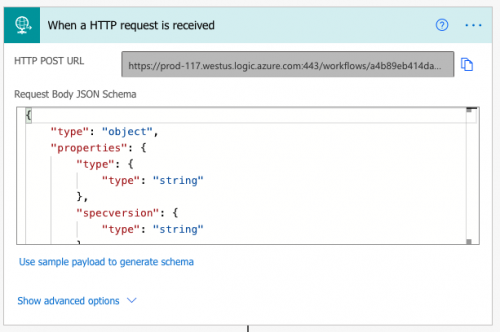
- Now you can delete the Response action (since it’s no longer needed) and implement whatever interesting workflow logic is desired within the flow – it will be triggered when events happen in the Blackbaud system. Here's an example Flow to send an email when the gift is added. Note that I have to make additional SKY API calls to ge the Gift details and the Constituent details to put in the email. I'm also including the properties from the webhook payload so you can see how to use them. One gotcha is to make sure you reference the right “id” property, it will be the one shown in the tooltip:
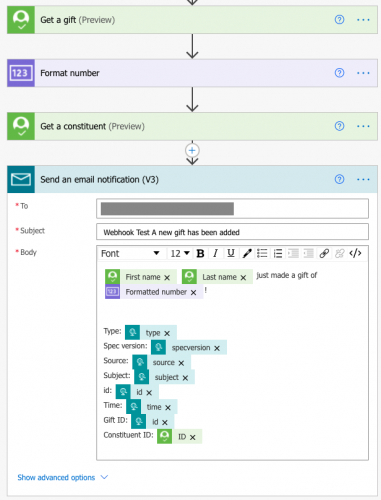
That should be it! Let me know if you manage to get it working.
Thanks!
Comments
-
What is the best way to obtain Authorization access token in Power Automate?
0 -
Hi @Alex Wong, in case you haven't gone through the initial setup steps already, here is the documentation:
This will take you through the process of connecting the Microsoft Power Platform for Raiser's Edge NXT app from the Marketplace and how to get it set up in Power Automate.
To make the Webhook API call to create the subscription, you can use something like Postman or the SKY API Console. However, the be aware that when creating subscriptions with the SKY API Console, the subscription will belong to the SKY API Console, which means the subscription will be canceled if it gets disconnected from your Blackbaud environment.
I hope that helps!
0 -
Hi, I have done all the setup already and able to use the actions under the Blackbaud Raisers Edge NXT connector. That is not what I am having issue with.
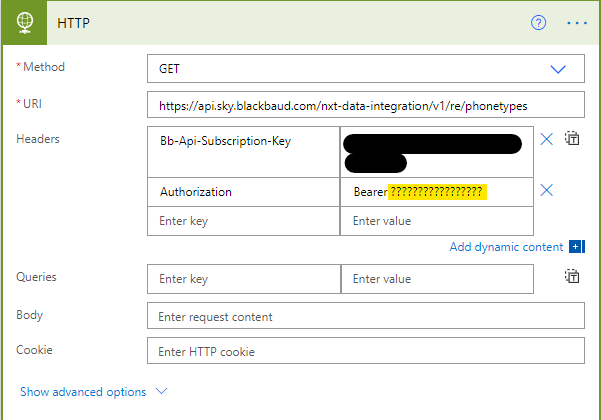
What I am trying to do is use Power Automate HTTP request to call the RESTful API of SKY API. (for example below, trying to get all phone types using GET method of HTTP). What I am not able to understand is how to generate the Authorization token that I need to pass into the yellow highlighted in the image below.
 1
1 -
Hi @Alex Wong, you'll need to generate the Authorization access token through some other means outside of Power Automate. The simplest way is to probably use Postman which will give you a callback URL and a place to put in the other query parameters needed for the OAuth 2.0 process. This will require you to register an app on the SKY Developer Platform to get the clientid and clientsecret, and connect the app to the environment you wish to make the API call to.
We have a tutorial for the OAuth authorization code flow that explains the process for developers. The Power Automate connector for RE NXT handles this for the APIs supported by the connector.
0 -
@Alex Wong, it's possible to connect to the API using the HTTP action, but it will be a lot of work, especially since your credentials expire after a set amount of time and all of those fields will have to be updated!
If you need to access an API endpoint that is not already included in Blackbaud's premium connector, a much easier way of doing it is building a custom connector. Once you have the authorization set up there, it will automatically refresh your authorization token whenever it expires.
0 -
We've been using webhooks in Power Automate for a while now, and they are very useful! There is one thing to watch out for, though.
All Connectors in Power Automate have throttling limits associated with them. These are rules that say, for instance, “You can only use this connector 300 times every 30 seconds.” If you try to use it more often then that, it will fail.
To see where the potential problem lies, let's say you create a flow that will email you when a constituent is deleted. Let's say you use an email connector that lets you send 100 emails every minute. Then let's say you go do some database cleanup and bulk delete 500 records all at once.
This will create 500 runs of your flow in Power Automate, and will quickly exceed your limit of 100 emails per minute. Most of your runs will fail.
Your best tool in this scenario is Concurrency Control. If you go to the trigger and go to settings, you can control how many flows can be run simultaneously. If you set this to one, it will only process one flow at a time, which will significantly slow down the number of emails being sent out, and will hopefully be enough to keep you within your limits.
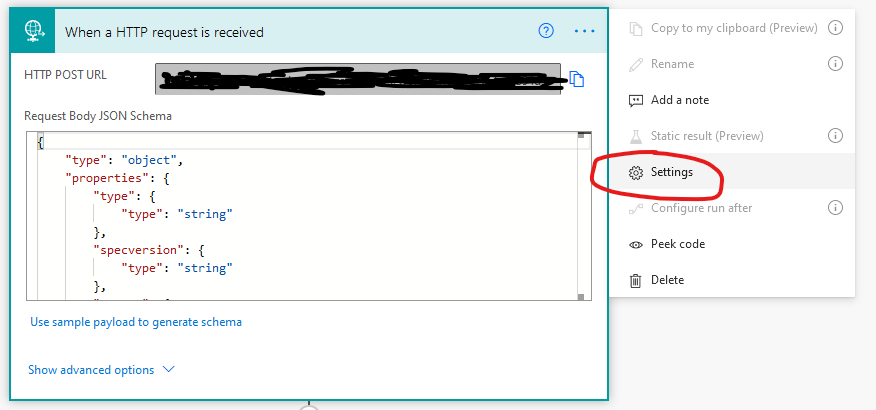
Trigger settings 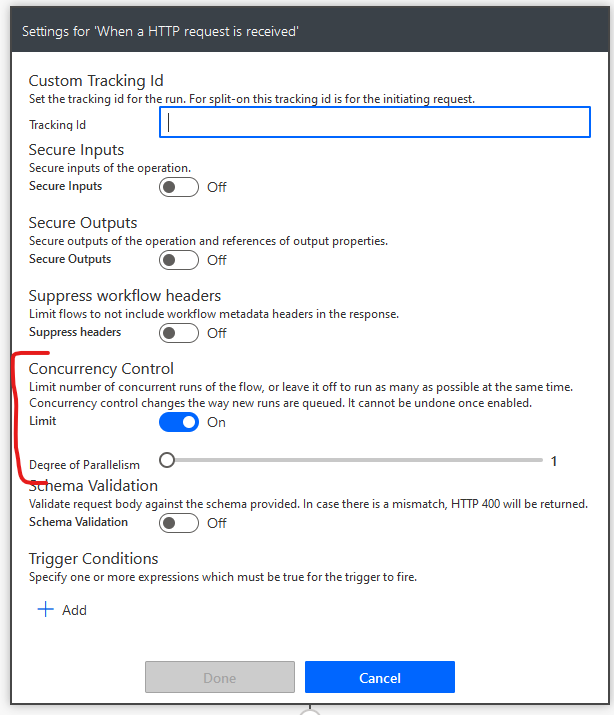
Concurrency Control If that's not enough to keep you from hitting your limits, you can add a delay to your flow so that each run will take longer to complete.
The main thing is that if you build a flow using a webhook, you need to make sure you know the throttling limits of each connector that the flow uses, and use concurrency control and possibly delays to make sure you don't hit it.
It's not a hard problem to solve, but it's an easy one to overlook!
2 -
Hi,
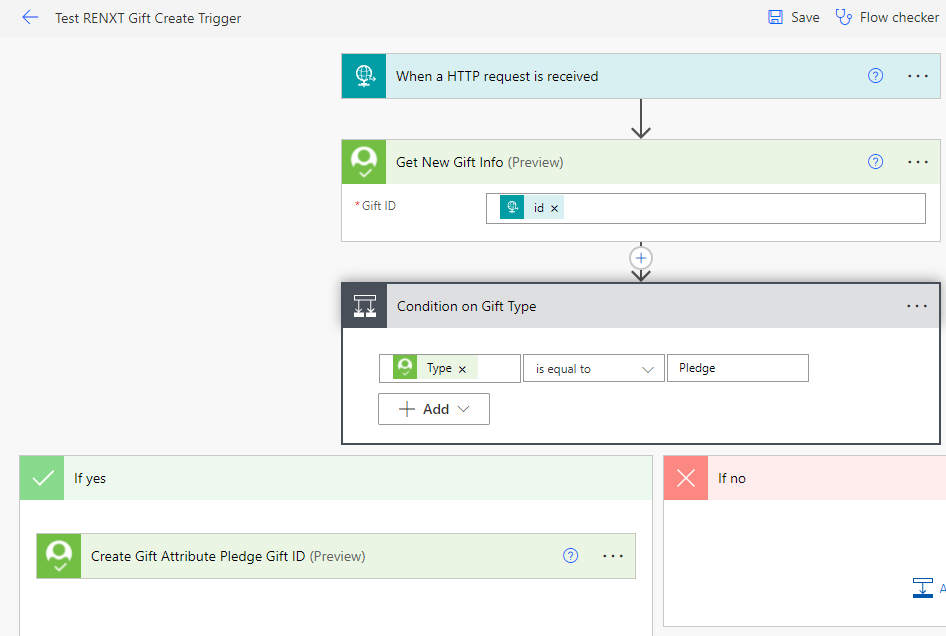
I was able to follow the tutorial to have new gift trigger my flow. Thank you.
I do have a question though, is there somewhere on developer portal that shows me all the webhook that was provisioned?
 0
0 -
You might be looking for this.
Webhook API resources - Blackbaud SKY API Developer Portal
The Endpoint Reference is very useful as well. You can use it to view all of your webhook subscriptions.
0 -
Apologies for re-starting a super old thread @Ben Wong, but I am a bit stuck. I've followed the first three steps but can't seem to get a 200 status code. In the API Console I keep getting a 400 Bad Request error.
I have the event I'm trying to reference provisioned, I manually added OPTIONS to the HTTP request trigger in Power Automate and still can't register the URL through the API.
This is my first attempt at using a Webhook, so please accept my apologies if the terms I've used are incorrect. For some context, I'm trying to create a webhook to send a notification in Slack when a new constituent has been added to the Database.
0 -
Microsoft recently made some changes to the URLs of their HTTP-triggered flows. Unfortunately, the new triggers do not yet support OPTIONS calls, so it's not possible to subscribe to a webhook using a flow right now.
I've heard that this might be fixed in the future, but not from official sources. If you need to subscribe a flow to a webhook in the meantime, many people are using Azure API Management on Consumption pricing as a workaround.
0 -
@Andrew Peterson @Ben Regier we have been working with Microsoft recently and have confirmed that there is currently a bug where the OPTIONS method, as well as other custom values, is not supported. It's a bug because the UI appears to let you define custom methods, but only the ones listed are actually supported.
We've been told by Microsoft that this is a known issue but there is no timeline for when it will be resolved. We are exploring other ways to subscribe to webhooks but also no timeline to offer yet.
1 -
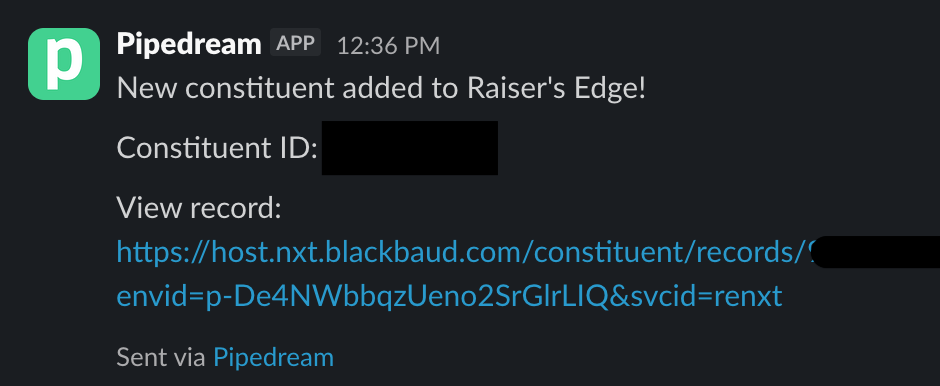
Thank you @Ben Regier and @Ben Wong, fingers crossed they fix it soon-ish! In the meantime, I was able to get a simple notification working in Slack via the Pipedream platform. It's pretty low tech, but it works!
 2
2 -
If you're using Pipedream, you can use it to subscribe and take it a step further and forward the webhooks to a Power Automate flow so that you can have your automations run based on that trigger. That is what I ended up configuring. There is an annual cost but I use it for our third party applications to move that info into RE as well.
0 -
I am now able to receive OPTIONS calls in my HTTP flows, and have been able to resubscribe all of my webhooks to my flows using the new flow URLs.
The new flow URLs are longer than 255 characters, which causes problems as many webhooks have a 255 character limit on the URL, but luckily Blackbaud does not seem to have that restriction.
1 -
thank you for the heads up. I will do mine too =D
0 -
Thank you @Ben Regier for the update. I got my flow to work now!
0














Categories
- All Categories
- 6 Blackbaud Community Help
- 211 bbcon®
- 1.4K Blackbaud Altru®
- 403 Blackbaud Award Management™ and Blackbaud Stewardship Management™
- 1.2K Blackbaud CRM™ and Blackbaud Internet Solutions™
- 15 donorCentrics®
- 360 Blackbaud eTapestry®
- 2.6K Blackbaud Financial Edge NXT®
- 659 Blackbaud Grantmaking™
- 579 Blackbaud Education Management Solutions for Higher Education
- 3.2K Blackbaud Education Management Solutions for K-12 Schools
- 943 Blackbaud Luminate Online® and Blackbaud TeamRaiser®
- 84 JustGiving® from Blackbaud®
- 6.7K Blackbaud Raiser's Edge NXT®
- 3.8K SKY Developer
- 250 ResearchPoint™
- 120 Blackbaud Tuition Management™
- 165 Organizational Best Practices
- 241 Member Lounge (Just for Fun)
- 36 Blackbaud Community Challenges
- 37 PowerUp Challenges
- 3 (Open) PowerUp Challenge: Grid View Batch
- 3 (Closed) PowerUp Challenge: Chat for Blackbaud AI
- 3 (Closed) PowerUp Challenge: Data Health
- 3 (Closed) Raiser's Edge NXT PowerUp Challenge: Product Update Briefing
- 3 (Closed) Raiser's Edge NXT PowerUp Challenge: Standard Reports+
- 3 (Closed) Raiser's Edge NXT PowerUp Challenge: Email Marketing
- 3 (Closed) Raiser's Edge NXT PowerUp Challenge: Gift Management
- 4 (Closed) Raiser's Edge NXT PowerUp Challenge: Event Management
- 3 (Closed) Raiser's Edge NXT PowerUp Challenge: Home Page
- 4 (Closed) Raiser's Edge NXT PowerUp Challenge: Standard Reports
- 4 (Closed) Raiser's Edge NXT PowerUp Challenge: Query
- 798 Community News
- 3K Jobs Board
- 56 Blackbaud SKY® Reporting Announcements
- 47 Blackbaud CRM Higher Ed Product Advisory Group (HE PAG)
- 19 Blackbaud CRM Product Advisory Group (BBCRM PAG)