Loyal Donor Query



Hi there. I'm wondering if someone can help me out with query directions for creating a query for loyal donors who have given consecutively for 2 or more years (at least 1 gift per year) including a gift in 2025. Thank you.
Answers
-
…for NXT RE
0 -
If you are creating this query in RE NXT, you can create a constituent query with the criteria of: Summary Information - Summary For Gift - Consecutive Years Giving - Greater than or equal to 2 AND Gifts - Gift Date - Last calendar year.
1 -
Hey there, @Wendy Turner
The Luminate Online platform has built in data for first gift date, last gift date, largest gift date, and amounts of all three of those. It also has last year gift total and current year gift totals. It also has fields for external data (e.g. imported from another database like Raiser's Edge) of the same if you have those files enabled and receiving data through a data sync to populate those fields. If you don't and wish to include Raiser's Edge or another external database, you may want to explore that with a Blackbaud Account Executive or Omatic Software to see what kind of solution that can entail; turning on the fields is free, however, through a Blackbaud Support case at https://support.blackbaud.com or through a consultant on staff at Blackbaud, like me, or someone who has Admin Site Admin access to access the Database Configuration on the Luminate Online platform.
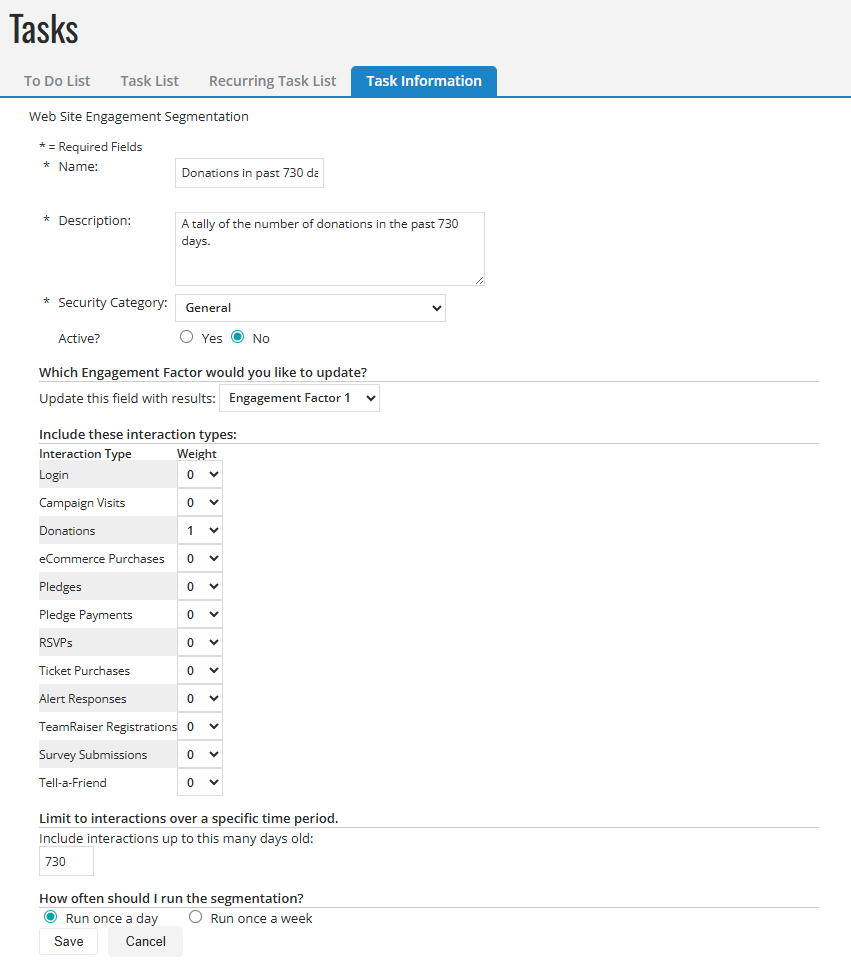
The Luminate Online platform also has Engagement Factors that can list a count of something over a certain number of days. With Engagement Factors under Data Management > Tasks, you can set up a task to get a tally count of engagement with the platform or with emails from the platform. In our case, we would use a Web Site Engagement Segmentation with 1 point (as the weight of each time something happens as a count) for each donation over the past 365 days, or you could set it up for 730 days (2 years) as you are seeking to do with the initial post to this thread. Set this to run once per day (screenshot below).
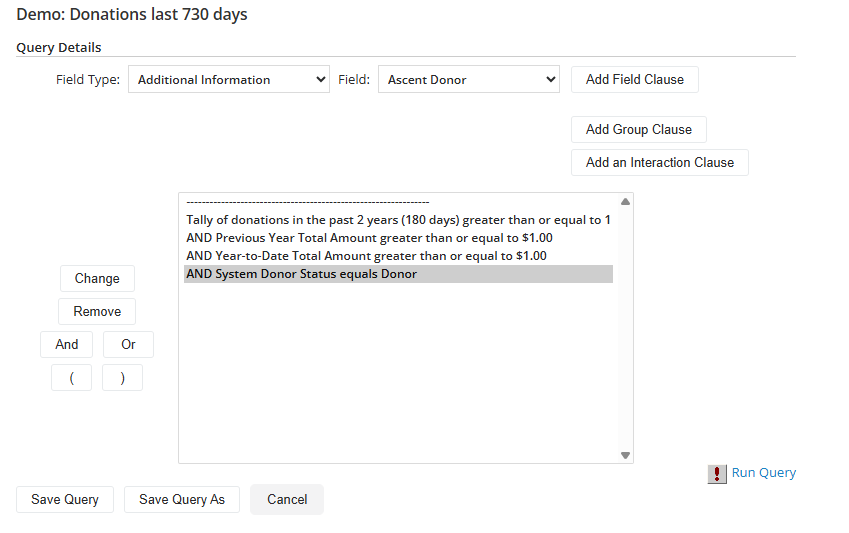
Then, what you would do is then go to Data Management > Query and set up a new query. You would include the following:
- Transaction Information > Engagement Factor used (e.g. Engagement Factor 1) to track the count of donations over the 730 period.
- AND Transaction Information > Previous Year Total Amount is greater than or equal to $1.00
- AND Transaction Information Year-to-Date Total Amount is greater than or equal to $1.00
- AND System > Donor Status is equal to donor
*Feel free to update the amounts and counts here if you are looking for higher level donors and amounts to set it to your liking.
If you want to exclude sustaining donors, like monthly/quarterly/annual donors, you would then add:
- AND (Sustained Giving Information > Status > Not equal to Current Sustaining Donor
- OR Sustained Giving Information > Status > Not equal to Lapsed Sustaining Donor
- OR Sustained Giving Information > Status > Not equal to Partially Lapsed Sustaining Donor)
The reason why we are including lapsed and partially lapsed sustaining donors is that a lapsed sustaining gift is still technically an active sustaining gift, it is just that the last attempt, something didn't process (maybe insufficient funds, expired card, etc.) and a partially lapsed means that there are at least two sustaining gifts and at least one of those is having trouble processing.
If you are building this for an email to invite regular one-time donors to become sustaining monthly donors, you may also want to only find good/valid email addresses by adding the following at the very top of the query:
- Email > Accept Email equals true
- AND Email > Email Status not equal to Bad - Hard Bounce
- AND System > Active Status not equal to removed
Once you have the data where you want it, you can use the "Use Query" option to create a group to use for email or any other use you may want with the group or you can use the "Mail Merge" option to produce a download of the data as a .csv file for your off-platform use/analysis.
Here is a screenshot of how the Web Site Engagement Segmentation should be set up if looking at donations over the past 730 days as an Engagement Factor under Data Management > Tasks:
Here is a screenshot of the query described above (without the search for good/valid email addresses as a part of it):
I hope this helps you get you what you are looking for.
Thanks,
Will
Blackbaud Principal Consultant, Luminate Online0










Categories
- All Categories
- 6 Blackbaud Community Help
- 211 bbcon®
- 1.4K Blackbaud Altru®
- 403 Blackbaud Award Management™ and Blackbaud Stewardship Management™
- 1.2K Blackbaud CRM™ and Blackbaud Internet Solutions™
- 15 donorCentrics®
- 360 Blackbaud eTapestry®
- 2.6K Blackbaud Financial Edge NXT®
- 658 Blackbaud Grantmaking™
- 579 Blackbaud Education Management Solutions for Higher Education
- 3.2K Blackbaud Education Management Solutions for K-12 Schools
- 943 Blackbaud Luminate Online® and Blackbaud TeamRaiser®
- 84 JustGiving® from Blackbaud®
- 6.7K Blackbaud Raiser's Edge NXT®
- 3.8K SKY Developer
- 250 ResearchPoint™
- 120 Blackbaud Tuition Management™
- 165 Organizational Best Practices
- 241 Member Lounge (Just for Fun)
- 36 Blackbaud Community Challenges
- 37 PowerUp Challenges
- 3 (Open) PowerUp Challenge: Grid View Batch
- 3 (Closed) PowerUp Challenge: Chat for Blackbaud AI
- 3 (Closed) PowerUp Challenge: Data Health
- 3 (Closed) Raiser's Edge NXT PowerUp Challenge: Product Update Briefing
- 3 (Closed) Raiser's Edge NXT PowerUp Challenge: Standard Reports+
- 3 (Closed) Raiser's Edge NXT PowerUp Challenge: Email Marketing
- 3 (Closed) Raiser's Edge NXT PowerUp Challenge: Gift Management
- 4 (Closed) Raiser's Edge NXT PowerUp Challenge: Event Management
- 3 (Closed) Raiser's Edge NXT PowerUp Challenge: Home Page
- 4 (Closed) Raiser's Edge NXT PowerUp Challenge: Standard Reports
- 4 (Closed) Raiser's Edge NXT PowerUp Challenge: Query
- 798 Community News
- 3K Jobs Board
- 56 Blackbaud SKY® Reporting Announcements
- 47 Blackbaud CRM Higher Ed Product Advisory Group (HE PAG)
- 19 Blackbaud CRM Product Advisory Group (BBCRM PAG)