Help, I cannot upload a zip file





Hi everyone 👋
I’m very new to Power Automate and starting to explore automating our donor thank-you letters.
I’m running into an issue importing flows and hoping someone here has cracked this before:
• When I try Legacy Import, I get the error:
“Importing packages with flows is disabled because the ‘Create in Dataverse solutions’ option was enabled by your admin. Use solution import instead.”
• When I try importing the same ZIP via Solutions, the import fails due to missing files
As a learning opportunity, I’d be love to build the flow from scratch instead of importing the ZIP. If anyone has step-by-step guidance, screenshots, or “here’s how I’d structure it” advice for an automated thank-you letter flow, I’m all ears.
Thanks in advance. Coffee has been consumed. Patience is fading. ☕😅
Best Answer
-
I have a difference in opinion.
I do not think the zip file you are trying to import is from a flow that was in a managed solution, the error message rather suggests that your org administrator disabled importing flow that's not part of a solution. You might want to send this error message to your IT team and have them look into the power platform admin setting around this.
2





Answers
-
Solutions are a different area of Power Automate - while solutions can contain flows, they are not themselves flows. I recommend you reach out to the original user that submitted the flow (via BB Community) and see if they can send the flow to you within an "unmanaged" solution. The unmanaged part is important, that will enable you to edit the flows within it after you import it into your environment.
On a different note, I recommend you start with the Gift Notification flow first - in all honesty it's were we all started, myself included. From there work your way up-to acknowledgements, which can be quite complex.
If you aren't already aware of the monthly user group for Power Automate, join that:
And check out the playlists on the SKY Developer YT channel with recordings from all sessions/skill labs sessions from past bbdevdays virtual conferences:
Copied from my response in the FB Group.1 -
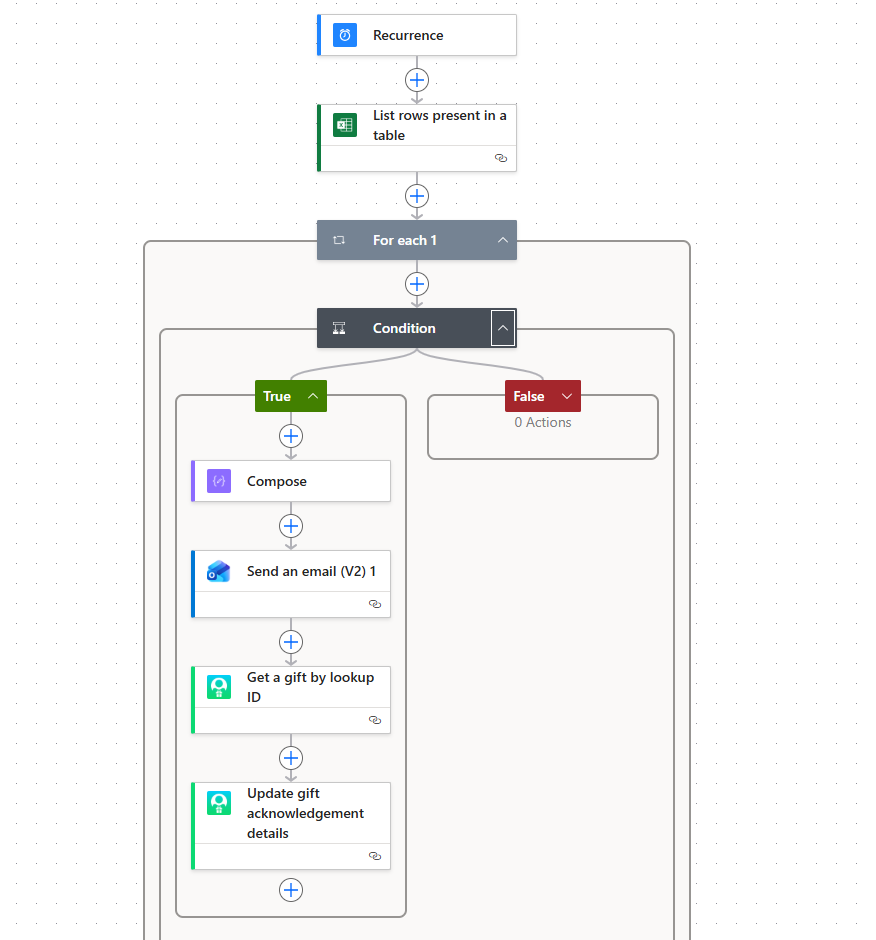
@Kylee Hamilton Can you tell me what the data source for the thank you letters is? What is your desired trigger? I recently did something similar although the automated letters were based on an export of gifts from each week. Here is a template of steps for my flow. The compose has the body of the letter with necessary fields from the excel file pulled in like salutation, gift amount etc.
Hope this helps!
Best,
Bipin
 0
0 -
Thanks all!
For anyone who runs into this: new Power Automate subscriptions have Dataverse Solutions turned on by default, which blocks legacy package imports. I disabled it in the Power Platform Admin Center and can now import ZIP files without issue.
0






Categories
- All Categories
- 6 Blackbaud Community Help
- 211 bbcon®
- 1.4K Blackbaud Altru®
- 403 Blackbaud Award Management™ and Blackbaud Stewardship Management™
- 1.2K Blackbaud CRM™ and Blackbaud Internet Solutions™
- 15 donorCentrics®
- 360 Blackbaud eTapestry®
- 2.6K Blackbaud Financial Edge NXT®
- 659 Blackbaud Grantmaking™
- 579 Blackbaud Education Management Solutions for Higher Education
- 3.2K Blackbaud Education Management Solutions for K-12 Schools
- 943 Blackbaud Luminate Online® and Blackbaud TeamRaiser®
- 84 JustGiving® from Blackbaud®
- 6.7K Blackbaud Raiser's Edge NXT®
- 3.8K SKY Developer
- 250 ResearchPoint™
- 120 Blackbaud Tuition Management™
- 165 Organizational Best Practices
- 241 Member Lounge (Just for Fun)
- 36 Blackbaud Community Challenges
- 37 PowerUp Challenges
- 3 (Open) PowerUp Challenge: Grid View Batch
- 3 (Closed) PowerUp Challenge: Chat for Blackbaud AI
- 3 (Closed) PowerUp Challenge: Data Health
- 3 (Closed) Raiser's Edge NXT PowerUp Challenge: Product Update Briefing
- 3 (Closed) Raiser's Edge NXT PowerUp Challenge: Standard Reports+
- 3 (Closed) Raiser's Edge NXT PowerUp Challenge: Email Marketing
- 3 (Closed) Raiser's Edge NXT PowerUp Challenge: Gift Management
- 4 (Closed) Raiser's Edge NXT PowerUp Challenge: Event Management
- 3 (Closed) Raiser's Edge NXT PowerUp Challenge: Home Page
- 4 (Closed) Raiser's Edge NXT PowerUp Challenge: Standard Reports
- 4 (Closed) Raiser's Edge NXT PowerUp Challenge: Query
- 798 Community News
- 3K Jobs Board
- 56 Blackbaud SKY® Reporting Announcements
- 47 Blackbaud CRM Higher Ed Product Advisory Group (HE PAG)
- 19 Blackbaud CRM Product Advisory Group (BBCRM PAG)