Dynamic RE Query to Exclude Constituents with Specific Alias Type





Hi All,
I have a question about RE Query. Let me first explain our current process—we're using Luminate Online (LO) for email campaigns and Omatic Cloud as the bridge between Raiser's Edge (RE) and LO. As part of this process, we store the Luminate ID as an alias type in RE. For an additional sync process, we need a dynamic RE query that includes only constituent records without a Luminate ID alias. This should capture records with no aliases at all, as well as records with other alias types like 'Demoted ID' but specifically no Luminate ID alias, while excluding any record that has even one Luminate ID alias. The query must remain dynamic since Omatic Cloud doesn't accept static queries or selections. I've tried various criteria combinations (Alias Type blank, Alias Type not equal to Luminate ID, OR logic), but none work correctly due to the one-to-many relationship between constituents and aliases. While Query 1 minus Query 2 (SUB operation) would work, it creates a static result that Omatic Cloud won't accept. How can we build a single dynamic query for this situation?
I would greatly appreciate any suggestions, guidance, or workarounds
Thank you!
Best Answer
-
I am not sure if this will work, but worth a try.
Do the SUB, that creates the static query
then create a new constituent dynamic query and use the Options tab to Select from query and point to the static query.
1





Answers
-
I am not sure why that is not working for you because I am able to pull a query using the Alias Type does not equal WHATEVER FIELD you choose. If you are putting in your query Alias Type does not equal Luminate ID, it should not pull any record that has that Type, it will pull other types (unless you state those types) and it will pull anyone who does not have an Alias Type at all.
Now if you are storing the Luminate ID in the TYPE Section, because that will be an issue. Maybe you need to explain a little more what exactly is not working with your query.
0 -
Thank you for your response. Let me clarify with a specific example of what's happening:
Scenario:
Record A: Has only 'Demoted ID' alias → Should appear in query results
Record B: Has only 'Luminate ID' alias → Should NOT appear
Record C: Has both 'Demoted ID' AND 'Luminate ID' aliases → Should NOT appear
Record D: Has no aliases → Should appear
The Problem with Alias Type does not equal Luminate ID:
When I use this criteria, Record C still appears because it does have a 'Demoted ID' alias that matches 'does not equal Luminate ID'. RE Query evaluates each alias separately due to the one-to-many relationship, so any matching alias brings the whole record into results.Our Use Case:
Newly created RE records need to sync to Luminate via Omatic Cloud, plus any existing records without Luminate ID. We're storing Luminate ID in the Alias Value field with 'Luminate ID' as the Alias Type.
Thank you!0 -
I understand now. Well the issue is putting that in the Alias Field. That Luminate ID should go into an attribute called Luminate ID. That is the issue with putting items into fields where it really should not go. You can still do a query of those with that Luminate ID, them import that ID into the attribute field and then go back and remove the Luminate ID from the Alias in a a global change (or keep it there, but it needs to be an attribute). I suggest only using the Alias for exactly that Alias Names.
0 -
@Venky Immadisetty How I believe query works and not sure if any of these is your use case but, if someone creates a Merge Query using the SUB merge operator, that query is static. Even if you reference it later using “Select from Query,” it will only use the saved results from the last time the Merge was run. It will not automatically update based on changes to the original criteria. If instead the original query is built as a Dynamic Constituent Query and you reference it using “Select from Query,” the new query will remain dynamic. Both queries will update automatically whenever the data changes.
0 -
I just wanted to share an update — I followed Alex’s suggestion and was able to achieve what I needed. Thanks, Alex, and thanks to everyone for your helpful suggestions!
0 -
Would you be using a merge query here, as you noted 'minus' in the initial note? Thanks.
0 -
You are likely correct here, a dynamic query that is "select from" a static query is not going to get the original "static query" to refresh its data.
However, the original post is not about dynamic refresh of the data, it's about the limitation of Omatic Cloud. Omatic Cloud requires a dynamic query, but Venky's org way of storing information requires a querying process that results in a static query. So simply "wrapping" the static query results in a dynamic query type using "select from" the static query is the fix.
0 -
I am using SUB Merge Operator, Thanks!
0 -
I'd like to share another update — we've encountered a new challenge in our process. Before explaining the issue, I want to provide some background on what we're trying to achieve.
We are currently using Omatic Cloud as a bridge to move data between Raiser's Edge (RE) and Luminate Online (LO). We store the Luminate Constituent ID as the Luminate Alias ID in RE. As part of our daily sync process, we want to push any record that does not have a Luminate Alias ID in RE into LO and create a record for them there. We also have a separate process that reads newly created records in LO and writes the Luminate Alias ID back into RE — though we are experiencing issues with that process as well. Together, these two processes are meant to keep our systems in sync. For now, we are focusing on Step 1.
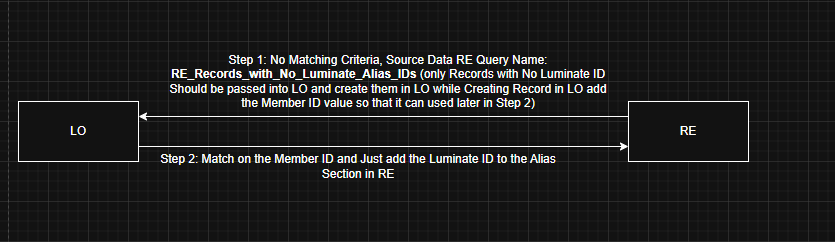
Here is what I've done so far, based on Alex's suggestion:
- Query 1 stores all records in RE.
- Query 2 stores all records in RE with a Luminate Alias ID.
- I used a Merge SUB operator on these two queries to isolate records without a Luminate Alias ID.
Since the Merge result is static, I created a new dynamic query that uses the Merge results query as its source, giving me a dynamic query that returns only records without a Luminate Alias ID.
I've tested this end-to-end and was successfully able to create a record in LO through this sync process — which is great!
To make this a daily sync, I scheduled both the Merge query and the dynamic query to refresh daily via the Queue. This approach ensures the Merge operation runs first, populates the static result set, and then the dynamic query refreshes against those results. When triggered on demand, this works correctly and the data refreshes as expected. However, here is the core problem: When the dynamic query is scheduled to automatically read the static query results on refresh, it converts the dynamic query to a static query. Since Omatic Cloud is not designed to read static queries — because Blackbaud does not yet expose an API for static queries — Omatic Cloud cannot pick it up. When I manually pass the static query results into the dynamic query, the type does not change. But as soon as it is scheduled for a daily refresh, the query type flips from dynamic to static
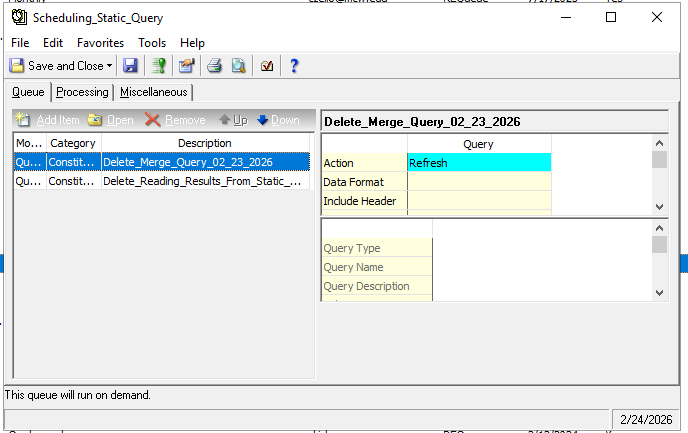
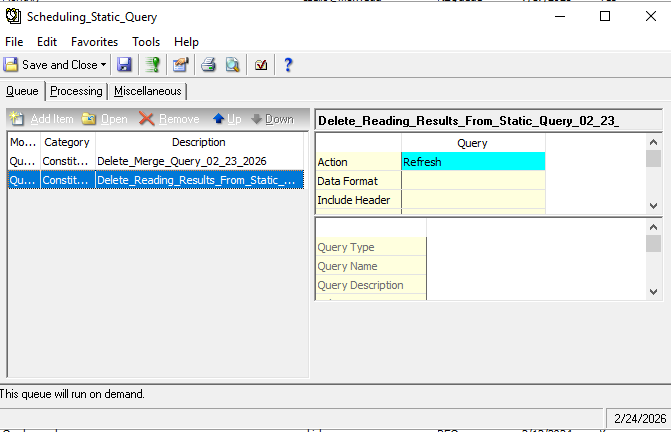
My question: Is there an API call I can use in a Power Automate flow to change the query type back from static to dynamic by passing the Query ID?
Thank you!
0 -
You do not need to refresh the dynamic query.
Use Queue to refresh the static query only.
0 -
I have removed the Dynamic query from the Queue and its working. Thank you very much Alex
0









Categories
- All Categories
- 6 Blackbaud Community Help
- 211 bbcon®
- 1.4K Blackbaud Altru®
- 403 Blackbaud Award Management™ and Blackbaud Stewardship Management™
- 1.2K Blackbaud CRM™ and Blackbaud Internet Solutions™
- 15 donorCentrics®
- 360 Blackbaud eTapestry®
- 2.6K Blackbaud Financial Edge NXT®
- 658 Blackbaud Grantmaking™
- 579 Blackbaud Education Management Solutions for Higher Education
- 3.2K Blackbaud Education Management Solutions for K-12 Schools
- 943 Blackbaud Luminate Online® and Blackbaud TeamRaiser®
- 84 JustGiving® from Blackbaud®
- 6.7K Blackbaud Raiser's Edge NXT®
- 3.8K SKY Developer
- 250 ResearchPoint™
- 120 Blackbaud Tuition Management™
- 165 Organizational Best Practices
- 241 Member Lounge (Just for Fun)
- 36 Blackbaud Community Challenges
- 37 PowerUp Challenges
- 3 (Open) PowerUp Challenge: Grid View Batch
- 3 (Closed) PowerUp Challenge: Chat for Blackbaud AI
- 3 (Closed) PowerUp Challenge: Data Health
- 3 (Closed) Raiser's Edge NXT PowerUp Challenge: Product Update Briefing
- 3 (Closed) Raiser's Edge NXT PowerUp Challenge: Standard Reports+
- 3 (Closed) Raiser's Edge NXT PowerUp Challenge: Email Marketing
- 3 (Closed) Raiser's Edge NXT PowerUp Challenge: Gift Management
- 4 (Closed) Raiser's Edge NXT PowerUp Challenge: Event Management
- 3 (Closed) Raiser's Edge NXT PowerUp Challenge: Home Page
- 4 (Closed) Raiser's Edge NXT PowerUp Challenge: Standard Reports
- 4 (Closed) Raiser's Edge NXT PowerUp Challenge: Query
- 798 Community News
- 3K Jobs Board
- 56 Blackbaud SKY® Reporting Announcements
- 47 Blackbaud CRM Higher Ed Product Advisory Group (HE PAG)
- 19 Blackbaud CRM Product Advisory Group (BBCRM PAG)