Unable To Locate PayPal Donations



Hi,
At some point in the past, I believe that the donations from donors who used PayPal to donate to us through our online donation form would be disbursed into our account via Blackbaud Merchant Services. However, it appears that that has changed at some point. I'm now not ablet to locate how these donations made via PayPal are being disbursed into bank account. Has anyone else had this issue? If so, how did you resolve it and where did you locate the PayPal disbursements?
Thanks,
Michael
Answers
-
Here is some product documentation. Does any of this help?
How do I set up PayPal (and Venmo) with Blackbaud Merchant Services?
Get Started with PayPalPayPal Integration
How can we report on and reconcile our PayPal transactions?I recommend you log in to your Pay Pal Business Account to pull down the monthly statement to reconcile against your RE transactions. I don't know that I've ever seen my PayPal transactions come through on my BBMS statements or be disbursed through BBMS. It is all set up in the PayPal Business Account.
1 -
As @Carlene Johnson stated, those funds will be located in your PayPal charitable account. You'll have to manually initiate the transfer of funds to your org's bank account.
1 -
I've looked through my org's PayPal account and there's no trace of those donations though. Could it have something to do with some other external software or service?
0 -
If these gifts are coming in through your RE‑NXT Online Giving Forms, they will be deposited into the PayPal Business Account connected to those forms.
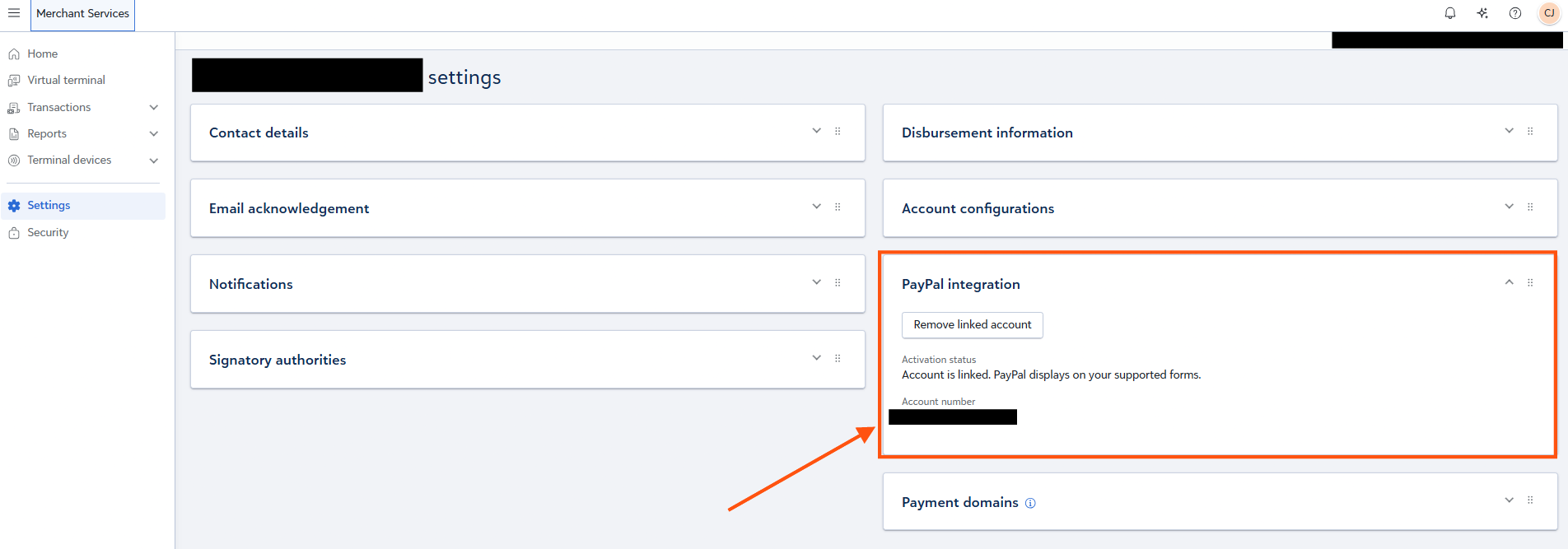
I’ve seen many organizations discover—often by accident—that they actually have more than one PayPal account, and not all of them are official business accounts. To make sure you’re checking the correct one, I recommend going into BBMS and confirming the PayPal account number associated with your Online Giving Forms, as shown here.
A common scenario is that an organization originally used a PayPal account tied to someone’s personal phone number, which means it isn’t a true business account. Later, they set up an official PayPal Business Account for use with Online Giving Forms. That business account is what connects to BBMS, even though the gifts themselves are not disbursed through BBMS.
Let us know what you find!
 0
0 -
@Michael Catrino, I haven't seen my org's PayPal transactions come through on my BBMS statements either. I've had to log into my PayPal business account and manually transfer the funds to my org's designated bank account. How often do you prefer to reconcile the donations made through this pay method? Monthly? Weekly? Biweekly? My org didn't get many of them, so we processed them in separate batches from credit card ones and transferred the funds monthly. Below is a modified version of my procedure for taking care of these gifts, if it helps:
- Go to www.paypal.com and log in using your credentials.
- From the Home screen, scroll down to Recent activity and click on the live link "View Activity."
- Calculate the Net amount that you need to transfer for the previous month using gift batch reports, comparing it to the transactions listed under View Activity from the previous month.
- Once you have the amount, go back to Home and click the Manage money dropdown button and select Transfer money.
- Update the amount at the top to reflect the amount that you calculated.
- Make sure that the in 1-3 days no fee option is chosen before clicking "Transfer $xxxx USD Now" button.
- Once complete, you'll be brought back to the Home screen.
- From the Home screen, go back to the Recent activity section and click View Activity.
- On the Transactions page, click on the Filter button, change the date to Custom, and enter the dates for the previous month. Click Apply Filters
- Once the page has refreshed, click on the download button next to the Filters button.
- You will be brought to an Activity report page. Change the drop down options above Customize report fields to "All transactions" and change the date range to the previous month. Click Create Report.
- The request will appear in the Activity reports section below. The email account associated with your PayPal business account will receive an email when the report is ready to be downloaded.
- Once it's ready, retrieve the download file and do the following to the spreadsheet. Unlike with regular credit card and direct debit payments processed through BBMS, a handy report will not be created for you to use for reconciliation. This downloaded report is the best available.
- Add a Batch Number column. Using reports you've generated for individual gift batches, add in the appropriate batch number for each gift.
- Remove any rows with a Type of User Initiated Withdrawal and General Authorization. What's left will be the actual completed donation with the correct Net amount.
- Use a Sum formula to add up the Gross, Fee, and Net columns.
- Once you've added the batch numbers to the gifts, save it as an Excel Worksheet
- Be sure to name it using a convention which makes the most sense to you. PayPal_Venmo Month Year Disbursement is what I use
- Let your contact in Fiscal Services/the Finance Office know that the report is ready and what batches to use for reconciliation.
- Check the email account associated with your PayPal business account for a confirmation email from PayPal that the transfer request is processing and save it as a PDF in the same place as the spreadsheet. Use a naming convention which makes the most sense to you. I use Month Year PayPal Gifts Transfer Confirmation mm.dd.yy.
Please let me know if any of this doesn't make sense.
2 -
These instructions are AMAZING! Thank you for sharing!
0 -
The problem is that I don't have an option to transfer money though. Which doesn't make any sense to me since there have been many donations that have come in through our Blackbaud over the past few months.
0 -
Can you SEE that there are transactions there that match up with what folks have given via the online form?
It may be that your SECURITY level is such that you are not allowed to transfer the money. I'd check with your finance office - or whomever set up / owns the PayPal account.0 -
No, the only transaction I can see is a single one that came in through a different source (it didn't come through our website). Our account manager for the PayPal account can't see the transaction from our website either.
0 -
Have you confirmed that you are logging in to the correct account? Could you make a $5.00 transaction on a company card to test what is happening?
The fact that you see a transaction that didn't come in through your website tells me you are probably logging in to the wrong account.0















Categories
- All Categories
- 6 Blackbaud Community Help
- 211 bbcon®
- 1.4K Blackbaud Altru®
- 403 Blackbaud Award Management™ and Blackbaud Stewardship Management™
- 1.2K Blackbaud CRM™ and Blackbaud Internet Solutions™
- 15 donorCentrics®
- 360 Blackbaud eTapestry®
- 2.6K Blackbaud Financial Edge NXT®
- 658 Blackbaud Grantmaking™
- 579 Blackbaud Education Management Solutions for Higher Education
- 3.2K Blackbaud Education Management Solutions for K-12 Schools
- 943 Blackbaud Luminate Online® and Blackbaud TeamRaiser®
- 84 JustGiving® from Blackbaud®
- 6.7K Blackbaud Raiser's Edge NXT®
- 3.8K SKY Developer
- 250 ResearchPoint™
- 120 Blackbaud Tuition Management™
- 165 Organizational Best Practices
- 241 Member Lounge (Just for Fun)
- 34 Blackbaud Community Challenges
- 37 PowerUp Challenges
- 3 (Open) PowerUp Challenge: Grid View Batch
- 3 (Closed) PowerUp Challenge: Chat for Blackbaud AI
- 3 (Closed) PowerUp Challenge: Data Health
- 3 (Closed) Raiser's Edge NXT PowerUp Challenge: Product Update Briefing
- 3 (Closed) Raiser's Edge NXT PowerUp Challenge: Standard Reports+
- 3 (Closed) Raiser's Edge NXT PowerUp Challenge: Email Marketing
- 3 (Closed) Raiser's Edge NXT PowerUp Challenge: Gift Management
- 4 (Closed) Raiser's Edge NXT PowerUp Challenge: Event Management
- 3 (Closed) Raiser's Edge NXT PowerUp Challenge: Home Page
- 4 (Closed) Raiser's Edge NXT PowerUp Challenge: Standard Reports
- 4 (Closed) Raiser's Edge NXT PowerUp Challenge: Query
- 798 Community News
- 3K Jobs Board
- 55 Blackbaud SKY® Reporting Announcements
- 47 Blackbaud CRM Higher Ed Product Advisory Group (HE PAG)
- 19 Blackbaud CRM Product Advisory Group (BBCRM PAG)