?️Thanks for your feedback! - Gradebook and Assignment Details Updates





Hi all! Ben from the LMS team here. I wanted to take a moment to thank so many of our teachers for sharing your feedback with us on the recent Gradebook and Assignment Details updates.
We are continuously reading through participants' comments, both positive and constructive. Based on what you've shared, I want to make sure you know we're listening and that the following items (and more!) are on our docket to address:
- From assignment details, seeing at a glance which students have submitted on time, submitted late, or not submitted
- Previewing an assignment through a view designed for projecting or screensharing with students
- Displaying all of a student's contributions to a discussion when grading them, both their original posts and replies to others
- Accessing assignment submissions directly from the gradebook
- Deleting an assignment directly from the gradebook
- And much much more!
We know it's an especially busy time of year for you, so again, thank you for taking the time to help us better meet your needs!
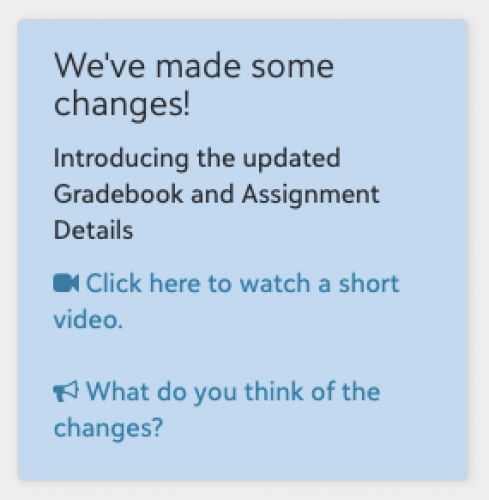
If you haven't had a chance to share feedback yet, we'll have the feedback link open a little while longer, which faculty can access from the blue announcement box currently on My Day:
Thanks again!
Comments
-
The choice for accessing the work turned in is now not visible under normal circumstances when looking at a student's assignment. You need to make the front size in your browser much smaller to reveal the choice in this new format. This looks like a very confusing byproduct of the new assignment screen design. BBaud support said “Currently there is not an option to change the style of the site. If you have any further questions regarding this feel free to contact us again.” but this is going to be confusing for teachers.
0 -
On the Assignments - grading Discussions is very clunky - the header on the assignment takes up almost the entire browser window on a 17" laptop (all our teacher use laptops and docking stations - so most do grading on laptops). The discussion window only allow a couple of lines of text - making the browser font smaller you can barely read the discussion. A collapse of the assignment header would be a GREAT function!
0 -
On a similar topic, in the Gradebook itself, the new view doesn't allow teachers to scroll all the way to the bottom of their list of students if they have more than about 12 kids in the class. Anyone past the 12th student or so will be "below the fold" of the page (i.e. cut off by the bottom of the screen), and there is no way to scroll down to view them at most standard resolutions. I don't just mean that there is no scroll bar "handle" for scrolling, I also mean that using the two-finger scroll on my trackpad won't get me there. The list sort of scrolls a bit, then behaves as though it's reached the end of the list (even though I know there are more), and "bounces" the list to indicate I can't scroll further.
This happens at most standard resolutions for our 13" faculty MacBooks, for instance mine is currently at 1536 x 960 resolution in Safari and I had to use the browser's View > Zoom Out option, twice, to be able to see the 13th, 14th, 15th, students in the list.1 -
Sylvie Andrews:
On a similar topic, in the Gradebook itself, the new view doesn't allow teachers to scroll all the way to the bottom of their list of students if they have more than about 12 kids in the class. Anyone past the 12th student or so will be "below the fold" of the page (i.e. cut off by the bottom of the screen), and there is no way to scroll down to view them at most standard resolutions. I don't just mean that there is no scroll bar "handle" for scrolling, I also mean that using the two-finger scroll on my trackpad won't get me there. The list sort of scrolls a bit, then behaves as though it's reached the end of the list (even though I know there are more), and "bounces" the list to indicate I can't scroll further.
This happens at most standard resolutions for our 13" faculty MacBooks, for instance mine is currently at 1536 x 960 resolution in Safari and I had to use the browser's View > Zoom Out option, twice, to be able to see the 13th, 14th, 15th, students in the list.I found that I was only able to see the rest of my students once I added an assignment. Once I added the first assignment, a vertical scrollbar showed up that allowed me to see the rest of the students.
1 -
Chris Felinski, thanks for the tip! Some of our teachers reported the scroll issue because they indeed hadn't yet added an assignment and were just trying to read through the gradebook to remind themselves who was in their class. Good to know that a scrollbar appears once an assignment is there.0
-
My teachers are reporting when adding comments it wipes the grades out - even after committing first, then making a comment later. This is annoying because they have to remember what the grade was that the comment wiped out. NOTE when making a comment the Grade is showing in the Evaluate assignment window is there but upon saving the grade is removed. I have reported to Support - even took a video of what's happening - and I get “We can't recreate the issue.” That seems to be their response lately.
0 -
Yes - I was able to see my whole class list when I had assignments added.
0 -
@Kathy Hannon - I saw the same behavior and submitted a case (018485584) with video.
I also saw: a comment can not be removed after it was committed in the Gradebook view. (It returns after the edit is committed.)
Also: in the Gradebook view, when changing a letter grade that has been committed to “no grade” (--), the grade displayed is not updated until the changed grade is committed. (Case 018485561)
0 -
@Brian Gray - yes we have seen the comment issue also, not being able to remove. You can put a “space” in but the Comment Bubble still shows - awful for faculty, they are turning off viewing comments which is going to be an issue soon!
0 -
@Ben Leddy: a teacher reported a surprising behavior regarding the gradebook and the Collected checkbox. I think that it's working as designed (but not in the way that the student or teacher expected). If it's a bug, I can report it though Case Central.
Our classes are mostly in-person, but a few students are still quarantining remotely. The teacher is creating assignments to allow in-system submissions for the remote students, but collects paper from most students in class.
The teacher used the Collected indicator for the students who handed in paper. But…the assignment still shows as Overdue for those students who handed in paper - presumably because they have not done an in-system submission.
Please consider linking the assignment status displayed to students with the Collected indicator, so that the student does not see an Overdue notice for an assignment he handed in on paper.
2 -
Hi all - the comment issue in gradebook came on our radar and we recently addressed it, but please do reach out to support if you're finding exceptions.
Thanks for describing the scenario around Collected. Since Collected was intended as a teacher-specific grading tool, it wasn't hooked up to the student view or to the Overdue status. That said, I understand the use case you are describing and will have my team look into it.1 -
Ben - when was the comment issue corrected? We have a case in but we are still seeing this issue. Thanks0
-
Kathy Hannon On Tuesday, I believe -- so I will keep an eye out for any continuing issues. In the meantime, deleting comments from assignment details should be functioning for the case of comments that need immediate deletion.0
-
Teachers used to have the ability to highlight a grade that is below a certain threshold. Are there any plans to bring this feature back? I know there is currently a way to sort the gradebook from lowest to highest grade, but that is an extra step that is not appealing to our teachers.
0 -
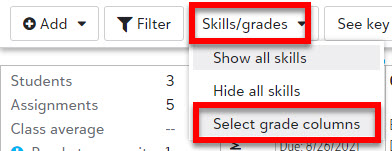
This is presently available under the Skills/grades dropdown in the Gradebook:

In response to user feedback, we will be updating the language and design for this for greater clarity moving forward!1 -
@Kim McAmis - As Ben said, you'll find that setting in the Skills/grades menu, but it's not obvious.
It's in Skills/grades > Select grade columns. It highlights the marking period average under a specified value. It does not flag low grades on individual assignments.
 1
1 -
Happy to share that the new indicators for Submitted assignments, with a color change for on-time versus late, are live. You can hover your mouse over the indicators to get more information on the date and time of submission. We're continuing to work through the list I shared previously and look forward to getting more updates out soon!
1 -
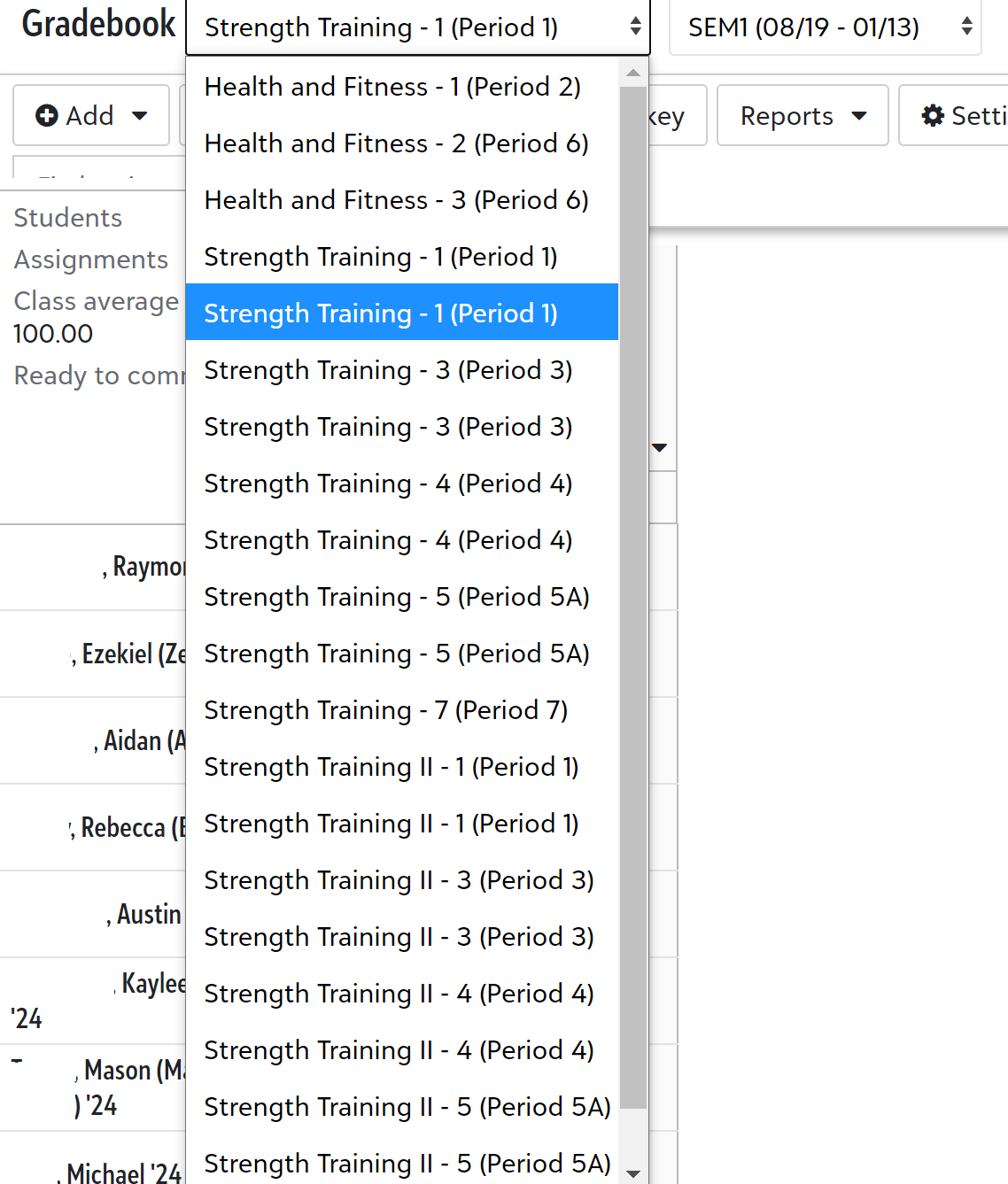
@Ben Leddy , overall my teachers are enjoying the new gradebook. I did come across one of our physical education teachers who noticed when he launches the gradebook, the drop-down list of his classes that permits a teacher to easily hop to different gradebooks is not very useable by him. It contains a list of not only all his classes from the current term, but it is showing all of his courses from next term too, but there is no term in the class name, so he has tons of duplicates. From our Core Years/Terms, we don't have SEM2 classes showing yet for teachers, so from his top Classes menu in the Faculty Persona, he only sees SEM1 classes as he should. However, from the gradebook, this setting does not seem to be respected there, and every class is showing. Also, ironically, he has noticed that the first class of the duplicate is SEM2 and the second class of the duplicate is SEM1 which is even more unnerving. I contact support, but they said that it was functioning as intended. Any insight in improving this experience? I've also attached a screenshot of his view.
 0
0 -
Thanks @Geoffrey Goodfellow ! I see the scenario and will connect with my team to see what might be doable.
1 -
@Geoffrey Goodfellow We've identified the issue and have it on our docket to address. Thanks!
0 -
Many thanks, @Ben Leddy !
0 -
There should be an option to “Uncommit” - when a teacher accidently marks over the grade, there isn't a way to go back to the way it was. the Commit stays and the old grade is gone, even if the commit was never selected.
0 -
Kathy Hannon Happy to share this can be done through the Cancel feature. Hit cancel for an uncommitted grade to revert back to the previous grade.
From assignment details:
From gradebook: 0
0 -
Ben Leddy - I am not seeing the screenshots like you do --- nothing in the gradebook but "Commit"
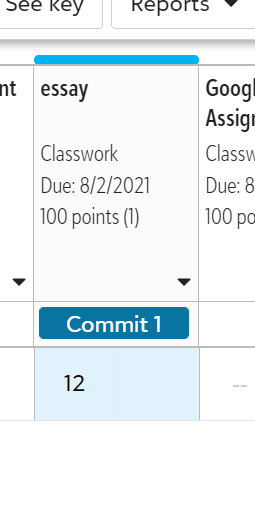
here's screenshot within the assignment - I don't see "Cancel changes" at all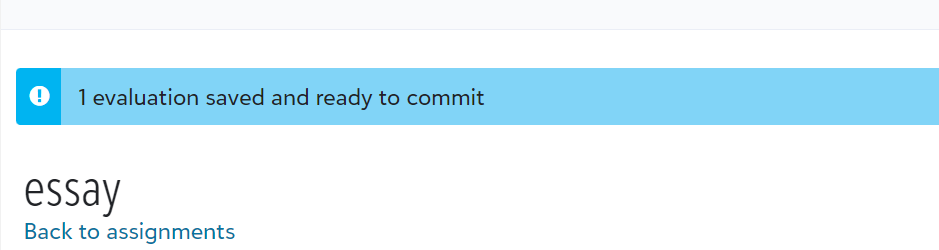 0
0 -
For assignment details, it's at the bottom of the page where you can commit individual changes.
For gradebook, click the blue square to the right of the 12, and you'll see it.
0 -
Awesome!! I am seeing both now. Thank you!0
-
@brian gray @Ben Leddy - reaching back to this August thread to ask whether there are any expected changes coming for “collected" being tied to a status change for students. Our teachers are trying to lean back into analog work now that we're back in the classroom, but teachers and students alike are feeling frustrated that there's not a way for a non-online assignment to be marked “complete” by the teacher. Especially troublesome for our teachers using CBE, since evaluating skills also doesn't consistently change the status for students --> lots of red “overdue” badges on student pages.
0 -
Thanks for checking in Morgan Kunze. In terms of the Collected status, we've heard mixed views on the approach of tying it to Completion, so we currently don't have any changes planned, but we continue to monitor. One thing students can do if the Overdue is a nuisance is submit text reading something like "I've turned this in in-person" to make sure it counts as Submitted within the system.0






















Categories
- All Categories
- 6 Blackbaud Community Help
- 211 bbcon®
- 1.4K Blackbaud Altru®
- 403 Blackbaud Award Management™ and Blackbaud Stewardship Management™
- 1.2K Blackbaud CRM™ and Blackbaud Internet Solutions™
- 15 donorCentrics®
- 360 Blackbaud eTapestry®
- 2.6K Blackbaud Financial Edge NXT®
- 660 Blackbaud Grantmaking™
- 581 Blackbaud Education Management Solutions for Higher Education
- 3.2K Blackbaud Education Management Solutions for K-12 Schools
- 944 Blackbaud Luminate Online® and Blackbaud TeamRaiser®
- 84 JustGiving® from Blackbaud®
- 6.7K Blackbaud Raiser's Edge NXT®
- 3.8K SKY Developer
- 250 ResearchPoint™
- 120 Blackbaud Tuition Management™
- 165 Organizational Best Practices
- 242 Member Lounge (Just for Fun)
- 37 Blackbaud Community Challenges
- 37 PowerUp Challenges
- 3 (Closed) PowerUp Challenge: Grid View Batch
- 3 (Closed) PowerUp Challenge: Chat for Blackbaud AI
- 3 (Closed) PowerUp Challenge: Data Health
- 3 (Closed) Raiser's Edge NXT PowerUp Challenge: Product Update Briefing
- 3 (Closed) Raiser's Edge NXT PowerUp Challenge: Standard Reports+
- 3 (Closed) Raiser's Edge NXT PowerUp Challenge: Email Marketing
- 3 (Closed) Raiser's Edge NXT PowerUp Challenge: Gift Management
- 4 (Closed) Raiser's Edge NXT PowerUp Challenge: Event Management
- 3 (Closed) Raiser's Edge NXT PowerUp Challenge: Home Page
- 4 (Closed) Raiser's Edge NXT PowerUp Challenge: Standard Reports
- 4 (Closed) Raiser's Edge NXT PowerUp Challenge: Query
- 800 Community News
- 3K Jobs Board
- 56 Blackbaud SKY® Reporting Announcements
- 47 Blackbaud CRM Higher Ed Product Advisory Group (HE PAG)
- 19 Blackbaud CRM Product Advisory Group (BBCRM PAG)