? Datepicker now shows class days and times!





Hi all! Ben from the LMS team here.
I'm excited to share that as of today, teachers can now see class meeting days and times when adding and editing assignment dates from their assignment center, section assignment lists, and the gradebook.
Take a look at the GIF to see how it works:
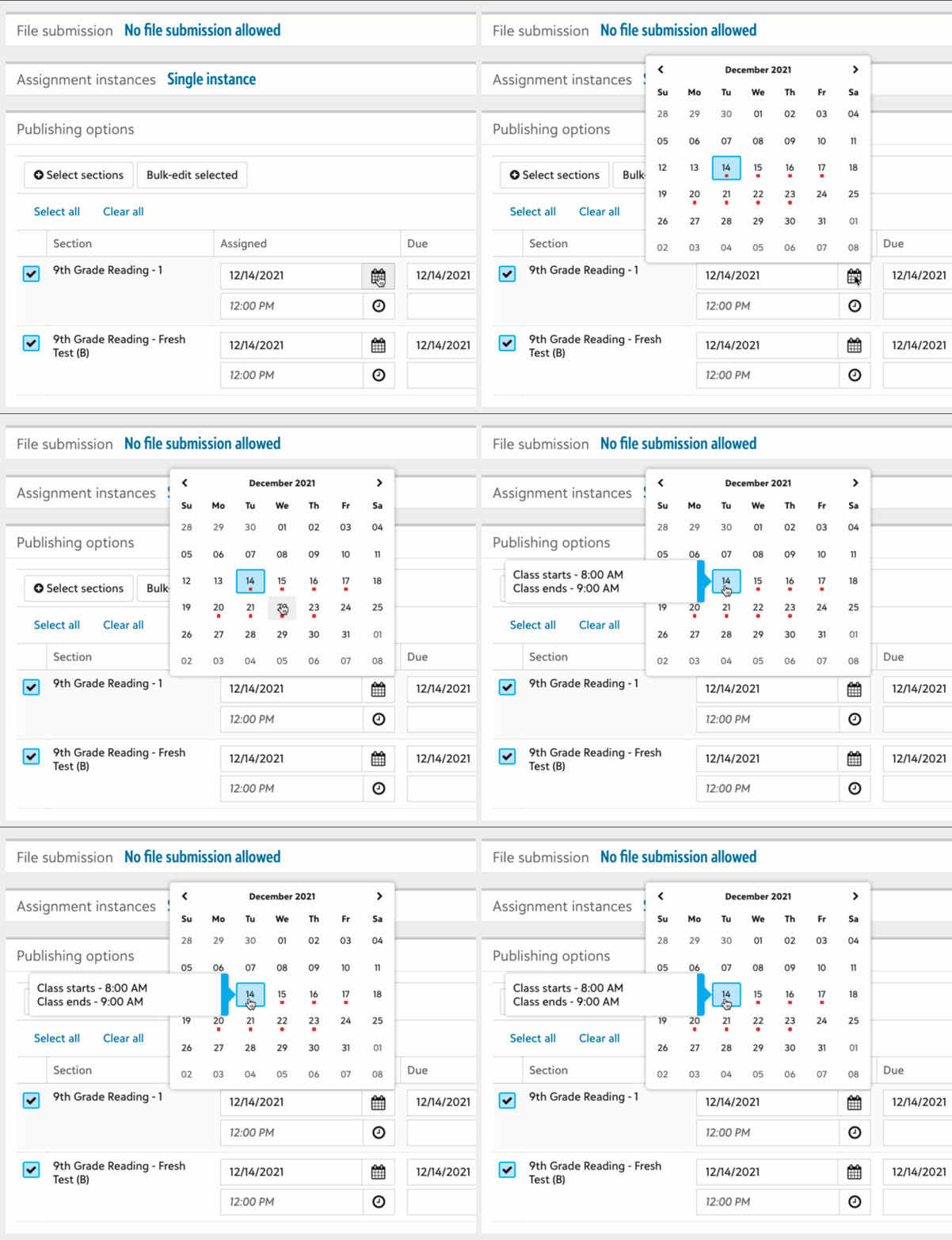
- Red dots indicate days when there is a class for the section.
- On desktop, hover over those dates to reveal when classes start and end.
We know this has been a major request, and we want to thank you for your feedback and patience as we got it over the finish line. Let us know what you think!
Comments
-
@Ben Leddy we're so glad the date picker is back and appreciate the added update of showing start/end times. Thank you!
2 -
This is a very helpful feature for scheduling!
2 -
THANK YOU @Ben Leddy! This is such a needed and necessary improvement and I'm sure our teachers will be thrilled to know the date picker has returned!
 2
2 -
Does anyone know why the datepicker doesn't show current-year meeting dates when editing assignments that were imported from a previous year? No dots showing in the calendar in that case currently. That would be so helpful.
0










Categories
- All Categories
- 6 Blackbaud Community Help
- 211 bbcon®
- 1.4K Blackbaud Altru®
- 402 Blackbaud Award Management™ and Blackbaud Stewardship Management™
- 1.1K Blackbaud CRM™ and Blackbaud Internet Solutions™
- 15 donorCentrics®
- 360 Blackbaud eTapestry®
- 2.6K Blackbaud Financial Edge NXT®
- 656 Blackbaud Grantmaking™
- 577 Blackbaud Education Management Solutions for Higher Education
- 3.2K Blackbaud Education Management Solutions for K-12 Schools
- 941 Blackbaud Luminate Online® and Blackbaud TeamRaiser®
- 84 JustGiving® from Blackbaud®
- 6.7K Blackbaud Raiser's Edge NXT®
- 3.7K SKY Developer
- 248 ResearchPoint™
- 120 Blackbaud Tuition Management™
- 165 Organizational Best Practices
- 240 Member Lounge (Just for Fun)
- 34 Blackbaud Community Challenges
- 37 PowerUp Challenges
- 3 (Open) PowerUp Challenge: Grid View Batch
- 3 (Closed) PowerUp Challenge: Chat for Blackbaud AI
- 3 (Closed) PowerUp Challenge: Data Health
- 3 (Closed) Raiser's Edge NXT PowerUp Challenge: Product Update Briefing
- 3 (Closed) Raiser's Edge NXT PowerUp Challenge: Standard Reports+
- 3 (Closed) Raiser's Edge NXT PowerUp Challenge: Email Marketing
- 3 (Closed) Raiser's Edge NXT PowerUp Challenge: Gift Management
- 4 (Closed) Raiser's Edge NXT PowerUp Challenge: Event Management
- 3 (Closed) Raiser's Edge NXT PowerUp Challenge: Home Page
- 4 (Closed) Raiser's Edge NXT PowerUp Challenge: Standard Reports
- 4 (Closed) Raiser's Edge NXT PowerUp Challenge: Query
- 796 Community News
- 3K Jobs Board
- 54 Blackbaud SKY® Reporting Announcements
- 47 Blackbaud CRM Higher Ed Product Advisory Group (HE PAG)
- 19 Blackbaud CRM Product Advisory Group (BBCRM PAG)