Does your school have a demo family account in Blackbaud K-12 for training and other purposes?





Comments
-
I use a "Tiger" family (our mascot is a tiger) - so I have Mom Tiger, Dad Tiger, Grandma Tiger, Grandpa Tiger, and a slew of Tiger children. I use the grad year as their first name so 2025 Tiger, 2030 Tiger, etc. I also have a Faculty Tiger and a Staff Tiger to test access on cloned roles I create. I usually have one tiger student per grade and then can give the teacher's the login info so they can see what students see. The only issue I come across is some teachers don't like to have a Tiger student on their roster so I try to find someone that doesn't mind. I also create Test classes and enroll the Tiger students so I can train how to use gradebook, assignments, etc. without showing real student info. It has worked great for us. We also use ConnectRE and just never link those "students" and "parents" so the info doesn't flow over to RE.3
-
@Susan Ott Does your method affect things like enrollment reports, student counts, withdrawal reports for the registrar? Our registrar doesn't want a fake student because it will mess up her counts, but this makes it difficult for me to test things out before they go live to faculty and students.
0 -
Years ago I needed an example student, so I created Ann Example. Since then, others have enrolled too. Anthony, Alfred, Abraham. The mother is Alice Example.
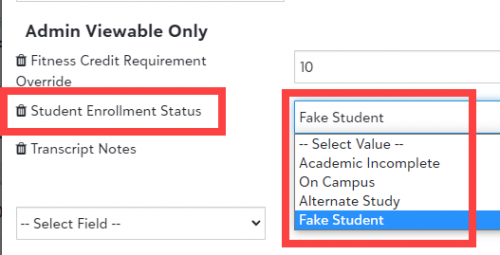
To make it easier to exclude them from lists, I added an Admin Viewable Only field for Student Enrollment Status. Many of my advanced lists specifically exclude students with certain statuses.
Academic Incomplete is used to identify a student who is completing academic work in the summer after their senior year to satisfy graduation requirements. Those students are not graduates and are not past students, but I don't want to include them in counts.
Alternate Study is used to identify students who are officially enrolled at the school but are studying off campus - exchange programs, School Year Abroad, etc.
On Campus is the value for a “normal” student. I use that value temporarily if I need to test something, but usually I just delete the field on the student's record.
 3
3 -
@Ryan Farrington
I’m the registrar and I love my test students. I have 2 — one is now repeating their senior year and another is in 5th grade.2












Categories
- All Categories
- New YourCause Community TEST
- New SKY Community TEST
- New Grantmaking TEST Community
- New Altru Test Community
- New bbcon Community - TEST
- 12 Blackbaud Agents for Good™
- New Raiser's Edge NXT Community
- 7 Blackbaud Community Help
- 218 bbcon®
- 1.4K Blackbaud Altru®
- 409 Blackbaud Award Management™ and Blackbaud Stewardship Management™
- 1.2K Blackbaud CRM™ and Blackbaud Internet Solutions™
- 16 donorCentrics®
- 361 Blackbaud eTapestry®
- 2.7K Blackbaud Financial Edge NXT®
- 680 Blackbaud Grantmaking™
- 598 Blackbaud Education Management Solutions for Higher Education
- 3.3K Blackbaud Education Management Solutions for K-12 Schools
- 952 Blackbaud Luminate Online® and Blackbaud TeamRaiser®
- 85 JustGiving® from Blackbaud®
- 7K Blackbaud Raiser's Edge NXT®
- 3.9K SKY Developer
- 257 ResearchPoint™
- 123 Blackbaud Tuition Management™
- 165 Organizational Best Practices
- 247 Member Lounge (Just for Fun)
- 40 Blackbaud Community Challenges
- 37 PowerUp Challenges
- 3 (Closed) PowerUp Challenge: Grid View Batch
- 3 (Closed) PowerUp Challenge: Chat for Blackbaud AI
- 3 (Closed) PowerUp Challenge: Data Health
- 3 (Closed) Raiser's Edge NXT PowerUp Challenge: Product Update Briefing
- 3 (Closed) Raiser's Edge NXT PowerUp Challenge: Standard Reports+
- 3 (Closed) Raiser's Edge NXT PowerUp Challenge: Email Marketing
- 3 (Closed) Raiser's Edge NXT PowerUp Challenge: Gift Management
- 4 (Closed) Raiser's Edge NXT PowerUp Challenge: Event Management
- 3 (Closed) Raiser's Edge NXT PowerUp Challenge: Home Page
- 4 (Closed) Raiser's Edge NXT PowerUp Challenge: Standard Reports
- 4 (Closed) Raiser's Edge NXT PowerUp Challenge: Query
- 822 Community News
- 3.1K Jobs Board
- 57 Blackbaud SKY® Reporting Announcements
- 47 Blackbaud CRM Higher Ed Product Advisory Group (HE PAG)
- 19 Blackbaud CRM Product Advisory Group (BBCRM PAG)