Connecting membership records to demographic information at check-in.





Hello all,
I work at a children's museum that sees a high volume of guests and member guests per day.
We collect important demographic information from members in regard to their children's DOB. Then at member check in we ask members how old the children they are checking in are. Both demographic points are used in grant writing, end-of-year reports, impact reports, etc, and are therefore vital pieces to collect.
However, members quickly grow tired/irritated of sharing this information with us at check in, and it also slows down the check in process. Is there any existing tech within Altru that would enable us to link the members checking in with their birth dates.
I.e., A member and their child checks in. The member (adult) is checking in with the child (3) listed on their account. Altru recognizes when we click Member Adult and Member Child that the child is 3, and records them as such in the daily sales tab. The transaction is completed and the information is recorded.
Any help on collecting this information AND saving time, would be much appreciated!
Comments
-
Hi @Lydia Baard,
I don't know of a way to customize the Daily Sales window to do what you are asking. I may check with your Customer Success Manager to see if they can investigate a little for you. Maybe there is something else they know of that you could do.
I do have an idea for you about creating a Selection of constituents that need DOB information collected. Then you could create a Notification based on the Selection that appears in Daily Sales. Just to see if this would be feasible could you please help me better understand your current process?
- How are these members connected - the Adult and the Child? Are they all listed on the Membership record? Are they connected via a Relationship? And if so, do they have a consistent Relationship Type (e.g. parent/child, spouse, partner, etc.)?
- How are you currently recording the date of births that you are collecting? Does your team enter them into a Daily Sales field? Or are they being collected somewhere else and then added to the Constituent record? Are they ultimately entered into the Date of Birth field on the Constituent record? If not, where are you recording the date of birth information?
- How are you pulling the information for your grant reporting? Is that by Sales Orders and visits? Or is it by active memberships? What I'm getting at here is that the adult probably has the sales order and visit record on their constituent record. The child probably does not have that. So I'm just thinking about how you are documenting the age of the child and visit info for any reporting,
Thank you.
Chris
0 - How are these members connected - the Adult and the Child? Are they all listed on the Membership record? Are they connected via a Relationship? And if so, do they have a consistent Relationship Type (e.g. parent/child, spouse, partner, etc.)?
-
@Chris Nungesser
We have a membership reports which report out the data that we have listed on constituents (in this case age). The age is saved in their constituent record, they are filed into a membership within Altru and then we consolidate every person in that membership into a household.
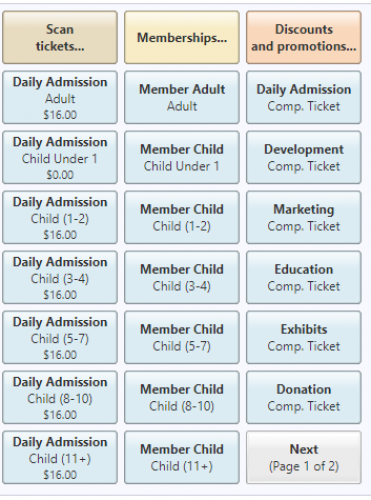
When guests visit (talking specifically only about members), we check them in with one of the following buttons (attached here). Then when event reports are pulled we have an exact breakdown of members vs GA and the age demographics that visited us on what days/times/during what exhibits.
We are seeking a solution to facilitate member check in. Currently we have to ask what age each child is, when in theory Altru already has this information on the constituents that are being checked in.
I'll for sure ask the customer success manager!0 -
@Lydia Baard
This is totally interesting. I don't think we have enough buttons to set it up like this! I'm assuming you have all programs on the 2nd page. We also have parking-member, non, and event, and two separate membership prices beyond member/child.Assuming you put the child birthday or just the birth year in the actual constituent record, wouldn't you create a query that you could pull daily to see the ages of who attended? Just wondering if that would work. Of course, you would need to make sure everyone had a birth date, at least for members.
1 -
@Lisa Saneda
It's definitely a little overwhelming when we start off, but it's INCREDIBLY helpful and important to our grants writer to have this data. We use it for programs, events, daily check-in for members and non-members, so essentially every person that comes through the door in the year, has an age range associated with them. A daily report is an idea, I'll have to troubleshoot it a little with the team. Thank you!!0






Categories
- All Categories
- 6 Blackbaud Community Help
- 209 bbcon®
- 1.4K Blackbaud Altru®
- 394 Blackbaud Award Management™ and Blackbaud Stewardship Management™
- 1.1K Blackbaud CRM™ and Blackbaud Internet Solutions™
- 15 donorCentrics®
- 359 Blackbaud eTapestry®
- 2.5K Blackbaud Financial Edge NXT®
- 646 Blackbaud Grantmaking™
- 563 Blackbaud Education Management Solutions for Higher Education
- 3.2K Blackbaud Education Management Solutions for K-12 Schools
- 934 Blackbaud Luminate Online® and Blackbaud TeamRaiser®
- 84 JustGiving® from Blackbaud®
- 6.4K Blackbaud Raiser's Edge NXT®
- 3.7K SKY Developer
- 243 ResearchPoint™
- 118 Blackbaud Tuition Management™
- 165 Organizational Best Practices
- 238 The Tap (Just for Fun)
- 33 Blackbaud Community Challenges
- 28 PowerUp Challenges
- 3 (Open) Raiser's Edge NXT PowerUp Challenge: Product Update Briefing
- 3 (Closed) Raiser's Edge NXT PowerUp Challenge: Standard Reports+
- 3 (Closed) Raiser's Edge NXT PowerUp Challenge: Email Marketing
- 3 (Closed) Raiser's Edge NXT PowerUp Challenge: Gift Management
- 4 (Closed) Raiser's Edge NXT PowerUp Challenge: Event Management
- 3 (Closed) Raiser's Edge NXT PowerUp Challenge: Home Page
- 4 (Closed) Raiser's Edge NXT PowerUp Challenge: Standard Reports
- 4 (Closed) Raiser's Edge NXT PowerUp Challenge: Query
- 779 Community News
- 2.9K Jobs Board
- 53 Blackbaud SKY® Reporting Announcements
- 47 Blackbaud CRM Higher Ed Product Advisory Group (HE PAG)
- 19 Blackbaud CRM Product Advisory Group (BBCRM PAG)