Refresh token was not valid





I'm using the example PHP code as a starting point. Trying to refresh the access token always gives me an error.
{"error":"invalid_grant","error_description":"The refresh token was not valid."}.
I'm sending the following body:
Array ( [grant_type] => refresh_token [refresh_token] => xxxxxxxxxxxxx )
With the following headers:
Array ( [0] => Content-type: application/x-www-form-urlencoded [1] => Authorization: Basic XXXXXXXXX
I know the refresh token is valid because it's returned from the API. I tried to refresh the access token immediately and also after an hour but get the same error, for some reason.
Any ideas?
Comments
-
@James Benson - it's difficult to tell with the information I am seeing… A common mistake that we often see regarding refresh tokens is when you attempt to use the same refresh token to refresh multiple access tokens. Each time you refresh an access token you will be returned a new refresh token and the previous refresh token is invalidated. Can you confirm if you are using the newly-generated refresh token each time and not attempting to reuse a refresh token more than once?
See the Common auth issues page for more details.
Thanks!
0 -
@James Benson
I used to do refresh token so here's what I have: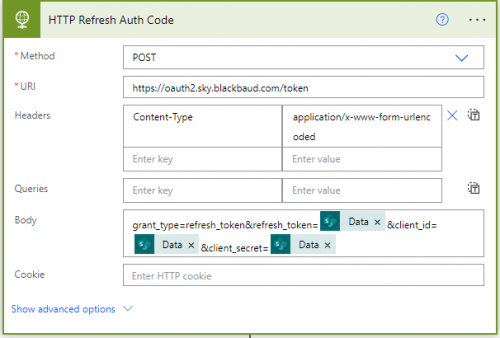
I store my client_id, client_secret, token and refresh_token in SharePoint List, every 59 minutes (60 minutes is when a token expires), I have an automation that runs the above action, which “refresh” the token for another 60 minutes. Once the above ran, I get back a new token and a new refresh token, which I store/overwrite the token and refresh token in SharePoint List.
0 -
@James Benson
Looking at your request, looks like you are not hitting the endpoint properly.You need to have body for:
grant_type=refresh_token
refresh_token=xxxxxxxxxxxxx (your valid refresh token)
client_id=xxxxxxxxxx
client_secret=xxxxxxxxxYour header just need to have Content-Type=x-www-form-urlencoded, no need for Authorization.
0 -
@Alex Wong
Thanks I will check that out. I think the client ID and secret are passed in the auth header.
I'm guessing it might be something to do with how I'm storing the refresh token and it's not being saved properly.0 -
@Alex Wong
Resolved this now.
It was indeed how I was storing the refresh token. I'm using wordpress and it was adding the values but not updating them.2 -
@James Benson
For calling the refresh token endpoint, you can pass the client_id and client_secret (along with refresh_token and grant_type) in the body of the HTTP call. You can also do Authorization it seems, but I do call using client_id and client_secret as you saw in my screenshot in previous post.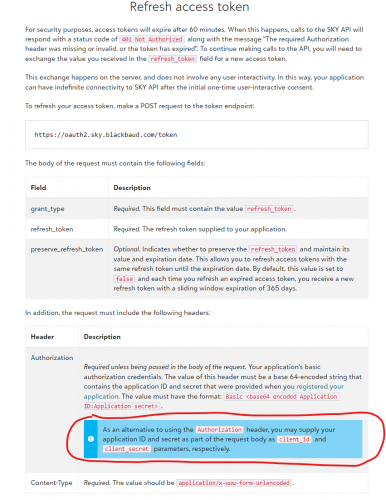 1
1









Categories
- All Categories
- 6 Blackbaud Community Help
- 209 bbcon®
- 1.4K Blackbaud Altru®
- 394 Blackbaud Award Management™ and Blackbaud Stewardship Management™
- 1.1K Blackbaud CRM™ and Blackbaud Internet Solutions™
- 15 donorCentrics®
- 359 Blackbaud eTapestry®
- 2.5K Blackbaud Financial Edge NXT®
- 646 Blackbaud Grantmaking™
- 563 Blackbaud Education Management Solutions for Higher Education
- 3.2K Blackbaud Education Management Solutions for K-12 Schools
- 934 Blackbaud Luminate Online® and Blackbaud TeamRaiser®
- 84 JustGiving® from Blackbaud®
- 6.4K Blackbaud Raiser's Edge NXT®
- 3.7K SKY Developer
- 243 ResearchPoint™
- 118 Blackbaud Tuition Management™
- 165 Organizational Best Practices
- 238 The Tap (Just for Fun)
- 33 Blackbaud Community Challenges
- 28 PowerUp Challenges
- 3 (Open) Raiser's Edge NXT PowerUp Challenge: Product Update Briefing
- 3 (Closed) Raiser's Edge NXT PowerUp Challenge: Standard Reports+
- 3 (Closed) Raiser's Edge NXT PowerUp Challenge: Email Marketing
- 3 (Closed) Raiser's Edge NXT PowerUp Challenge: Gift Management
- 4 (Closed) Raiser's Edge NXT PowerUp Challenge: Event Management
- 3 (Closed) Raiser's Edge NXT PowerUp Challenge: Home Page
- 4 (Closed) Raiser's Edge NXT PowerUp Challenge: Standard Reports
- 4 (Closed) Raiser's Edge NXT PowerUp Challenge: Query
- 779 Community News
- 2.9K Jobs Board
- 53 Blackbaud SKY® Reporting Announcements
- 47 Blackbaud CRM Higher Ed Product Advisory Group (HE PAG)
- 19 Blackbaud CRM Product Advisory Group (BBCRM PAG)