Disable Development Office Home Action Button Preview





How do I remove the url preview of my AddInClient under the action button?
This used to not be a thing that displayed, but now its loading an iframe of the page I have set in “Add-in URL"
So how can I remove this iframe preview?
Comments
-
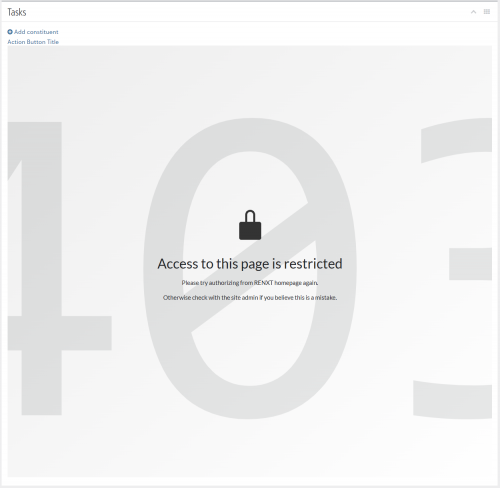
Tasks tile on RENXT homepage 
Application add-in settings It used to not load the “Add-in URL” page straight into the Tasks tile but now it is loading an iframe of the whole page into the tile. How can I remove this so that it is just the “Action Button Title” in the tile?
PS. The restricted message is intended0 -
Hey @Kevin Li, I'll pass along this feedback to the Raiser's Edge NXT team. I agree that the iframe content should not be visible for these actions. For now, you may need to set the height of your action page content to 0.
1 -
@Kevin Li
mine does not do this

I don't know if it is any difference when using SKY UX, but I am simply using the Add-in URL that is provided by by Blackbaud SPA (i.e. power bi SPA). This is very different than you trying to use a URL that is not part of BB SPA.
What exactly is “https://localhost:4201/”?
localhost is generally for testing when the web/app server is installed in your local computer and you are accessing the page through localhost. “your localhost” is not accessible from anywhere else
0 -
@Alex Wong
I am currently developing an add-in so its on localhost currently but I also do have a live page that also creates the iframe.0 -
@Kevin Li
In my screenshot, you can see a button for “FIDF.net NXT” that is a full screen app when clicked on will show the custom webapp in full screen (aside from having the RE top global menu).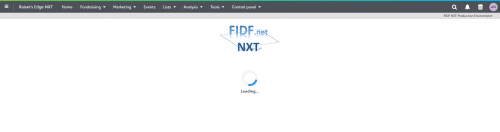
if this is your intention, then you need to have TWO add-ins.
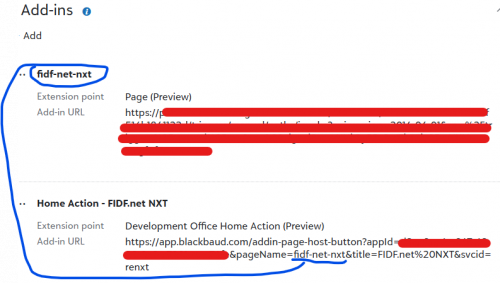
where one of the add-in URL is your custom webapp, and the “NAME” of the webapp is then used as reference in the URL for the home page action
0 -
@Alex Wong
Thanks for all the suggestions Alex.
For complete context, my intention for this add-in is to redirect to another page add-in and yes, I do already have another page add-in set as you've described; using the “NAME” of the webapp as the reference.
This was all working perfectly fine before my development break which started around late July/early August.0 -
@Kevin Li
the issue i see from your screenshot is you “flipped” the extension point and Add-in URL:https://localhost:4201/ Add-in URL should use the Extension point of Page (Preview), given a name such as test-custom-page-addin
and then the Add-in URL that actually add a “button” (Extension point = Development Office Home Action (Preview)) to the Task tile is
https://app.blackbaud.com/addin-page-host-button?appId=YOUR-APP-ID&pageName=test-custom-page-addin&title=ButtonLabel&svcid=renxt0 -
@Alex Wong
I understand your solution. However, I completed neglected to mention a big detail.
When clicking on the button, I don't only want to navigate to that page. I need to first authorize the user and then pass along the tokens from the auth response to the page add-in. I have created a JavaScript “sky-addin-client” in my node app that is controlling this whole flow which is being hosted at the development address “https://localhost:4201”.
Sorry for neglecting to provide this needed context and thanks for helping.0 -
@Kevin Li
I think what you mention matters if what you are developing is going to run SKY API using auth token specific to the user, such that the user is recorded as the “added by” or “last changed by" on whatever records your app is going to touch.I do not authenticate user in this manner, my app only cares about if the app is accessed by authenticated user, which I can do using UIT (User Identity Token) which is obtained through BBSkyAddinClient's getUserIdentityToken() JavaScript method and then validate the UIT via a SKY API endpoint that does just that. However, this UIT cannot be used to get auth token, which is required to execute SKY API endpoint on user's behalf, at least I don't think it can be done. Any SKY API execution is done through my account, which may not work for everyone.
Since I don't do authentication that you seems to want to do, I can't really comment more on it, however, I think the extension point and url mentioned before is likely still valid.
0 -
Hey @Kevin Li, the Raiser's Edge NXT team made an update to that Tasks tile this morning, so your iframe content should no longer be visible. Let me know if that's not the case. Thanks for the heads up about the issue.
1 -
@Alex Wong
I could be wrong but I believe the need for authentication makes this issue inherently different as I can't just provide the app.blackbaud.com link since there needs to be some backend transactions before redirecting. (the button first navigates to my node.js host, performs the necessary actions, and then redirects to the app.blackbaud.com page add-in link)
I have been informed that the RENXT team has pushed a fix for this but I still need to test it. With all that said, I thank you for all your suggestions and trying to help!0 -
Hi @Chris Rodgers,
I've tested it and it's not showing up anymore so all is good now.
Thanks for the help.1








Categories
- All Categories
- 6 Blackbaud Community Help
- 209 bbcon®
- 1.4K Blackbaud Altru®
- 394 Blackbaud Award Management™ and Blackbaud Stewardship Management™
- 1.1K Blackbaud CRM™ and Blackbaud Internet Solutions™
- 15 donorCentrics®
- 359 Blackbaud eTapestry®
- 2.5K Blackbaud Financial Edge NXT®
- 646 Blackbaud Grantmaking™
- 563 Blackbaud Education Management Solutions for Higher Education
- 3.2K Blackbaud Education Management Solutions for K-12 Schools
- 934 Blackbaud Luminate Online® and Blackbaud TeamRaiser®
- 84 JustGiving® from Blackbaud®
- 6.4K Blackbaud Raiser's Edge NXT®
- 3.7K SKY Developer
- 243 ResearchPoint™
- 118 Blackbaud Tuition Management™
- 165 Organizational Best Practices
- 238 The Tap (Just for Fun)
- 33 Blackbaud Community Challenges
- 28 PowerUp Challenges
- 3 (Open) Raiser's Edge NXT PowerUp Challenge: Product Update Briefing
- 3 (Closed) Raiser's Edge NXT PowerUp Challenge: Standard Reports+
- 3 (Closed) Raiser's Edge NXT PowerUp Challenge: Email Marketing
- 3 (Closed) Raiser's Edge NXT PowerUp Challenge: Gift Management
- 4 (Closed) Raiser's Edge NXT PowerUp Challenge: Event Management
- 3 (Closed) Raiser's Edge NXT PowerUp Challenge: Home Page
- 4 (Closed) Raiser's Edge NXT PowerUp Challenge: Standard Reports
- 4 (Closed) Raiser's Edge NXT PowerUp Challenge: Query
- 779 Community News
- 2.9K Jobs Board
- 53 Blackbaud SKY® Reporting Announcements
- 47 Blackbaud CRM Higher Ed Product Advisory Group (HE PAG)
- 19 Blackbaud CRM Product Advisory Group (BBCRM PAG)