Disabling application distributions





Happy Friday! ?
I wanted to pop in here to make sure everyone saw the What’s new post for November 1st.
Based on feedback from our users, we have added an option to allow Billing clerks to disable the creation of application distributions in the system. Application distributions are created when a payment or credit is applied to a charge and basically washes the application amount through the AR. Since Billing Management is a single AR summary setup, these application distributions are creating a lot of clutter in the Post to GL file and extra noise on the Distributions grid on transactions.
For example, if we have a credit that’s applied to two charges, application distributions will create a distribution for each application. In the example below, we see a distribution for $9,999 and one for $1 based on the applications for the same amount. But they are both for the AR summary account.
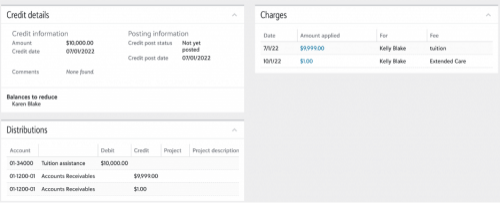
When application distributions are disabled, we only have one distribution for the AR summary to cover the amount for both of the charge applications:
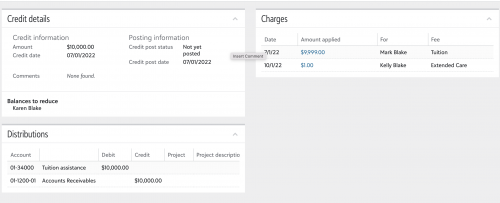
To disable the creation of application distributions:
- In Billing Management, go to Settings > Transaction rules > Application distributions tile and click Edit
- Uncheck the option to Enable application distributions
- Save
Disabling application distributions will not impact any existing applications and will only stop the creation of them once the option is disabled. Let us know if you have any questions!
Comments
-
@Julia Meseck
Hallelujah! That caused me some grief.0



Categories
- All Categories
- 6 Blackbaud Community Help
- 209 bbcon®
- 1.4K Blackbaud Altru®
- 394 Blackbaud Award Management™ and Blackbaud Stewardship Management™
- 1.1K Blackbaud CRM™ and Blackbaud Internet Solutions™
- 15 donorCentrics®
- 359 Blackbaud eTapestry®
- 2.5K Blackbaud Financial Edge NXT®
- 646 Blackbaud Grantmaking™
- 563 Blackbaud Education Management Solutions for Higher Education
- 3.2K Blackbaud Education Management Solutions for K-12 Schools
- 934 Blackbaud Luminate Online® and Blackbaud TeamRaiser®
- 84 JustGiving® from Blackbaud®
- 6.4K Blackbaud Raiser's Edge NXT®
- 3.7K SKY Developer
- 243 ResearchPoint™
- 118 Blackbaud Tuition Management™
- 165 Organizational Best Practices
- 238 The Tap (Just for Fun)
- 33 Blackbaud Community Challenges
- 28 PowerUp Challenges
- 3 (Open) Raiser's Edge NXT PowerUp Challenge: Product Update Briefing
- 3 (Closed) Raiser's Edge NXT PowerUp Challenge: Standard Reports+
- 3 (Closed) Raiser's Edge NXT PowerUp Challenge: Email Marketing
- 3 (Closed) Raiser's Edge NXT PowerUp Challenge: Gift Management
- 4 (Closed) Raiser's Edge NXT PowerUp Challenge: Event Management
- 3 (Closed) Raiser's Edge NXT PowerUp Challenge: Home Page
- 4 (Closed) Raiser's Edge NXT PowerUp Challenge: Standard Reports
- 4 (Closed) Raiser's Edge NXT PowerUp Challenge: Query
- 779 Community News
- 2.9K Jobs Board
- 53 Blackbaud SKY® Reporting Announcements
- 47 Blackbaud CRM Higher Ed Product Advisory Group (HE PAG)
- 19 Blackbaud CRM Product Advisory Group (BBCRM PAG)