Fundraiser/Canvasser Endpoint for NXT in Power BI





I'm trying to find a way to associate assigned fundraisers with constituents in Power BI, but I can't seem to find an endpoint that would allow me to do this.
There is an answer in the forum from a couple of years ago (https://community.blackbaud.com/forums/viewtopic/586/55395#p218156), that implies this is possible, but doesn't provide any further info. Does anyone know if this can be done?
Comments
-
@Phil Calderwood
It is possible, but it takes a few steps, and if you're new to BI it may involve doing things you haven't done before.There's a fundraisers column in the Gift endpoint. But you'll see that it only contains “null” or “List” values. That's because a gift can have multiple fundraisers. So you will first need to expand the Fundraisers column so that you can see the fundraiser's constituent IDs.
It's important to note here that expanding this column means that if a gift had two fundraisers, it will now appear twice. If it had five fundraisers, five times. Etc. Be sure you're taking this into account in your reports.
If you want the Fundraiser's names (which you probably do), you're going to have to bring the Constituent endpoint into your data model if it isn't already there so that you can get your fundraiser's names using their constituent ids.
This is admittedly a lot of hoops to jump through just to see fundraiser names. Depending on what you're reporting on and when/how you would like to refresh your data source, it may be easier to bring the data in a different way. You could build a query in database view that has all the data and fields you need, export it to an Excel file or a .csv and bring it in like that instead.
But if you want to use the connecter, it is possible.
3 -
@Ben Regier Thanks for your help Ben. I've implemented the report by exporting the data from a list for now, but this will be useful when I come to version 2
0 -
Thanks for your post. I am trying to find “assigned fundraiser" in the connector so I can create KPI reports filtered on fundraiser assignment. We use different fundraiser types depending on the prospect. What table might I find that in the PowerBi connector?
Alternately, I was thinking I could create a constituent list in RENXT based on fundraiser but I'm unsure if that will solve my issue.
Thanks!
0 -
@Hallie Guiseppe
I haven't done much reporting using the assigned fundraiser, but the only place I remember coming across that data in the API is the Fundraiser Assignment List (Single Constituent).(Just a note that this endpoint relates to the Constituent fundraiser, not the gift fundraiser.)
I don't think this endpoint is included in the Power BI connector. If you wanted to run reports on this data, you may need to bring it in to your report with a query/export or something like that.
1 -
@Ben Regier
I think the OP and @Hallie Guiseppe was talking about is the Constituent Assigned Fundraiser, not gift fundraiser, which is more easy to deal with as it comes in an array from Gift List@Hallie Guiseppe
what exactly are you trying to do, maybe can give some additional light to it. (though like Ben is saying, Power BI connector is likely not your answer, rather you will need to “gather” the info “elsehow”: RE:Queue or Power Automate to gather data then report on it in BI)0 -
Thank you both for your reply. I am looking for the constituent level assigned fundraiser to create portfolio reports for each fundraiser. Not all assigned prospects have given yet so they would not be picked up in the gift level information.
I believe I am going to need to use Power Automate to pull that information into a .csv and then have PowerBi connect to that file. It gives me a chance to adapt Chris Zello's Power Automate Template to pick up the information I need to build the reports. As I progress I'm sure I'll have more questions. ?
Hallie
0 -
@Hallie Guiseppe
There is the Opportunity List, which has info on who is the fundraiser (ID only, so you do need Constituent List to know who the fundraiser is). If your org has it that the fundraiser profolio is managed through opportunity record (prospect records in database view terminology), then you can use PA to pull all Opportunity using Opportunity List, store it (it needs to be stored in a way that you can then pull into Power BI, so turning the JSON from API call into excel or csv). Do the same with Constituent List.However, if you are not using Opportunity or not fully using opportunity, then it is slightly more complex, you will need to use the endpoint that Ben pointed out, but that endpoint is per constituent. So you will need to first “filter” on your fundraisers (best if your fundraisers have some tag you can filter on in a Constituent List endpoint). Then loop through each fundraiser, and call the Fundraiser assignment list (Single constituent) endpoint to get an array of all constituents that are assigned to the fundraiser (Please see below, I think this endpoint MAY not be how I think it works). Then you can start handling what you want to show in the portfolio (i.e. has the constituent given this year yet and how much, which will need you to run gift list for each constituent for current year).
A few things to consider:
- gift list on constituent id is not going to give you gift that has been soft credit to this constituent. 2 ways to handle in my opinion:
- You have a data warehouse of all gifts, all soft credit info, and all gift fundraiser info
- in the PA flow each run, get ALL gifts in current year, if not a LOT (less than 5000 so you don't need multiple run of Gift List). Then you can use data operation in flow to filter out only gifts that is direct credit to constituent and then another filter on all gifts soft credit to the constituent
- with the gift considered, then you can report on the portfolio also on gift that is the fundraiser's constituent but the gift did not have the fundraiser being him/her
Anyways, maybe too much info here, apology as I tend to go overboard sometime.
There is 1 problem I want to indicate here though, maybe Ben can shed some light.
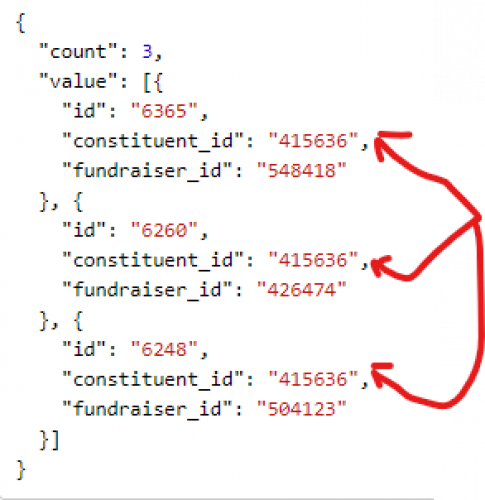
The Fundraiser assignment list (Single constituent) endpoint provides info back like above, This JSON is for fundraiser 415636 (constituent sys id), I'm getting back 3 fundraiser_id which is not the ones that the fundraiser's “constituent assigned to him” rather, it is the fundraiser's “assigned fundraiser”.
If the endpoint actually provides the “opposite” info, then Hallie, you will have an even tougher times.
0 - gift list on constituent id is not going to give you gift that has been soft credit to this constituent. 2 ways to handle in my opinion:
-
Then loop through each fundraiser, and call the Fundraiser assignment list (Single constituent) endpoint to get an array of all constituents that are assigned to the fundraiser (Please see below, I think this endpoint MAY not be how I think it works).
Unfortunately, it's the opposite. You pass the endpoint a constituent ID, and it gives you a list of all Fundraisers assigned to that Constituent. So in order to do this in Power Automate, you would have to call that endpoint for every single constituent in the report.
This is why I suspect that it may be easier to get a .csv of the relevant data using a Query in database view. You'd want a query that includes all constituents who may be in your report, and then make sure the output includes their system record ID (so you can link it to your Constituent table in Power BI), and their solicitor information.
0 -
@Ben Regier
Thanks for confirming, then yes RE:Queue (if you want this report automated) would be the way to go, and setup queries that then turn to csv for you to process.FYI: you can setup a flow that waits for sFTP for “new/modified” file and get the csv for processing WITHOUT RE:Queue. RE:Queue just automates the “exporting” of the query output, even without it (not sure if your org has this feature in your contract), you can still setup everything, except for the auto export part of RE:Queue. So whenever you want this workflow to “start”, just export the file from db view manually, and everything you setup in flow will kicks off. (I mention this b/c I do hear that some people “link” RE:Queue with sFTP, as if they are one and you have to have RE:Queue to do anything with sFTP csv in flow)
0 -
@Ben Regier
I could obtain fundraiser list for gifts, but I want fundraisers that are associated to prospects/opportunities. I see there's constituent ID in the query, but those are the prospects and not the fundraisers. Updated: I think I found it, is it the fundraiser list with the constituent ID?0 -
@Chris Li
Yes, you would have to expand the fundraisers column. After that you should have a fundraisers.constituent_id column which is the ID of the fundraiser for that opportunity.0












Categories
- All Categories
- 2 Blackbaud Agents for Good™
- Raiser's Edge NXT test
- 6 Blackbaud Community Help
- 212 bbcon®
- 1.4K Blackbaud Altru®
- 403 Blackbaud Award Management™ and Blackbaud Stewardship Management™
- 1.2K Blackbaud CRM™ and Blackbaud Internet Solutions™
- 16 donorCentrics®
- 360 Blackbaud eTapestry®
- 2.6K Blackbaud Financial Edge NXT®
- 664 Blackbaud Grantmaking™
- 583 Blackbaud Education Management Solutions for Higher Education
- 3.3K Blackbaud Education Management Solutions for K-12 Schools
- 947 Blackbaud Luminate Online® and Blackbaud TeamRaiser®
- 84 JustGiving® from Blackbaud®
- 6.8K Blackbaud Raiser's Edge NXT®
- 3.8K SKY Developer
- 251 ResearchPoint™
- 120 Blackbaud Tuition Management™
- 165 Organizational Best Practices
- 243 Member Lounge (Just for Fun)
- 37 Blackbaud Community Challenges
- 37 PowerUp Challenges
- 3 (Closed) PowerUp Challenge: Grid View Batch
- 3 (Closed) PowerUp Challenge: Chat for Blackbaud AI
- 3 (Closed) PowerUp Challenge: Data Health
- 3 (Closed) Raiser's Edge NXT PowerUp Challenge: Product Update Briefing
- 3 (Closed) Raiser's Edge NXT PowerUp Challenge: Standard Reports+
- 3 (Closed) Raiser's Edge NXT PowerUp Challenge: Email Marketing
- 3 (Closed) Raiser's Edge NXT PowerUp Challenge: Gift Management
- 4 (Closed) Raiser's Edge NXT PowerUp Challenge: Event Management
- 3 (Closed) Raiser's Edge NXT PowerUp Challenge: Home Page
- 4 (Closed) Raiser's Edge NXT PowerUp Challenge: Standard Reports
- 4 (Closed) Raiser's Edge NXT PowerUp Challenge: Query
- 805 Community News
- 3K Jobs Board
- 57 Blackbaud SKY® Reporting Announcements
- 47 Blackbaud CRM Higher Ed Product Advisory Group (HE PAG)
- 19 Blackbaud CRM Product Advisory Group (BBCRM PAG)