Highlighting Projects and the ability to define GL distribution for Tuition using more dimensions





Hello billing clerks! Here are two features that I wanted to highlight for you..
First, Billing Management now supports the use of Projects as part of your GL Distribution. There is one setup step that you need to complete in order to turn on Projects in your system: Go to Billing>Settings, click Edit in the Projects tile and then mark the checkbox to enable project codes.
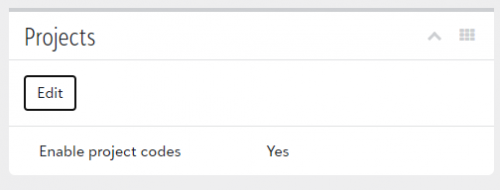
Once you have that turned on, you will then be able to define projects as part of your GL Distribution when creating fees and when adding new transactions. If you're using FE NXT, the project field will be a lookup to allow you to see your list of projects in FE. If you're not using FE NXT, this will just be a text field.
The other feature is the ability to define GL distribution for Tuition using more dimensions. Previously, Tuition could be posted to a single account or different accounts based on grade level. With this release, you can now define different GL accounts using any of these dimensions: Board type, Grade level, International/Domestic, Payment plan, or Program.
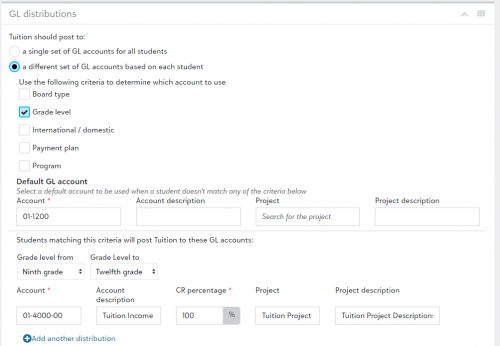
In order to start using this new functionality, just go to your Tuition fee in your Billing Year and set up your new GL Distributions using any combination of those dimensions. You will also need to define a default account, which will be used if a student does not fall into any of the categories you define. Please note that any changes you make will be reflected on any new Tuition charges you add but it will not retroactively change any Tuition that's already been added.
We hope that these features will be helpful for those of you who have been been looking for more granularity and detail in your distributions!
Categories
- All Categories
- 6 Blackbaud Community Help
- 209 bbcon®
- 1.4K Blackbaud Altru®
- 394 Blackbaud Award Management™ and Blackbaud Stewardship Management™
- 1.1K Blackbaud CRM™ and Blackbaud Internet Solutions™
- 15 donorCentrics®
- 359 Blackbaud eTapestry®
- 2.5K Blackbaud Financial Edge NXT®
- 646 Blackbaud Grantmaking™
- 563 Blackbaud Education Management Solutions for Higher Education
- 3.2K Blackbaud Education Management Solutions for K-12 Schools
- 934 Blackbaud Luminate Online® and Blackbaud TeamRaiser®
- 84 JustGiving® from Blackbaud®
- 6.4K Blackbaud Raiser's Edge NXT®
- 3.7K SKY Developer
- 243 ResearchPoint™
- 118 Blackbaud Tuition Management™
- 165 Organizational Best Practices
- 238 The Tap (Just for Fun)
- 33 Blackbaud Community Challenges
- 28 PowerUp Challenges
- 3 (Open) Raiser's Edge NXT PowerUp Challenge: Product Update Briefing
- 3 (Closed) Raiser's Edge NXT PowerUp Challenge: Standard Reports+
- 3 (Closed) Raiser's Edge NXT PowerUp Challenge: Email Marketing
- 3 (Closed) Raiser's Edge NXT PowerUp Challenge: Gift Management
- 4 (Closed) Raiser's Edge NXT PowerUp Challenge: Event Management
- 3 (Closed) Raiser's Edge NXT PowerUp Challenge: Home Page
- 4 (Closed) Raiser's Edge NXT PowerUp Challenge: Standard Reports
- 4 (Closed) Raiser's Edge NXT PowerUp Challenge: Query
- 779 Community News
- 2.9K Jobs Board
- 53 Blackbaud SKY® Reporting Announcements
- 47 Blackbaud CRM Higher Ed Product Advisory Group (HE PAG)
- 19 Blackbaud CRM Product Advisory Group (BBCRM PAG)