Blackbaud’s Education Management Solutions: What’s New For January 10, 2023

Bob Costanzo
Blackbaud Employee




Here are the latest changes, updates, and new features for the Education management products for January 10, 2023.
Just like the old Academic Profile, the new 360 Profile displays when you select a student or alumnus via the People finder in Academics. The new profile contains the same features and capabilities as the older Academic Profile (plus a few new tools that we’ll show off in the Community post linked below), but arranged under new tab headings in a more accessible format. Depending on your role at the school, some or all of the following profile areas will be available to you.
To see screenshots of the upcoming 360 Profile and an explanation of the new features, check out the announcement in the Higher Education Solutions Community.
Charges are listed along the right of the page, and payments or credits are along the left; Select a credit or payment to see a list of charges associated with the account, and then toggle one of the charges listed and enter an amount under Apply this amount. Once the payment or credit is applied to various charges, select Apply payment or Apply credit.
The requirement will be enforced in “waves.” The first wave of schools will require MFA as of October 3, 2023. If, by this summer, your organization has not yet established an SSO connection, then we will send you an email with the exact date on which your users will be required to use MFA.
Exemptions
The following users are exempt from Blackbaud’s MFA requirement for BBID and their login experiences will not be affected:
Multi-factor authentication (MFA) requires a user to successfully validate at least two of three factors to authenticate before gaining access to your solution and data. Blackbaud ID will require MFA using your password (what you use today) and a unique, time-based, one-time code accessed on a secondary device. We are proactively making this change, following industry-standard security measures, to help protect your organization and your data.
Try MFA early
We recommend testing MFA with a cloned role at your school’s convenience. For example, require users who have the nurse role to login with MFA and BBID. The nurse could complete the login using a numeric code sent to their phone for additional security.
As a platform manager, go to Core, Security, Roles, and search for a role. On the role’s row, select more (…) and then select to Enforce MFA.
Platform managers can also Remove MFA enforcement from here (during your testing phase). When you disable the MFA requirement for a role, users in the affected roles may still be prompted to login with MFA. However, after logging in, the user can go to their individual BBID profile to opt out of MFA.
When MFA is required for a school role, those users can view their BBID profile, but can’t opt out of MFA.
Encourage your users to act now by enabling MFA on their Blackbaud ID if they have not already done so.
Miscellaneous
Please note:
Please contact Support or your Customer Success Manager with any questions.
We've added a new Due Date placeholder for admissions managers to use when working with Contract Reminder Notifications.
Finally, we've updated the gender options for schools with SAO installed, the default options are Male, Female, Prefer Not to Respond, and Self Identify.
Please keep in mind that admissions managers will need to make these changes from Admissions Setup and then SAO Settings to enable these updates, otherwise the SAO Integration will remain the same.
The student_degrees object received the following changes:
The endpoints impacted by these changes include:
We've updated the responses for the following endpoints to include additional properties.
The endpoints impacted by these changes include: We've updated the responses for the following endpoints to include additional properties:
For each endpoint listed, the following properties are now returned in the responses as part of the new metadata object:
To manage your community subscriptions:
Academics
Coming soon: New academic profiles
We are planning to roll out a new version of Academic Profiles to all schools in the first quarter of 2023.Just like the old Academic Profile, the new 360 Profile displays when you select a student or alumnus via the People finder in Academics. The new profile contains the same features and capabilities as the older Academic Profile (plus a few new tools that we’ll show off in the Community post linked below), but arranged under new tab headings in a more accessible format. Depending on your role at the school, some or all of the following profile areas will be available to you.
To see screenshots of the upcoming 360 Profile and an explanation of the new features, check out the announcement in the Higher Education Solutions Community.
Bulk commit assignment grades and skills
In the Gradebook, faculty can now select Commit All to commit evaluations for multiple assignments at once. Selecting Commit All commits grades currently waiting to be committed for the class and marking period selected in the gradebook. Previously, faculty had to select Commit for each individual assignment.Billing management
Use Needs attention to identify unapplied payments and credit
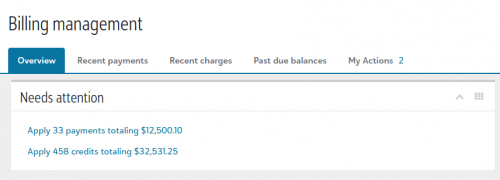
Needs attention is a new section on the Billing management overview that provides direct access to two separate links that communicate the number of unapplied credits and unapplied payments; Billing clerks select either of these links to begin applying either payments or credit to charges.
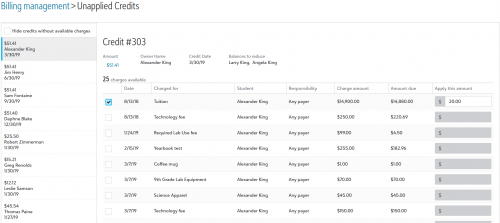
Charges are listed along the right of the page, and payments or credits are along the left; Select a credit or payment to see a list of charges associated with the account, and then toggle one of the charges listed and enter an amount under Apply this amount. Once the payment or credit is applied to various charges, select Apply payment or Apply credit.

Core
View State ID in User and Student Lists
List managers can now view State ID as a column in the Users list and Students list. This data also appears on Contact cards. Schools who integrate with Clever often use this information.October 3, 2023 – Blackbaud ID requires Multi-factor Authentication
Starting October 2023, Blackbaud will begin to require faculty and staff users of Blackbaud Education Management® (BBEM) to enable multi-factor authentication (MFA) on their Blackbaud ID (BBID) username and password. These users have roles with Application or Employee/Volunteer types.The requirement will be enforced in “waves.” The first wave of schools will require MFA as of October 3, 2023. If, by this summer, your organization has not yet established an SSO connection, then we will send you an email with the exact date on which your users will be required to use MFA.
Exemptions
The following users are exempt from Blackbaud’s MFA requirement for BBID and their login experiences will not be affected:
- Users who login with a single sign on (SSO),
- Users who login with Sign in with Google,
- Users who login with Sign in with Apple,
- Students, alumni, and non-administrative users of Blackbaud Education Management. These users have only Constituent or Other role types.
Multi-factor authentication (MFA) requires a user to successfully validate at least two of three factors to authenticate before gaining access to your solution and data. Blackbaud ID will require MFA using your password (what you use today) and a unique, time-based, one-time code accessed on a secondary device. We are proactively making this change, following industry-standard security measures, to help protect your organization and your data.
Try MFA early
We recommend testing MFA with a cloned role at your school’s convenience. For example, require users who have the nurse role to login with MFA and BBID. The nurse could complete the login using a numeric code sent to their phone for additional security.
As a platform manager, go to Core, Security, Roles, and search for a role. On the role’s row, select more (…) and then select to Enforce MFA.
Platform managers can also Remove MFA enforcement from here (during your testing phase). When you disable the MFA requirement for a role, users in the affected roles may still be prompted to login with MFA. However, after logging in, the user can go to their individual BBID profile to opt out of MFA.
When MFA is required for a school role, those users can view their BBID profile, but can’t opt out of MFA.
Encourage your users to act now by enabling MFA on their Blackbaud ID if they have not already done so.
Miscellaneous
Please note:
- Users who login with single sign on (SSO), Sign in with Google, or Sign in with Apple, will not be prompted to use Blackbaud’s MFA, even if the school enforces MFA for one of their roles.
- Users who use Sign in with Google or Sign in with Apple may be prompted to use an MFA that is managed by Google or Apple, even when Blackbaud doesn’t require MFA. These “social sign ins” are subject to the third party’s authentication processes, instead of Blackbaud’s process.
- Users who are already required to use MFA because they also use their BBID for other Blackbaud applications, such as Raiser’s Edge NXT, will still require MFA, regardless of their MFA settings for their roles in Education Management.
Please contact Support or your Customer Success Manager with any questions.
Accommodations tile added to Contact card
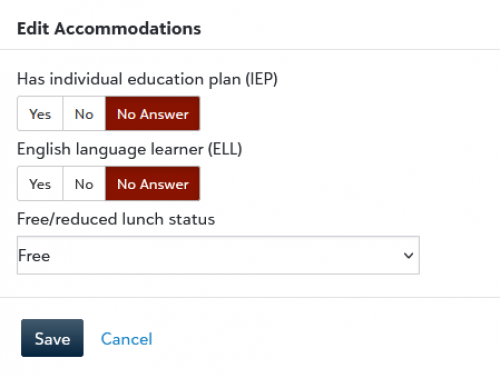
We’ve added a new Accommodations tile to the Contact card; under Accommodations, record whether the student has an individual education plan (IEP), is an English language learner (ELL) or has a free or reduced lunch status.
Enrollment management
Notification Placeholders
We've added Preferred Name as a placeholder for admissions managers to use when working with Student and Candidate Checklist Notifications.We've added a new Due Date placeholder for admissions managers to use when working with Contract Reminder Notifications.
Process Center
Candidate Date of Birth is now listed as part of the header information for the Inquiry, Application, and Checklist Process Center.SAO Integration Update
We've made a number of updates to the SAO integration regarding gender. The Applicant Block now has a Pronouns field which then updates the user profile page when the application is processed. If the Pronoun field is already filled in on the user profile, the Applicant Block will automatically populate when a parent or candidate starts a new application.Finally, we've updated the gender options for schools with SAO installed, the default options are Male, Female, Prefer Not to Respond, and Self Identify.
Please keep in mind that admissions managers will need to make these changes from Admissions Setup and then SAO Settings to enable these updates, otherwise the SAO Integration will remain the same.
API and Integrations
School API and OneRoster API
For information about recently added endpoints and updates, view the School API and OneRoster API changelog.School API
Changed
We've consolidated and renamed several objects and properties returned in the response for GET Degrees student degrees by ID (BETA); these are breaking changes that may disrupt current endpoint implementations.The student_degrees object received the following changes:
- The user_degree_id property is renamed to id.
- The degree sub-object is renamed to requirement_set.
- The major_concentrations sub-object of majors is renamed to concentrations.
- The area_of_study sub-objects are renamed to requirement_set.
- The group_name and group_short_description properties have been removed and are now represented as new sub-objects specific to the parent object:
- majors.requirement_set now features a major object with the following properties: id, name, and abbreviation.
- concentrations.requirement_set now features a concentrations object with the following properties: id, name, and abbreviation.
- minors.requirement_set now features a minor object with the following properties: id, name, and abbreviation.
- student_degrees.requirement_set now features a degree object with the following properties: id, name, and abbreviation.
OneRoster API
Changed
We've updated the responses for several endpoints to include additional properties.The endpoints impacted by these changes include:
- GET Students by ID
- GET Students all
- GET Students for a School
- GET Teacher by ID
- GET Teachers all
- GET Teachers for a School
- GET User by ID
- GET Users all
- givenName
- The Preferred name of the user; If Preferred name is undefined, First name is returned. Preferred name and First name are defined under General information on the Contact Card.
- middleName
- The middle name of the user. Middle name is defined under General information on the Contact Card.
- Phone
- The 10-digit (e.g., 6035012002) home phone number of the user; if the home phone number is undefined, the wireless phone number is returned. If both home and wireless phone types are undefined, the value of Phone is an empty string. Phone numbers are defined under Phone on the Contact Card.
- Sms
- The 10-digit (e.g., 6035012002) wireless phone number of the user; if the wireless number is undefined, the home phone number is returned. If both home and wireless phone types are undefined, the value of Sms is an empty string. Phone numbers are defined under Phone on the Contact Card.
- The email address of the user. Email addresses are defined under Digital on the Contact Card.
- Metadata
- An object that contains a variety of address-related properties, including:
- address1
- address2
- city
- state
- stateId
- postCode
- phone
- grade
We've updated the responses for the following endpoints to include additional properties.
The endpoints impacted by these changes include: We've updated the responses for the following endpoints to include additional properties:
For each endpoint listed, the following properties are now returned in the responses as part of the new metadata object:
- address1
- address2
- city
- state
- postCode
- phone
- iepStatus
- The IEP status, if available, as defined under Accommodations on the Contact Card.
- ellStatus
- The ELL field, if available, as defined under Accommodations on the Contact Card.
- frlStatus
- The FRL field, if available, as defined under Accommodations on the Contact Card.
Subscribe to “What’s New”
To receive email notifications when the What’s new update appears, make sure to subscribe to the Higher education community’s blog by logging into the community site and selecting the Subscribe button.To manage your community subscriptions:
- Log into the community and locate your name and profile picture in the upper right corner.
- Select the drop-down arrow and select My Account.
- From the My Account page, select the Subscriptions tab and scroll down to the Blogs section.
- Locate Blackbaud Higher Education solutions Blog. If you want to be notified as soon as the What’s new content goes live on the community, select the Instant option. You can also opt for Daily and Weekly notifications.
- Scroll to the end of the page and select Save changes.
What’s Recent
Missed any of our weekly releases? You can catch up on everything in our Month in Review blog posts, which cover every feature and update Education management releases each month.0
Categories
- All Categories
- New eTapestry Home Community
- New K-12 Community Home (TEST)
- New Higher Education Home Page (Test)
- New Impact Edge Community TEST
- New YourCause Community TEST
- New SKY Community TEST
- New Grantmaking TEST Community
- New Altru Test Community
- New bbcon Community - TEST
- 12 Blackbaud Agents for Good™
- New Raiser's Edge NXT Community
- 8 Blackbaud Community Help
- 223 bbcon®
- 1.4K Blackbaud Altru®
- 411 Blackbaud Award Management™ and Blackbaud Stewardship Management™
- 1.2K Blackbaud CRM™ and Blackbaud Internet Solutions™
- 16 donorCentrics®
- 361 Blackbaud eTapestry®
- 2.7K Blackbaud Financial Edge NXT®
- 688 Blackbaud Grantmaking™
- 604 Blackbaud Education Management Solutions for Higher Education
- 3.3K Blackbaud Education Management Solutions for K-12 Schools
- 954 Blackbaud Luminate Online® and Blackbaud TeamRaiser®
- 85 JustGiving® from Blackbaud®
- 7.1K Blackbaud Raiser's Edge NXT®
- 4K SKY Developer
- 258 ResearchPoint™
- 124 Blackbaud Tuition Management™
- 165 Organizational Best Practices
- 249 Member Lounge (Just for Fun)
- 40 Blackbaud Community Challenges
- 37 PowerUp Challenges
- 3 (Closed) PowerUp Challenge: Grid View Batch
- 3 (Closed) PowerUp Challenge: Chat for Blackbaud AI
- 3 (Closed) PowerUp Challenge: Data Health
- 3 (Closed) Raiser's Edge NXT PowerUp Challenge: Product Update Briefing
- 3 (Closed) Raiser's Edge NXT PowerUp Challenge: Standard Reports+
- 3 (Closed) Raiser's Edge NXT PowerUp Challenge: Email Marketing
- 3 (Closed) Raiser's Edge NXT PowerUp Challenge: Gift Management
- 4 (Closed) Raiser's Edge NXT PowerUp Challenge: Event Management
- 3 (Closed) Raiser's Edge NXT PowerUp Challenge: Home Page
- 4 (Closed) Raiser's Edge NXT PowerUp Challenge: Standard Reports
- 4 (Closed) Raiser's Edge NXT PowerUp Challenge: Query
- 829 Community News
- 3.1K Jobs Board
- 57 Blackbaud SKY® Reporting Announcements
- 47 Blackbaud CRM Higher Ed Product Advisory Group (HE PAG)
- 19 Blackbaud CRM Product Advisory Group (BBCRM PAG)