Sharing my Power Automate Flow: Daily Gift Digest Notification
Comments
-
I'm not sure if this was posted somewhere in this thread or elsewhere but here's a link to the step-by-step session with Trevor from several years ago, in case anyone else is starting from zero PA experience!
0 -
@Audrey Morris @Alex Wong I have downloaded this template and, in step 4 where I select the list from RE NXT it indicates “No items” i definately have lists created so that isnt my issue.
To troubleshoot I have:
Reconnected incase I was some how connected to a BB test environment from one of my PD sessions, still no lists.
Started a new flow and tried to recreate from scratch, still no lists.
Any ideas why i dont have any lists in the drop down section?0 -
@Louise Williams
In Power Automate, when you connect to Blackbaud connectors.. there is no indicator of which Blackbaud environment you are connected to. So if you do have multiple Blackbaud environment, you will have trouble.as an immeidate fix, you can select a “new connector” for Blackbaud RE NXT Constituent connector, and make sure to select your production environment.
However, it is important to “fix” this issue. Use 1 Power Automate environment for 1 blackbaud environment. So it is best you “create a new environment" and call it production environment and any connection you make to Blackbaud environment is the same production one. IF this all sound too confusing for you, you will want to attend next month's Power Automate user group and it can be better explained that way.
0 -
Hello, I was able to create the flow and use it. However now, I am trying to add Gift dates and Fund name to my table, without success. I added an action "Get gift details" (after Get constituent details) and for gift ID I added the from the Pull Gift List from RE NXT. And then in my Email content step I copy/pasted this code:
{
"Name": "<a href='http://renxt.blackbaud.com/constituents/@{outputs('Get_constituent_details')?['body/id']}'>@{outputs('Get_constituent_details')?['body/name']}</a>",
"Constituent ID": "@{outputs('Get_constituent_details')?['body/lookup_id']}",
"Gift Amount": "<a href='http://renxt.blackbaud.com/gifts/@{items('For_each_gift')?['id']}'>@{body('Format_amount_as_currency')}</a>",
"Gift Date": "@{items('For_each_gift')?['date']}",
"Fund": "@{outputs('Get_gift_details')?['body/fund/name']}"
}Unfortunately when I tested the flow, now it looks like this:

Any idea on how to fix this? First, why the hyperlinks disappeared? And why there is no fund name? Also I got to change the gift date format.
Any help would be appreciate!
0 -
Hi @Nastassia Chamoun - when I look at your hyperlink above it looks like it has a quote before 'http and another at the end. I would try removing those quotes.
"Name": "<a href='http://renxt.blackbaud.com/constituents/@{outputs('Get_constituent_details')?['body/id']}'>@{outputs('Get_constituent_details')?['body/name']}</a>",
Mine looks like this: "<a href=http://renxt.blackbaud.com/constituents/outputs('Get_Donor_Name')?['body/id']>outputs('Get_constituent_details')?['body/name']</a>"
To format the gift date, you need to use an expression. Mine looks like this which would do 11/21/2025.
formatDateTime(outputs('Get_each_gift_details')?['body/date'],'MM/dd/yyyy')
I hope that helps,
Carol
1 -
You were right, thanks! Any idea on how to get the fund name? It does not appear in my email..

This is what my email content code looks like now:
{
"Name": "<a href=http://renxt.blackbaud.com/constituents/@{outputs('Get_constituent_details')?['body/id']}>@{outputs('Get_constituent_details')?['body/name']}</a>",
"Constituent ID": "@{outputs('Get_constituent_details')?['body/lookup_id']}",
"Gift Amount": "<a href=http://renxt.blackbaud.com/gifts/@{items('For_each_gift')?['id']}>@{body('Format_amount_as_currency')}</a>",
"Gift Date": "@{formatDateTime(items('For_each_gift')?['date'], 'MM/dd/yyyy')}",
"Fund": "@{outputs('Get_gift_details')?['body/fund/name']}"
}0 -
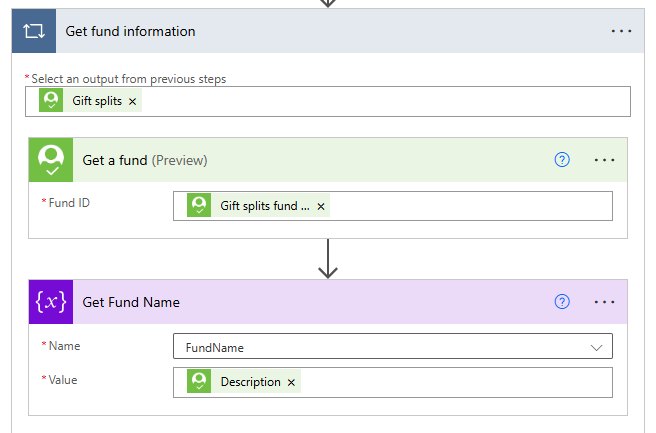
@Nastassia Chamoun For Fund, I am pulling it by using 'Get a Fund' which is under the Blackbaud- Fundraising connector. Then pull in your gift splits fund ID into Get a Fund (from Get Gift Details, not from List Gifts). This will create a loop (Apply to each) which is fine.
Even though you may not split gifts, this is what they called it. I also created a Fund Name string variable to store the Fund Name, you don't have to.
 1
1 -
@Carol Grant Thank you for your help! I got it now. Only thing is that I had to initialize a variable at the beginning of the flow and then inside the loop you mentioned I could add a Set variable step! Now it is all fixed. Thank you so much !
1 -
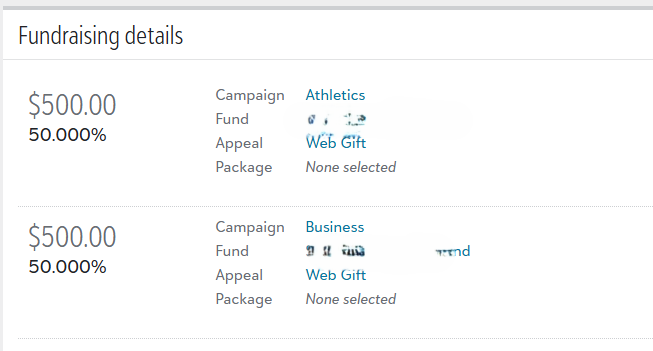
Hey team, another question. My flow is working great now but I have been ask to show the two funds name if someone makes a split gift. For example this lady donated $1,000 and when I click on the gift amount we can see that it is a split gift. Is there a way to make the two funds name appear in the email's table?

 0
0 -
you will need to either use an Array variable and then use join() expression when ready to add to the gift detail array.
or use continue to use string variable, but you have to use Append to string variable.
In order for either of this to work, you will have to make sure that in the apply to each loop for the list of gifts (not apply to each for each fund of a gift splits), that you either "set variable" to empty string or empty array at the beginning of the loop or end of the loop so each gift start "fresh".
I had a template that does this but can't find it right now.
0 -
@Alex Wong - you say "make sure that in the apply to each loop for the list of gifts (not apply to each for each fund of a gift splits)," but list gifts doesn't have fund ID. You need to pull in Get a Gift to get the fund ID. Do you mean the gift split item from Get a Gift she should loop around?
0 -
an action flow chart (bullet list) makes more sense:
- init var Funds (assume using string variable)
- init var Appeals (if desired and assume using string variable)
- init var Gift Array (the array that adds each gift's information for later display in HTML table)
- list gifts
- apply to each gift
- get constituent
- apply to each gift splits
- get fund of the split
- append to string variable Funds the Fund Description and/or Fund Lookup ID (Fund ID)
- get appeal of the split (if desired)
- append to string variable Appeals the Appeal Description and/or Appeal Lookup ID (Appeal ID) (if desired)
- Append to Gift Array (constituent name, gift date, gift amount, Funds, Appeals, etc)
- set variable Funds to empty string
- set variable Appeals to empty string
- create HTML table from Gift Array
- send email
3 -
Thank you! Will try to do that.
0 -
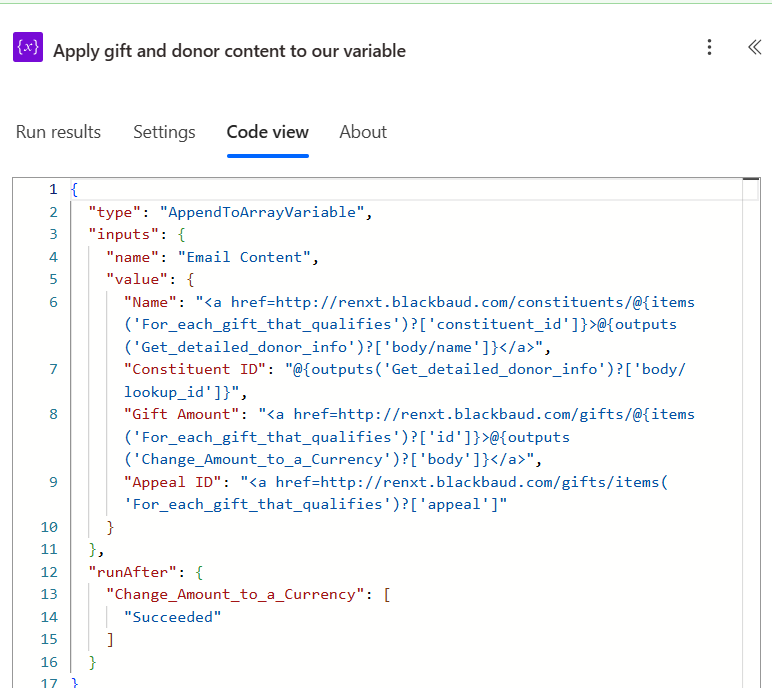
Hi, I would like the gift digest notification to show the appeal ID because the one we have only shows Name, Constituent ID, and Gift Amount. Did I do this right?
 0
0 -
this is unlikely to be correct.
Your "Appeal ID" property is set to:
<a href=http://renxt.blackbaud.com/gifts/items('For_each_gift_that_qualifies')?['appeal']- this is not a valid HTML code for a link
- valid code looks like <a href=thelink>clickable text</a>
- you are using
items('For_each_gift_that_qualifies')?['appeal']as part of a "typed" in string that means nothing to Power Automate as a dynamic content for the appeal - from the naming "For each gift that qualifies", which is a loop to loop through each gift in a list, there is no such property "appeal" in a gift. A gift has an array of gift splits (one gift can have more than one gift splits (campaign, fund, appeal, package, split amount).
Please read my reply directly before yours to see a "flow" of what are the actions needed for you to display appeal (any gift splits info).
Here's a template I published that build into the flow that you can import that already does the appeal.
1 - this is not a valid HTML code for a link
-
Thank you, @Alex Wong! Sorry, I'm a beginner with Power Automate and I actually am just using the gift digest notification PA template and would usually just get this. Was hoping to add a column that shows which Appeal ID it was designated to. Could you or someone here help provide a step-by-step instruction for beginners like me? 😊 Thank you!
 0
0 -
The steps for the flow were posted above:
init var
Funds(assume using string variable)init var
Appeals(if desired and assume using string variable)init var
Gift Array(the array that adds each gift's information for later display in HTML table)list gifts
- apply to each gift
- get constituent
- apply to each gift splitsget fund of the splitappend to string variable
FundstheFund Descriptionand/orFund Lookup ID(Fund ID)get appeal of the split (if desired)append to string variableAppealstheAppeal Descriptionand/orAppeal Lookup ID(Appeal ID) (if desired) - Append to
Gift Array(constituent name, gift date, gift amount, Funds, Appeals, etc) - set variable
Fundsto empty string - set variable
Appealsto empty string
create HTML table from
Gift Arraysend email
Another option I pointed out is you can start with a template that already have Appeal and Fund displayed, which is the link I sent above.
If you can wait, you can bring your flow to the monthly Power Automate User Group which we help troubleshoot and guide people who are stuck. However, I there there is no PA User Group in May. @Erik Leaver ?
I also provide training in Power Automate with RE NXT, and can help you understand and get past the learning curve, if interested, you can email me alex.wong@ffxconsulting.co
1 - apply to each gift
-
@Cherylynn Lumasag - Alex is correct here on how to do it but I thought a visual would help. I did up a quick gift flow to show how to do this. It's using the old format in Power Automate
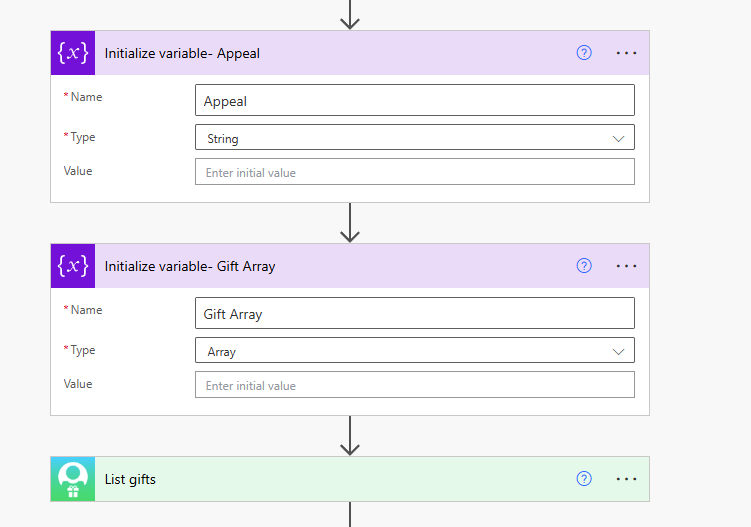
After List gifts- I pull in Get a Gift because it's easier for me to use that. When I pull in the Gift ID from List Gifts it will create a loop around each gift from List Gifts which is fine.
Then I go and pull in Get an Appeal from the Blackbaud Fundraising. I choose the Gift Splits appeal ID from Get a Gift in my Get an Appeal. This will create another loop around Gift splits which is fine.

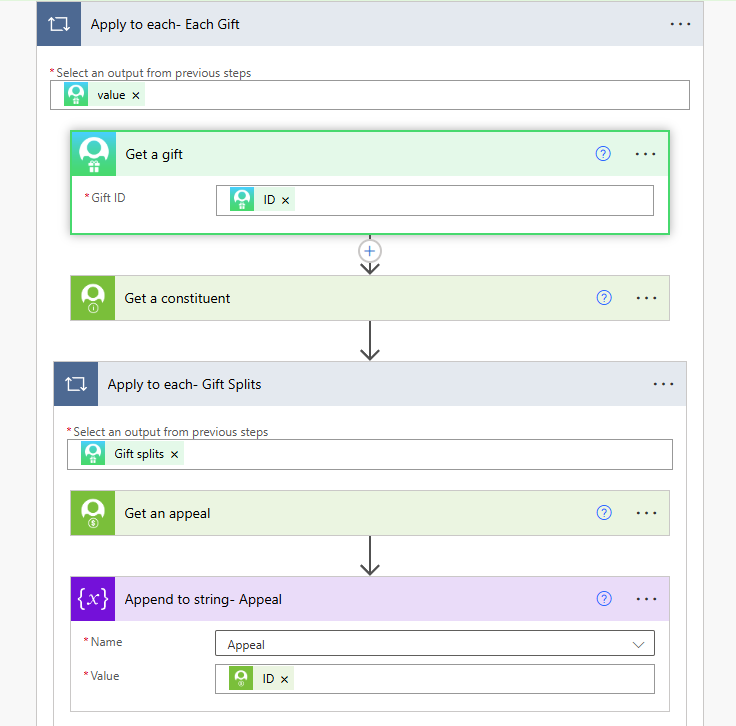
Then put the Appeal ID into the Append to string variable.
Lastly, this is how it should look like in your final Gift Array. For appeals, the link is below, this will show the Appeal ID and a link to the Appeal in your final email.
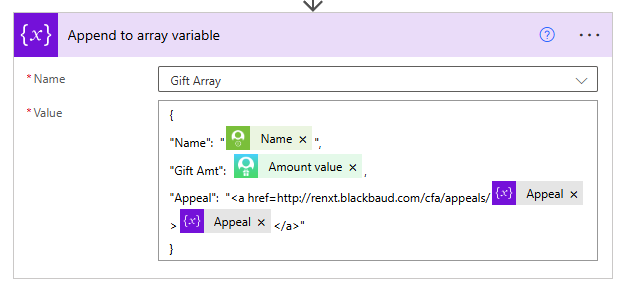 2
2 -
Thank you, @Carol Grant ! Visuals always help a lot! I will try that.
0 -
Hi there - I am super new to Power Automate (this is my first flow ever). I watched the demo video from 2021 at the beginning of this thread and I have everything working, but would like to add listing the solicitor name if it's credited on the gift. I keep trying different options and the flow won't run, it times out. Does anyone have a solution? When I did get it to display in email it showed as: [{"amount":{"value":500.0},"constituent_id":"110809"}] instead of the actual Solicitor Name.
I do well with visuals. I have no idea to write any code. Feel free to email me if that would be easier: cchilcutt@grandcanyon.org
0 -
the dynamic content you use (fundraisers) is an array of id and amount, which requires you to use the id to lookup the constituent record (fundraiser) to get name to add to your Digest, and format the amount to look appealing. Simply adding the fundraisers dynamic content array will result in what you saw: [{…….}]
Meaning, you will need create a new variable (string or array, I prefer array, but string may be easier to use for beginner). Loop through the fundraisers to get constituent name then add to the digest content.
I created a new Gift Digest Notification template that incorporated Campaign, Fund, Appeal, Fundraiser, Soft Credit and Tribute, with an easy toggle to display or not display these columns:
0 -
@Cassie Chilcutt Hi, Alex is correct and I can give you a visual for this. I like to create a string variable for some of these but you can use either as Alex said.
I am assuming you want the Solicitor that is listed on the gift. We don't do add the Solicitor to gifts but we do want to see who they are assigned to under Relationships. If you want that solicitor, let me know. This is for the solicitor on the gift. Below I call my solicitor Fundraiser.
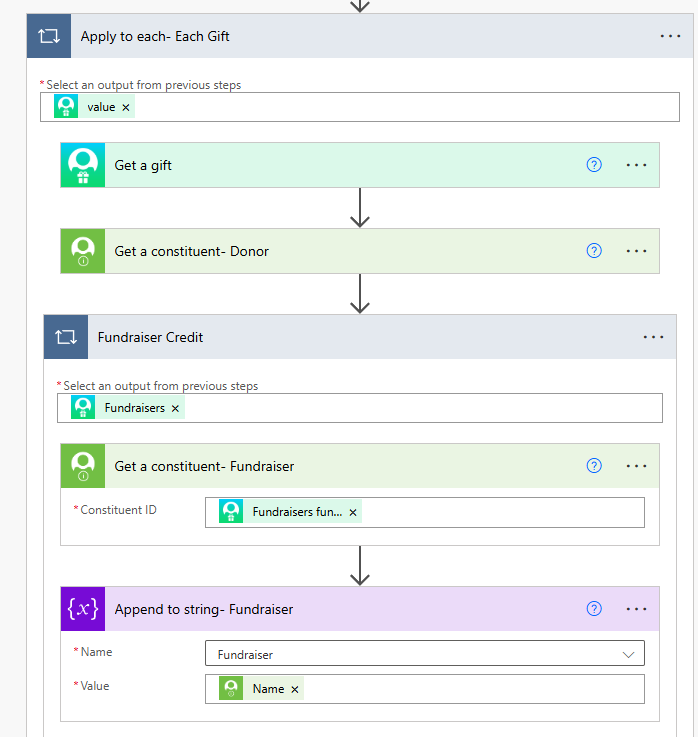
- Initialize your variable- I called mine Fundraiser.
- I pull in Get a Gift from the List Gifts. You don't have to but Get a Gift includes the Fund information. Below you see that I am also pulling Get a Constituent for the Donor (Name, Address etc)
- You want to pull Get a Constituent a 2nd time from the Blackbaud Constituents connector. I just did the Plus sign after my Get a Constituent- Donor field.
- In the Get a Constituent field Constituent ID, you want to find under Get a Gift the Fundraisers Fundraiser ID. Put that in Get a Constituent, this will cause a loop which is fine in case there is more than one. I renamed my Get a Constituent to say Get a Constituent- Fundraiser.
- Click Add - you want to Append to a String Variable. Here you choose your variable to append to. Then from the Get a Constituent- Fundraiser you want to find the Name field that goes with that one.
6. In your final gift array you will have to put the field in for it to appear in your email.

 0
0 -
@Carol Grant and @Alex Wong thank you for chiming in! I tried to configure this, but when I go to test, it times out and won't run. Do I have something in the wrong spot?
At the top I put initialize variable fundraiser as string
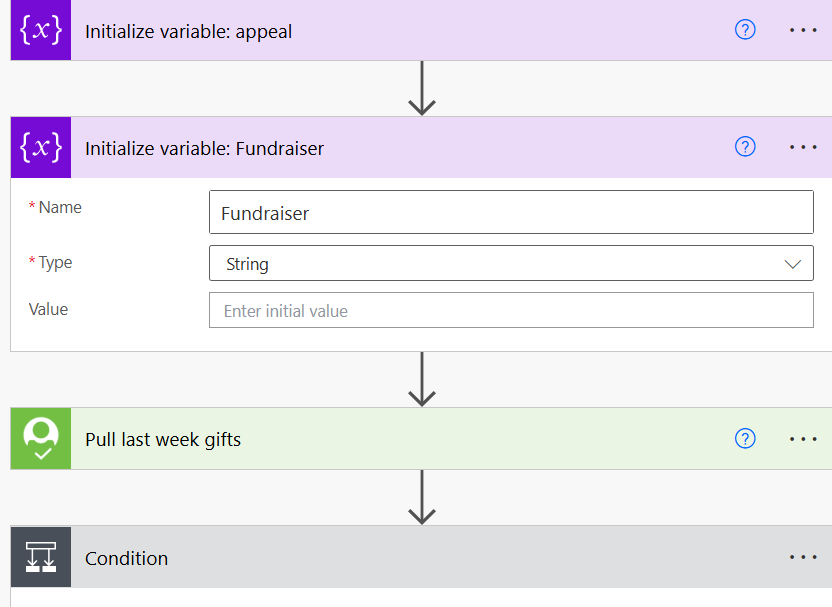
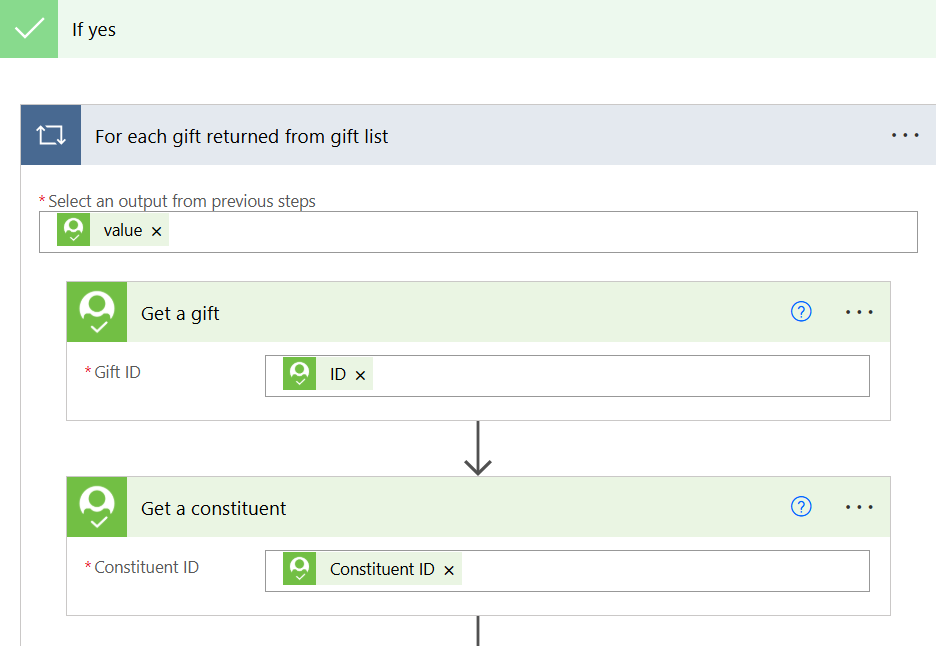
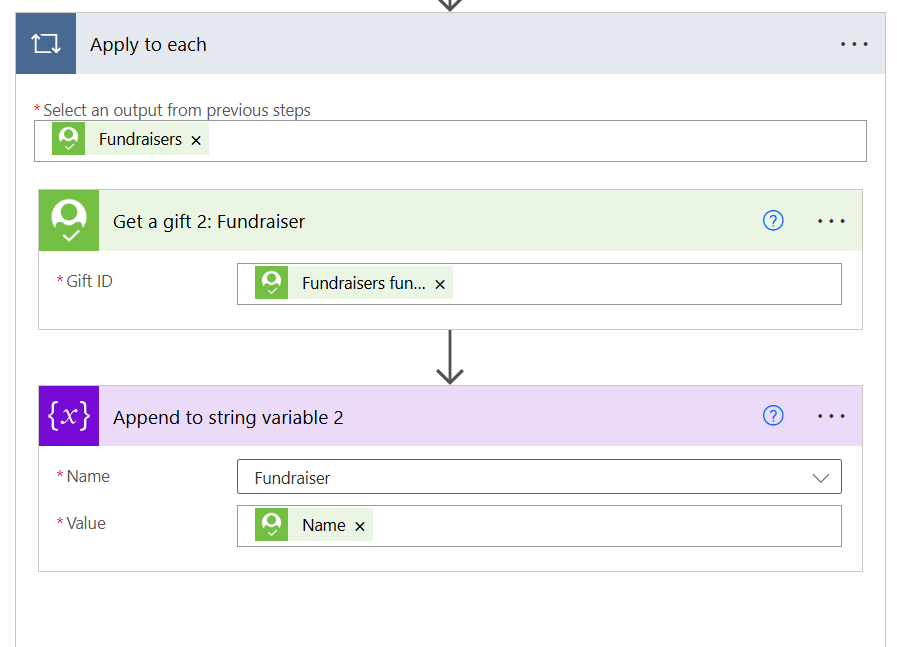
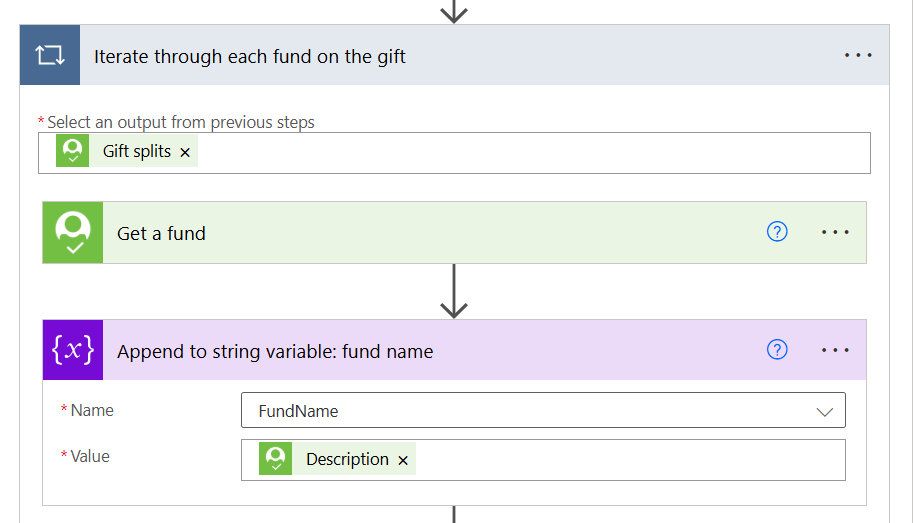
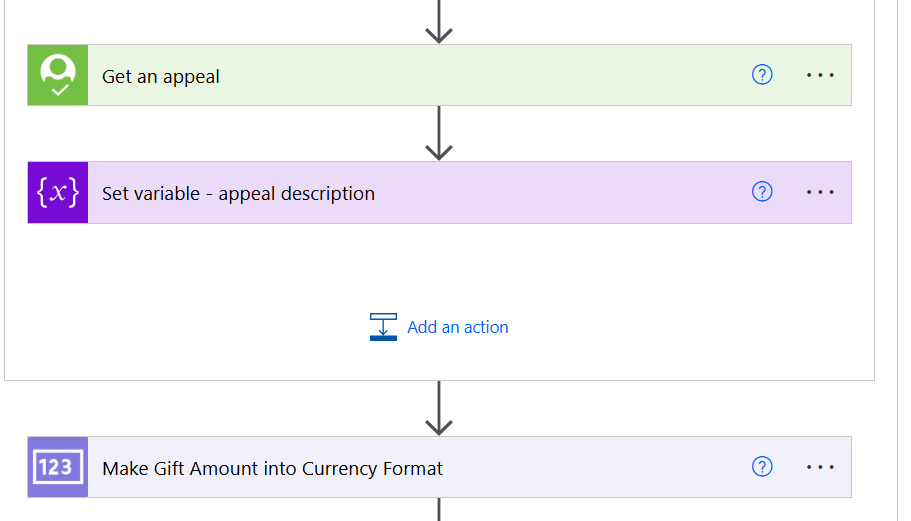
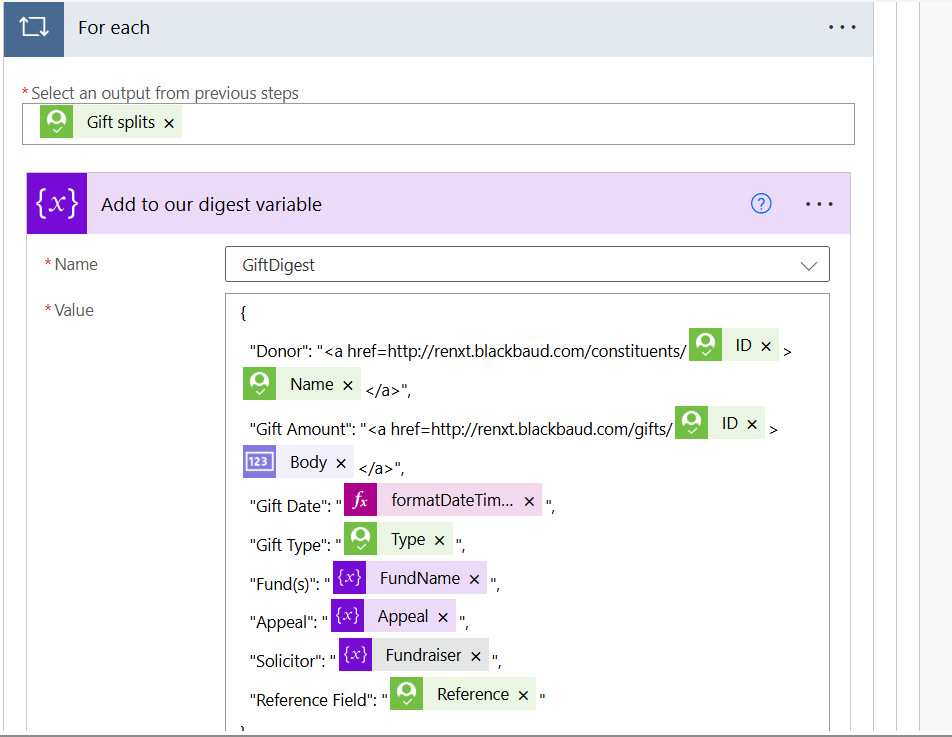
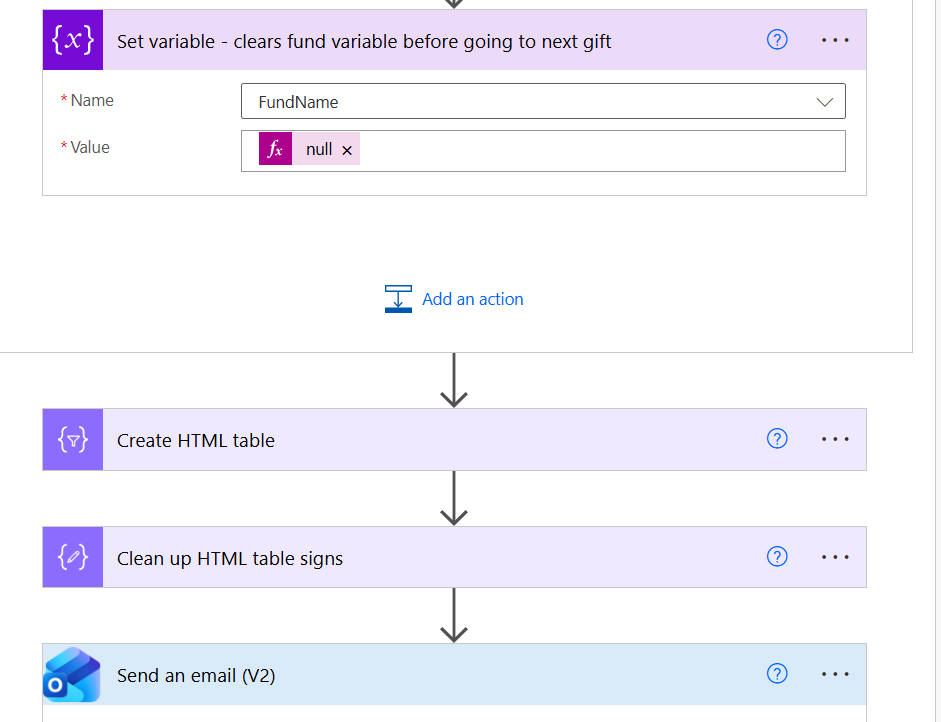
This is the error I get:
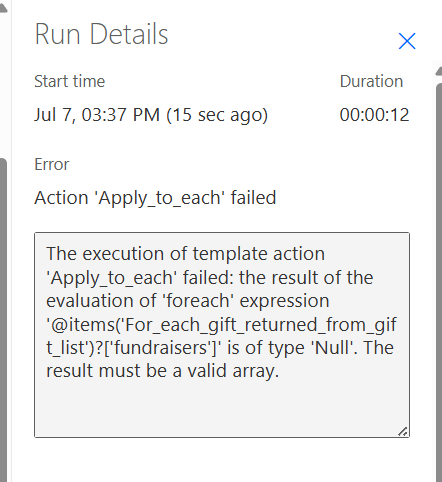 0
0 -
The link I provided has how to handle fundraiser, so you can download, import and take a look.
Here's screenshot of the section:
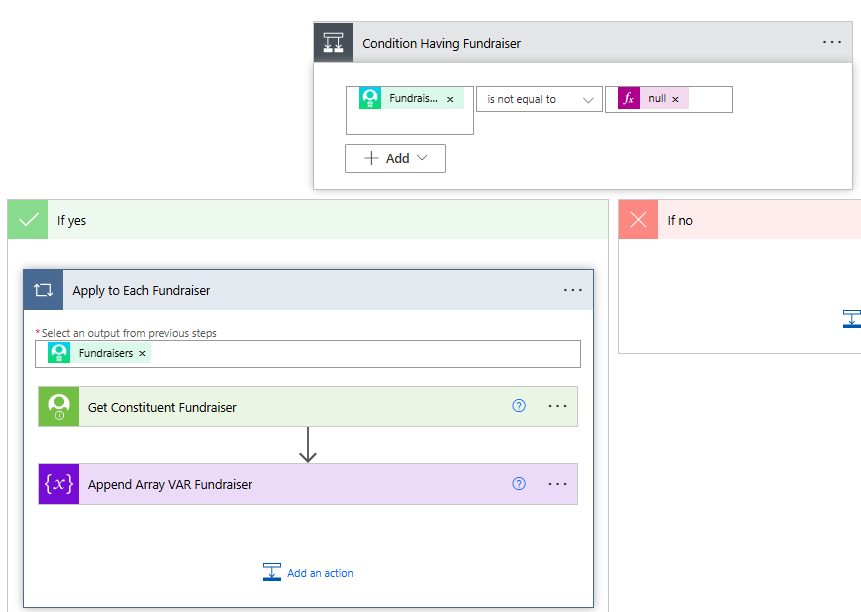 0
0 -
Anyone would have a template that includes split gift amount and split gift fund if any? I have been asked to create a Gift Notification for the Deans when someone donate to their school, as a reminder to check the giving reports we send them and thank their donors. What is the best way to proceed? If someone donates a $100 but $50 went to football and $50 to the School of Business. I just want the Dean to see the $50 that was given to the School of Business. Thanks in advance!
0 -
Large Gift Notification with Appeal/Fund
Gift Digest with CFA/Soft Credit/Fundraiser/Tribute option
Some modification will be need to only show certain fund and amount to that fund
1 -
This tutorial and the template flow are awesome. THANK YOU!!!
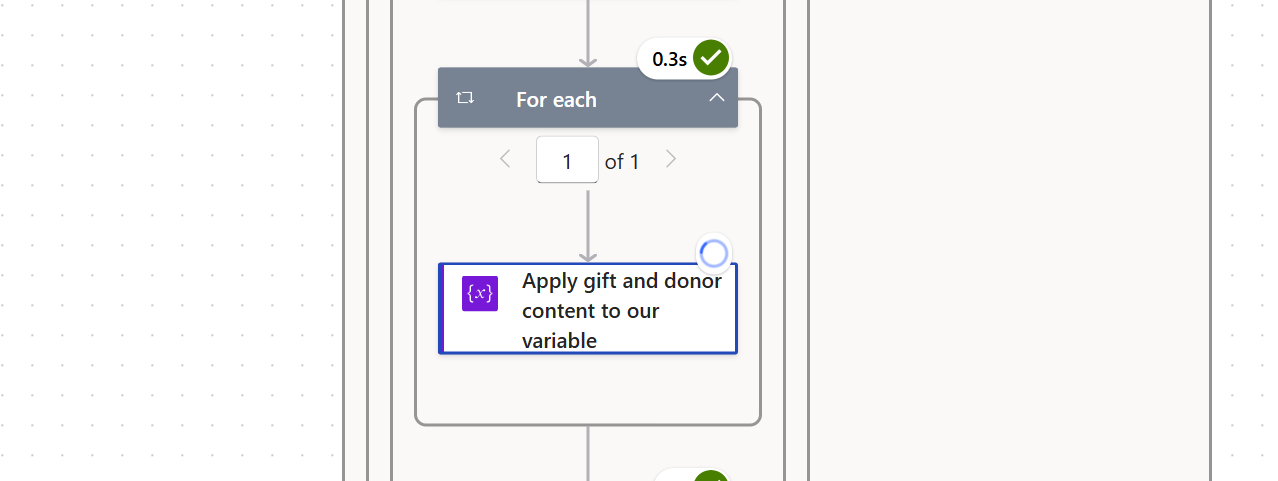
Everything is working but the loop around 'Apply gift and donor content to a variable' keeps running and won't stop. Any help would be greatly appreciated.
 0
0 -
the Apply gift and donor content to our variable should not be inside a For each loop, so something you edited in the action has a one-to-many property that cause Power Automate to place the For each loop for you.
Please provide content of whats in the Apply gift and donor content to our variable action
0




























Categories
- All Categories
- New K-12 Community Home (TEST)
- New Higher Education Home Page (Test)
- New Impact Edge Community TEST
- New YourCause Community TEST
- New SKY Community TEST
- New Grantmaking TEST Community
- New Altru Test Community
- New bbcon Community - TEST
- 12 Blackbaud Agents for Good™
- New Raiser's Edge NXT Community
- 8 Blackbaud Community Help
- 222 bbcon®
- 1.4K Blackbaud Altru®
- 410 Blackbaud Award Management™ and Blackbaud Stewardship Management™
- 1.2K Blackbaud CRM™ and Blackbaud Internet Solutions™
- 16 donorCentrics®
- 361 Blackbaud eTapestry®
- 2.7K Blackbaud Financial Edge NXT®
- 687 Blackbaud Grantmaking™
- 603 Blackbaud Education Management Solutions for Higher Education
- 3.3K Blackbaud Education Management Solutions for K-12 Schools
- 954 Blackbaud Luminate Online® and Blackbaud TeamRaiser®
- 85 JustGiving® from Blackbaud®
- 7K Blackbaud Raiser's Edge NXT®
- 4K SKY Developer
- 258 ResearchPoint™
- 123 Blackbaud Tuition Management™
- 165 Organizational Best Practices
- 248 Member Lounge (Just for Fun)
- 40 Blackbaud Community Challenges
- 37 PowerUp Challenges
- 3 (Closed) PowerUp Challenge: Grid View Batch
- 3 (Closed) PowerUp Challenge: Chat for Blackbaud AI
- 3 (Closed) PowerUp Challenge: Data Health
- 3 (Closed) Raiser's Edge NXT PowerUp Challenge: Product Update Briefing
- 3 (Closed) Raiser's Edge NXT PowerUp Challenge: Standard Reports+
- 3 (Closed) Raiser's Edge NXT PowerUp Challenge: Email Marketing
- 3 (Closed) Raiser's Edge NXT PowerUp Challenge: Gift Management
- 4 (Closed) Raiser's Edge NXT PowerUp Challenge: Event Management
- 3 (Closed) Raiser's Edge NXT PowerUp Challenge: Home Page
- 4 (Closed) Raiser's Edge NXT PowerUp Challenge: Standard Reports
- 4 (Closed) Raiser's Edge NXT PowerUp Challenge: Query
- 829 Community News
- 3.1K Jobs Board
- 57 Blackbaud SKY® Reporting Announcements
- 47 Blackbaud CRM Higher Ed Product Advisory Group (HE PAG)
- 19 Blackbaud CRM Product Advisory Group (BBCRM PAG)