the body was not in the correct format
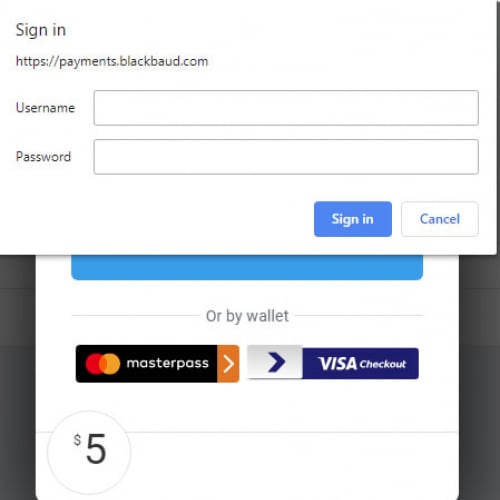




I am using the Blackbaud Checkout form which returns a token that is used to finalize the transaction.
var data = new donation_data
{
amount = (int)Math.Round(model.Cart.TotalAmount * 100),
authorization_token = transactiontoken
};
var body = JsonConvert.SerializeObject(data);
Above C# code is the body I used to finalize the transaction for Card Not Present transaction. The requestUri to finalize is “payments/v1/checkout/transaction”. It works fine.
What is the body format that is used for Store Card Info transaction?
I changed the transaction_type to ‘store_card_info’ in the parameter that is passed to Blackbaud_Init() in JavaScript and changed the requestUri to ‘payments/v1/cardtokens’ for finalizing. When I use following body:
var body = JsonConvert.SerializeObject(new
{
card_token = Guid.NewGuid().ToString(),
authorization_token = transactiontoken
});
to finalize the transaction, it gives me the error: the body was not in the correct format.
Thanks!
Tiehu Jiang
Comments
-
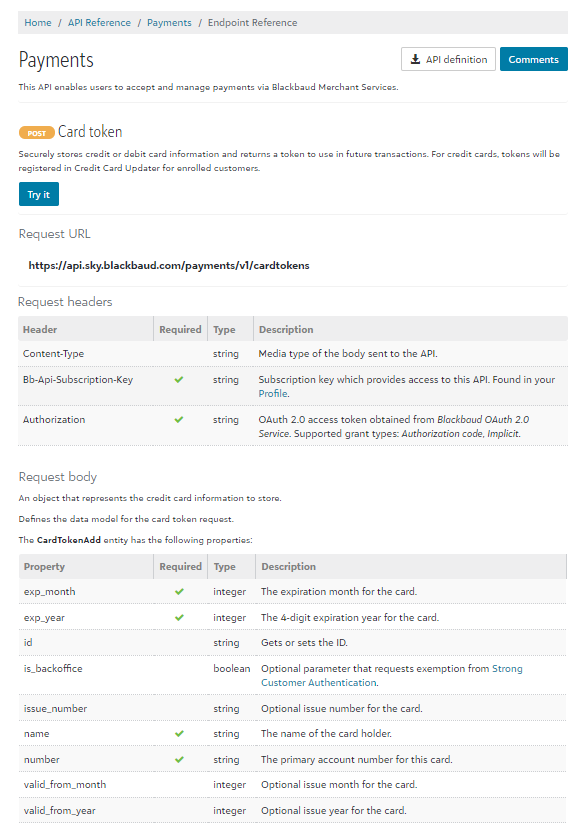
Thank you for the question. You can find information about API endpoint references here
 0
0 -
Thank you for your reply, Daniel!
I had looked the payment API document and I know the body should be like this:{<br/> "exp_month": 2,<br/> "exp_year": 1985,<br/> "issue_number": "443",<br/> "name": "Blackbaud",<br/> "number": "4111111111111111",<br/> "valid_from_month": 1,<br/> "valid_from_year": 1980<br/>}<br/><br/>but when we use Blackbaud Checkout form (see Save Card form), we only get a token for finalizing the store_card_info transaction. How do I get the Credit Card information? I get these information from the return from /checkout/transaction service call in card_not_present transaction.<br/><br/>Thanks,<br/>-Tiehu<br/>0 -
Hi Tiehu
To use Blackbaud Checkout to store a card you wont need any follow up server side request, like you do for capturing a transaction.
After you set the `transaction_type` to `store_card` then checkout will store the card information using the `card_token` you specified using Blackbaud_OpenStoreCardForm(). Here is the preloading checkout docs. And the store card JS docs.
Once the user completes the UI and submits, you dont need to make any additional server side requests for store card.
Hope this helps.
As Daniel points out below we DO have a server endpoint for storing card information but this would be used for non-checkout store card workflows and does put your consuming application into further PCI scope because you would handle the full card information. Alternatively, checkout store card would keep you from having to handle the full card number on your application.
Amanda
0 -
Thank you, Amanda!
This is helpful. It solved my issue.
Tiehu0





Categories
- All Categories
- New YourCause Community TEST
- New SKY Community TEST
- New Grantmaking TEST Community
- New Altru Test Community
- New bbcon Community - TEST
- 12 Blackbaud Agents for Good™
- New Raiser's Edge NXT Community
- 7 Blackbaud Community Help
- 218 bbcon®
- 1.4K Blackbaud Altru®
- 409 Blackbaud Award Management™ and Blackbaud Stewardship Management™
- 1.2K Blackbaud CRM™ and Blackbaud Internet Solutions™
- 16 donorCentrics®
- 361 Blackbaud eTapestry®
- 2.7K Blackbaud Financial Edge NXT®
- 681 Blackbaud Grantmaking™
- 599 Blackbaud Education Management Solutions for Higher Education
- 3.3K Blackbaud Education Management Solutions for K-12 Schools
- 952 Blackbaud Luminate Online® and Blackbaud TeamRaiser®
- 85 JustGiving® from Blackbaud®
- 7K Blackbaud Raiser's Edge NXT®
- 3.9K SKY Developer
- 257 ResearchPoint™
- 123 Blackbaud Tuition Management™
- 165 Organizational Best Practices
- 247 Member Lounge (Just for Fun)
- 40 Blackbaud Community Challenges
- 37 PowerUp Challenges
- 3 (Closed) PowerUp Challenge: Grid View Batch
- 3 (Closed) PowerUp Challenge: Chat for Blackbaud AI
- 3 (Closed) PowerUp Challenge: Data Health
- 3 (Closed) Raiser's Edge NXT PowerUp Challenge: Product Update Briefing
- 3 (Closed) Raiser's Edge NXT PowerUp Challenge: Standard Reports+
- 3 (Closed) Raiser's Edge NXT PowerUp Challenge: Email Marketing
- 3 (Closed) Raiser's Edge NXT PowerUp Challenge: Gift Management
- 4 (Closed) Raiser's Edge NXT PowerUp Challenge: Event Management
- 3 (Closed) Raiser's Edge NXT PowerUp Challenge: Home Page
- 4 (Closed) Raiser's Edge NXT PowerUp Challenge: Standard Reports
- 4 (Closed) Raiser's Edge NXT PowerUp Challenge: Query
- 822 Community News
- 3.1K Jobs Board
- 57 Blackbaud SKY® Reporting Announcements
- 47 Blackbaud CRM Higher Ed Product Advisory Group (HE PAG)
- 19 Blackbaud CRM Product Advisory Group (BBCRM PAG)