Android Mobile Application help with using Google to login

Hello

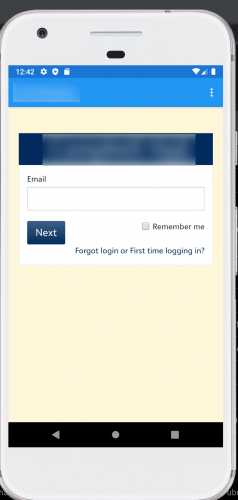
I'm updating an Android mobile app's login page. I'm using Android Studio in Java. Specifically, in Android Studio I am using a WebView to load the login landing page as seen here (for privacy i'm blurring out our institution):
c3de48547411707565e93fa30c5c431c-huge-la


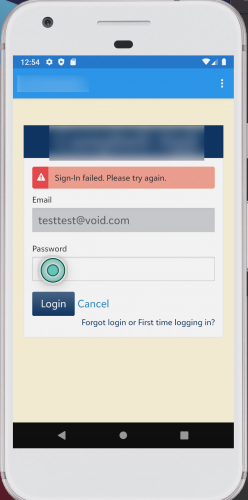
When a user tries to enter a personal gmail account, a fake email, or username that is not in our database, I let Blackbaud handle the authentication part which prompts the user that the credentials are not valid as seen here:
41bc3e34df77f969bee0245c6b43f245-huge-si

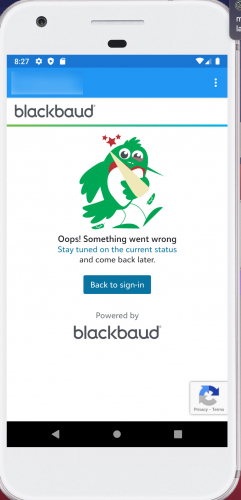
But when I try with a valid user, such as mine, I get the following:
0d19cec984f541caeb4a9b2508043420-huge-bl

In the code behind I am using the WebView object to load the login site; https://"institutename".muschoolapp.com/app/sso/"unique sso name".

The load looks like this:

CookieManager cookieManager = CookieManager.getInstance();
cookieManager.setAcceptCookie(true);
String userAgent = "Mozilla/5.0 (Linux; Android 4.1.1; Galaxy Nexus Build/JRO03C) AppleWebKit/537.36 (KHTML, like Gecko) Chrome/41.0.2228.0 Mobile Safari/535.19";
//Set WebView
WebView webView =(WebView)findViewById(R.id.webView);
webView.setWebViewClient(new WebViewClient());
webView.getSettings().setUserAgentString(userAgent);
//Set WebSettings
WebSettings webSettings = webView.getSettings();
webSettings.setJavaScriptEnabled(true);//enable JS for webpage can display BB login
webSettings.setAppCacheEnabled(true);//setting cache?
webSettings.setJavaScriptCanOpenWindowsAutomatically(true);//open another window if necessary
webSettings.setSupportMultipleWindows(true);//multiple windows? should this be set


if (Build.VERSION.SDK_INT >= Build.VERSION_CODES.LOLLIPOP) {
webView.getSettings().setMixedContentMode(WebSettings.MIXED_CONTENT_ALWAYS_ALLOW);
}
//


webView.loadUrl("https://"institutename".muschoolapp.com/app/sso/"unique sso name"");

Toolbar toolbar = (Toolbar) findViewById(R.id.toolbar);
setSupportActionBar(toolbar);

LocalBroadcastManager.getInstance(getApplicationContext())
.registerReceiver(loginBroadcastReceiver,
new IntentFilter(LoginHelper.LOGIN_MESSAGE));

}

My question is am i missing something to enable Google authentication? Has anyone ran into this issue and solved? I thought it could have been the User Agent identifier but that doesn't seem to solve.

Thanks

Comments

  • It looks like there may be a typo in the domain name. `myschoolapp.com` is the proper domain name for Blackbaud Education Management not `muschoolapp.com`

  • HI Daniel

    Thanks for your reply.
    Yes, it should be myschoolapp.com instead of muschool…
    On the code behind it's actually myschoolapp I must have mistyped it as i was making our institute anonymous.
    It is still coming up as “something went wrong”. I was wondering if there's something I'm missing. I'm using the WebView class to display the login. Notice the WebView class is really a slimmed down web browser; it doesn't have an address bar, navigation buttons, etc. it's the right behavior as we just need users to use their Google email to log in.
    The only think I can think of is the UserAgent. I set the User Agent as "Mozilla/5.0 (Linux; Android 4.1.1; Galaxy Nexus Build/JRO03C) AppleWebKit/537.36 (KHTML, like Gecko) Chrome/41.0.2228.0 Mobile Safari/535.19" then load it as a websetting into the WebView object.

    Any tips is greatly appreciated.

    Thank you!

  • Hi Gail! if you would contact our support team to do a first pass at pinpointing the issue that would be great. There may be other things they need to get from you to attempt to resolve and if not will need to capture in order to get it raised up to dev so it would be your most efficient path. Thanks!

  • Thank you Angie for the guidance.

    When I contact support would I be able to do something like a Zoom or sharescreen? That way I can show them in real time.

    I was able to actually get it to work on an Apple iPhone. I figured the methodology would be similar to Android but wanted to know.

    Thank you

  • Hello

    After sleuthing the Internet and testing for a couple weeks I found a solution. I hope this helps someone out with a similar issue.

    So the issue was not the user agent.
    The issue was with the WebSettings for the WebView class.
    In the websettings you must have the following enabled:
    webSettings.setCacheMode(WebSettings.LOAD_DEFAULT);
    webSettings.setAppCacheEnabled(true);
    webSettings.setDomStorageEnabled(true);

    If you do not have these settings you will get the pictured error posted in the questions.
    Previously I only had these settings:
    webSettings.setJavaScriptEnabled(true);
    webSettings.setJavaScriptCanOpenWindowsAutomatically(true);
    webSettings.setAllowContentAccess(true);
    webSettings.setLoadsImagesAutomatically(true);

    Thanks