GL Report - Expenses



Is there a way to pull a GL report that contains the Expense Detail/Purpose or Description instead of only the vendor name?
Comments
-
Hi Art!
The Vendor Activity Report shows the details below. I like to use this report when reviewing 1099s.
To run in FE Database View (Accounts Payable > Reports > Vendor Reports > Vendor Activity Report.
 1
1 -
If you want to see the GL account numbers there is the Account Distribution Report.
In the FE Database view run by: (Accounts Payable > Reports > Invoice Reports > Account Distribution Report.)
This report breaks expenses down by GL account and includes the following information (you can also add project distribution):
 1
1 -
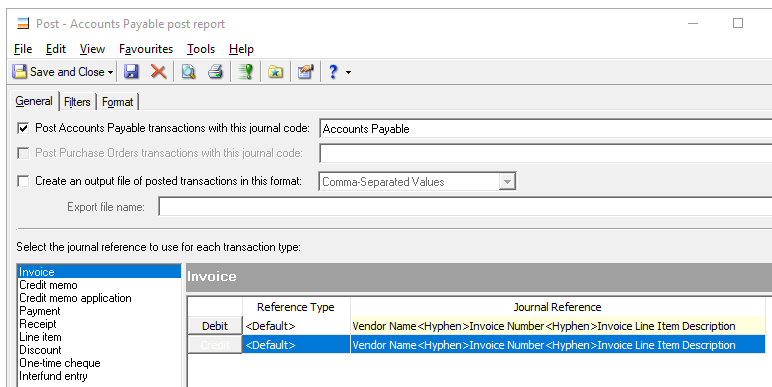
One item to make sure you setup is in the AP Posting process.
There is a spot where you can define what flows from AP into the GL detail. We use the syntax below. This will then include the text entered in the AP Description line. If nothing is being entered when AP is being processed, then that is another issue.
For example in my detail gl listing, I have a line that reads:
“Vendor name-210919-Translation service for articles by xxxxx”
So when I print out the gl for departments, not only does the vendor and invoice # show up, but the description is included.
 2
2 -
Thank You! This is a feature that I have overlooked and should provide what I need.
1 -
So currently there is not a way to run Vendor Activity Report in NXT?
0 -
As far as I can tell, not in NXT. I have only been able to do it in the database view.
0 -
I think it should be added to NXT
0









Categories
- All Categories
- New K-12 Community Home (TEST)
- New Higher Education Home Page (Test)
- New Impact Edge Community TEST
- New YourCause Community TEST
- New SKY Community TEST
- New Grantmaking TEST Community
- New Altru Test Community
- New bbcon Community - TEST
- 12 Blackbaud Agents for Good™
- New Raiser's Edge NXT Community
- 8 Blackbaud Community Help
- 222 bbcon®
- 1.4K Blackbaud Altru®
- 410 Blackbaud Award Management™ and Blackbaud Stewardship Management™
- 1.2K Blackbaud CRM™ and Blackbaud Internet Solutions™
- 16 donorCentrics®
- 361 Blackbaud eTapestry®
- 2.7K Blackbaud Financial Edge NXT®
- 687 Blackbaud Grantmaking™
- 603 Blackbaud Education Management Solutions for Higher Education
- 3.3K Blackbaud Education Management Solutions for K-12 Schools
- 954 Blackbaud Luminate Online® and Blackbaud TeamRaiser®
- 85 JustGiving® from Blackbaud®
- 7K Blackbaud Raiser's Edge NXT®
- 4K SKY Developer
- 258 ResearchPoint™
- 123 Blackbaud Tuition Management™
- 165 Organizational Best Practices
- 248 Member Lounge (Just for Fun)
- 40 Blackbaud Community Challenges
- 37 PowerUp Challenges
- 3 (Closed) PowerUp Challenge: Grid View Batch
- 3 (Closed) PowerUp Challenge: Chat for Blackbaud AI
- 3 (Closed) PowerUp Challenge: Data Health
- 3 (Closed) Raiser's Edge NXT PowerUp Challenge: Product Update Briefing
- 3 (Closed) Raiser's Edge NXT PowerUp Challenge: Standard Reports+
- 3 (Closed) Raiser's Edge NXT PowerUp Challenge: Email Marketing
- 3 (Closed) Raiser's Edge NXT PowerUp Challenge: Gift Management
- 4 (Closed) Raiser's Edge NXT PowerUp Challenge: Event Management
- 3 (Closed) Raiser's Edge NXT PowerUp Challenge: Home Page
- 4 (Closed) Raiser's Edge NXT PowerUp Challenge: Standard Reports
- 4 (Closed) Raiser's Edge NXT PowerUp Challenge: Query
- 829 Community News
- 3.1K Jobs Board
- 57 Blackbaud SKY® Reporting Announcements
- 47 Blackbaud CRM Higher Ed Product Advisory Group (HE PAG)
- 19 Blackbaud CRM Product Advisory Group (BBCRM PAG)