Computer Checks not sorted by payee name

NXT Treasury - Process Payments

When selecting invoices to pay, they are listed by vendor/payee name.

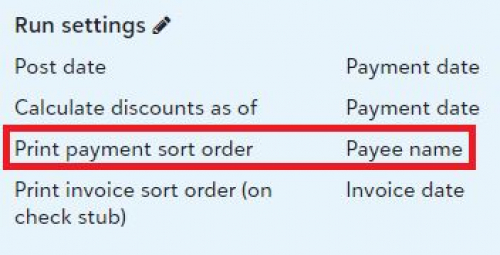
When we select all, checks are generated by payee name as shown in print settings.
4dab7b67bfb275e770e66e04dc399165-huge-ch
Computer Check Print Settings

We confirm that first by generating a pre-payment report.

However, today's check run did not sort by payee name. It was all over the place and couldn't find a logical explanation. Sort order was random, neither by check amount, invoice number, vendor name nor vendor ID. Two users in our organization run the same report with the same results.

I cleared my browser data, closed and reopened my browser, but it didn't make any difference.

Has anyone noticed this today?

Thank you.

Comments

  • We've been having this issue for a few check runs. Our AP person opened a case, but very little has been resolved. Our checks were printing in alphabetical order, but only inside the batch. So if you look at the batches that you entered, the checks would be in alphabetical order according to each batch. When she would run the preview, it would tell her there were XXX number of checks to be run. She'd put that many checks in then be X number short on checks because they weren't combining checks to the same vendor on one check. If she entered Dell invoices in 3 different batches, then Dell would get 3 checks for them. They have fixed the one check for each vendor issue, but it is still printing alphabetical by batch instead of just alphabetical. Creates more work for me when signing checks and more work for our person that files the check stubs and back-up.

  • Just noticed that this morning! Checks didn't match up to my documentation I needed to attach! Thought I needed more coffee! Glad I am not alone in this!

  • Yes, noticed this morning. I found a Knowledgebase article (71408) that supposedly addressed this, and edited my user options in database view, but that did nothing. It seems I have to reset my defaults every other day, and this is a particularly annoying change.

  • If checks are printed from the Database View, they again default to alphabetical by payee name instead of by order of entry into FE.

  • My sort order was not affected last week after the update, but today the first 8 checks were in random order and then the rest were in vendor alphabetical order like they should be. I didn't change anything between last week and this week.

  • Same thing here! Every time when there is an update, I am concerned. It has never been a clean transition! ?

  • This happened to me today when I ran checks. Ours is set up to run by payee name also and it was very random when exporting to pdf to print. My process changed too. Now when I open the bank account to process payments it open in a full screen. It used to open on the side. Also when exporting to pdf to print, my close button is gone for after printing. I have to go up to the x in the right hand corner to close now.

  • Mine did this and I was told it was a known issue they are working on but did not know when it would be fixed. The solution is to use database. I have never used that so that does me no good. The new updates are extremely frustrating.

  • Thank you for utilizing the community to support and share information.

    As many of you know, our staff value your insights by reading your posts. I received an email from a member of the FENXT team letting me know they have read your posts and are steadily working on this issue.

    In harmony,

    Elizabeth

    Blackbaud Community Team

  • My checks also don't print in alphabetical order, I noticed they are printing in the order that they're entered/approved.

  • Same issue here… I am going to go back to the old way and run my batch on data view. Between this, the slowness of FENXT and errors it creates it is VERY frustrating.

  • Hopefully this won't happen to you, but our whole department (5 of us) cannot print out of database view. It was intermittent for a while who could and who couldn't, then when you could and couldn't. We had 1 person that hadn't been affected until today. We've got a case open with Blackbaud to fix it, but none of their answers are working. I hope that doesn't happen to you while you are trying to print checks.

  • Thak you for bringing this up. This has been happening to me too ever since the update and I can't discern what order they are printing in.

  • Jessica – They are printing in the order the invoices were entered. Definitely not convenient!

  • Hi Valued FENXT Community Members,

    I just heard from the development team. Your posts are top of mind as they continue their work towards a solution.

    In harmony,

    Elizabeth

    Blackbaud Community Team

  • Yea! Elizabeth, while they are at it, could they also fix the date entry problem with NXT? Used to be, if I wanted to type in today's date, all I had to enter was the day (9 for March 9th) - that still works in the Database View and also in some other parts of NXT, but not in AP. Now if I type a 9, it autofills with 1-1-2009. Please ask the developers to stop taking away shortcuts that make our jobs easier and faster! Thanks!!

  • Today my checks in NXT are again printing in alphabetical order. I'd like to thank Blackbaud support for reaching out to those of us who remarked on this issue for letting us know it had been fixed…OH WAIT I heard NOTHING from Blackbaud. Just was at my wits end and decided to try it, since printing in Database view had stopped working.