Missing 2nd Quarter/Fall Semester Grade for system to calculate
What are the steps/procedure in order to have the system calculate a student's Final Grade, since there are no 2nd Quarter/Fall Semester Grades for the system to calculate (student enrolled in school in February).
Also, what are the steps/procedure in order to have the system calculate a student's Final Grade for a course, when a student moved sections at beginning of Spring Semester (was enrolled in different section during Fall semester)?
Thanks in advance.
Shane

Comments
-
Hi Shane. In those cases I have always calculated the student's grade and entered it by hand. I don't know of any way to get the system to calculate it, but I'd be curious if others know of a way. I find it odd that the calculator can't recognize that a student was in a different section of the same course each term.
In some cases, because of the unusual way that we weight our courses, I have to create a special class for students who enter a yearlong course mid-year.
1 -
Thank you, Kate. Much appreciated. That worked!
0 -
Shane,
Another option for calculating a final grade based on just the half-year the student was actually in the class is to define a separate “HalfYear” calculation and make that available to the teachers.
As for dealing with a grade for a class in which a student changed sections midyear, you could ensure the teacher of the first section [for the beginning of the year] puts a report card grade in and then calculate the final grade using that and the latest grade.
0 -
Hi Kate and Shane,
You can solve this by adding another calculation to your grading plan details.
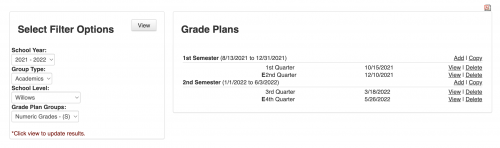
Academic => Grades => Grading Set Up=> Check that your filter is appropriate (i.e. Grade Plan in my screenshot is for Numeric Grades) => click on the Q4 view ==>

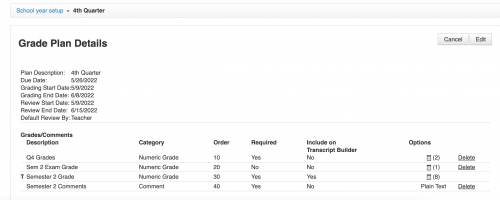
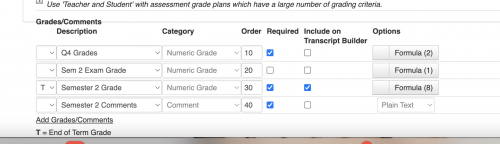
Here you see near my Semester 2 “Options” I have 8 calculations (that is a calculator icon) ==> click edit button on top right to add more calculations within the Grade Plan Details ==>

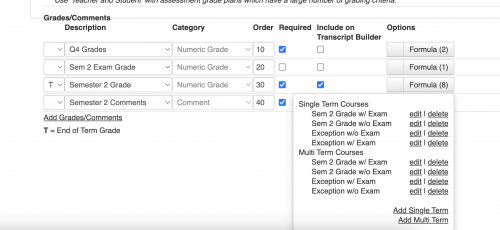
Then, Click on the Formula box across from the semester grade box to see calculations entered

The 8 calculations listed I have entered for Semester 2 grades situations such as to calculate with Q3 and Q4 with exams and w/o exams; The “exception w/Exam” and "exception w/o exam" are for calculations that include just Q4 and the exam or just Q4. I have the same calculations for semester 1.
To add more calculations, at this point, click on “Add Multi Term” or “Add Single Term”.

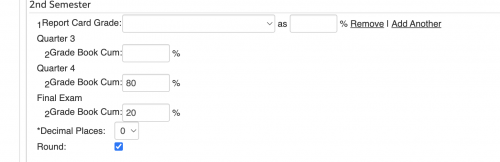
The “calculation” is just entering how to handle the situation==> I clicked edit near one of the calculations to show you this ==> then, see below, I am saying for this calculation include nothing for Q3 - it is blank, Q4 = 80% and the Final Exam = 20%
This is my “Exception w/Exam”

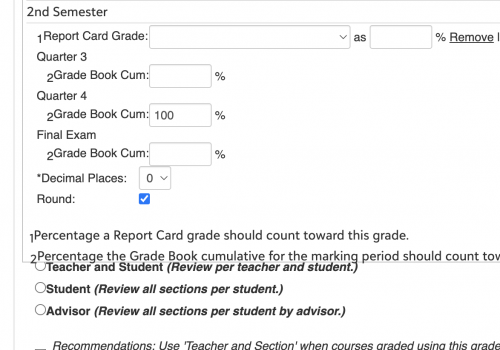
In the below screenshot, I am telling the calculation to be 100% Q4 because I do not have an exam in that class==> Q3 and the Exam fields are blank ==> This is my “Exception w/o Exam”

Then, once the calculations are set within the system as I mentioned in above information, then the teachers have access to these when calculating her semester grades ==> ,when calculating the semester grades, the teacher will click “calculate” at the top of the semester 2 column ==> this pulls up the next screen, the teacher will select from the Description box the calculation as appropriate (i.e. Semester 2 w/ Exam) then save and close ==> but these “exception” students (those who only attended one quarter) will highlight in red and their grade for the semester will not calculate. The teacher needs to click calculate again, then for those students with the exception, he/she needs to click select all or just one of them => then from the “Description” pulldown box that appears, the teacher should select the appropriate calculation (i.e. exception w/ Exam or other calculation) then Save and close==> the grade will calculate appropriately for that student's situation.
I hope this is helpful. The calculations should be carried over to each year so they are in place for the times your teachers have such exceptions.
Have a great day!
Mary
0 -
Hi Mary, Thank you for your detailed responses. Most helpful! Have a good day.
0 -
@F Shane Johnson and @Mary Daniel, I was reading through your community posts about a similar problem that I've had over the years about the need to create all kinds of exception calculations for students that don't have a report card grade for every term that is included in the default average final grade calculation. This year, I finally created a Blackbaud Idea for it. Please vote if you find it helpful.
“In Academics > Grades > Grading Setup > School Year Setup, it is possible to configure default grade plan calculations for teachers so that multiple report card grade columns can be averaged together at the end of the academic year. For example, for any one quarterly course, a student may earn a final report grade for Q1, again in Q2, Q3, and Q4, and teachers run a calculation to average these four grades into a FG or final grade column on the report card at the end of the school year. This calculation involves setting up an average FG calculation whereby 25% of the grade is Q1, 25% of the grades is Q2, etc. However, this average calculation only works if the student had grades in all four quarters. If the student was gone for Q2, for example, that results in a blank grade for that term, the FG calculation above no longer works. Instead a separate average calculation needs to be created for FG to average 33.3% Q1, 33.3% Q3, and 33.3% Q4. Another might need to be setup for Q1, Q2, and Q4, etc. There are many combinations. I would like the system to create an average calculation that works like Microsoft Excel. If I setup a formula to average four columns, the average is correct even if one, two, or three of the columns do not contain data. I would like to create a SINGLE grade plan average calculation for multiple terms that can be used for all courses that works for all students regardless if the course grade is present in all four quarters or not.”
1
Categories
- All Categories
- 6 Blackbaud Community Help
- 209 bbcon®
- 1.4K Blackbaud Altru®
- 395 Blackbaud Award Management™ and Blackbaud Stewardship Management™
- 1.1K Blackbaud CRM™ and Blackbaud Internet Solutions™
- 15 donorCentrics®
- 360 Blackbaud eTapestry®
- 2.5K Blackbaud Financial Edge NXT®
- 648 Blackbaud Grantmaking™
- 567 Blackbaud Education Management Solutions for Higher Education
- 3.2K Blackbaud Education Management Solutions for K-12 Schools
- 937 Blackbaud Luminate Online® and Blackbaud TeamRaiser®
- 84 JustGiving® from Blackbaud®
- 6.5K Blackbaud Raiser's Edge NXT®
- 3.7K SKY Developer
- 247 ResearchPoint™
- 118 Blackbaud Tuition Management™
- 165 Organizational Best Practices
- 239 The Tap (Just for Fun)
- 33 Blackbaud Community Challenges
- 31 PowerUp Challenges
- 3 (Open) PowerUp Challenge: Data Health
- 3 (Closed) Raiser's Edge NXT PowerUp Challenge: Product Update Briefing
- 3 (Closed) Raiser's Edge NXT PowerUp Challenge: Standard Reports+
- 3 (Closed) Raiser's Edge NXT PowerUp Challenge: Email Marketing
- 3 (Closed) Raiser's Edge NXT PowerUp Challenge: Gift Management
- 4 (Closed) Raiser's Edge NXT PowerUp Challenge: Event Management
- 3 (Closed) Raiser's Edge NXT PowerUp Challenge: Home Page
- 4 (Closed) Raiser's Edge NXT PowerUp Challenge: Standard Reports
- 4 (Closed) Raiser's Edge NXT PowerUp Challenge: Query
- 782 Community News
- 2.9K Jobs Board
- 53 Blackbaud SKY® Reporting Announcements
- 47 Blackbaud CRM Higher Ed Product Advisory Group (HE PAG)
- 19 Blackbaud CRM Product Advisory Group (BBCRM PAG)