Simple App to open an external site in the Slideout panel





Hi all,
I would like to create a simple app for RE NXT that has an endpoint as a button on the Constituent Page. I want the button to open a page on a separate site in the popout slidepanel. The URL will be constructed using a custom field on the Constituent record.
Are there any git repositories that might be useful as a springboard for this project. It seems like a simple task: get a custom field, append the value to a URL, and then open in it in the sidepanel. I have limited time to dedicate to the project so rather than re-inventing the wheel I'm seeing if there might be some resources out there someone could share.
Thank you!
Evan
Comments
-
Hi @Evan Webb interesting scenario! I have some thoughts for you - TLDR I believe this is do-able, but not necessarily a simple task.
You'll need an “add-in” (a webpage running somewhere) to act as the container for the actual page you want to show. The add-in page contains the JavaScript needed to interact with the Blackbaud host application. If you control the target page you want to show, you could add the required add-in client library to that page, but if you don't control the page you want to show, you'll need to wrap it in an iframe running on your add-in page.
The context made available to your add-in at runtime will only include the current constituent's system record ID, so you'll need some code to fetch the custom fields for that constituent, identify the one containing the URL, and then compose the desired URL for the iframe.
Do you happen to use Microsoft's Power Platform? I think it should be possible to create a Power App that acts as the thin wrapper for the page you want to display. The Power App could be shown using the Power App Host SPA described in our docs. So the Power App would just contain an iframe that you'd populate when the app is loaded. You could either leverage the Constituents connector directly from within the Power App to fetch the custom field and build the URL, or you could invoke a Power Automate flow to do that logic and return the URL to the Power app.
Any more details you can provide about your scenario?
1 -
@Ben Lambert @evan webb
Please don't make it dependent on PowerBI. This would be extremely useful to us at Felsted. By which I mean very useful indeed, and I'd have suggested it years ago if I had thought it possible. We're a LAMP shop, without Power, but we have full control over our PHP/Apache web server.0 -
Using Power Platform wouldn't be a requirement, just one possible approach that wouldn't involve building/deploying a page for the add-in.
Using the SKY Add-in framework, it's definitely possible to inject a button onto the Constituent page (for example). You control the button caption and the logic that is executed when the button is clicked (this logic lives in your add-in page). When the button is clicked, your button click handler (JavaScript running on your add-in page) is invoked and you then have control over what happens (like showing a flyout). Your button add-in will know the “context” (for example, the current constituent system record ID) and you can pass that value to your own backend where you can call the SKY API to lookup the constituent record, get the custom fields, locate the custom field that contains the URL, perform any other logic, etc..
For flyouts, you control the URL of the “page” shown in the flyout. Like your button add-in, this page also has to use the SKY Add-in client library (so that it can interact with the host application). This page can contain an iframe that will render the desired target URL (assuming that website allows being rendered in an iframe).
So this is do-able, just requires building and deploying an intermediate site to act as the add-in.
1 -
@Ben Lambert That is absolutely marvellous. I've started reading the doc: it looks fun, though as always it's mind-bending to start with. The main problem is that I must complete another project first, a necessary one not nearly so exciting. But I look forward to getting going on this.
1 -
@Christopher Dawkins I spent some time over the weekend with this idea, and would like to spend a little more time today working on it with a goal of writing up a detailed “blog post” style article illustrating how one would approach solving this (given all the moving pieces).
I did learn that Power Apps doesn't currently have a native iframe component, which makes this a little more of a developer-solution vs a citizen-developer/no-code solution. There is a “component” that you can import that is described here, but I didn't want that to be a requirement. So that just means you'd need to build and deploy a page that contains an iframe to render the target URL, but you can still use Power Automate as the backend logic that fetches the custom field for the constituent, etc.
I'll report back with more details as soon as I have something working.
1 -
@Ben Lambert
Many thanks. Just a small reminder that I'm not using Power or PowerBI, but I do have a PHP website under my control. I think I shall merely need to provide a web page that includes a block of your Javascript, where 'merely' means a lot of luck, magic and RTFM. The back-end work is no problem, though that's a very risky thing to say!There is one additional context parameter that could be useful (but not essential). That is, the username of the user who has called the page.
I should not be asking you questions like this until I have read the doc, so ignore if you wish. You say I need to deploy a page that contains an iframe to render the target URL. My initial impression was that you call the URL I provide and load it into your iframe. But it now seems there is another layer: you call my page, my page decides what to do and then calls another page of mine inside an iframe.And I've just had a reminder about the project I must complete first. Not nearly as interesting, but regrettably both essential and needed soon. So back to work.
0 -
@Evan Webb (and @Christopher Dawkins)
I was interested in this scenario, so I spent some time on it over the past few days and wanted to write up the details. There are certainly many ways you could tackle this, and the approach I'll describe here is just one option meant to illustrate an overall technique (not be a fully comprehensive solution since I don't know all the details about the original scenario).
First, some data
To get some data to play with, I'll first define a new constituent custom field type named "Profile URL" to contain the URL of the target page to be shown. Custom fields are known as "attributes" in database view, and managed within the Config -> Attributes area. Since we haven't built this functionality in webview yet, I'll use database view to create the new attribute type:
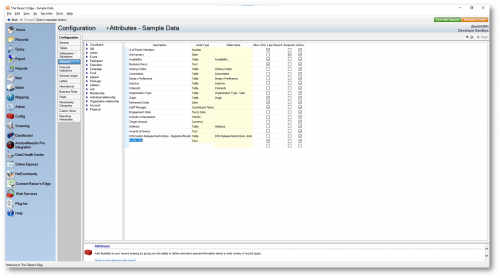
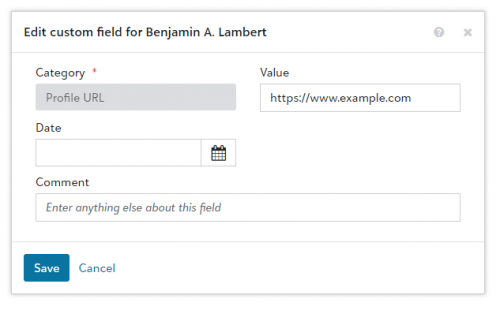
In webview, I'll add this custom field to my constituent record. Just for illustration, I'll specify https://www.example.com as the Profile URL since I know that site supports being rendered in an iframe:
Overview
The basic approach I mentioned in my last response involves two moving pieces:
- A SKY Add-in representing the "front-end" presentation UX - this injects a button onto the Constituent page that, when clicked, shows a flyout panel containing an iframe that houses the target page to be displayed (the URL for the iframe will ultimately come from the Profile URL custom field on the constituent record). In my case I'm going to create an Angular SPA using SKYUX as described here, but note that neither Angular nor SKYUX are a requirement...an add-in is a webpage with some JavaScript on it that you build and deploy somewhere, so feel free to use whatever tech stack you'd like.
- A backend web service - this service is called by the front-end (my SPA) and handles the logic needed to determine the URL of the target page to display (by fetching the constituent's custom fields and looking for a Profile URL custom field). In my case I'm going to use Power Automate, but as mentioned this isn't a requirement and you could certainly build your own web service.
[It's worth noting that, depending on your tech stack and how much code you own or can control, you could certainly combine these moving pieces, including the target page to display, into a single web site. I think it's useful to illustrate them as separate, so that's how I'm going to present the content here]
Runtime
At runtime, the Constituent page will load and the add-in will be instantiated (i.e., the add-in page will be loaded into a hidden iframe on the page). As mentioned here, add-ins are loaded before being made visible to give you an opportunity to perform any logic needed to determine whether the add-in should be shown or not. In this example, I only want to show the add-in button on the constituent page if a Profile URL custom field is found on the constituent record. You could certainly choose to always show the add-in, and then display a "No URL found" message when the button is clicked.
The add-in code (running in the browser) will make a call to the backend service (my Power Automate flow) to look up the URL for the constituent. If a URL is found, it is returned to the add-in, otherwise a 404 Not Found response is returned. If a URL was found, the add-in informs the host application to show the button, and when the button is clicked the add-in calls showFlyout() (which is another page in my SPA that contains the iframe that will be used to render the target page) and passes the URL via the context object. The flyout page sets the src attribute on the iframe to the URL from the context object.Building the add-in
I followed the tutorial for creating a button add-in using SKY UX. I'll omit the gory details of creating a SPA, the key interesting code here is in my button component's ngOnInit method:
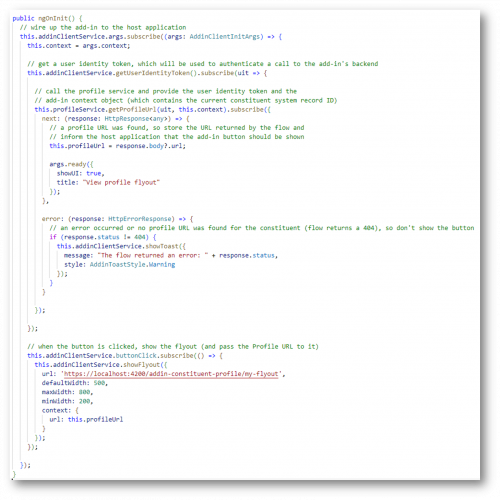
In this code, my add-in gets wired up to the host application (the Constituent page in RENXT). The add-in makes a call to the backend (my flow) to see if the constituent has a Profile URL, and if so that URL is stored and the add-in tells the host application to show the button. When the button is clicked, the add-in shows a flyout and passes the Profile URL to it.
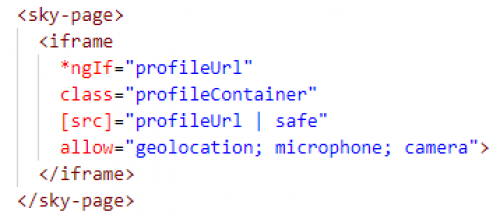
You'll notice the showFlyout() method references a different page in my Angular SPA - this page is *also* an add-in, and my SPA will be loaded again in a separate iframe (the content area of the flyout). The markup on this page just contains an iframe (wrapped in a <sky-page> component to get the proper spacing and backcolor):
..and the interesting logic happens again in the component's ngOnInit:
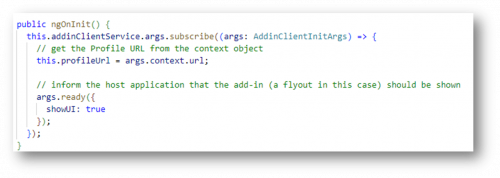
The code just gets the Profile URL from the context object, and that binds to the src property on the iframe.
1 -
The SKY application
Next, I'll create a SKY application (via the SKY Developer portal) and register my add-in:
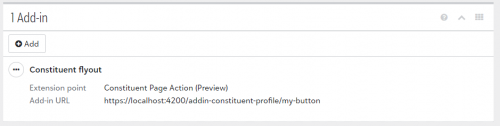
The backend service
In this example, I'll use Power Automate to build a flow triggered by an HTTP request. The flow will do some work, and return a response - which makes the flow essentially a web service!
I'll start by defining a flow triggered by an HTTP request, and I'll paste in a sample request body to generate the schema. The request body will contain the user identity token and the context object defined by the Constituent page action extension point. It will look something like this:
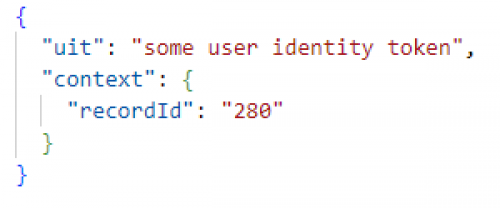
So my initial flow trigger will look like this:
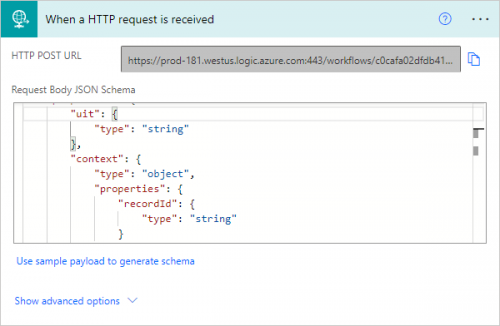
The first step in my flow will be to validate the user identity token from the request body, as described here:
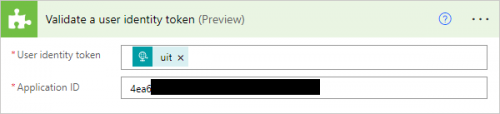
Next, I'll fetch the custom fields for the constituent:

…and then filter the array returned so that it only contains Profile URL custom fields:
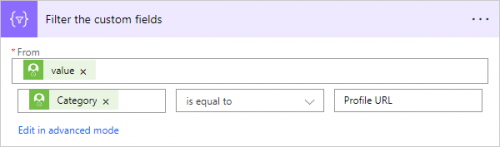
I'll use a Compose action to grab the first Profile URL item from the array:

Finally, I'll use a Condition to check if a Profile URL value was found - if so, I'll use a Response action to return a 200 with the URL in the body. Otherwise, I'll return a 404:
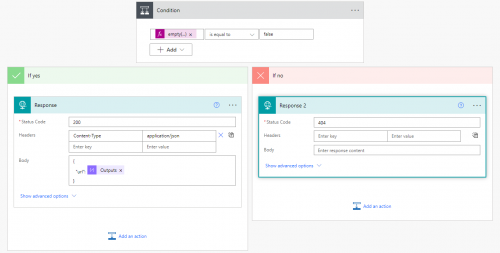
The end result…
Here is my constituent page showing a “View profile flyout” button in the Add-ins dropdown:
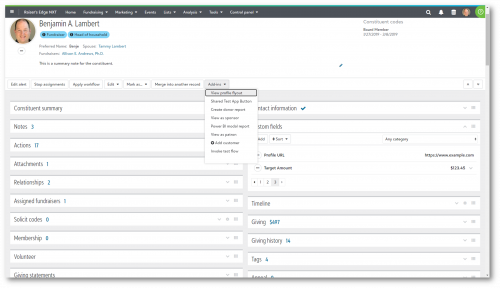
When the button is clicked, a flyout panel opens showing an external page defined by a custom field on my constituent record:
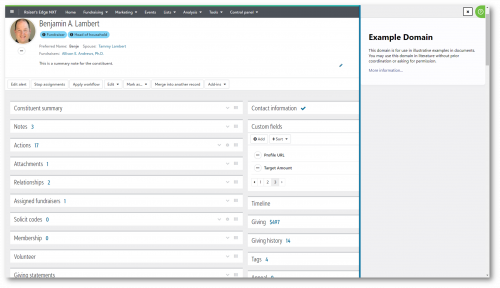
Summary
A few additional notes:
- This relies on a user-defined custom field value that any user with permission could specify. Some consideration should be given to make sure you don't allow a user to provide a malicious website as the Profile URL value.
- As coded, the add-in will call the backend each time the constituent page is loaded. You could save a call to the backend (and thus limit the # of flow runs) by deferring that until the button is clicked. So you'd always show the button, and just perform the lookup in the click handler - if no Profile URL was found you could show a toast message instead of the flyout (or show the flyout with a "No profile found" message).
- Currently, the constituent page does not automatically refresh when a custom field value is added/edited. So if you change the Profile URL custom field value, you'll need to manually refresh the Constituent page in order to see it in the flyout.
I know this is a long response, but hopefully it helps illustrate one approach to implementing this type of add-in.
2 -
Hmm - Community seems to have mangled my responses and the images aren't showing. Working on editing the responses now…
0 -
Hi @Ben Lambert,
Wow! Thank you so much for going over in detail how you would do this. Since we use the Power Platform, this seems like it would be pretty do-able to adapt to our particular use case.
Similar to your example, our use case is using a custom field to hold an external ID that we can use to construct a link to a person's profile on that external DB (RE is our fundraising database, but we are an animal welfare organization so we have another database to track animals, adoptions, medical visits, etc). My goal with this has been to make it easier for our team to get a full picture of a donor by being able to view their adoption history, names/kinds of pets they have, etc. all of which is stored on the external database I would be linking to.
I'll have to find some free time in the midst of all the other work on my plate to implement this, but the guidance you've given will make it so much easier. Thank you again! I look forward to trying this out.
0







Categories
- All Categories
- New YourCause Community TEST
- New SKY Community TEST
- New Grantmaking TEST Community
- New Altru Test Community
- New bbcon Community - TEST
- 12 Blackbaud Agents for Good™
- New Raiser's Edge NXT Community
- 7 Blackbaud Community Help
- 218 bbcon®
- 1.4K Blackbaud Altru®
- 409 Blackbaud Award Management™ and Blackbaud Stewardship Management™
- 1.2K Blackbaud CRM™ and Blackbaud Internet Solutions™
- 16 donorCentrics®
- 361 Blackbaud eTapestry®
- 2.7K Blackbaud Financial Edge NXT®
- 680 Blackbaud Grantmaking™
- 598 Blackbaud Education Management Solutions for Higher Education
- 3.3K Blackbaud Education Management Solutions for K-12 Schools
- 952 Blackbaud Luminate Online® and Blackbaud TeamRaiser®
- 85 JustGiving® from Blackbaud®
- 7K Blackbaud Raiser's Edge NXT®
- 3.9K SKY Developer
- 257 ResearchPoint™
- 123 Blackbaud Tuition Management™
- 165 Organizational Best Practices
- 247 Member Lounge (Just for Fun)
- 40 Blackbaud Community Challenges
- 37 PowerUp Challenges
- 3 (Closed) PowerUp Challenge: Grid View Batch
- 3 (Closed) PowerUp Challenge: Chat for Blackbaud AI
- 3 (Closed) PowerUp Challenge: Data Health
- 3 (Closed) Raiser's Edge NXT PowerUp Challenge: Product Update Briefing
- 3 (Closed) Raiser's Edge NXT PowerUp Challenge: Standard Reports+
- 3 (Closed) Raiser's Edge NXT PowerUp Challenge: Email Marketing
- 3 (Closed) Raiser's Edge NXT PowerUp Challenge: Gift Management
- 4 (Closed) Raiser's Edge NXT PowerUp Challenge: Event Management
- 3 (Closed) Raiser's Edge NXT PowerUp Challenge: Home Page
- 4 (Closed) Raiser's Edge NXT PowerUp Challenge: Standard Reports
- 4 (Closed) Raiser's Edge NXT PowerUp Challenge: Query
- 822 Community News
- 3.1K Jobs Board
- 57 Blackbaud SKY® Reporting Announcements
- 47 Blackbaud CRM Higher Ed Product Advisory Group (HE PAG)
- 19 Blackbaud CRM Product Advisory Group (BBCRM PAG)