Dashboard for Department Managers to Monitor Budget and Expenses

Could someone please point me in the correct direction for creating a dashboard that would permit a department manager to see his/her accounts, the budget vs actual expenses for each and remaining funds available in each account. I would also like them to be able to click on the actual expenses and open a list of all the transactions that make up those expenses.

I've tried creating a variety of dashboards, but none of them seem to do what I'm wanting.

Comments

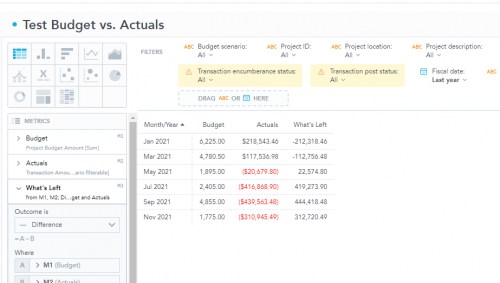
  • @Geoffrey Goodfellow Hi Geoffrey, I took a quick crack at this, and it looks like I can accomplish this with Insight Designer (the trial has released today, 9/20; it's an optional addon billed annually), by taking one of our predefined insights (budget vs. actual by project by year) and adding a column. I hope you can see this:

    86e143986dc15ece2ecf5042c47801ba-huge-im

    I just used the filters that came on the insight, but of course these can be changed. I added (under “Metrics” on the left side of the canvas) a “What's Left” calculated metric, which is Budget (labeled as M1 by the app) - Actual (M2) to give you a variance/"What's Left" column. This data is test data, and as such is just an example. Of course you can do this by account, and expand this out to account/project by month (or account/project by year), as well as add additional filters/columns, and pick any of the 13 visualizations that make sense in this insight to add to a dashboard. Hope this helps!

    Eddie Barker - Blackbaud Product Management

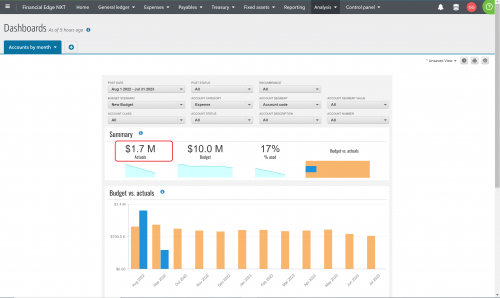
  • Many thanks, @Eddie Barker! This is very helpful, and I will give that a look. Times are tough, so I'm not thrilled about a billable addon, but perhaps that is the only way to achieve what I need. I have the normal out-of-the-box dashboards available in FE, and there was a time when I could click the summary number I have highlighted, and it would open a detailed budget vs. actual report that all of our department managers would use. Not sure what happened, but now it doesn't work for anyone.

    e0d9ca526031b09284b8850c5c60fd8a-huge-un


  • @Geoffrey Goodfellow - I can't click to go to the detailed detail anymore either. I'd like to know why that feature isn't working, I don't want to pay for another addon. The dashboard is where I've been sending our staff, we created view only logins that are restricted to just their accounts because the report queue doesn't work anymore.

  • @Geoffrey Goodfellow
    Hi Geoffrey! We are using the 30 day trial on the insight designer. I am able to get the actual net revenue by department… but I think the Budget side gives an incorrect value. It adds all the amounts together instead of recognizing their CR and DR balances. If you figure this out… please let me know. Thanks, Frances

  • @Frances Bowers Thanks for the update. We haven't pursued the 30 day free trial for Insight Designer because we didn't have a plan for what to do after the 30 days expired. I was hoping that the out-of-box dashboards that we pay for already would at least have the limited ability to show simple budget vs actual columns.

  • @Geoffrey Goodfellow
    Yes… even if you pay for the insight designer… I think there is an issue with the Budget calculating correctly. BB has it set up as SUM metric.