Setting up Pass/Fail for specific courses





Hello,
Just another question on grading that I wonder if there's a simple workaround for.
Is there a way for a specific class to have a Pass/Fail option within a grading term? Or is it locked to the grading term having a fixed type of grading set up (in school year setup).
I found this article which is exactly what I am looking for but I'm having difficulty setting it up, but I may be misunderstanding the architecture of the grade set up process.
Do I need to create another grading term and tie those to Pass/No Pass, or could I set it up within the specific class (say every class is getting letter grades except for these few courses)? But I'm not sure where I would go in to tie to that Grade Plan.
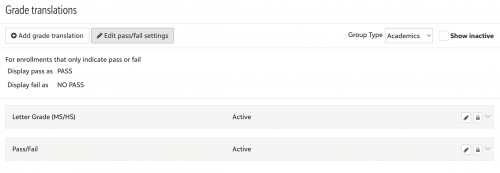
Have it in grade translation:
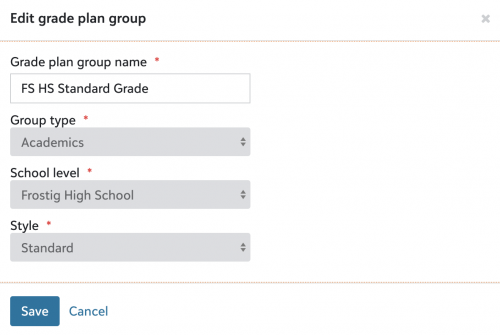
Grade Plan Group:
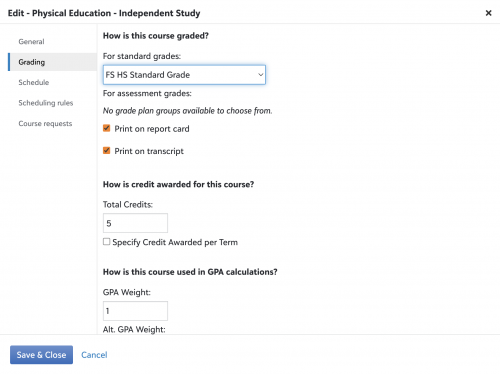
Within the class I'm trying to change:
In short just wondering how people who want to give the option of Pass/No Pass to teachers, or if that extra step aside, just have specific courses be P/NP where other classes of the same term are getting a letter grade.
Thanks!
Comments
-
@Nathan Ong This is what our grade translation set up looks like and how we're able to grade some students as pass while others in the same class receive a letter grade.
 0
0 -
@Tina Pappas
That's a clever workaround, thanks!1 -
2
-
You can either create a separate grade translation table for P/F or add the options of P/F to the translation table this course is using (at the bottom add P and F as letter options if you have a letter grade scale.
Once a course is offered and rostered you cannot change the assigned grading style. If you create a separate translation table, you will have to create a new (copy) of the course and offer it then create sections and open it for the teacher. It may be too late in the year for the new course path.0 -
@Nathan Ong - If you decide to add the “Pass” grade to an existing letter grade translation table, you may want to set the minimum and maximum range values for “Pass” to be much higher than your top letter grade. (For example, if your A range is 95 - 100, make the range for Pass be 200 - 200.)
This is important if your Honor Roll rules is something like average ≥ 90 and no grade below a C-.
The “no grade below” is somewhat literal here - if the Pass grade appears below C- in the translation table, it is a “lower” grade. So a student with a high average and a P in a Pass/Fail course would not meet the Honor Roll rules.
1











Categories
- All Categories
- New YourCause Community TEST
- New SKY Community TEST
- New Grantmaking TEST Community
- New Altru Test Community
- New bbcon Community - TEST
- 12 Blackbaud Agents for Good™
- New Raiser's Edge NXT Community
- 7 Blackbaud Community Help
- 218 bbcon®
- 1.4K Blackbaud Altru®
- 409 Blackbaud Award Management™ and Blackbaud Stewardship Management™
- 1.2K Blackbaud CRM™ and Blackbaud Internet Solutions™
- 16 donorCentrics®
- 361 Blackbaud eTapestry®
- 2.7K Blackbaud Financial Edge NXT®
- 680 Blackbaud Grantmaking™
- 598 Blackbaud Education Management Solutions for Higher Education
- 3.3K Blackbaud Education Management Solutions for K-12 Schools
- 952 Blackbaud Luminate Online® and Blackbaud TeamRaiser®
- 85 JustGiving® from Blackbaud®
- 7K Blackbaud Raiser's Edge NXT®
- 3.9K SKY Developer
- 257 ResearchPoint™
- 123 Blackbaud Tuition Management™
- 165 Organizational Best Practices
- 247 Member Lounge (Just for Fun)
- 40 Blackbaud Community Challenges
- 37 PowerUp Challenges
- 3 (Closed) PowerUp Challenge: Grid View Batch
- 3 (Closed) PowerUp Challenge: Chat for Blackbaud AI
- 3 (Closed) PowerUp Challenge: Data Health
- 3 (Closed) Raiser's Edge NXT PowerUp Challenge: Product Update Briefing
- 3 (Closed) Raiser's Edge NXT PowerUp Challenge: Standard Reports+
- 3 (Closed) Raiser's Edge NXT PowerUp Challenge: Email Marketing
- 3 (Closed) Raiser's Edge NXT PowerUp Challenge: Gift Management
- 4 (Closed) Raiser's Edge NXT PowerUp Challenge: Event Management
- 3 (Closed) Raiser's Edge NXT PowerUp Challenge: Home Page
- 4 (Closed) Raiser's Edge NXT PowerUp Challenge: Standard Reports
- 4 (Closed) Raiser's Edge NXT PowerUp Challenge: Query
- 822 Community News
- 3.1K Jobs Board
- 57 Blackbaud SKY® Reporting Announcements
- 47 Blackbaud CRM Higher Ed Product Advisory Group (HE PAG)
- 19 Blackbaud CRM Product Advisory Group (BBCRM PAG)