Board Members Query in Data Base



Hello everyone,
I am super new to RE and wanted to know the How to of Creating a list
The list is going to be Board of Directors - Current
and the outstanding pledges of the past 2 years.
I would love tips on how to do this as getting started is the Trickey part
Boss needs this to send invoice to a list of BOD members for their outstanding pledges.
Comments
-
@Vanessa Rodriguez, this is going to depend on how you have your Board Members marked. Usually, people mark them with a unique Constituent Code, but it could also be marked under Attributes or another field.
Assuming it is a Cons Code, you would:
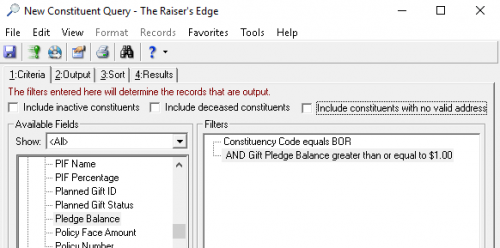
- Pull a query with
- Cons Code = Board Member, AND
- Pledge Balance > $1
- Then use an Export to include:
- Addressee
- Salutation
- Address Processing lines, city, state, zip
- Pledge Balance (be sure to filter by date range and fund, if needed)
Now, that being said … I'm wondering if it is best to send a reminder for their entire pledge balance? Some donors may be paying in installments. If this is the case, you may prefer to send a pledge reminder mailing instead using the canned processes in Mail. In this case,
- Go ahead and create your Board Member query as above.
- Go to Mail – Reminders – and click “New”. Link your query.
- Under “Fields”, include Addressee, Address, Fund, etc.
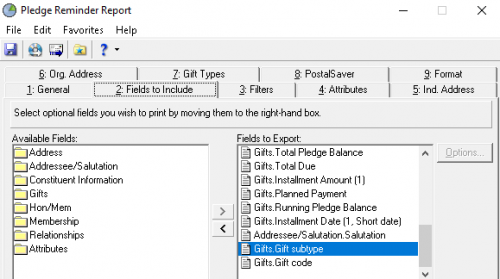
- Click “Export”.
Regardless which method you choose, you will then need to export and merge in Word outside of RE.
4 - Pull a query with
-
Thank you so much for help I will! This was very thorough! ?
The mailing will also come in handy later, I am sure.
-Vanessa
0





Categories
- All Categories
- New YourCause Community TEST
- New SKY Community TEST
- New Grantmaking TEST Community
- New Altru Test Community
- New bbcon Community - TEST
- 12 Blackbaud Agents for Good™
- New Raiser's Edge NXT Community
- 7 Blackbaud Community Help
- 219 bbcon®
- 1.4K Blackbaud Altru®
- 409 Blackbaud Award Management™ and Blackbaud Stewardship Management™
- 1.2K Blackbaud CRM™ and Blackbaud Internet Solutions™
- 16 donorCentrics®
- 361 Blackbaud eTapestry®
- 2.7K Blackbaud Financial Edge NXT®
- 682 Blackbaud Grantmaking™
- 600 Blackbaud Education Management Solutions for Higher Education
- 3.3K Blackbaud Education Management Solutions for K-12 Schools
- 952 Blackbaud Luminate Online® and Blackbaud TeamRaiser®
- 85 JustGiving® from Blackbaud®
- 7K Blackbaud Raiser's Edge NXT®
- 3.9K SKY Developer
- 257 ResearchPoint™
- 123 Blackbaud Tuition Management™
- 165 Organizational Best Practices
- 247 Member Lounge (Just for Fun)
- 40 Blackbaud Community Challenges
- 37 PowerUp Challenges
- 3 (Closed) PowerUp Challenge: Grid View Batch
- 3 (Closed) PowerUp Challenge: Chat for Blackbaud AI
- 3 (Closed) PowerUp Challenge: Data Health
- 3 (Closed) Raiser's Edge NXT PowerUp Challenge: Product Update Briefing
- 3 (Closed) Raiser's Edge NXT PowerUp Challenge: Standard Reports+
- 3 (Closed) Raiser's Edge NXT PowerUp Challenge: Email Marketing
- 3 (Closed) Raiser's Edge NXT PowerUp Challenge: Gift Management
- 4 (Closed) Raiser's Edge NXT PowerUp Challenge: Event Management
- 3 (Closed) Raiser's Edge NXT PowerUp Challenge: Home Page
- 4 (Closed) Raiser's Edge NXT PowerUp Challenge: Standard Reports
- 4 (Closed) Raiser's Edge NXT PowerUp Challenge: Query
- 822 Community News
- 3.1K Jobs Board
- 57 Blackbaud SKY® Reporting Announcements
- 47 Blackbaud CRM Higher Ed Product Advisory Group (HE PAG)
- 19 Blackbaud CRM Product Advisory Group (BBCRM PAG)