Over Budget errpr

Hi All,

When I try to create invoice from Web view for some accounts it gives me this error but still, I have the option to create invoice anyway.

One or more accounts are over budget. If you do not correct this situation before saving this record, these budgets will be exceeded.

f049a60f69b51e349b7ff289f5546f8e-huge-ac

But in case of API approach, it doesn't allow me to create invoice.it gives me error as “One or more accounts are over budget. If you do not correct this situation before saving this record, these budgets will be exceeded.

is there any way by which I can still force create invoice via API for this error?

Comments

  • @Kanverse User

    This is Elizabeth, the Blackbaud Financial Edge NXT® community manager. While I am not a product expert, I am here to support you in community. I have no doubt many of our knowledgeable members could give you an answer. However, if you need this answer to keep you working in the system and it is an error message I encourage you to contact Customer Support,

    (Click Help in the Main Navigation on the top of every community page.)

    In harmony,

    Elizabeth

    #CustomerSupportTroubleshooting

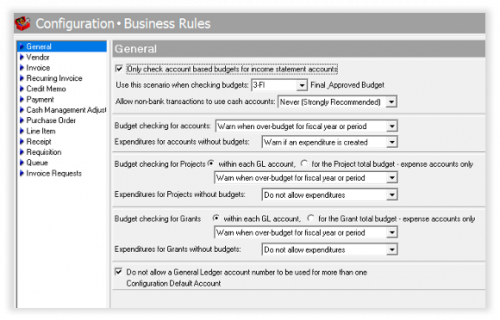
  • @Kanverse User, the business rule for this setting can be found in FE 7 (database view) -Accounts Payables-Configuration-Business Rules-General.

    Here you'll find lots of options to make budget checking specific for your organization's needs:

    34218811ec47647e13121aae5ae3119f-huge-im
    FE 7 - Accounts Payables - Configuration - Business Rules

    Once you make updates in FE 7 Business Rules, you need to to refresh webview. Note it may take a little bit for the changes to take place.

    I'm covering this in an upcoming Success Session Payables Series, Part 1, that airs 2/9/23 2pm ET. You can catch it live or on-demand via this link: Payables Series – Part 1:​ Make Bill Paying Easy and Efficient​. Part 2 will air on 2/22/23, 2pm ET: Payables Series - Part 2: Reporting and Invoice Processing.

Categories